
hamburger-menu icon
Აირჩიეთ ენა

MV216 – Application for Title Correction (Delaware)

  1. Ენა ინგლისური
  2. ქვეყანა აშშ
  3. აქტივობა ავტომობილის რეგისტრაცია
  4. სახელმწიფო დელავერი
MV216 – Application for Title Correction (Delaware)

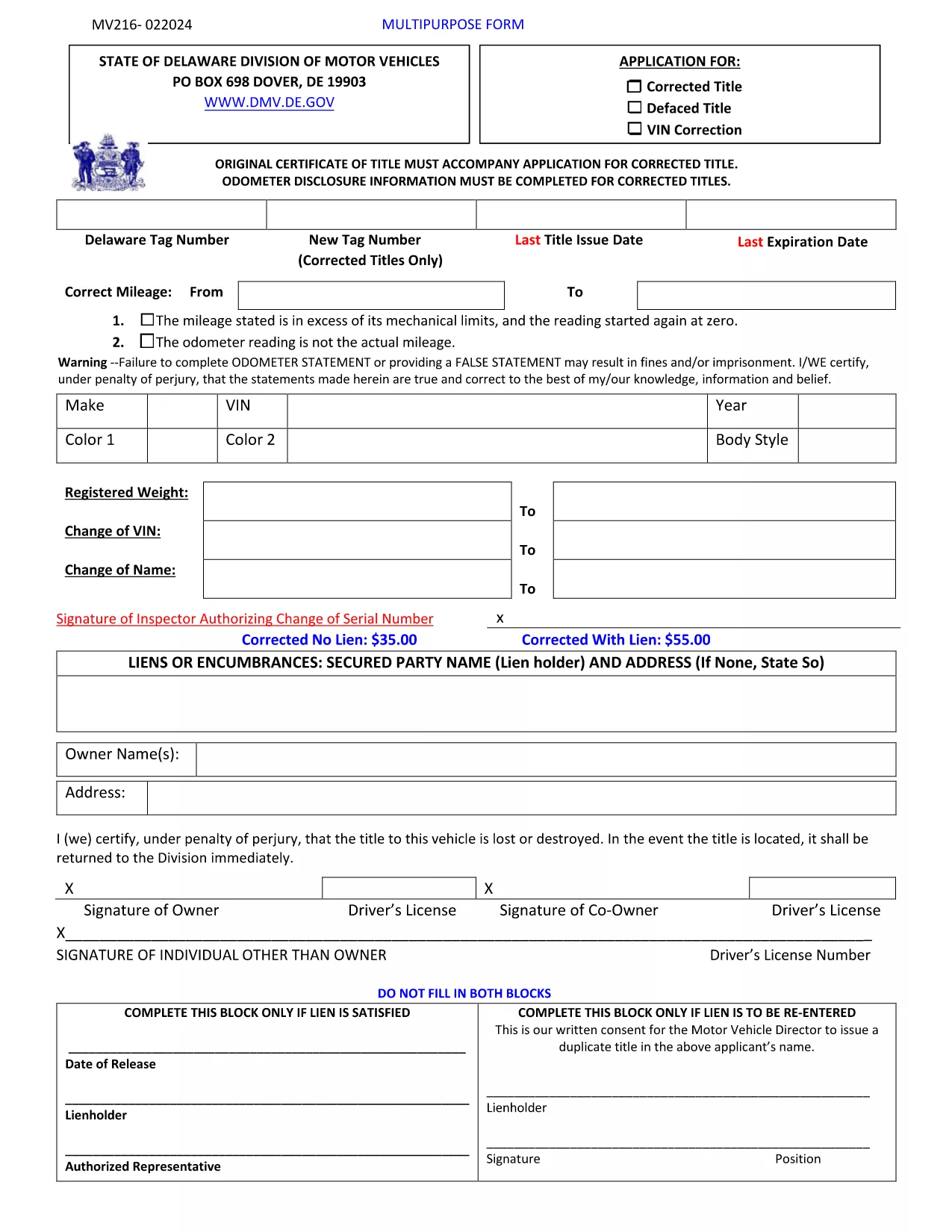
The MV216 is the Delaware Division of Motor Vehicles (DMV) application used to correct errors on a vehicle title or to request a multipurpose title change. Whether you need to fix a misspelled name, update a VIN, or change ownership details, this form is required before the DMV can issue a corrected title.

What Is the MV216 Form?

MV216 is a government‑issued, fillable PDF that captures the vehicle’s current title information, the correction needed, and the owner's signature. The form is used for:

  • Correcting misspelled names or addresses
  • Fixing VIN transcription errors
  • Updating lienholder details
  • Other multipurpose title adjustments

How to Complete the MV216 Online

Instead of downloading, printing, and scanning, you can fill the form directly in your browser using Formize’s PDF Filler app. Follow these simple steps:

  1. Click the "Fill out this form" button on this page.
  2. The Formize PDF Filler loads the MV216 PDF instantly.
  3. Enter your information in the highlighted fields.
  4. Review the data, add your electronic signature, and click Submit.
  5. Download the completed PDF for your records or print it for in‑person submission.

Common Mistakes & Tips

Avoid these pitfalls to ensure a smooth processing time:

  • Incorrect VIN: Double‑check the 17‑character VIN against the vehicle’s registration.
  • Missing signatures: Both the owner and, if applicable, the lienholder must sign.
  • Unsupported file types: Use the built‑in Formize filler; do not attach separate PDFs.
  • Out‑of‑date information: Make sure your address and contact details match DMV records.

Where to Submit Your Completed Form

After filling out MV216, you have two options:

  • In‑person: Bring the printed form to any Delaware DMV office.
  • Mail: Send the completed PDF (or printed copy) to:
    Division of Motor Vehicles
    PO Box 698
    Dover, DE 19903

Include any supporting documentation (e.g., proof of identity) to avoid delays.

Download the Official PDF Instructions

If you prefer the original instructions, you can download the official PDF directly from the Delaware DMV website.

FAQ
  • Do I need to print the MV216 after filling it out online?

    Printing is required only if you plan to submit the form in person. For mail submissions, a printed copy is also recommended.

  • Can I submit the MV216 electronically?

    Delaware DMV currently accepts mailed or in‑person submissions. However, using Formize lets you complete the form quickly and ensures all fields are correctly filled before printing.

  • What supporting documents do I need with MV216?

    Include a copy of the current title, proof of identity (driver’s license or state ID), and any lienholder documentation if applicable.

  • How long does it take for the corrected title to arrive?

    Processing typically takes 7‑10 business days after the DMV receives a complete MV216 application.

  • Is there a fee for filing MV216?

    Yes, the Delaware DMV charges a title correction fee. Check the latest fee schedule on the DMV website or the form instructions.

  • What if I make a mistake after submitting?

    Contact the Delaware DMV immediately. You may need to submit a new MV216 with the correct information and pay an additional fee.

  • Can I use a mobile device to fill out MV216?

    Yes, the Formize PDF Filler works on most modern smartphones and tablets, allowing you to complete the form on the go.

ᲠᲝᲒᲝᲠ

როგორ შეავსოთ MV216 form უფასოდ, ონლაინ 5 მარტივი ნაბიჯებით:

  1. 1
    Open the Fillable Form
    Click the “Fill out this form” button on the page. The Formize PDF Filler app will load the MV216 PDF instantly in your browser.
  2. 2
    Enter Your Information
    Fill in all highlighted fields – owner details, vehicle information, and the specific correction you need.
  3. 3
    Add Your Signature
    Use the built‑in signature tool to sign electronically. If a lienholder signature is required, have them sign the same way.
  4. 4
    Review and Submit
    Double‑check every entry, then click the Submit button. The completed PDF will be saved to your device.
  5. 5
    Print or Email
    Print the completed form for in‑person DMV submission, or email the PDF to the Delaware DMV if they accept electronic filings.
PDF შემავსებლის აპლიკაციის ფორმირება
ᲨᲔᲡᲐᲮᲔᲑ

სატრანსპორტო საშუალების რეგისტრაციის ფორმები

თუ თქვენ ფლობთ ან იჯარით გაქვთ ავტომობილი, მისაბმელი ან ნავი, თქვენ უნდა შეასრულოთ გარკვეული ვალდებულებები, რათა შეინარჩუნოთ თქვენი მანქანა კანონიერად რეგისტრირებული და უსაფრთხო.

MV216 form არის სატრანსპორტო საშუალების რეგისტრაციის ერთ-ერთი ფორმა, რომელიც წარმოადგენს დოკუმენტებს, რომლებიც გამოიყენება ავტომობილის რეგისტრაციისთვის შესაბამის სახელმწიფო ან პროვინციულ ორგანოში. ეს ფორმები, როგორც წესი, საჭიროა, როდესაც ადამიანი ყიდულობს ახალ ან მეორად სატრანსპორტო საშუალებას, ან როდესაც ისინი გადადიან ახალ შტატში ან პროვინციაში მანქანით.

ავტომობილის რეგისტრაციისთვის საჭირო ზუსტი მოთხოვნები და ფორმები შეიძლება განსხვავდებოდეს მდებარეობის მიხედვით, მაგრამ ზოგადად, პროცესი გულისხმობს ინფორმაციის მიწოდებას ავტომობილის, მფლობელისა და ავტომობილის ნებისმიერი გირავნობის შესახებ.

სარეგისტრაციო ფორმებისა და მოსაკრებლების წარდგენის შემდეგ, სახელმწიფო ან პროვინციული ორგანო ავტომობილის მფლობელს გასცემს სარეგისტრაციო მოწმობას ან სანომრე ნიშანს. ეს რეგისტრაცია საშუალებას აძლევს მანქანას ლეგალურად იმოძრაოს საჯარო გზებსა და მაგისტრალებზე.

ᲛᲐᲮᲐᲡᲘᲐᲗᲔᲑᲚᲔᲑᲘ

PDF შემავსებელი

ონლაინ MV216 form-ის შევსების უმარტივესი გზა

  • სწრაფად შეავსეთ MV216 form
    ეძებთ გზას სწრაფად შეავსოთ MV216 form ონლაინ? ჩვენი ონლაინ უფასო PDF ფორმის შემავსებლით, თქვენ გეცოდინებათ როგორ შეცვალოთ და შეავსოთ ეს pdf დოკუმენტი ერთ წუთზე ნაკლებ დროში.
  • მარტივი გამოსაყენებელი ონლაინ PDF რედაქტორი
    მოგბეზრდათ PDF ფაილების დაბეჭდვა, რათა მათი რედაქტირება შეძლოთ, ხელახლა სკანირებამდე და უკან გაგზავნამდე? შეცვალეთ PDF დოკუმენტები უფასოდ ონლაინ. გამოიყენეთ ჩვენი ონლაინ pdf რედაქტორი დროისა და ქაღალდის დაზოგვისთვის.
  • შესანიშნავი ხელსაწყოები, ყველა პლატფორმა
    გაინტერესებთ როგორ შეავსოთ MV216 form Mac-ზე, ან იქნებ როგორ გამოიყენოთ PDF შემავსებელი უფასოდ? ჩვენი ონლაინ PDF ინსტრუმენტები მუშაობს ყველა პლატფორმაზე.
  • ფაილების უსაფრთხო შენახვა
    დასრულებული „MV216 form“ ფაილები ინახება დაცულ მონაცემთა ბაზაში, რომელსაც მართავს Amazon Cloud ჰოსტინგი. თქვენ შეგიძლიათ წაშალოთ თქვენი ფაილები ჩვენი სისტემიდან ნებისმიერ დროს. ნებისმიერ შემთხვევაში, ეს ფაილები ავტომატურად იშლება 24 საათის შემდეგ.
  • ჩატი MV216 form-ით
    ესაუბრეთ „MV216 form“-ს Chatize-ზე, რომელიც არის PDF წამკითხველის უფასო ასისტენტი. დასვით კითხვები და მიიღეთ პასუხები „MV216 form“-დან. უბრალოდ დააწკაპუნეთ ღილაკზე ჩატი დოკუმენტთან ზემოთ.

შევსების სესიის წაშლა

წაშალოთ არჩეული შევსების სესია? ამ შემთხვევაში, თქვენი პროგრესი ფორმის შევსებაში დაიკარგება.

რედაქტირების სესიის წაშლა

წაშალოთ არჩეული რედაქტირების სესია? ამ შემთხვევაში, თქვენი პროგრესი ფორმის შექმნასა და რედაქტირებაში დაიკარგება.