
hamburger-menu icon
Აირჩიეთ ენა

Missouri Form 1576 – Application for Replacement Plates & Tabs (Fillable PDF)

  1. Ენა ინგლისური
  2. ქვეყანა აშშ
  3. აქტივობა ავტომობილის რეგისტრაცია
  4. სახელმწიფო მისურის
Missouri Form 1576 – Application for Replacement Plates & Tabs (Fillable PDF)

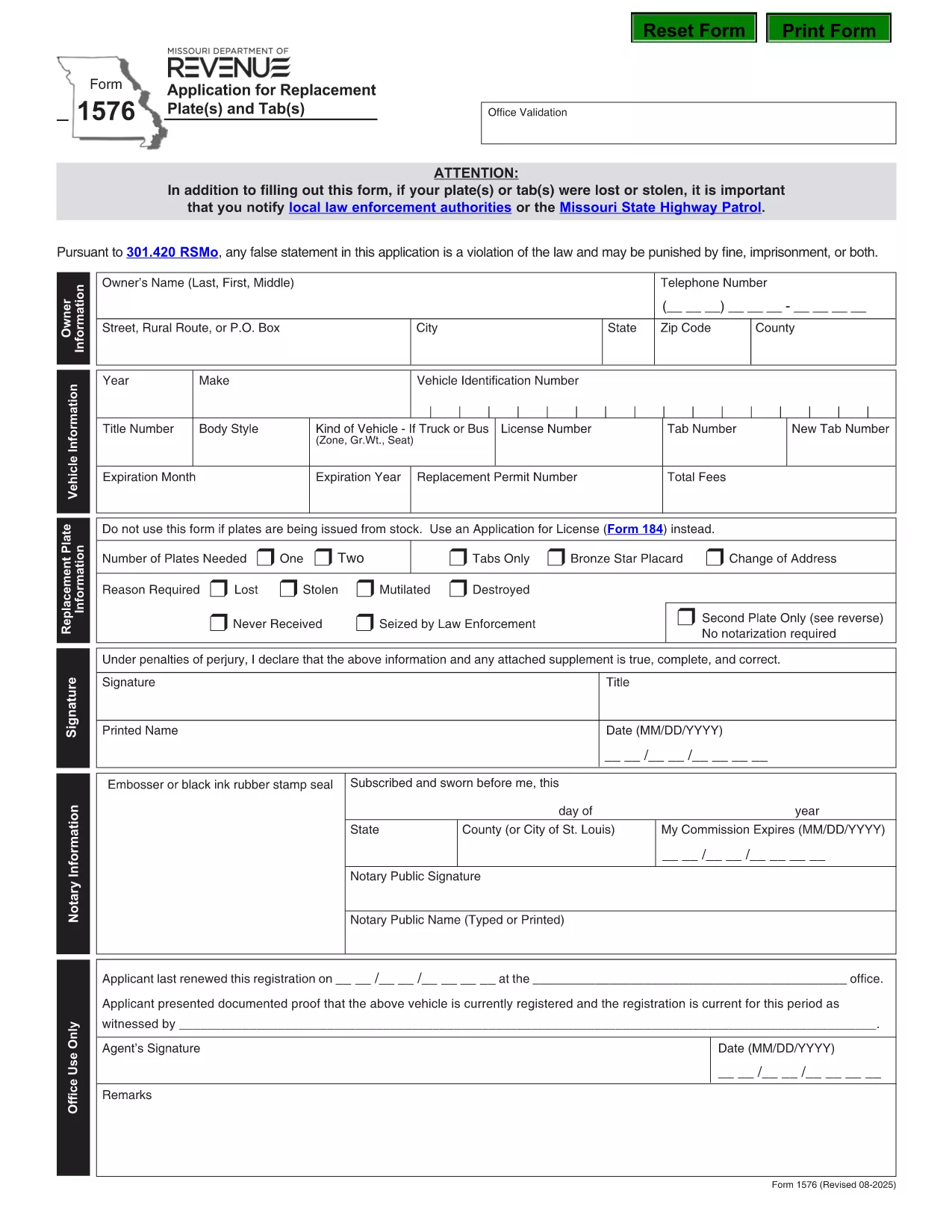
Form 1576 is the official Missouri Department of Revenue (DOR) application used when you need a replacement for lost, stolen, mutilated, destroyed, or never‑received license plates or registration tabs. The form must be notarized before submission, and it includes sections for vehicle details, owner information, and payment.

What Is Form 1576 and When Is It Required?

Missouri drivers file Form 1576 whenever any of the following occurs:

  • License plates are lost or stolen.
  • Registration tabs are missing, damaged, or never received.
  • Plates are mutilated, destroyed by fire, flood, or other accident.
  • You need a duplicate set because the original was never delivered.

The form is processed by the Missouri DOR and must be accompanied by the appropriate fee and a notarized signature.

How to Complete the Fillable PDF with Formize

Instead of printing, scanning, or editing the PDF manually, use the Formize PDF Filler – a fast, browser‑based solution that keeps the document fully fillable.

  1. Click the “Fill out this form” button on this page.
  2. The Formize PDF Filler app loads directly in your browser.
  3. Enter your information field‑by‑field: owner name, address, vehicle VIN, make, model, and year.
  4. Upload a digital notarization if you have a remote notary, or print the completed form for a traditional notary.
  5. Review the completed form, then click “Download” or “Print” to submit to your local DOR office.

Common Mistakes & Tips for a Successful Submission

  • Missing notarization: The DOR will reject the form without a notarized signature.
  • \n
  • Incorrect VIN: Double‑check the Vehicle Identification Number; a typo can delay processing.
  • Fee amount: Verify the current replacement fee on the DOR website before paying.
  • Incomplete sections: Leave no required field blank; use “N/A” only when the form explicitly allows it.

Following these tips helps ensure a quick turnaround and avoids unnecessary trips to the DOR office.

FAQ
  • Do I need a notarized signature on Form 1576?

    Yes. Missouri law requires a notarized signature on Form 1576 before the DOR will process your replacement request.

  • Can I submit Form 1576 electronically?

    The DOR currently accepts only paper submissions. Use the fillable PDF to avoid errors, then print and have it notarized before mailing or delivering it in person.

  • How much does a replacement plate or tab cost?

    Fees vary by vehicle type and plate style. Check the latest fee schedule on the Missouri DOR website before paying.

  • What if my VIN is incorrect on the form?

    An incorrect VIN will delay processing. Verify the VIN on your registration or title and correct any typos before submitting.

  • Do I need to provide proof of ownership?

    A copy of your current registration or title is recommended, but not mandatory if the DOR can verify ownership through the VIN and your personal information.

  • How long does it take to receive replacement plates?

    Processing time is typically 7–10 business days after the DOR receives a complete, notarized Form 1576 and the required fee.

  • Can I use Form 1576 for a personalized plate replacement?

    Yes, Form 1576 covers all standard, personalized, and specialty plates as long as the reason is loss, theft, or damage.

ᲠᲝᲒᲝᲠ

როგორ შეავსოთ Form 1576 უფასოდ, ონლაინ 5 მარტივი ნაბიჯებით:

  1. 1
    Open the Fillable Form
    Click the “Fill out this form” button on the page. The Formize PDF Filler loads instantly in your browser.
  2. 2
    Enter Your Information
    Complete each field – owner details, vehicle VIN, make, model, year, and reason for replacement.
  3. 3
    Add Notarization
    If you have a digital notarization, upload it now. Otherwise, print the completed form for a traditional notary signature.
  4. 4
    Review and Save
    Double‑check all entries, then click “Download” or “Print” to obtain a final copy for submission.
  5. 5
    Submit to the DOR
    Take the printed, notarized form (or submit the digital copy if accepted) to your local Missouri Department of Revenue office along with the required fee.
PDF შემავსებლის აპლიკაციის ფორმირება
ᲨᲔᲡᲐᲮᲔᲑ

სატრანსპორტო საშუალების რეგისტრაციის ფორმები

თუ თქვენ ფლობთ ან იჯარით გაქვთ ავტომობილი, მისაბმელი ან ნავი, თქვენ უნდა შეასრულოთ გარკვეული ვალდებულებები, რათა შეინარჩუნოთ თქვენი მანქანა კანონიერად რეგისტრირებული და უსაფრთხო.

Form 1576 არის სატრანსპორტო საშუალების რეგისტრაციის ერთ-ერთი ფორმა, რომელიც წარმოადგენს დოკუმენტებს, რომლებიც გამოიყენება ავტომობილის რეგისტრაციისთვის შესაბამის სახელმწიფო ან პროვინციულ ორგანოში. ეს ფორმები, როგორც წესი, საჭიროა, როდესაც ადამიანი ყიდულობს ახალ ან მეორად სატრანსპორტო საშუალებას, ან როდესაც ისინი გადადიან ახალ შტატში ან პროვინციაში მანქანით.

ავტომობილის რეგისტრაციისთვის საჭირო ზუსტი მოთხოვნები და ფორმები შეიძლება განსხვავდებოდეს მდებარეობის მიხედვით, მაგრამ ზოგადად, პროცესი გულისხმობს ინფორმაციის მიწოდებას ავტომობილის, მფლობელისა და ავტომობილის ნებისმიერი გირავნობის შესახებ.

სარეგისტრაციო ფორმებისა და მოსაკრებლების წარდგენის შემდეგ, სახელმწიფო ან პროვინციული ორგანო ავტომობილის მფლობელს გასცემს სარეგისტრაციო მოწმობას ან სანომრე ნიშანს. ეს რეგისტრაცია საშუალებას აძლევს მანქანას ლეგალურად იმოძრაოს საჯარო გზებსა და მაგისტრალებზე.

ᲛᲐᲮᲐᲡᲘᲐᲗᲔᲑᲚᲔᲑᲘ

PDF შემავსებელი

ონლაინ Form 1576-ის შევსების უმარტივესი გზა

  • სწრაფად შეავსეთ Form 1576
    ეძებთ გზას სწრაფად შეავსოთ Form 1576 ონლაინ? ჩვენი ონლაინ უფასო PDF ფორმის შემავსებლით, თქვენ გეცოდინებათ როგორ შეცვალოთ და შეავსოთ ეს pdf დოკუმენტი ერთ წუთზე ნაკლებ დროში.
  • მარტივი გამოსაყენებელი ონლაინ PDF რედაქტორი
    მოგბეზრდათ PDF ფაილების დაბეჭდვა, რათა მათი რედაქტირება შეძლოთ, ხელახლა სკანირებამდე და უკან გაგზავნამდე? შეცვალეთ PDF დოკუმენტები უფასოდ ონლაინ. გამოიყენეთ ჩვენი ონლაინ pdf რედაქტორი დროისა და ქაღალდის დაზოგვისთვის.
  • შესანიშნავი ხელსაწყოები, ყველა პლატფორმა
    გაინტერესებთ როგორ შეავსოთ Form 1576 Mac-ზე, ან იქნებ როგორ გამოიყენოთ PDF შემავსებელი უფასოდ? ჩვენი ონლაინ PDF ინსტრუმენტები მუშაობს ყველა პლატფორმაზე.
  • ფაილების უსაფრთხო შენახვა
    დასრულებული „Form 1576“ ფაილები ინახება დაცულ მონაცემთა ბაზაში, რომელსაც მართავს Amazon Cloud ჰოსტინგი. თქვენ შეგიძლიათ წაშალოთ თქვენი ფაილები ჩვენი სისტემიდან ნებისმიერ დროს. ნებისმიერ შემთხვევაში, ეს ფაილები ავტომატურად იშლება 24 საათის შემდეგ.
  • ჩატი Form 1576-ით
    ესაუბრეთ „Form 1576“-ს Chatize-ზე, რომელიც არის PDF წამკითხველის უფასო ასისტენტი. დასვით კითხვები და მიიღეთ პასუხები „Form 1576“-დან. უბრალოდ დააწკაპუნეთ ღილაკზე ჩატი დოკუმენტთან ზემოთ.

შევსების სესიის წაშლა

წაშალოთ არჩეული შევსების სესია? ამ შემთხვევაში, თქვენი პროგრესი ფორმის შევსებაში დაიკარგება.

რედაქტირების სესიის წაშლა

წაშალოთ არჩეული რედაქტირების სესია? ამ შემთხვევაში, თქვენი პროგრესი ფორმის შექმნასა და რედაქტირებაში დაიკარგება.