
hamburger-menu icon
Აირჩიეთ ენა

MV10 Break Bond Title Application – Fillable PDF Form

  1. Ენა ინგლისური
  2. ქვეყანა აშშ
  3. აქტივობა ავტომობილის რეგისტრაცია
  4. სახელმწიფო მონტანას
MV10 Break Bond Title Application – Fillable PDF Form

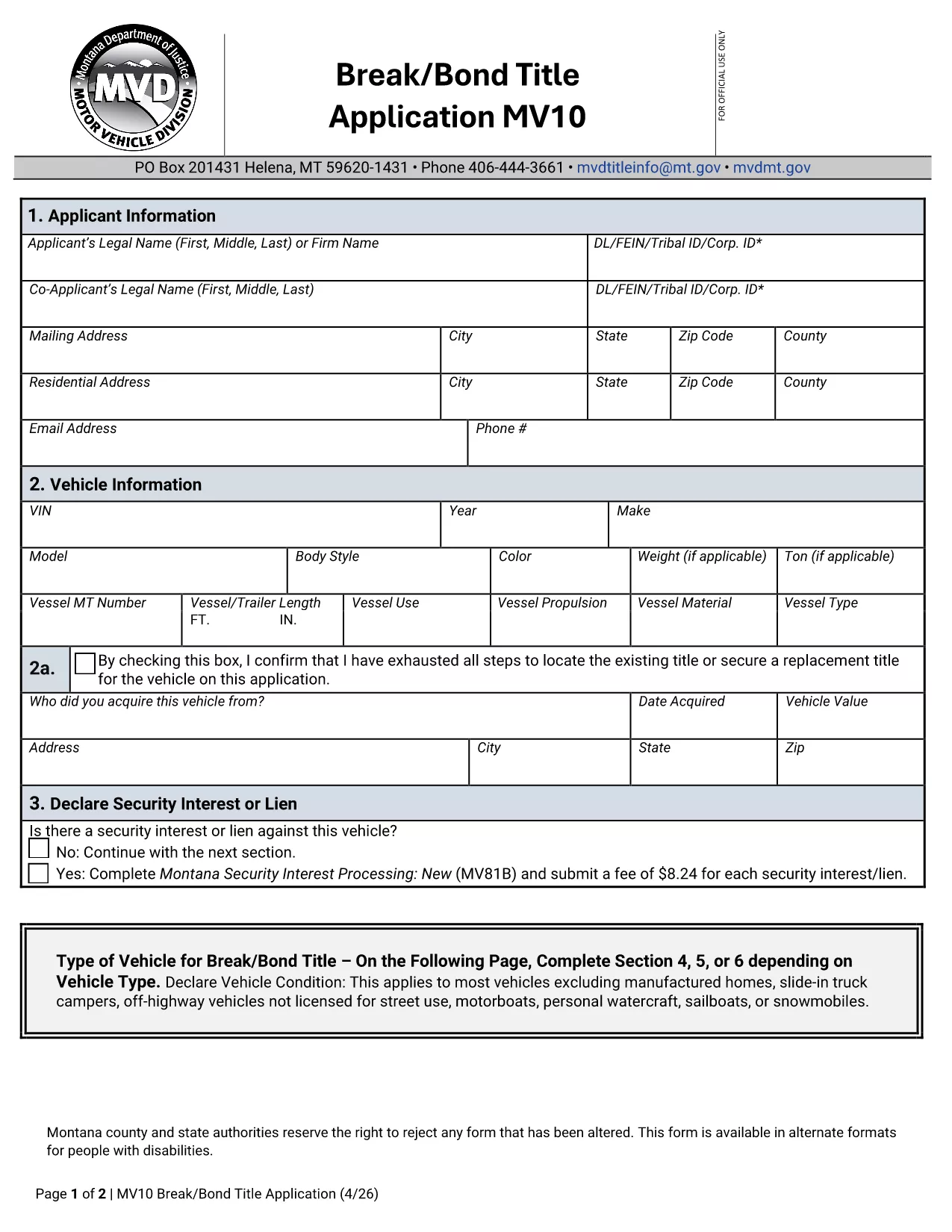
The MV10 Break Bond Title Application is the official Montana form used when a vehicle title is being transferred but a bond is required instead of the original title. This form is essential for owners who have lost their title, need to clear a lien, or are completing a title transfer under special circumstances.

Our fillable PDF version lets you complete the MV10 quickly, securely, and without any paper prints. Simply click the "Fill out this form" button on the page and the Formize PDF Filler will launch in your browser.

Below you’ll find a concise guide on each section of the MV10, tips to avoid common errors, and the exact steps for submitting the form to the Montana Department of Motor Vehicles.

Whether you’re a private owner, dealer, or lienholder, this page provides everything you need to successfully file the MV10 Break Bond Title Application.

FAQ
  • What is the purpose of the MV10 form?

    The MV10 Break Bond Title Application is used when a vehicle title is needed but a bond is required instead of the original title, often due to lost titles or lien releases.

  • Can I fill out the MV10 on a mobile device?

    Yes. The Formize PDF Filler works on most smartphones and tablets with a modern browser, allowing you to complete the form on the go.

  • Do I need a notary for the MV10?

    A notary is required only for the bond portion of the application. Check the instructions in Section 5 to see if notarization applies to your situation.

  • How much is the bond fee?

    The bond amount is based on the vehicle’s value and the reason for the bond. Refer to Section 4 of the MV10 for the exact calculation or contact your local DMV office.

  • What should I do if I make a mistake after submitting?

    If you discover an error after submission, contact the Montana Department of Motor Vehicles immediately. You may need to complete a new MV10 and pay a re‑filing fee.

  • Is the fillable PDF the same as the paper form?

    Yes. The fillable PDF contains the identical fields and language as the official paper form, ensuring it is accepted by the DMV.

  • Where do I mail the completed MV10?

    Mail the signed and notarized MV10, along with the required bond, to the Title and Registration Bureau of the Montana DMV. The exact address is listed in the form’s instructions.

  • Can I submit the MV10 electronically?

    Some Montana counties accept electronic submissions through their online portal. Verify with your local county office for availability.

ᲠᲝᲒᲝᲠ

როგორ შეავსოთ MV10 form უფასოდ, ონლაინ 5 მარტივი ნაბიჯებით:

  1. 1
    Open the Fillable Form
    Click the "Fill out this form" button on this page. The Formize PDF Filler app will load directly in your browser.
  2. 2
    Load the MV10 PDF
    The MV10 Break Bond Title Application PDF will appear automatically in the filler. No download or extra software is needed.
  3. 3
    Complete Each Section
    Enter the required information for sections 1‑6. Use the tab key or click to move between fields. All fields are validated in real time.
  4. 4
    Review and Save
    After filling the form, click "Review" to check for missing or incorrect data. Then save the completed PDF to your computer or device.
  5. 5
    Print or Submit Electronically
    Print the completed form for mailing, or follow your local DMV’s electronic submission guidelines.
PDF შემავსებლის აპლიკაციის ფორმირება
ᲨᲔᲡᲐᲮᲔᲑ

სატრანსპორტო საშუალების რეგისტრაციის ფორმები

თუ თქვენ ფლობთ ან იჯარით გაქვთ ავტომობილი, მისაბმელი ან ნავი, თქვენ უნდა შეასრულოთ გარკვეული ვალდებულებები, რათა შეინარჩუნოთ თქვენი მანქანა კანონიერად რეგისტრირებული და უსაფრთხო.

MV10 form არის სატრანსპორტო საშუალების რეგისტრაციის ერთ-ერთი ფორმა, რომელიც წარმოადგენს დოკუმენტებს, რომლებიც გამოიყენება ავტომობილის რეგისტრაციისთვის შესაბამის სახელმწიფო ან პროვინციულ ორგანოში. ეს ფორმები, როგორც წესი, საჭიროა, როდესაც ადამიანი ყიდულობს ახალ ან მეორად სატრანსპორტო საშუალებას, ან როდესაც ისინი გადადიან ახალ შტატში ან პროვინციაში მანქანით.

ავტომობილის რეგისტრაციისთვის საჭირო ზუსტი მოთხოვნები და ფორმები შეიძლება განსხვავდებოდეს მდებარეობის მიხედვით, მაგრამ ზოგადად, პროცესი გულისხმობს ინფორმაციის მიწოდებას ავტომობილის, მფლობელისა და ავტომობილის ნებისმიერი გირავნობის შესახებ.

სარეგისტრაციო ფორმებისა და მოსაკრებლების წარდგენის შემდეგ, სახელმწიფო ან პროვინციული ორგანო ავტომობილის მფლობელს გასცემს სარეგისტრაციო მოწმობას ან სანომრე ნიშანს. ეს რეგისტრაცია საშუალებას აძლევს მანქანას ლეგალურად იმოძრაოს საჯარო გზებსა და მაგისტრალებზე.

ᲛᲐᲮᲐᲡᲘᲐᲗᲔᲑᲚᲔᲑᲘ

PDF შემავსებელი

ონლაინ MV10 form-ის შევსების უმარტივესი გზა

  • სწრაფად შეავსეთ MV10 form
    ეძებთ გზას სწრაფად შეავსოთ MV10 form ონლაინ? ჩვენი ონლაინ უფასო PDF ფორმის შემავსებლით, თქვენ გეცოდინებათ როგორ შეცვალოთ და შეავსოთ ეს pdf დოკუმენტი ერთ წუთზე ნაკლებ დროში.
  • მარტივი გამოსაყენებელი ონლაინ PDF რედაქტორი
    მოგბეზრდათ PDF ფაილების დაბეჭდვა, რათა მათი რედაქტირება შეძლოთ, ხელახლა სკანირებამდე და უკან გაგზავნამდე? შეცვალეთ PDF დოკუმენტები უფასოდ ონლაინ. გამოიყენეთ ჩვენი ონლაინ pdf რედაქტორი დროისა და ქაღალდის დაზოგვისთვის.
  • შესანიშნავი ხელსაწყოები, ყველა პლატფორმა
    გაინტერესებთ როგორ შეავსოთ MV10 form Mac-ზე, ან იქნებ როგორ გამოიყენოთ PDF შემავსებელი უფასოდ? ჩვენი ონლაინ PDF ინსტრუმენტები მუშაობს ყველა პლატფორმაზე.
  • ფაილების უსაფრთხო შენახვა
    დასრულებული „MV10 form“ ფაილები ინახება დაცულ მონაცემთა ბაზაში, რომელსაც მართავს Amazon Cloud ჰოსტინგი. თქვენ შეგიძლიათ წაშალოთ თქვენი ფაილები ჩვენი სისტემიდან ნებისმიერ დროს. ნებისმიერ შემთხვევაში, ეს ფაილები ავტომატურად იშლება 24 საათის შემდეგ.
  • ჩატი MV10 form-ით
    ესაუბრეთ „MV10 form“-ს Chatize-ზე, რომელიც არის PDF წამკითხველის უფასო ასისტენტი. დასვით კითხვები და მიიღეთ პასუხები „MV10 form“-დან. უბრალოდ დააწკაპუნეთ ღილაკზე ჩატი დოკუმენტთან ზემოთ.

შევსების სესიის წაშლა

წაშალოთ არჩეული შევსების სესია? ამ შემთხვევაში, თქვენი პროგრესი ფორმის შევსებაში დაიკარგება.

რედაქტირების სესიის წაშლა

წაშალოთ არჩეული რედაქტირების სესია? ამ შემთხვევაში, თქვენი პროგრესი ფორმის შექმნასა და რედაქტირებაში დაიკარგება.