
hamburger-menu icon
Აირჩიეთ ენა

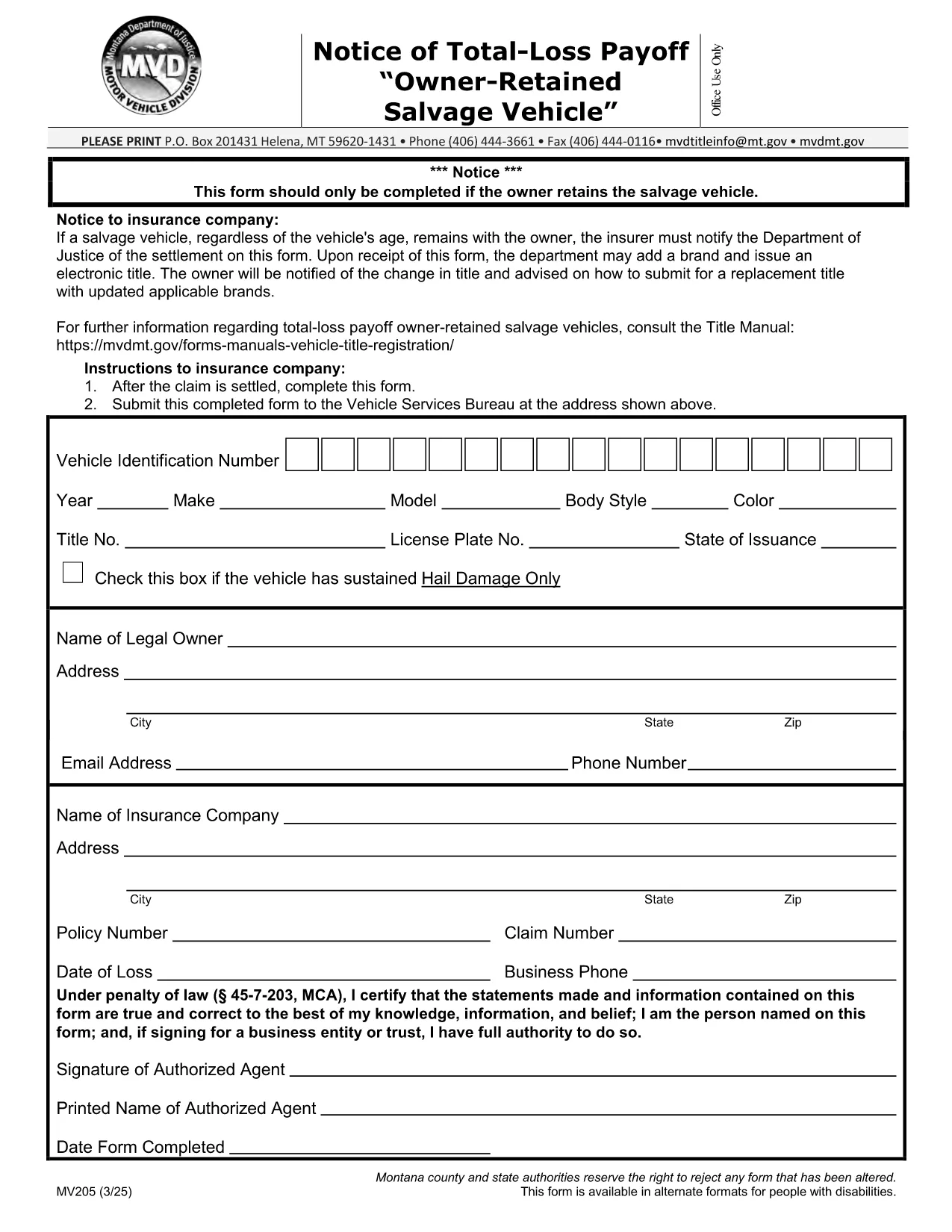
MV205 Notice of Total‑Loss Payoff – Owner‑Retained Salvage Vehicle

  1. Ენა ინგლისური
  2. ქვეყანა აშშ
  3. აქტივობა ავტომობილის რეგისტრაცია
  4. სახელმწიფო მონტანას
MV205 Notice of Total‑Loss Payoff – Owner‑Retained Salvage Vehicle

The MV205 Notice of Total‑Loss Payoff is the official document used when a salvage vehicle remains with its owner after a total‑loss settlement. Insurance companies must notify the Department of Motor Vehicles (DMV) using this form, and the owner may be required to surrender the certificate of ownership.

What Is the MV205 Form?

The MV205 captures essential details about the vehicle, the insurance settlement, and the owner’s intent to retain the salvage. It is required by most state motor vehicle agencies, including Montana, to ensure proper title handling and to prevent fraudulent title transfers.

How to Complete the MV205 Online with Formize

Instead of downloading, printing, and scanning, you can fill the MV205 directly in your browser. Follow these simple steps:

  1. Click the "Fill out this form" button on this page.
  2. Wait a few seconds while the Formize PDF Filler app loads.
  3. Enter the required information in each fillable field (vehicle VIN, insurer details, payout amount, etc.).
  4. Use the built‑in eSignature tool to sign the form electronically.
  5. Click Save & Download to get a completed PDF, or choose Send via Email to forward it directly to your insurance company or DMV.

Common Mistakes & Tips for a Successful Submission

  • Incorrect VIN: Double‑check the Vehicle Identification Number; a single digit error can delay processing.
  • Missing insurer information: Include the insurer’s name, claim number, and contact details exactly as they appear on the settlement statement.
  • Signature errors: Use the eSignature tool; a handwritten signature scanned later may be rejected.
  • Leaving optional fields blank: If a field is marked "optional," you may leave it empty, but be sure all required fields are completed.
  • Submitting the wrong version: Use the official MV205 PDF provided below to avoid outdated formats.

Where to Send the Completed Form

After you finish the online fill, send the PDF to the address listed on the form. Typically, this is the state Department of Motor Vehicles or the specific office handling title transfers. Some states also accept electronic submissions through their online portal—check your local DMV website for details.

Need help? Review the FAQs below or contact your insurance provider for clarification on the settlement amount.

FAQ
  • Who needs to file the MV205 form?

    Any vehicle owner whose insurance company has paid a total‑loss settlement and who intends to keep the salvage vehicle must file the MV205 with the state DMV.

  • Can I submit the MV205 electronically?

    Many states accept an electronically signed PDF. Check your local DMV website; otherwise, print the completed form and mail it to the address shown on the form.

  • What happens if I forget to include the insurer’s claim number?

    The DMV may reject the form, causing processing delays. Always include the full claim number as it appears on the settlement statement.

  • Do I need to surrender my current certificate of ownership?

    Yes, the DMV typically requires you to surrender the existing certificate of ownership when you submit the MV205 for a salvage vehicle.

  • Is the Formize filler free to use?

    Formize offers free filling and e‑signing for most state forms, including MV205. No download or installation is required.

  • How long does it take the DMV to process the MV205?

    Processing time varies by state, but most DMVs complete the review within 7‑10 business days after receiving a correctly completed form.

  • Can I correct a mistake after I’ve submitted the MV205?

    If you notice an error, contact your DMV immediately. In most cases, you’ll need to submit a corrected MV205 with a brief explanation.

  • Is the MV205 the same as a title transfer form?

    No. The MV205 notifies the DMV of a total‑loss payoff for a retained salvage vehicle. A separate title transfer form is required to change ownership.

ᲠᲝᲒᲝᲠ

როგორ შეავსოთ MV205 form უფასოდ, ონლაინ 5 მარტივი ნაბიჯებით:

  1. 1
    Open the Fillable Form
    Click the "Fill out this form" button on the page. The Formize PDF Filler will open in a new tab.
  2. 2
    Load the Formize PDF Filler
    Wait a few seconds while the secure online editor loads the MV205 PDF.
  3. 3
    Enter All Required Information
    Type the VIN, insurer details, payout amount, and any other required fields directly into the fillable boxes.
  4. 4
    Add Your Electronic Signature
    Use the built‑in eSignature tool to sign the form. This signature is legally binding.
  5. 5
    Save or Send the Completed Form
    Click "Save & Download" to keep a copy, or choose "Send via Email" to forward the completed MV205 to your DMV or insurance company.
PDF შემავსებლის აპლიკაციის ფორმირება
ᲨᲔᲡᲐᲮᲔᲑ

სატრანსპორტო საშუალების რეგისტრაციის ფორმები

MV205 form არის სატრანსპორტო საშუალების რეგისტრაციის ერთ-ერთი ფორმა, რომელიც არის დოკუმენტები, რომლებიც გამოიყენება ავტომობილის დასარეგისტრირებლად შესაბამის სახელმწიფო ორგანოში, როგორც წესი, ავტომობილების დეპარტამენტში (DMV) ან ეკვივალენტურ სააგენტოში. ეს ფორმები საჭიროა, როდესაც ადამიანი ყიდულობს ახალ ან მეორად სატრანსპორტო საშუალებას, გადასცემს ავტომობილის საკუთრებას ან გადადის ახალ იურისდიქციაში ავტომობილით.

ავტომობილის რეგისტრაციის სპეციფიკური ფორმები შეიძლება განსხვავდებოდეს იურისდიქციის მიხედვით, მაგრამ ისინი ჩვეულებრივ მოითხოვს შემდეგ ინფორმაციას:

სატრანსპორტო საშუალების ინფორმაცია: ეს მოიცავს დეტალებს მანქანის შესახებ, როგორიცაა მარკა, მოდელი, წელი, მანქანის საიდენტიფიკაციო ნომერი (VIN) და ოდომეტრის ჩვენება.

მფლობელის ინფორმაცია: ფორმა მოითხოვს ინფორმაციას მანქანის მფლობელის შესახებ, მათ შორის, მათი სახელი, მისამართი, საკონტაქტო ინფორმაცია და მართვის მოწმობის ნომერი.

მფლობელობის დამადასტურებელი საბუთი: გარემოებებიდან გამომდინარე, შეიძლება საჭირო გახდეს საკუთრების დამადასტურებელი საბუთი, როგორიცაა საკუთრების მოწმობა, გაყიდვის ბილეთი ან მწარმოებლის წარმოშობის სერტიფიკატი (ახალი მანქანებისთვის).

დაზღვევის ინფორმაცია: როგორც წესი, საჭიროა ავტომობილის დაზღვევის მოქმედი დაფარვის დამადასტურებელი საბუთი. ეს შეიძლება მოიცავდეს სადაზღვევო პოლისის ნომრის, დაფარვის თარიღების და სადაზღვევო კომპანიის დეტალების მიწოდებას.

საკომისიოების გადახდა: ავტომობილის რეგისტრაცია მოიცავს სხვადასხვა საფასურის გადახდას, როგორიცაა რეგისტრაციის მოსაკრებლები, გადასახადები და, შესაძლოა, იურისდიქციისთვის სპეციფიკური სხვა გადასახადები.

ამ ძირითადი მოთხოვნების გარდა, ზოგიერთ იურისდიქციას შეიძლება ჰქონდეს დამატებითი ფორმები ან დოკუმენტაციის მოთხოვნები. მაგალითად, ემისიების ტესტის შედეგები, უსაფრთხოების ინსპექტირება ან საცხოვრებელი ადგილის დამადასტურებელი საბუთი შესაძლოა საჭირო გახდეს გარკვეულ ადგილებში.

მანქანის რეგისტრაციის ფორმების შევსების და წარდგენის შემდეგ, სამთავრობო ორგანო გასცემს სარეგისტრაციო მოწმობას, სანომრე ნიშნებს და სარეგისტრაციო სტიკერებს. ეს დოკუმენტები მიუთითებს, რომ მანქანა კანონიერად არის რეგისტრირებული და უფლებამოსილია იმოძრაოს საჯარო გზებზე.

მნიშვნელოვანია აღინიშნოს, რომ ავტომობილის რეგისტრაციის მოთხოვნები შეიძლება მნიშვნელოვნად განსხვავდებოდეს იურისდიქციის მიხედვით. ამიტომ, რეკომენდირებულია მიმართოთ ადგილობრივ DMV-ს ან ეკვივალენტურ სააგენტოს კონკრეტული ფორმებისა და პროცედურების შესახებ, რომლებიც გამოიყენება თქვენს მდებარეობაზე.

ᲛᲐᲮᲐᲡᲘᲐᲗᲔᲑᲚᲔᲑᲘ

PDF შემავსებელი

ონლაინ MV205 form-ის შევსების უმარტივესი გზა

  • სწრაფად შეავსეთ MV205 form
    ეძებთ გზას სწრაფად შეავსოთ MV205 form ონლაინ? ჩვენი ონლაინ უფასო PDF ფორმის შემავსებლით, თქვენ გეცოდინებათ როგორ შეცვალოთ და შეავსოთ ეს pdf დოკუმენტი ერთ წუთზე ნაკლებ დროში.
  • მარტივი გამოსაყენებელი ონლაინ PDF რედაქტორი
    მოგბეზრდათ PDF ფაილების დაბეჭდვა, რათა მათი რედაქტირება შეძლოთ, ხელახლა სკანირებამდე და უკან გაგზავნამდე? შეცვალეთ PDF დოკუმენტები უფასოდ ონლაინ. გამოიყენეთ ჩვენი ონლაინ pdf რედაქტორი დროისა და ქაღალდის დაზოგვისთვის.
  • შესანიშნავი ხელსაწყოები, ყველა პლატფორმა
    გაინტერესებთ როგორ შეავსოთ MV205 form Mac-ზე, ან იქნებ როგორ გამოიყენოთ PDF შემავსებელი უფასოდ? ჩვენი ონლაინ PDF ინსტრუმენტები მუშაობს ყველა პლატფორმაზე.
  • ფაილების უსაფრთხო შენახვა
    დასრულებული „MV205 form“ ფაილები ინახება დაცულ მონაცემთა ბაზაში, რომელსაც მართავს Amazon Cloud ჰოსტინგი. თქვენ შეგიძლიათ წაშალოთ თქვენი ფაილები ჩვენი სისტემიდან ნებისმიერ დროს. ნებისმიერ შემთხვევაში, ეს ფაილები ავტომატურად იშლება 24 საათის შემდეგ.
  • ჩატი MV205 form-ით
    ესაუბრეთ „MV205 form“-ს Chatize-ზე, რომელიც არის PDF წამკითხველის უფასო ასისტენტი. დასვით კითხვები და მიიღეთ პასუხები „MV205 form“-დან. უბრალოდ დააწკაპუნეთ ღილაკზე ჩატი დოკუმენტთან ზემოთ.

შევსების სესიის წაშლა

წაშალოთ არჩეული შევსების სესია? ამ შემთხვევაში, თქვენი პროგრესი ფორმის შევსებაში დაიკარგება.

რედაქტირების სესიის წაშლა

წაშალოთ არჩეული რედაქტირების სესია? ამ შემთხვევაში, თქვენი პროგრესი ფორმის შექმნასა და რედაქტირებაში დაიკარგება.