
hamburger-menu icon
Აირჩიეთ ენა

MVR-618 Fillable PDF – North Carolina Weight Declaration Form

  1. Ენა ინგლისური
  2. ქვეყანა აშშ
  3. აქტივობა ავტომობილის რეგისტრაცია
  4. სახელმწიფო ჩრდილოეთ კაროლინას
MVR-618 Fillable PDF – North Carolina Weight Declaration Form

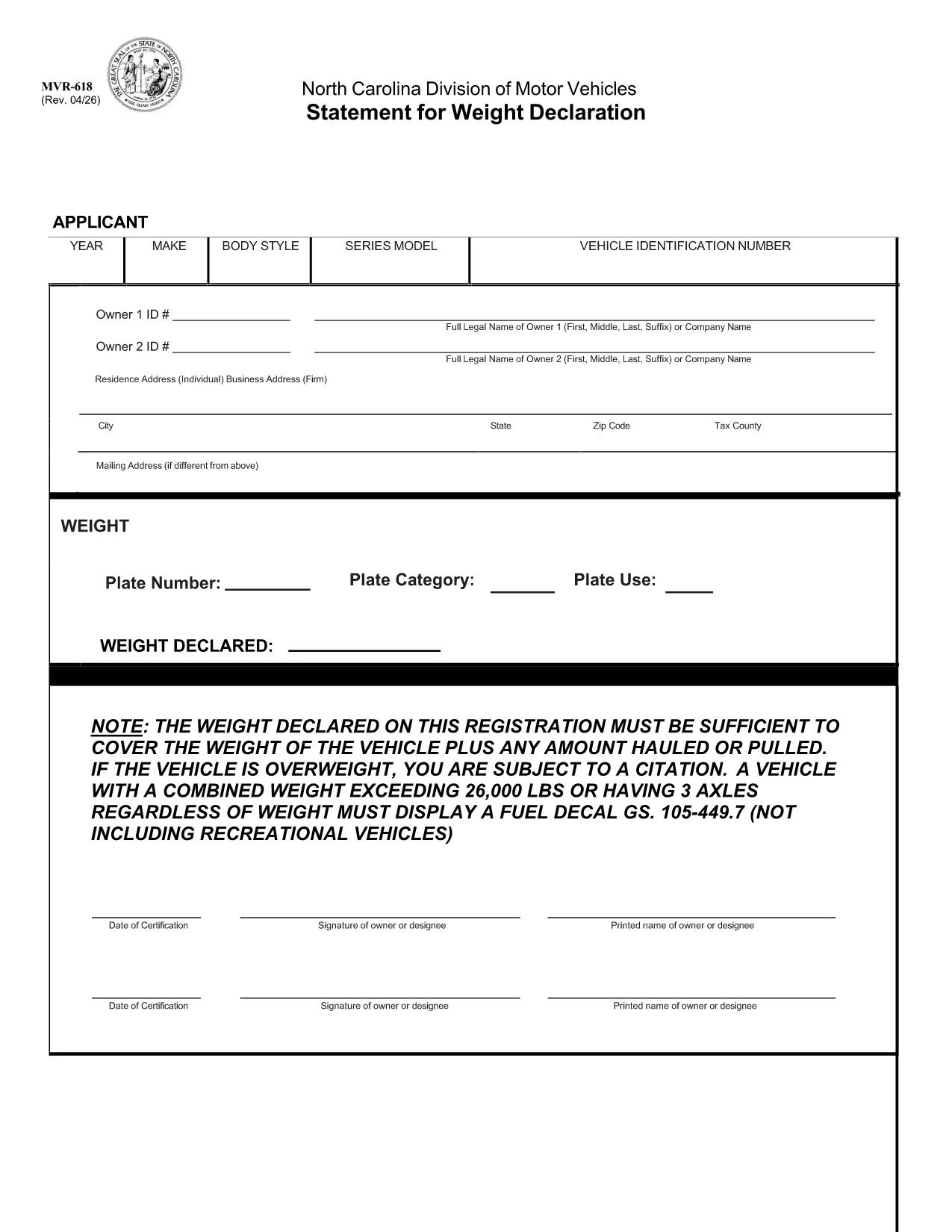
The MVR-618 is the North Carolina Division of Motor Vehicles (NCDMV) “Statement for Weight Declaration.” It is required whenever you register a vehicle that carries a load, pulls a trailer, or exceeds certain weight thresholds. The form ensures the declared weight covers the vehicle plus any hauled or pulled cargo, helping you stay compliant and avoid citations.

What is Form MVR-618?

Form MVR-618 captures the total weight of your vehicle and any additional load. North Carolina law mandates that the declared weight must be sufficient for the vehicle’s own weight plus any cargo. Vehicles over 26,000 lbs or with three axles must display a fuel decal (GS 105‑449.7). The form is part of the standard vehicle registration packet and is used by the Department of Motor Vehicles to verify compliance.

How to Fill Out MVR-618 Online

Instead of printing, printing, and scanning, you can complete the form instantly in your browser using Formize’s Fillable PDF tool. Follow the quick steps below:

  • Click the “Fill out this form” button on this page.
  • The Formize PDF Filler loads – no download required.
  • Enter the requested information (vehicle weight, cargo weight, axle count, etc.).
  • Review the data, then click **Submit** to generate a completed PDF.
  • Save or print the finished document for your records.

Common Mistakes & Tips

Even a small error can lead to a citation. Keep these tips in mind:

  • Double‑check the total weight. Add vehicle weight and cargo weight accurately.
  • Include all axles. Remember that three‑axle vehicles need a fuel decal regardless of weight.
  • Use pounds (lbs) only. The form does not accept kilograms.
  • Signature required. The online filler adds a digital signature field – sign before saving.
  • Keep a copy. Store the completed PDF in your vehicle records folder.

Download & Save the PDF

If you prefer a hard copy, the original fillable PDF is available for download below. The file is the official NCDOT version, fully compatible with Formize.

Download MVR-618 (Official PDF)

Whether you use the online filler or the printable PDF, Formize makes completing MVR-618 fast, accurate, and hassle‑free.

FAQ
  • Do I need to print the MVR-618 after filling it online?

    Printing is optional. You can keep the digital PDF for your records, but many DMV offices still require a printed copy. Use the “Print” button in the Formize filler if you need one.

  • What happens if my declared weight is too low?

    If the declared weight does not cover the vehicle plus any load, the DMV may issue a citation and you could be required to re‑register with a corrected weight declaration.

  • Can I edit the form after I’ve downloaded it?

    Once you download the completed PDF, it is locked for editing. If you need to make changes, return to the online filler, adjust the fields, and download a new version.

  • Is the Formize filler secure?

    Yes. Formize uses SSL encryption for data transmission, and the completed PDF is stored only in your browser session unless you choose to download it.

  • Do I need a fuel decal if my vehicle is under 26,000 lbs but has three axles?

    Yes. North Carolina law requires a fuel decal for any vehicle with three axles, regardless of total weight.

  • What if I lose the completed MVR-618?

    You can re‑fill the form online at any time using the same vehicle information. Keep a digital copy saved on your computer or cloud storage for easy access.

ᲠᲝᲒᲝᲠ

როგორ შეავსოთ MVR-618 უფასოდ, ონლაინ 4 მარტივი ნაბიჯებით:

  1. 1
    Open the Fillable Form
    Click the “Fill out this form” button on this page. The Formize PDF Filler loads directly in your browser – no software download needed.
  2. 2
    Enter Required Information
    Fill in the vehicle’s gross weight, cargo weight, axle count, and any other fields shown. All entries are saved automatically.
  3. 3
    Review and Sign
    Check the completed values for accuracy, then use the digital signature field to sign the form.
  4. 4
    Save or Print
    Click “Download” to save the completed PDF to your device, or select “Print” to obtain a hard copy for your records.
PDF შემავსებლის აპლიკაციის ფორმირება
ᲨᲔᲡᲐᲮᲔᲑ

სატრანსპორტო საშუალების რეგისტრაციის ფორმები

თუ თქვენ ფლობთ ან იჯარით გაქვთ ავტომობილი, მისაბმელი ან ნავი, თქვენ უნდა შეასრულოთ გარკვეული ვალდებულებები, რათა შეინარჩუნოთ თქვენი მანქანა კანონიერად რეგისტრირებული და უსაფრთხო.

MVR-618 არის სატრანსპორტო საშუალების რეგისტრაციის ერთ-ერთი ფორმა, რომელიც წარმოადგენს დოკუმენტებს, რომლებიც გამოიყენება ავტომობილის რეგისტრაციისთვის შესაბამის სახელმწიფო ან პროვინციულ ორგანოში. ეს ფორმები, როგორც წესი, საჭიროა, როდესაც ადამიანი ყიდულობს ახალ ან მეორად სატრანსპორტო საშუალებას, ან როდესაც ისინი გადადიან ახალ შტატში ან პროვინციაში მანქანით.

ავტომობილის რეგისტრაციისთვის საჭირო ზუსტი მოთხოვნები და ფორმები შეიძლება განსხვავდებოდეს მდებარეობის მიხედვით, მაგრამ ზოგადად, პროცესი გულისხმობს ინფორმაციის მიწოდებას ავტომობილის, მფლობელისა და ავტომობილის ნებისმიერი გირავნობის შესახებ.

სარეგისტრაციო ფორმებისა და მოსაკრებლების წარდგენის შემდეგ, სახელმწიფო ან პროვინციული ორგანო ავტომობილის მფლობელს გასცემს სარეგისტრაციო მოწმობას ან სანომრე ნიშანს. ეს რეგისტრაცია საშუალებას აძლევს მანქანას ლეგალურად იმოძრაოს საჯარო გზებსა და მაგისტრალებზე.

ᲛᲐᲮᲐᲡᲘᲐᲗᲔᲑᲚᲔᲑᲘ

PDF შემავსებელი

ონლაინ MVR-618-ის შევსების უმარტივესი გზა

  • სწრაფად შეავსეთ MVR-618
    ეძებთ გზას სწრაფად შეავსოთ MVR-618 ონლაინ? ჩვენი ონლაინ უფასო PDF ფორმის შემავსებლით, თქვენ გეცოდინებათ როგორ შეცვალოთ და შეავსოთ ეს pdf დოკუმენტი ერთ წუთზე ნაკლებ დროში.
  • მარტივი გამოსაყენებელი ონლაინ PDF რედაქტორი
    მოგბეზრდათ PDF ფაილების დაბეჭდვა, რათა მათი რედაქტირება შეძლოთ, ხელახლა სკანირებამდე და უკან გაგზავნამდე? შეცვალეთ PDF დოკუმენტები უფასოდ ონლაინ. გამოიყენეთ ჩვენი ონლაინ pdf რედაქტორი დროისა და ქაღალდის დაზოგვისთვის.
  • შესანიშნავი ხელსაწყოები, ყველა პლატფორმა
    გაინტერესებთ როგორ შეავსოთ MVR-618 Mac-ზე, ან იქნებ როგორ გამოიყენოთ PDF შემავსებელი უფასოდ? ჩვენი ონლაინ PDF ინსტრუმენტები მუშაობს ყველა პლატფორმაზე.
  • ფაილების უსაფრთხო შენახვა
    დასრულებული „MVR-618“ ფაილები ინახება დაცულ მონაცემთა ბაზაში, რომელსაც მართავს Amazon Cloud ჰოსტინგი. თქვენ შეგიძლიათ წაშალოთ თქვენი ფაილები ჩვენი სისტემიდან ნებისმიერ დროს. ნებისმიერ შემთხვევაში, ეს ფაილები ავტომატურად იშლება 24 საათის შემდეგ.
  • ჩატი MVR-618-ით
    ესაუბრეთ „MVR-618“-ს Chatize-ზე, რომელიც არის PDF წამკითხველის უფასო ასისტენტი. დასვით კითხვები და მიიღეთ პასუხები „MVR-618“-დან. უბრალოდ დააწკაპუნეთ ღილაკზე ჩატი დოკუმენტთან ზემოთ.

შევსების სესიის წაშლა

წაშალოთ არჩეული შევსების სესია? ამ შემთხვევაში, თქვენი პროგრესი ფორმის შევსებაში დაიკარგება.

რედაქტირების სესიის წაშლა

წაშალოთ არჩეული რედაქტირების სესია? ამ შემთხვევაში, თქვენი პროგრესი ფორმის შექმნასა და რედაქტირებაში დაიკარგება.