
hamburger-menu icon
Აირჩიეთ ენა

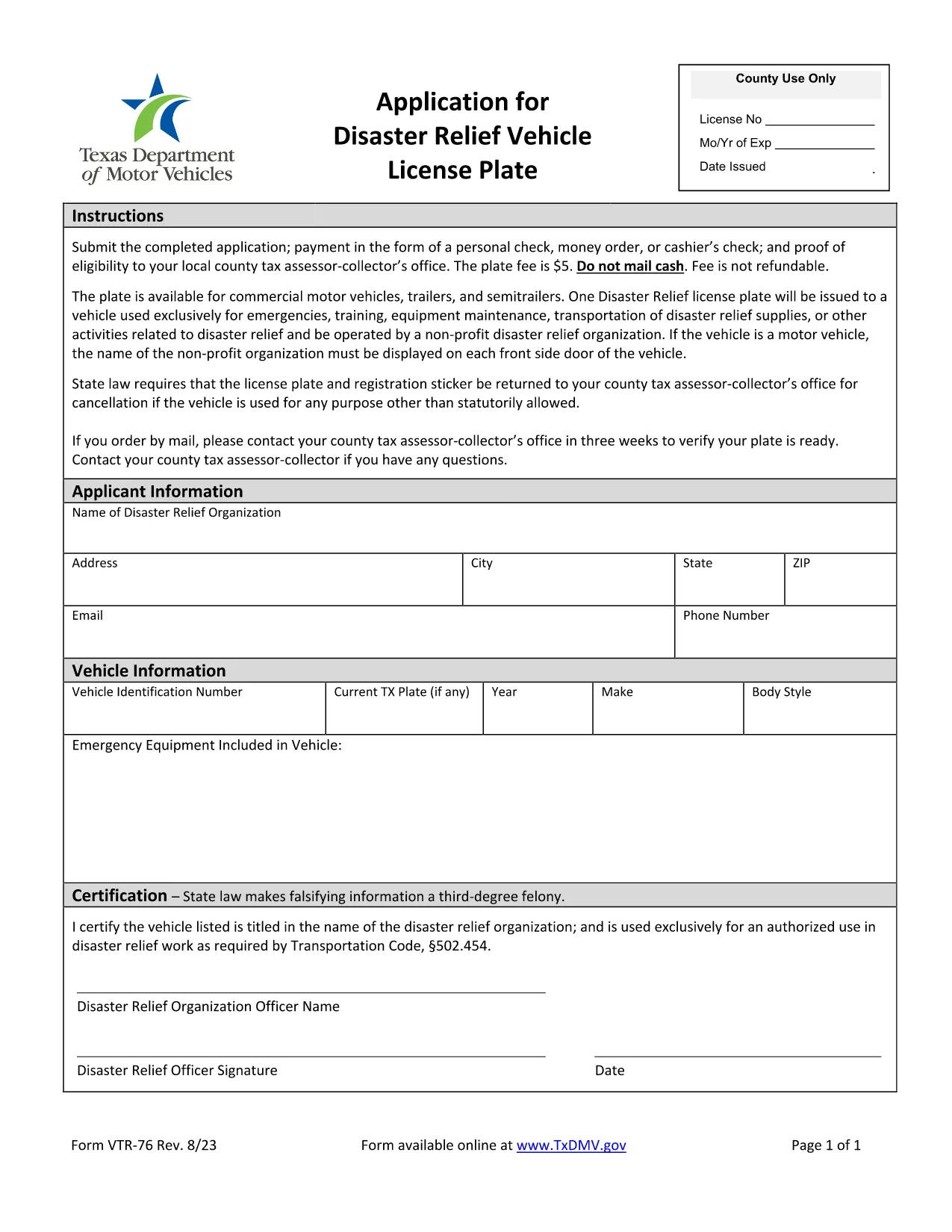
VTR-76 Disaster Relief Vehicle License Plate Application (Fillable PDF)

  1. Ენა ინგლისური
  2. ქვეყანა აშშ
  3. აქტივობა ავტომობილის რეგისტრაცია
  4. სახელმწიფო ტეხასი
VTR-76 Disaster Relief Vehicle License Plate Application (Fillable PDF)

The VTR-76 is the official Texas Department of Motor Vehicles (TxDMV) application for a Disaster Relief Vehicle License Plate. This fillable PDF lets eligible owners quickly obtain a special plate that provides tax and registration benefits for vehicles used in disaster‑relief efforts.

What Is the VTR-76 Form?

Form VTR-76 is specifically designed for:

  • Non‑profit organizations, government agencies, and individuals who operate vehicles in disaster‑relief activities.
  • Vehicles that will be used for transporting supplies, personnel, or equipment during emergencies.
  • Applicants who need a distinct plate to identify their vehicle as a disaster‑relief asset.

How to Complete the VTR-76 Online

Instead of downloading the PDF to a desktop editor, simply click the "Fill out this form" button on this page. The Formize PDF Filler app will load automatically, letting you enter data directly in your browser.

Common Mistakes to Avoid

  • Incorrect vehicle identification number (VIN): Double‑check the VIN before submitting.
  • Missing supporting documents: Attach proof of disaster‑relief affiliation (e.g., letter from a recognized agency).
  • Wrong expiration date: The plate is valid for one year; ensure the date matches the current calendar year.

Submission Requirements & Fees

After completing the form, you will need to:

  • Pay the nominal processing fee (currently $5) via TxDMV’s online portal.
  • Submit the completed PDF through the TxDMV website or mail it to the address listed on the form.
  • Allow 7‑10 business days for the plate to be manufactured and mailed.

FAQs About VTR-76

For quick answers to the most common questions, scroll down to our FAQ section.

FAQ
  • Who is eligible for a disaster‑relief vehicle plate?

    Eligible applicants include nonprofit disaster‑relief organizations, government agencies, and individuals who regularly use a vehicle for emergency response or recovery operations.

  • Do I need to attach proof of eligibility?

    Yes. Attach a letter of endorsement from a recognized disaster‑relief authority or a copy of your organization’s 501(c)(3) status.

  • How long does the VTR‑76 process take?

    After submission, the TxDMV typically processes the application within 7‑10 business days, after which the special plate is mailed to the address on file.

  • Can I edit the form after I submit it?

    Once submitted, the form cannot be edited. If you need changes, contact TxDMV to request a new VTR‑76 submission.

  • Is there a fee for the disaster‑relief plate?

    A modest processing fee (currently $5) is required. The fee covers plate manufacturing and administrative costs.

  • What if I lose my special plate?

    Report the loss to TxDMV immediately. You will need to complete a replacement request and pay a small replacement fee.

ᲠᲝᲒᲝᲠ

როგორ შეავსოთ VTR-76 უფასოდ, ონლაინ 4 მარტივი ნაბიჯებით:

  1. 1
    Click the Fillable Form Button
    On this page, locate the "Fill out this form" button and click it. The Formize PDF Filler will open in a new window.
  2. 2
    Enter Your Information
    Use the on‑screen fields to type in your vehicle details, organization info, and any supporting data. All fields are interactive and save automatically.
  3. 3
    Review and Validate
    Check each section for accuracy. The filler highlights required fields and alerts you to common errors.
  4. 4
    Submit or Download
    When finished, click "Submit" to send the form directly to TxDMV, or choose "Download" to save a copy for your records.
PDF შემავსებლის აპლიკაციის ფორმირება
ᲨᲔᲡᲐᲮᲔᲑ

სატრანსპორტო საშუალების რეგისტრაციის ფორმები

თუ თქვენ ფლობთ ან იჯარით გაქვთ ავტომობილი, მისაბმელი ან ნავი, თქვენ უნდა შეასრულოთ გარკვეული ვალდებულებები, რათა შეინარჩუნოთ თქვენი მანქანა კანონიერად რეგისტრირებული და უსაფრთხო.

VTR-76 არის სატრანსპორტო საშუალების რეგისტრაციის ერთ-ერთი ფორმა, რომელიც წარმოადგენს დოკუმენტებს, რომლებიც გამოიყენება ავტომობილის რეგისტრაციისთვის შესაბამის სახელმწიფო ან პროვინციულ ორგანოში. ეს ფორმები, როგორც წესი, საჭიროა, როდესაც ადამიანი ყიდულობს ახალ ან მეორად სატრანსპორტო საშუალებას, ან როდესაც ისინი გადადიან ახალ შტატში ან პროვინციაში მანქანით.

ავტომობილის რეგისტრაციისთვის საჭირო ზუსტი მოთხოვნები და ფორმები შეიძლება განსხვავდებოდეს მდებარეობის მიხედვით, მაგრამ ზოგადად, პროცესი გულისხმობს ინფორმაციის მიწოდებას ავტომობილის, მფლობელისა და ავტომობილის ნებისმიერი გირავნობის შესახებ.

სარეგისტრაციო ფორმებისა და მოსაკრებლების წარდგენის შემდეგ, სახელმწიფო ან პროვინციული ორგანო ავტომობილის მფლობელს გასცემს სარეგისტრაციო მოწმობას ან სანომრე ნიშანს. ეს რეგისტრაცია საშუალებას აძლევს მანქანას ლეგალურად იმოძრაოს საჯარო გზებსა და მაგისტრალებზე.

ᲛᲐᲮᲐᲡᲘᲐᲗᲔᲑᲚᲔᲑᲘ

PDF შემავსებელი

ონლაინ VTR-76-ის შევსების უმარტივესი გზა

  • სწრაფად შეავსეთ VTR-76
    ეძებთ გზას სწრაფად შეავსოთ VTR-76 ონლაინ? ჩვენი ონლაინ უფასო PDF ფორმის შემავსებლით, თქვენ გეცოდინებათ როგორ შეცვალოთ და შეავსოთ ეს pdf დოკუმენტი ერთ წუთზე ნაკლებ დროში.
  • მარტივი გამოსაყენებელი ონლაინ PDF რედაქტორი
    მოგბეზრდათ PDF ფაილების დაბეჭდვა, რათა მათი რედაქტირება შეძლოთ, ხელახლა სკანირებამდე და უკან გაგზავნამდე? შეცვალეთ PDF დოკუმენტები უფასოდ ონლაინ. გამოიყენეთ ჩვენი ონლაინ pdf რედაქტორი დროისა და ქაღალდის დაზოგვისთვის.
  • შესანიშნავი ხელსაწყოები, ყველა პლატფორმა
    გაინტერესებთ როგორ შეავსოთ VTR-76 Mac-ზე, ან იქნებ როგორ გამოიყენოთ PDF შემავსებელი უფასოდ? ჩვენი ონლაინ PDF ინსტრუმენტები მუშაობს ყველა პლატფორმაზე.
  • ფაილების უსაფრთხო შენახვა
    დასრულებული „VTR-76“ ფაილები ინახება დაცულ მონაცემთა ბაზაში, რომელსაც მართავს Amazon Cloud ჰოსტინგი. თქვენ შეგიძლიათ წაშალოთ თქვენი ფაილები ჩვენი სისტემიდან ნებისმიერ დროს. ნებისმიერ შემთხვევაში, ეს ფაილები ავტომატურად იშლება 24 საათის შემდეგ.
  • ჩატი VTR-76-ით
    ესაუბრეთ „VTR-76“-ს Chatize-ზე, რომელიც არის PDF წამკითხველის უფასო ასისტენტი. დასვით კითხვები და მიიღეთ პასუხები „VTR-76“-დან. უბრალოდ დააწკაპუნეთ ღილაკზე ჩატი დოკუმენტთან ზემოთ.

შევსების სესიის წაშლა

წაშალოთ არჩეული შევსების სესია? ამ შემთხვევაში, თქვენი პროგრესი ფორმის შევსებაში დაიკარგება.

რედაქტირების სესიის წაშლა

წაშალოთ არჩეული რედაქტირების სესია? ამ შემთხვევაში, თქვენი პროგრესი ფორმის შექმნასა და რედაქტირებაში დაიკარგება.