
언어 선택

ATF Form 5400.13/5400.16 – Responsible Person Questionnaire

  1. 언어 영어
  2. 국가 미국
  3. 부서 술, 담배, 화기 및 폭발물 단속국
  4. 부문 폭발물
ATF Form 5400.13/5400.16 – Responsible Person Questionnaire

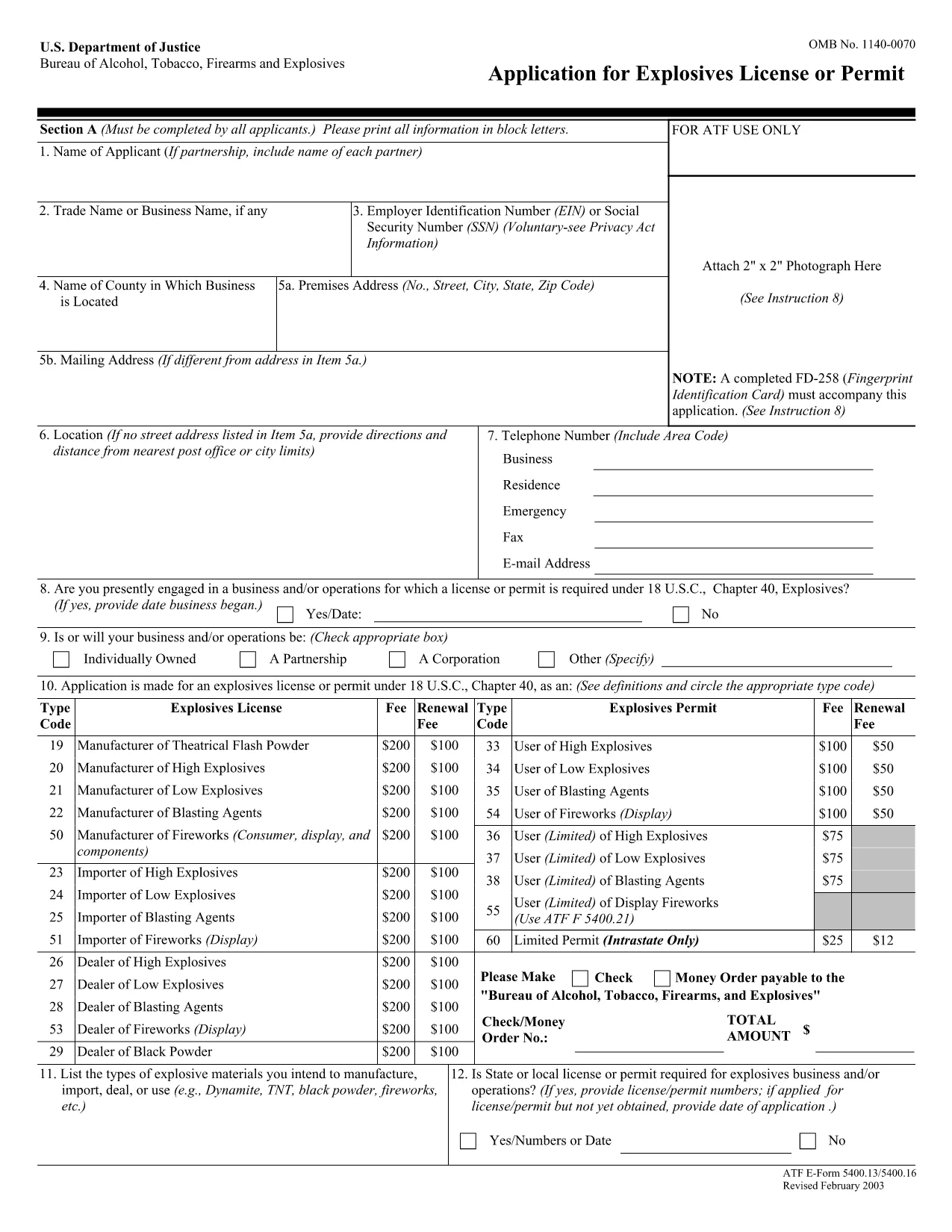
The ATF Form 5400.13 (Responsible Person Questionnaire) and its companion Form 5400.16 are required for anyone applying for an explosives license or permit. These forms collect detailed information about each responsible person associated with the business, ensuring compliance with the Bureau of Alcohol, Tobacco, Firearms and Explosives (ATF) regulations.

What Is ATF Form 5400.13/5400.16?

Form 5400.13 gathers personal, business, and background data for each responsible person, while Form 5400.16 provides additional certification and signature fields. Together, they form the core of the ATF’s Responsible Person Questionnaire, a mandatory part of every explosives license or permit application.

How to Complete the Form Online with Formize

  • Step 1: Click the "Fill out this form" button on this page.
  • Step 2: Wait a few seconds while the Formize PDF Filler app loads the fillable PDF.
  • Step 3: Enter the requested information in each field. The interface saves your progress automatically.
  • Step 4: When all sections are complete, download the finished PDF or submit it directly to the ATF portal.

Common Mistakes & Tips for a Successful Submission

Don’t leave any required fields blank. The ATF will reject applications with missing data. Use the "Add another responsible person" button if you have more than one individual to report.

Use legal names only. Include maiden names, previous married names, and any aliases exactly as they appear on official documents.

Double‑check dates. Ensure birth dates, licensing dates, and expiration dates follow the MM/DD/YYYY format.

Where to Send the Completed Form

After you download the completed PDF, mail or fax it to the ATF National Services Center, Federal Explosives Licensing Center, P.O. Box 6200‑18, Portland, OR 97228‑6200. Refer to the ATF instructions for any additional submission requirements.

Need a printable version? Use the download link below to get the original PDF.

자주하는 질문
  • Who must complete ATF Form 5400.13/5400.16?

    Every individual who will act as a responsible person for an explosives business – owners, partners, officers, and key employees – must complete the questionnaire.

  • Can I submit a paper copy instead of the fillable PDF?

    Yes, a printed version is accepted, but using the fillable PDF reduces errors and speeds up processing.

  • What if I have more than three responsible persons?

    Use the "Add another responsible person" button in the online filler, or attach additional sheets if you print the form.

  • How long is the form valid after I submit it?

    The information is valid for the duration of the license or permit. Any changes (e.g., new responsible person) must be reported to the ATF promptly.

  • Do I need a digital signature?

    A typed name in the signature field is acceptable for the online version. For paper submissions, sign with a pen.

  • Is there a filing fee associated with this questionnaire?

    The questionnaire itself has no fee, but it is part of the overall explosives license application, which may have associated fees.

  • What should I do if I make a mistake after saving?

    Open the saved PDF in the Formize filler again, correct the error, and re‑download the updated file.

  • Where can I find the official ATF instructions?

    The ATF publishes detailed guidance on its website under the Explosives Licensing section; a link is included on the form’s cover page.

어떻게

4개의 간단한 단계를 통해 온라인으로 ATF Form 5400.13를 무료로 작성하는 방법:

  1. 1
    Click the Fill‑out Button
    Press the "Fill out this form" button on the page to launch the Formize PDF Filler.
  2. 2
    Wait for the Filler to Load
    A few seconds later the fillable PDF appears in the browser. No download or extra software is needed.
  3. 3
    Enter All Required Information
    Complete each field for every responsible person. The app auto‑saves as you type.
  4. 4
    Download or Submit
    When finished, click "Download PDF" to save a copy or follow ATF instructions to submit the form.
Formize PDF 필러 앱
에 대한

ATF(알코올, 담배, 총기 및 폭발물) 양식 관리부

ATF Form 5400.13는 미국 법무부 산하 연방 법 집행 기관인 ATF에서 사용하는 공식 양식 중 하나입니다. ATF는 술, 담배, 총기 및 폭발물과 관련된 연방법 및 규정을 집행하는 일을 담당합니다. 이러한 양식은 해당 산업에 관련된 기업 및 개인의 등록, 라이센스 및 규제를 포함한 다양한 목적으로 사용됩니다. 다음은 ATF 양식의 몇 가지 예입니다.

ATF 양식 4473: 이 양식은 개인이 연방 허가를 받은 총기 판매상으로부터 총기를 구매할 때 신원 조사 절차에 사용됩니다. 구매자의 신원, 배경, 총기 소지 자격에 대한 정보를 수집합니다.

ATF 양식 1: 이 양식은 총기 제조 및 등록을 신청하는 데 사용됩니다. 일반적으로 개인용 총기를 제조하거나 기존 총기를 다른 구성으로 변환하려는 개인에게 사용됩니다.

ATF 양식 4: 이 양식은 개인이나 단체에서 다른 개인이나 단체로 총기를 양도하고 등록하는 데 사용됩니다. 개인으로부터 총기를 구입하거나, 신탁이나 법인에 총기를 양도하는 과정에서 흔히 사용됩니다.

ATF 양식 6: 이 양식은 ATF가 규제하는 총기, 탄약 및 기타 특정 품목을 수입하는 데 사용됩니다. 이러한 품목을 미국으로 수입하려는 개인이나 기업에게 필요합니다.

ATF 양식 7: 이 양식은 연방 총기 면허(FFL)를 신청하고 갱신하는 데 사용됩니다. 이는 총기 제조, 거래 또는 수입 사업에 종사하는 개인 또는 기업에 필요합니다.

ATF 양식 5320.20: 이 양식은 총기 운송에 대한 통지 및 승인에 사용됩니다. 또는 주 경계선을 가로지르는 파괴적인 장치.

ATF 양식 5400.13: 이 양식은 다음을 등록하고 보고하는 데 사용됩니다. 폭발성 물질 및 장치.

이는 알코올, 담배, 총기 및 폭발물을 규제하는 연방법의 규제 및 집행과 관련된 다양한 목적으로 사용되는 ATF 양식의 몇 가지 예입니다. 필요한 특정 양식은 수행되는 특정 활동이나 거래 및 적용되는 규정에 따라 다릅니다. 주류, 담배, 총기 및 폭발물 단속국의 공식 웹사이트(www.atf.gov)를 참조하거나 전문가의 안내를 받아 정확한 최신 정보를 구하는 것이 중요합니다. 귀하의 상황과 관련된 특정 ATF 양식에 관한 것입니다.

특징

PDF 필러

온라인에서 PDF 양식을 채우는 가장 쉬운 방법

  • ATF Form 5400.13를 빠르게 작성하세요.
    온라인에서 ATF Form 5400.13을(를) 빠르게 채우는 방법을 찾고 계십니까? 온라인 무료 PDF 양식 필러를 사용하면 1분 이내에 이 PDF 문서를 편집하고 채우는 방법을 알 수 있습니다.
  • 사용하기 쉬운 온라인 PDF 편집기
    다시 스캔하여 다시 보내기 전에 편집할 수 있도록 PDF 파일을 인쇄하는 데 지쳤습니까? 온라인에서 무료로 PDF 문서를 편집하세요. 온라인 PDF 편집기를 사용하여 시간과 종이를 절약하십시오.
  • 훌륭한 도구, 모든 플랫폼
    Mac에서 ATF Form 5400.13를 채우는 방법이나 PDF 필러를 무료로 사용하는 방법이 궁금하십니까? 당사의 온라인 PDF 도구는 모든 플랫폼에서 작동합니다.
  • 안전한 파일 저장
    완료된 "ATF Form 5400.13" 파일은 Amazon 클라우드 호스팅에서 관리하는 보안 데이터베이스에 저장됩니다. 언제든지 시스템에서 파일을 삭제할 수 있습니다. 어쨌든 이러한 파일은 24시간 후에 자동으로 삭제됩니다.
  • ATF Form 5400.13님과 채팅
    무료 PDF 리더 도우미인 Chatize에서 "ATF Form 5400.13"와 채팅하세요. "ATF Form 5400.13"에서 질문하고 답변을 받으세요. 위의 문서와 채팅 버튼을 클릭하세요.

필링 세션 삭제

선택한 필링 세션을 삭제하시겠습니까?이 경우 양식 작성 진행 상황이 손실됩니다.

편집 세션 삭제

선택한 편집 세션을 삭제하시겠습니까? 이 경우 양식 작성 및 편집 진행 상황이 손실됩니다.