
언어 선택

Australian Tax File Number (TFN) Declaration Form – Fillable PDF

  1. 국가 호주
  2. 언어 영어
  3. 활동 구실
  4. 부서 Australian Taxation Office
Australian Tax File Number (TFN) Declaration Form – Fillable PDF

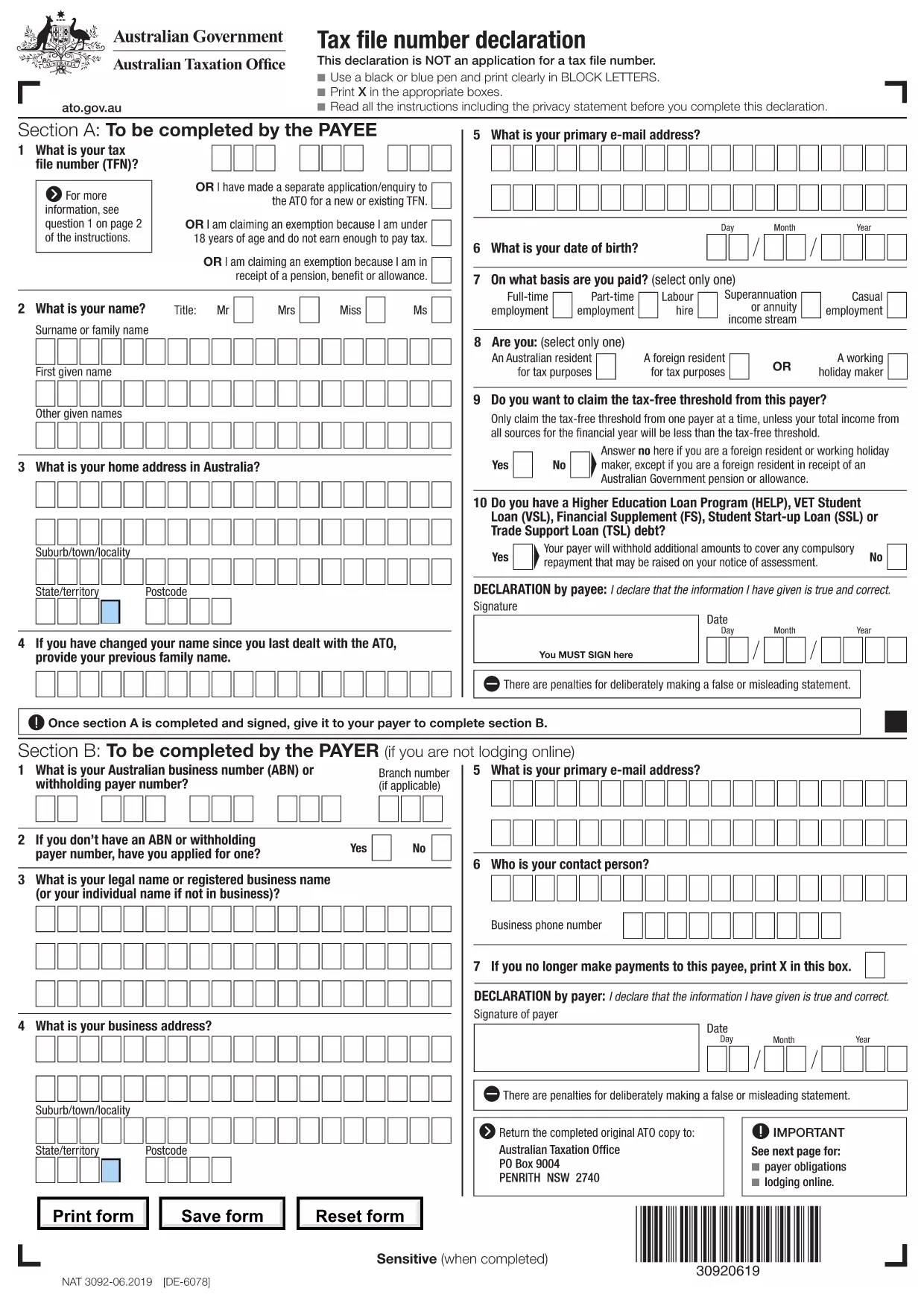
The Tax File Number (TFN) Declaration is an essential Australian tax document used by employers, banks, and other payers to collect your TFN and tax‑free threshold preferences. Our fillable PDF version lets you complete the form quickly, accurately, and without printing.

What is the TFN Declaration Form?

This form, also known as NAT 3092, captures your TFN, residency status, and whether you wish to claim the tax‑free threshold. It is not an application for a TFN; it simply records the information needed for withholding tax purposes.

How to Complete the Form Online

Follow the step‑by‑step guide below to fill out the PDF directly in your browser using Formize’s PDF Filler app.

Common Mistakes to Avoid

  • Using a stylus or handwritten notes – the form must be typed.
  • Leaving the TFN field blank – this will delay processing.
  • Choosing the wrong residency option, which can affect your tax rate.
  • Not signing the declaration – an unsigned form is invalid.

Where to Submit the Completed Form

After you’ve filled and signed the PDF, send it to the requesting organization (employer, bank, etc.) via their preferred method – usually email, secure upload, or in‑person hand‑over.

Need more help? Review the instructions on the PDF itself or contact the organization that provided the form.

자주하는 질문
  • What is the purpose of the TFN Declaration?

    It records your tax file number and residency status so payers can withhold the correct amount of tax.

  • Is this form an application for a TFN?

    No. The TFN Declaration is only a declaration of an existing TFN. To apply for a TFN you need a separate form.

  • Can I fill out the form on a mobile device?

    Yes. The Formize PDF Filler works on most smartphones and tablets with a modern browser.

  • Do I need to print and sign the form?

    No. The fillable PDF includes an electronic signature field accepted by most Australian organisations.

  • What happens if I enter the wrong TFN?

    An incorrect TFN can cause tax reporting errors. Verify the number with your previous tax documents before submitting.

  • How do I know if I should claim the tax‑free threshold?

    If you have only one job or source of income, you can claim the threshold to reduce tax withheld. If you have multiple jobs, claim it on your primary employer only.

  • Is my data safe when using Formize?

    Formize uses SSL encryption and does not store your personal data after the session ends.

어떻게

5개의 간단한 단계를 통해 온라인으로 TFN declaration pdf를 무료로 작성하는 방법:

  1. 1
    Click the Fill‑out Button
    On this page, click the "Fill out this form" button to launch the Formize PDF Filler.
  2. 2
    Wait for the PDF Filler to Load
    The fillable PDF will open in your browser. A loading spinner indicates the app is preparing the form.
  3. 3
    Enter Your Information
    Type directly into each field: TFN, name, address, residency status, and tax‑free threshold choice.
  4. 4
    Review and Sign
    Double‑check all entries, then add your electronic signature using the built‑in signature field.
  5. 5
    Save or Submit
    Download the completed PDF or use the organization’s upload link to submit it securely.
Formize PDF 필러 앱
에 대한

세금 양식

TFN declaration pdf는 세금 관련 정보를 해당 세무 당국에 보고하는 데 사용되는 문서인 세금 양식 중 하나입니다. 납세자의 상황과 위치에 따라 연방, 주 및 지방 세금 양식을 포함하여 다양한 유형의 세금 양식이 있습니다.
특징

PDF 필러

온라인에서 PDF 양식을 채우는 가장 쉬운 방법

  • TFN declaration pdf를 빠르게 작성하세요.
    온라인에서 TFN declaration pdf을(를) 빠르게 채우는 방법을 찾고 계십니까? 온라인 무료 PDF 양식 필러를 사용하면 1분 이내에 이 PDF 문서를 편집하고 채우는 방법을 알 수 있습니다.
  • 사용하기 쉬운 온라인 PDF 편집기
    다시 스캔하여 다시 보내기 전에 편집할 수 있도록 PDF 파일을 인쇄하는 데 지쳤습니까? 온라인에서 무료로 PDF 문서를 편집하세요. 온라인 PDF 편집기를 사용하여 시간과 종이를 절약하십시오.
  • 훌륭한 도구, 모든 플랫폼
    Mac에서 TFN declaration pdf를 채우는 방법이나 PDF 필러를 무료로 사용하는 방법이 궁금하십니까? 당사의 온라인 PDF 도구는 모든 플랫폼에서 작동합니다.
  • 안전한 파일 저장
    완료된 "TFN declaration pdf" 파일은 Amazon 클라우드 호스팅에서 관리하는 보안 데이터베이스에 저장됩니다. 언제든지 시스템에서 파일을 삭제할 수 있습니다. 어쨌든 이러한 파일은 24시간 후에 자동으로 삭제됩니다.
  • TFN declaration pdf님과 채팅
    무료 PDF 리더 도우미인 Chatize에서 "TFN declaration pdf"와 채팅하세요. "TFN declaration pdf"에서 질문하고 답변을 받으세요. 위의 문서와 채팅 버튼을 클릭하세요.

필링 세션 삭제

선택한 필링 세션을 삭제하시겠습니까?이 경우 양식 작성 진행 상황이 손실됩니다.

편집 세션 삭제

선택한 편집 세션을 삭제하시겠습니까? 이 경우 양식 작성 및 편집 진행 상황이 손실됩니다.