
언어 선택

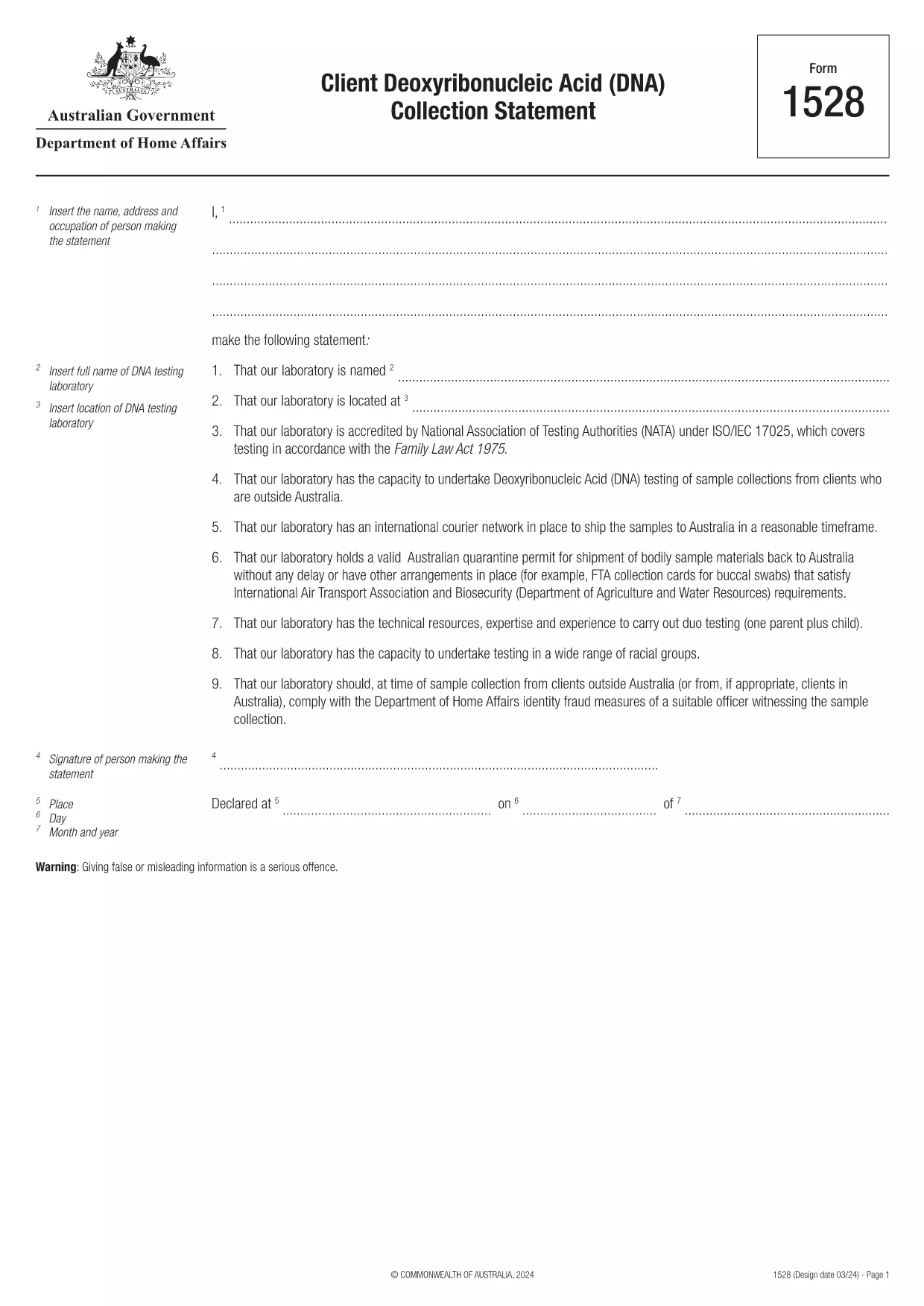
Form 1528 – Client DNA Collection Statement (Fillable PDF)

  1. 국가 호주
  2. 언어 영어
  3. 활동 캐릭터 또는 정체성
Form 1528 – Client DNA Collection Statement (Fillable PDF)

Form 1528 is the official Client Deoxyribonucleic Acid (DNA) Collection Statement required by the Australian Department of Home Affairs. The form captures the name, address and occupation of the person making the statement, as well as details of the DNA testing laboratory.

What Is Form 1528?

This form is used when an individual must provide a DNA sample for immigration, visa, or forensic purposes. It must be completed by the person providing the sample and signed by an authorised DNA testing laboratory.

How to Fill Out Form 1528 with Formize

Instead of printing, scanning, or editing the PDF manually, simply click the “Fill out this form” button on this page. The Formize PDF Filler app will load the fillable version, letting you enter data, add signatures, and save the completed document in seconds.

Common Mistakes & Tips

  • Leave no blank fields – the Department rejects forms with empty required sections.
  • Use the exact laboratory name and address as it appears on the lab’s official letterhead.
  • Check date formats – use DD/MM/YYYY throughout.
  • Sign electronically only after all information is verified; a digital signature is accepted.

Where to Submit the Completed Form

After you download the completed PDF, you can upload it through your online visa portal, email it to the requesting officer, or deliver a printed copy to the nearest Australian Visa Application Centre.

Need More Help?

For detailed guidance, review the instructions on the Department of Home Affairs website or contact your DNA testing laboratory for clarification on laboratory‑specific fields.

자주하는 질문
  • Is an electronic signature accepted on Form 1528?

    Yes. The Department of Home Affairs accepts a clear electronic signature created with the Formize PDF Filler.

  • Can I print the form after filling it online?

    Absolutely. After completing the form, you can download the PDF and print a hard copy if you prefer a physical submission.

  • What if I make a mistake after saving the form?

    Open the saved PDF again in Formize, edit the incorrect fields, and re‑save. The fillable PDF allows unlimited edits before final submission.

  • Do I need to attach any supporting documents?

    Typically, the DNA laboratory will provide a separate certification letter. Attach that letter alongside the completed Form 1528 when you submit your application.

  • How long does it take to process Form 1528?

    Processing time varies by case, but the Department generally reviews the statement within 5‑10 business days after receipt.

  • Is there a fee for using Formize’s PDF filler?

    Formize offers a free basic fillable version for Form 1528. Advanced features such as bulk signing require a paid plan, but are not needed for a single submission.

  • Can I fill out Form 1528 on a mobile device?

    Yes. The Formize PDF Filler works on smartphones and tablets, allowing you to complete the form anywhere.

  • What format should I use when uploading the completed form?

    Upload the final document as a PDF file. Ensure the file size does not exceed the portal’s limit (usually 5 MB).

어떻게

5개의 간단한 단계를 통해 온라인으로 Form 1528를 무료로 작성하는 방법:

  1. 1
    Open the Fillable Form
    Click the “Fill out this form” button on the page. The Formize PDF Filler app will launch in a new tab with the fillable version of Form 1528.
  2. 2
    Enter Your Information
    Type the required details – personal data, laboratory name, and address – directly into the highlighted fields.
  3. 3
    Add Electronic Signatures
    Use the signature tool to sign the statement and, if required, the laboratory representative’s signature.
  4. 4
    Review & Validate
    Double‑check every field for accuracy, especially dates and laboratory information.
  5. 5
    Download or Submit
    When you’re satisfied, click “Save & Download” to get the completed PDF, or use the built‑in “Submit” button to send it directly to the Home Affairs portal.
Formize PDF 필러 앱
에 대한

캐릭터 또는 신원 양식

Form 1528는 개인의 성격이나 자질에 대한 정보를 수집하는 데 사용되는 문서 중 하나입니다. 이러한 양식은 고용, 주택, 법적 절차 등 다양한 상황에서 개인의 적합성이나 신뢰성을 평가하는 데 사용될 수 있습니다. 다음은 다양한 상황에서 "문자 형식"으로 간주될 수 있는 형식의 몇 가지 예입니다.

인격 추천 양식: 이 양식은 개인의 성격, 기술 및 자격을 보증할 수 있는 개인으로부터 정보를 수집하는 데 사용됩니다. 취업 지원, 임대 신청 또는 법적 절차의 일부로 요청되는 경우가 많습니다. 양식은 일반적으로 지원자와의 관계, 지원자의 성격에 대한 의견, 관련 경험이나 관찰에 대한 세부 정보를 요구합니다.

개인 진술 양식: 특정 상황에서 개인은 자신의 성격, 가치 및 동기를 전달하기 위해 개인 진술이나 에세이를 제공하도록 요청받을 수 있습니다. 이는 대학 입학, 장학금 신청 또는 전문 라이센스 프로세스에 필요할 수 있습니다.

인격 증인 증언 양식: 법적 절차에서 개인의 성격, 평판 또는 행동에 관한 증언을 제공하기 위해 인격 증인을 호출할 수 있습니다. 일반적으로 미리 정의된 문서 형식은 아니지만 증인의 증언 구성을 안내하기 위해 제공되는 양식이나 템플릿이 있을 수 있습니다.

신원 조사 공개 및 승인 양식: 입사 지원서와 같은 일부 상황에서 개인은 신원 조사를 승인하는 양식을 작성하라는 요청을 받을 수 있습니다. 이러한 양식에는 인물 추천, 이전 범죄 기록 또는 기타 관련 개인 정보에 대한 질문이 포함될 수 있습니다.

개인의 성격을 평가하는 데 사용되는 특정 형식은 관련 조직이나 기관의 상황과 요구 사항에 따라 달라질 수 있다는 점을 유념하는 것이 중요합니다. 따라서 원하는 정보를 이해하고 양식을 정확하게 작성하는 방법을 이해하려면 관련 당사자가 제공한 특정 양식을 참조하는 것이 좋습니다.

특징

PDF 필러

온라인에서 PDF 양식을 채우는 가장 쉬운 방법

  • Form 1528를 빠르게 작성하세요.
    온라인에서 Form 1528을(를) 빠르게 채우는 방법을 찾고 계십니까? 온라인 무료 PDF 양식 필러를 사용하면 1분 이내에 이 PDF 문서를 편집하고 채우는 방법을 알 수 있습니다.
  • 사용하기 쉬운 온라인 PDF 편집기
    다시 스캔하여 다시 보내기 전에 편집할 수 있도록 PDF 파일을 인쇄하는 데 지쳤습니까? 온라인에서 무료로 PDF 문서를 편집하세요. 온라인 PDF 편집기를 사용하여 시간과 종이를 절약하십시오.
  • 훌륭한 도구, 모든 플랫폼
    Mac에서 Form 1528를 채우는 방법이나 PDF 필러를 무료로 사용하는 방법이 궁금하십니까? 당사의 온라인 PDF 도구는 모든 플랫폼에서 작동합니다.
  • 안전한 파일 저장
    완료된 "Form 1528" 파일은 Amazon 클라우드 호스팅에서 관리하는 보안 데이터베이스에 저장됩니다. 언제든지 시스템에서 파일을 삭제할 수 있습니다. 어쨌든 이러한 파일은 24시간 후에 자동으로 삭제됩니다.
  • Form 1528님과 채팅
    무료 PDF 리더 도우미인 Chatize에서 "Form 1528"와 채팅하세요. "Form 1528"에서 질문하고 답변을 받으세요. 위의 문서와 채팅 버튼을 클릭하세요.

필링 세션 삭제

선택한 필링 세션을 삭제하시겠습니까?이 경우 양식 작성 진행 상황이 손실됩니다.

편집 세션 삭제

선택한 편집 세션을 삭제하시겠습니까? 이 경우 양식 작성 및 편집 진행 상황이 손실됩니다.