
언어 선택

Reg 116 Report & Consent Form – Fillable PDF

  1. 언어 영어
  2. 국가 호주
  3. 부서 City of Melbourne
  4. 활동 Building Regulations
Reg 116 Report & Consent Form – Fillable PDF

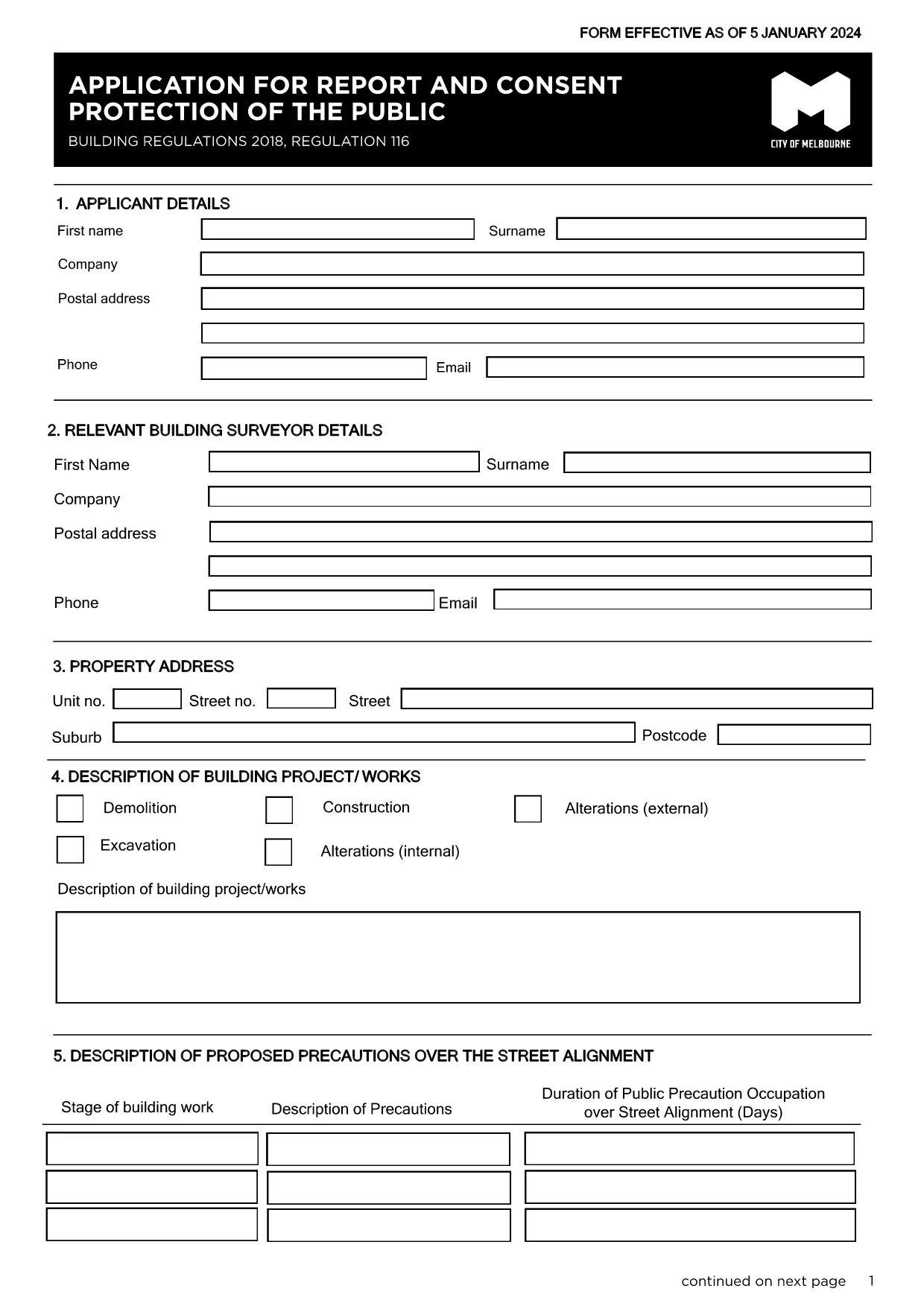
The Regulation 116 Report and Consent is required for any construction or demolition work that could affect public safety in the City of Melbourne. This fillable PDF lets you provide all necessary details quickly, securely, and in compliance with the Building Act 1993.

What Is the Reg 116 Report & Consent?

Reg 116 is a specific provision of the Building Regulations 2018 that mandates a formal report and consent before starting public‑protection measures such as hoardings, scaffolding, gantries, or exclusion zones. The form captures project details, risk assessments, and proposed safety measures.

When Do You Need This Form?

  • Any new construction, alteration, or demolition that impacts public spaces.
  • When a Construction Management Plan (CMP) is required.
  • Before installing hoardings, scaffolding, or temporary structures near footpaths or roads.

How to Complete the Form Online with Formize

Instead of downloading the PDF and editing it in a separate program, simply click the "Fill out this form" button on this page. The Formize PDF Filler app will load automatically, allowing you to:

  1. Enter text directly into each field.
  2. Upload supporting drawings or risk‑assessment documents.
  3. Save a draft and return later if needed.
  4. Submit the completed form securely to the City of Melbourne.

Common Mistakes to Avoid

  • Leaving required fields blank – the system will highlight missing information before you can submit.
  • Using an outdated version – always use the latest PDF linked below.
  • Submitting without a signature – you can add a digital signature in Formize or print, sign, and scan.

Where to Submit the Completed Form

After you finish, the Formize platform routes the file to the City of Melbourne’s Building Department. You will receive a confirmation email with a reference number. If you prefer a hard copy, you can print the PDF and deliver it to:

Building Department
City of Melbourne
Administration Building, 120 Swanston St
Melbourne VIC 3000

For any questions, refer to the FAQ section below.

자주하는 질문
  • What is Regulation 116?

    Regulation 116 requires a Report and Consent for any work that could affect public safety, such as hoardings, scaffolding, or temporary structures.

  • Do I need a digital signature?

    A digital signature is accepted when using Formize. If you prefer a handwritten signature, print, sign, and scan the completed PDF before uploading.

  • Can I save a draft and finish later?

    Yes. Formize lets you save your progress and return to the form at any time using the same browser session or by logging into your account.

  • How long does the approval take?

    The City of Melbourne typically reviews Reg 116 submissions within 5‑10 business days, depending on project complexity.

  • Is there a fee for filing Reg 116?

    Yes. As of the latest schedule, the fee for a public‑protection consent is $334.50. Check the City’s fee schedule for updates.

  • What if I submit the wrong version of the form?

    The system will reject outdated versions. Always use the latest PDF linked on this page to avoid delays.

  • Can I submit the form by email?

    While you can email a completed PDF, using the Formize online submission ensures the file is logged and tracked automatically.

  • What supporting documents are required?

    Attach a site plan, risk assessment, and any relevant engineering drawings. The form’s attachment section lists all required files.

  • Who can I contact for help?

    For technical assistance with the Formize filler, refer to the help icon on the form. For regulatory questions, contact the City of Melbourne Building Department at building@melbourne.vic.gov.au.

어떻게

5개의 간단한 단계를 통해 온라인으로 Reg 116 report and consent를 무료로 작성하는 방법:

  1. 1
    Open the Fillable Form
    Click the "Fill out this form" button on the page. The Formize PDF Filler will load in your browser.
  2. 2
    Enter Your Details
    Complete each field – project description, site address, risk assessments, and proposed safety measures.
  3. 3
    Add Attachments
    Upload any required drawings, risk‑assessment PDFs, or supporting documents using the attachment icon.
  4. 4
    Review and Sign
    Use the built‑in digital signature tool or print, sign, and scan the form before final submission.
  5. 5
    Submit Securely
    Press the Submit button. You’ll receive an email confirmation with a reference number for tracking.
Formize PDF 필러 앱
에 대한

{키워드} 템플릿

PDF 문서를 보고 작성하기 위한 기존 기능 세트와 웹 애플리케이션 및 반응형 레이아웃의 이점을 결합하면 몇 분 만에 Reg 116 report and consent을(를) 완료할 수 있습니다.
특징

PDF 필러

온라인에서 PDF 양식을 채우는 가장 쉬운 방법

  • Reg 116 report and consent를 빠르게 작성하세요.
    온라인에서 Reg 116 report and consent을(를) 빠르게 채우는 방법을 찾고 계십니까? 온라인 무료 PDF 양식 필러를 사용하면 1분 이내에 이 PDF 문서를 편집하고 채우는 방법을 알 수 있습니다.
  • 사용하기 쉬운 온라인 PDF 편집기
    다시 스캔하여 다시 보내기 전에 편집할 수 있도록 PDF 파일을 인쇄하는 데 지쳤습니까? 온라인에서 무료로 PDF 문서를 편집하세요. 온라인 PDF 편집기를 사용하여 시간과 종이를 절약하십시오.
  • 훌륭한 도구, 모든 플랫폼
    Mac에서 Reg 116 report and consent를 채우는 방법이나 PDF 필러를 무료로 사용하는 방법이 궁금하십니까? 당사의 온라인 PDF 도구는 모든 플랫폼에서 작동합니다.
  • 안전한 파일 저장
    완료된 "Reg 116 report and consent" 파일은 Amazon 클라우드 호스팅에서 관리하는 보안 데이터베이스에 저장됩니다. 언제든지 시스템에서 파일을 삭제할 수 있습니다. 어쨌든 이러한 파일은 24시간 후에 자동으로 삭제됩니다.
  • Reg 116 report and consent님과 채팅
    무료 PDF 리더 도우미인 Chatize에서 "Reg 116 report and consent"와 채팅하세요. "Reg 116 report and consent"에서 질문하고 답변을 받으세요. 위의 문서와 채팅 버튼을 클릭하세요.

필링 세션 삭제

선택한 필링 세션을 삭제하시겠습니까?이 경우 양식 작성 진행 상황이 손실됩니다.

편집 세션 삭제

선택한 편집 세션을 삭제하시겠습니까? 이 경우 양식 작성 및 편집 진행 상황이 손실됩니다.