
언어 선택

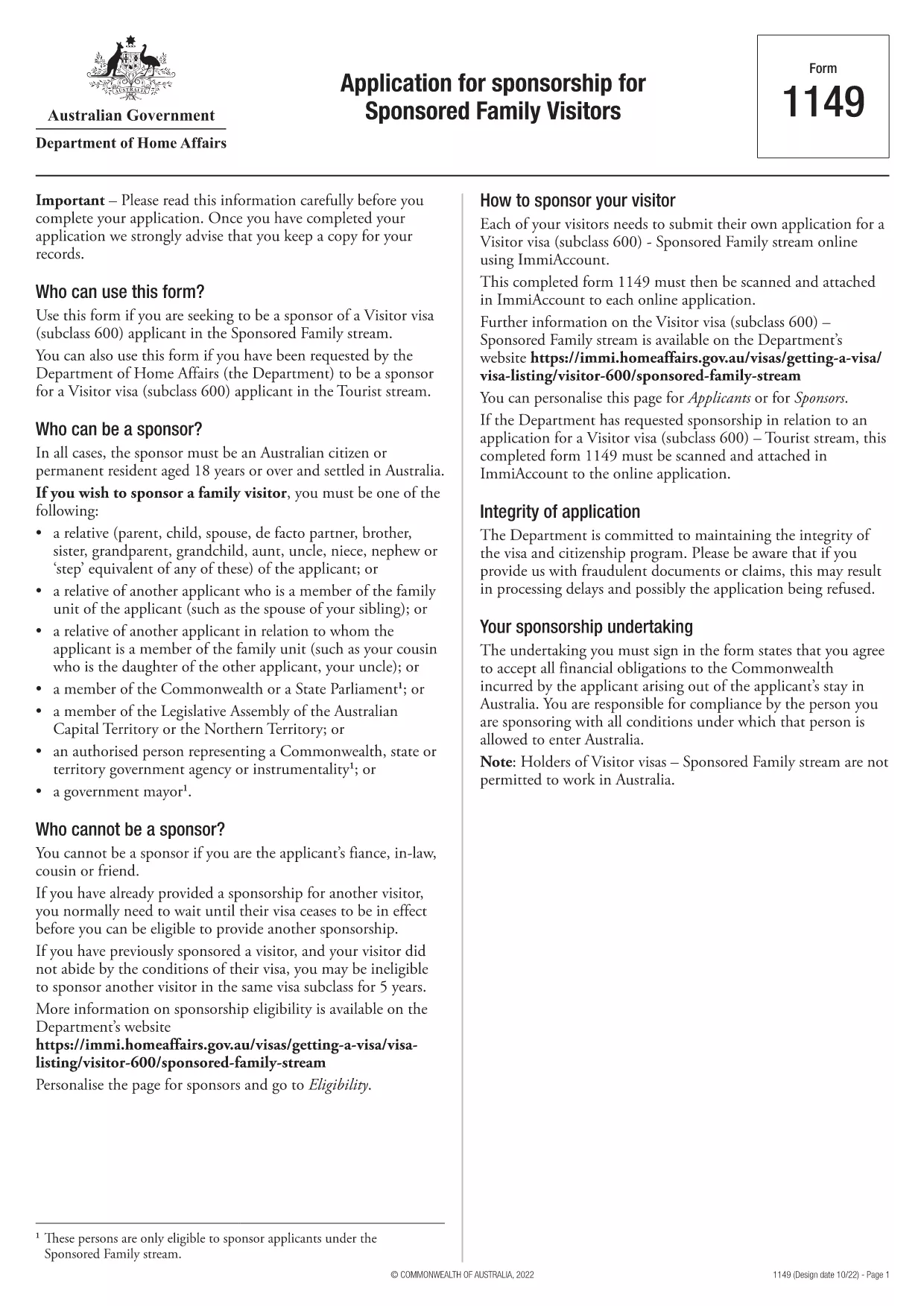
Form 1149 – Application for Sponsorship of a Family Visitor (Visitor Visa 600)

  1. 국가 호주
  2. 언어 영어
  3. 활동 가족 가입 또는 동반
Form 1149 – Application for Sponsorship of a Family Visitor (Visitor Visa 600)

Form 1149 is the official Application for Sponsorship for Sponsored Family Visitors used by Australian citizens or permanent residents who wish to sponsor a relative, a member of the Commonwealth, or a state parliamentarian for a Visitor visa (subclass 600). The form outlines the sponsor’s obligations, eligibility criteria, and any security bond requirements.

Traditionally the form is a static PDF that must be printed, handwritten, and mailed. With Formize you can complete the same form entirely online – just click Fill out this form and let our secure PDF filler do the work.

What Is Form 1149?

Form 1149 collects detailed information about the sponsor (name, address, citizenship status), the invited visitor (relationship, passport details, travel dates), and the financial support the sponsor will provide. It also asks about any previous sponsorships and the sponsor’s ability to meet the visa conditions.

Who Needs to Complete This Form?

  • Australian citizens or permanent residents sponsoring a family member for a Visitor visa (subclass 600).
  • Members of the Commonwealth or state parliament who are inviting a guest for official duties.
  • Anyone required to provide a security bond for the visitor’s stay.

How to Fill Form 1149 Online with Formize

Follow these simple steps to complete the form without printing:

  1. Click the Fill out this form button on this page.
  2. Wait a few seconds while the Formize PDF Filler loads the fillable version of Form 1149.
  3. Enter all required details in the highlighted fields. The filler validates dates, passport numbers, and numeric entries in real‑time.
  4. Review the summary page, correct any highlighted errors, and click Submit to download the completed PDF.
  5. Print the signed PDF (if a physical signature is required) and attach it to your visa application package.

Common Mistakes to Avoid

  • Incorrect passport numbers: Double‑check each digit; a single typo can delay processing.
  • Missing sponsor’s financial details: Provide clear evidence of income or savings to satisfy the bond requirement.
  • Leaving optional fields blank: If a field asks for “previous sponsorships”, answer “None” rather than leaving it empty.
  • Using an outdated version: Always use the latest PDF – the link on this page points to the current 2024 version.

Where to Submit the Completed Form

After filling and printing the form, include it with the Visitor visa (subclass 600) application packet and submit to the Department of Home Affairs either online via ImmiAccount or by post to the address indicated in the visa instructions.

Using Formize’s online filler saves time, reduces errors, and ensures you are working with the most up‑to‑date version of Form 1149.

자주하는 질문
  • Who can act as a sponsor on Form 1149?

    Only Australian citizens or permanent residents may sponsor a family visitor for a subclass 600 visa. Commonwealth or state parliament members may also sponsor for official visits.

  • Do I need to provide a security bond?

    A bond is required if the sponsor cannot demonstrate sufficient financial capacity. The amount is determined by the Department of Home Affairs based on the visitor’s length of stay and circumstances.

  • Can I submit the form electronically?

    Yes. Fill the form online with Formize, download the completed PDF, and attach it to your ImmiAccount submission. Some cases may still require a printed, signed copy.

  • How long is Form 1149 valid?

    The form does not have an expiry date, but you should use the latest version available on the Department of Home Affairs website.

  • What common errors cause delays?

    Incorrect passport numbers, missing financial information, and leaving optional fields blank are the most frequent reasons for processing delays.

  • Is there a fee to use Formize’s PDF filler?

    Formize offers a free basic filler for most government forms, including Form 1149. Premium features are optional and not required for this form.

  • Do I need to sign the PDF digitally?

    A digital signature is accepted for most online submissions. If you submit a paper application, print the PDF and sign it with a pen.

어떻게

5개의 간단한 단계를 통해 온라인으로 Form 1149를 무료로 작성하는 방법:

  1. 1
    Open the Fillable Form
    Click the "Fill out this form" button on this page. The Formize PDF Filler will open in a new tab.
  2. 2
    Enter Your Details
    Fill each highlighted field with accurate information. The tool validates entries in real time.
  3. 3
    Review and Correct Errors
    Check the summary page for any highlighted errors, correct them, and confirm the data.
  4. 4
    Download the Completed PDF
    Click "Submit" to download the fully completed PDF. Print and sign if a physical signature is required.
  5. 5
    Attach to Your Visa Application
    Include the signed PDF with your Visitor visa (subclass 600) application and submit to the Department of Home Affairs.
Formize PDF 필러 앱
에 대한

가족 양식에 가입하거나 가져오세요

Form 1149는 개인이 다른 국가에서 가족 구성원의 이민이나 재결합을 후원하고 촉진하기 위해 사용하는 신청서 양식 중 하나입니다. 이러한 양식은 이미 특정 국가에 거주하고 있는 개인이 직계 가족을 합류시킬 수 있도록 허용하는 가족 기반 이민 프로그램이나 정책과 관련되어 있는 경우가 많습니다. 구체적인 양식은 국가와 이민 시스템에 따라 다를 수 있지만 다음은 몇 가지 일반적인 예입니다.

가족 후원 신청서: 이민을 위해 가족 구성원을 후원하려는 개인이 사용하는 기본 양식입니다. 후원자(이미 해당 국가에 거주하고 있는 사람)와 후원받는 가족에 대한 정보(관계, 개인 정보, 증빙 서류 등)를 수집합니다.

부양 비자 신청서: 일부 이민 시스템에서는 이미 한 국가에 거주하고 있는 개인이 배우자, 자녀 또는 부모와 같은 직계 가족을 데려오기 위해 부양 비자를 신청할 수 있습니다. 부양가족 비자 신청서에는 스폰서, 부양가족, 이들의 관계, 증빙 서류에 대한 정보가 수집됩니다.

지원 진술서: 일부 국가에서는 후원자가 후원 가족 구성원에 대한 재정적 책임을 확인하는 법적 문서인 재정 지원 진술서를 제출해야 할 수도 있습니다. 이 문서에는 후원자의 소득, 자산, 가족 구성원의 재정적 지원 능력에 대한 세부 정보가 포함되는 경우가 많습니다.

건강 검진 양식: 이민 후원을 받는 가족은 목적지 국가의 건강 요건을 충족하는지 확인하기 위해 건강 검진을 받아야 할 수도 있습니다. 건강검진 양식에는 필요한 건강 정보와 검사 결과가 수집됩니다.

관계 서류 양식: 후원자와 후원받는 가족 간의 가족 관계를 증명하기 위해 다양한 서류가 필요할 수 있습니다. 여기에는 출생 증명서, 결혼 증명서, 입양 서류 또는 기타 가족 관계를 뒷받침하는 증거가 포함될 수 있습니다.

특정 양식과 요구 사항은 국가와 이민법 및 정책에 따라 크게 달라질 수 있다는 점을 유념하는 것이 중요합니다. 가족을 특정 국가로 후원하거나 데려오는 데 필요한 양식 및 절차에 관한 정확한 최신 정보를 얻으려면 이민 당국의 공식 웹사이트를 참조하거나 법적 조언을 구하는 것이 좋습니다.

특징

PDF 필러

온라인에서 PDF 양식을 채우는 가장 쉬운 방법

  • Form 1149를 빠르게 작성하세요.
    온라인에서 Form 1149을(를) 빠르게 채우는 방법을 찾고 계십니까? 온라인 무료 PDF 양식 필러를 사용하면 1분 이내에 이 PDF 문서를 편집하고 채우는 방법을 알 수 있습니다.
  • 사용하기 쉬운 온라인 PDF 편집기
    다시 스캔하여 다시 보내기 전에 편집할 수 있도록 PDF 파일을 인쇄하는 데 지쳤습니까? 온라인에서 무료로 PDF 문서를 편집하세요. 온라인 PDF 편집기를 사용하여 시간과 종이를 절약하십시오.
  • 훌륭한 도구, 모든 플랫폼
    Mac에서 Form 1149를 채우는 방법이나 PDF 필러를 무료로 사용하는 방법이 궁금하십니까? 당사의 온라인 PDF 도구는 모든 플랫폼에서 작동합니다.
  • 안전한 파일 저장
    완료된 "Form 1149" 파일은 Amazon 클라우드 호스팅에서 관리하는 보안 데이터베이스에 저장됩니다. 언제든지 시스템에서 파일을 삭제할 수 있습니다. 어쨌든 이러한 파일은 24시간 후에 자동으로 삭제됩니다.
  • Form 1149님과 채팅
    무료 PDF 리더 도우미인 Chatize에서 "Form 1149"와 채팅하세요. "Form 1149"에서 질문하고 답변을 받으세요. 위의 문서와 채팅 버튼을 클릭하세요.

필링 세션 삭제

선택한 필링 세션을 삭제하시겠습니까?이 경우 양식 작성 진행 상황이 손실됩니다.

편집 세션 삭제

선택한 편집 세션을 삭제하시겠습니까? 이 경우 양식 작성 및 편집 진행 상황이 손실됩니다.