
언어 선택

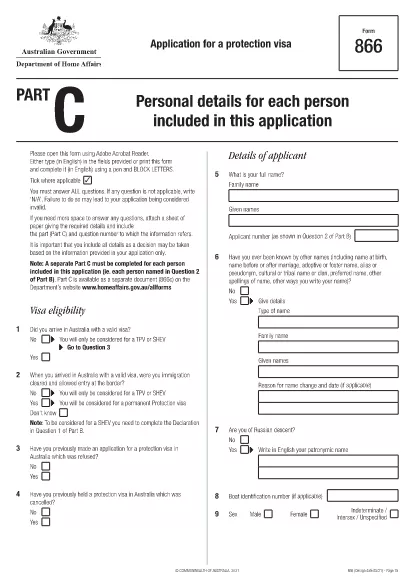
Form 866C – Application for a Protection Visa (Fillable PDF)

  1. 언어 영어
  2. 국가 호주
  3. 활동 난민 및 인도주의
Form 866C – Application for a Protection Visa (Fillable PDF)

Form 866C is the Australian Application for a Protection Visa. It is required when you are seeking protection under the Australian Migration Act. The form must be completed in English, using block letters, and signed where indicated.

At Formize.com you can open the official Form 866C PDF directly in our secure PDF Filler – no extra software needed. The fillable version lets you type, upload a passport‑size photograph, and sign digitally.

What is Form 866C?

Form 866C gathers personal details, travel history, family connections, education, employment, and any criminal matters relevant to your protection claim. It is part of the broader protection visa (subclass 866) application package.

How to Complete Form 866C Online

Simply click the “Fill out this form” button on this page. The Formize PDF Filler app loads, presenting each field in a clear, editable format. Follow the on‑screen prompts, upload your photograph, and sign with your mouse or finger.

Common Mistakes to Avoid

  • Leaving any mandatory field blank.
  • Using cursive or non‑block letters.
  • Submitting an outdated or blurred photograph.
  • Providing inconsistent dates or travel details.
  • Forgetting to sign the declaration at the end.

Where to Submit Your Completed Form

After saving the filled PDF, print a hard copy and attach it to your complete protection‑visa application package. Submit the package to the Department of Home Affairs – either by post to the address on the Department’s website or via an authorised migration agent.

Download the Official PDF

The official, up‑to‑date Form 866C can be downloaded directly from the Australian Department of Home Affairs:

https://immi.homeaffairs.gov.au/form-listing/forms/866c.pdf

Use Formize’s online filler to avoid the hassle of printing, scanning, or re‑typing. Your completed form is ready for submission in minutes.

자주하는 질문
  • Is Form 866C available as a fillable PDF?

    Yes. The official form is a PDF that can be opened in Formize’s online filler, allowing you to type, upload a photo, and sign digitally.

  • Can I submit the PDF electronically?

    The Department of Home Affairs requires a printed, signed copy as part of the protection visa package. Use the online filler to create a clean, printable version.

  • What language must I use on Form 866C?

    All entries must be in English, written in block (capital) letters.

  • Do I need a passport‑size photograph?

    Yes. Attach a recent passport‑size photo in the designated area and certify it according to the form’s instructions.

  • How long does it take to fill out Form 866C?

    Using the fillable PDF typically takes 20‑30 minutes, depending on how much information you have prepared.

  • Where should I send the completed form?

    Include the printed Form 866C with the rest of your protection visa application and send it to the Department of Home Affairs address listed on their website.

  • Can I correct mistakes after saving?

    Yes. Open the saved PDF again in Formize, edit the necessary fields, and re‑save before printing.

  • Is there a fee to download Form 866C?

    No. The form is provided free of charge by the Australian Department of Home Affairs.

어떻게

5개의 간단한 단계를 통해 온라인으로 Form 866C를 무료로 작성하는 방법:

  1. 1
    Click the Fill button
    Press the “Fill out this form” button on the page. The Formize PDF Filler loads the official Form 866C.
  2. 2
    Enter your information
    Type your personal details, travel history, and other required data directly into the fillable fields. Use block letters.
  3. 3
    Upload your photograph
    Click the photo placeholder and upload a recent passport‑size image that meets the Department’s specifications.
  4. 4
    Sign digitally
    Use your mouse, trackpad, or finger to add a digital signature in the designated area.
  5. 5
    Save and download
    When all fields are completed, click “Save”. Download the filled PDF, print a hard copy, and include it with your visa application.
Formize PDF 필러 앱
에 대한

난민 및 인도주의 양식

Form 866C는 난민 지위나 인도적 보호를 신청하는 과정에서 사용되는 신청서 중 하나입니다. 이러한 양식은 박해, 분쟁 또는 기타 생명을 위협하는 상황을 피해 국제적 보호와 지원을 원하는 개인이 활용합니다. 구체적인 형태와 절차는 국가와 이민 정책, 난민과 인도주의적 보호를 규율하는 국제 협약 및 협정에 따라 달라질 수 있습니다. 다음은 "난민 및 인도주의" 양식의 몇 가지 예입니다.

난민 신청서: 난민 지위를 원하는 개인이 사용하는 기본 양식입니다. 이는 개인 정보, 개인의 상황에 대한 세부 정보, 보호를 구하는 이유, 지원 문서 또는 증거를 수집합니다.

망명 신청 양식: 박해를 피해 도망친 개인에게 제공되는 법적 보호를 지칭하기 위해 "망명"이라는 용어가 사용되는 국가에서는 망명 신청 양식이 작성됩니다. 여기에는 신청자의 신원, 배경, 망명 신청 이유에 대한 정보와 관련 증빙 서류가 포함됩니다.

재정착 신청서: 일부 개인, 특히 난민 캠프나 위태로운 상황에 거주하는 개인은 제3국에 재정착을 신청할 수 있습니다. 재정착 신청서에는 신청자의 개인 및 가족 세부 정보, 배경, 재정착을 원하는 이유에 대한 정보가 수집됩니다.

가족 재결합 양식: 특정 국가에서 난민 또는 인도주의적 지위를 부여받은 개인의 경우 가족 구성원의 합류를 신청하는 양식과 절차가 있을 수 있습니다. 이러한 양식에는 일반적으로 후원자(이미 보호를 받은 사람)와 후원을 받는 가족 구성원에 대한 정보는 물론 가족 관계를 확립하기 위한 증빙 서류가 필요합니다.

여행 서류 신청서: 해외 여행이 필요한 난민이나 인도적 보호를 받는 개인은 여행 서류를 신청해야 할 수도 있습니다. 신청서에는 여행 계획에 대한 개인 정보와 세부 정보가 수집됩니다.

임시 보호 신청서: 경우에 따라 국가에서는 난민 지위 기준을 충족하지 못하지만 분쟁이나 기타 예외적인 상황으로 인해 본국으로 돌아갈 수 없는 개인에게 임시 보호를 제공할 수 있습니다. 임시 보호 신청서에는 신청자의 상황과 임시 보호를 요청하는 이유에 대한 정보가 수집되어 있습니다.

난민 및 인도주의적 보호를 위한 구체적인 형태와 절차는 국가와 이민 정책, 국제 협정 및 협약에 따라 크게 달라질 수 있다는 점을 유념하는 것이 중요합니다. 특정 국가에서 난민 또는 인도적 보호를 구하는 데 필요한 양식 및 절차에 관한 정확한 최신 정보를 얻으려면 관련 정부 기관, 난민 지원 기관 또는 법률 전문가와 상담하는 것이 좋습니다.

특징

PDF 필러

온라인에서 PDF 양식을 채우는 가장 쉬운 방법

  • Form 866C를 빠르게 작성하세요.
    온라인에서 Form 866C을(를) 빠르게 채우는 방법을 찾고 계십니까? 온라인 무료 PDF 양식 필러를 사용하면 1분 이내에 이 PDF 문서를 편집하고 채우는 방법을 알 수 있습니다.
  • 사용하기 쉬운 온라인 PDF 편집기
    다시 스캔하여 다시 보내기 전에 편집할 수 있도록 PDF 파일을 인쇄하는 데 지쳤습니까? 온라인에서 무료로 PDF 문서를 편집하세요. 온라인 PDF 편집기를 사용하여 시간과 종이를 절약하십시오.
  • 훌륭한 도구, 모든 플랫폼
    Mac에서 Form 866C를 채우는 방법이나 PDF 필러를 무료로 사용하는 방법이 궁금하십니까? 당사의 온라인 PDF 도구는 모든 플랫폼에서 작동합니다.
  • 안전한 파일 저장
    완료된 "Form 866C" 파일은 Amazon 클라우드 호스팅에서 관리하는 보안 데이터베이스에 저장됩니다. 언제든지 시스템에서 파일을 삭제할 수 있습니다. 어쨌든 이러한 파일은 24시간 후에 자동으로 삭제됩니다.
  • Form 866C님과 채팅
    무료 PDF 리더 도우미인 Chatize에서 "Form 866C"와 채팅하세요. "Form 866C"에서 질문하고 답변을 받으세요. 위의 문서와 채팅 버튼을 클릭하세요.

필링 세션 삭제

선택한 필링 세션을 삭제하시겠습니까?이 경우 양식 작성 진행 상황이 손실됩니다.

편집 세션 삭제

선택한 편집 세션을 삭제하시겠습니까? 이 경우 양식 작성 및 편집 진행 상황이 손실됩니다.