
언어 선택

Form 1193 – Consent for Electronic Communication

  1. 언어 영어
  2. 국가 호주
  3. 활동 비자 지원
Form 1193 – Consent for Electronic Communication

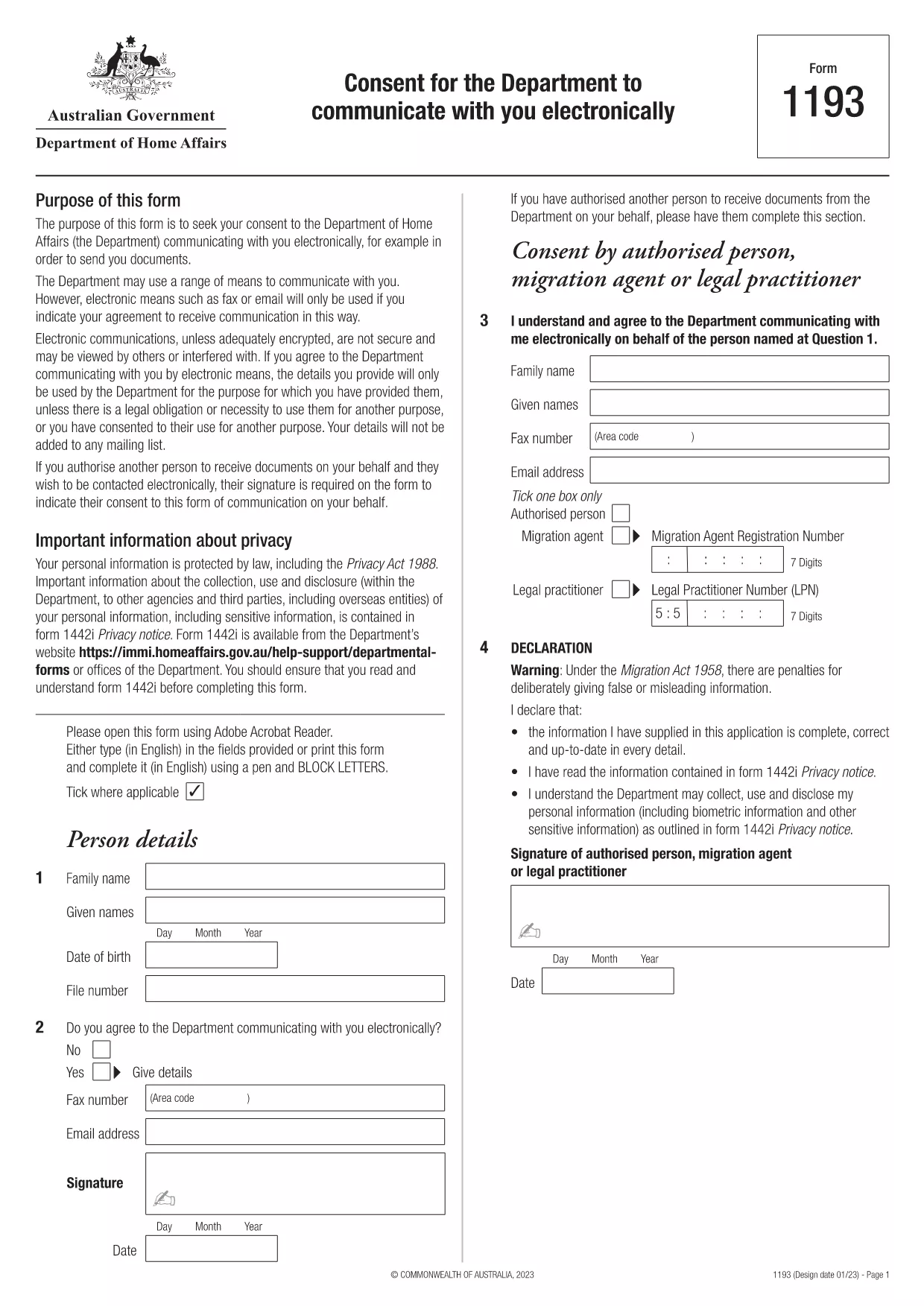
Form 1193 is the official consent form used by the Australian Department of Home Affairs to obtain your permission to receive all communications – such as visa updates, interview notices, and other important messages – via electronic means (email, fax, or other digital channels). This fillable PDF can be completed online with Formize’s PDF Filler, saving you time and reducing the risk of errors.

What is Form 1193?

The form asks for your personal details, a signature, and information about any authorised person (migration agent or legal practitioner) who may act on your behalf. Providing consent is mandatory for applicants who wish to receive electronic correspondence from the Department.

How to Complete Form 1193 Online

Instead of printing, signing, and scanning, simply click the “Fill out this form” button on this page. The Formize PDF Filler will load the document, allowing you to type directly into each field, add your digital signature, and save a completed copy.

Common Mistakes to Avoid

  • Leaving the signature line blank – a digital signature is required.
  • Providing an outdated email address – double‑check for typos.
  • Omitting details of an authorised representative when one is appointed.
  • Saving the file in a non‑PDF format before submitting.

Download the Fillable PDF

You can also download the original fillable PDF to keep a local copy. Download Form 1193 (PDF)

Where to Submit the Form

After completing the form, you can upload the saved PDF through your ImmiAccount portal or email it to the address provided in your visa correspondence. Keep a copy for your records.

자주하는 질문
  • Do I need to print Form 1193 to sign it?

    No. Formize’s online PDF filler lets you add a digital signature directly in the browser, eliminating the need to print.

  • Can I use any email address for electronic communication?

    You must provide a valid email address that you regularly check. The Department will send all official notices to this address.

  • What if I have a migration agent acting for me?

    Enter the agent’s full name, registration number, and contact details in the “Authorised Person” section of the form.

  • Is the filled PDF secure?

    Yes. The Formize app processes the document locally in your browser, so your personal data never leaves your device unless you choose to upload it.

  • How long is the electronic consent valid?

    The consent remains in effect until you withdraw it in writing or update your communication preferences through ImmiAccount.

  • Can I edit the form after I have saved it?

    You can reopen the saved PDF in the Formize filler to make changes, then re‑save and re‑submit.

  • What should I do if I make a mistake?

    Delete the incorrect entry, re‑type the correct information, and save the document again before submitting.

어떻게

5개의 간단한 단계를 통해 온라인으로 Form 1193를 무료로 작성하는 방법:

  1. 1
    Open the online filler
    Click the “Fill out this form” button on the page. The Formize PDF Filler app will load the Form 1193 document automatically.
  2. 2
    Enter your details
    Type your personal information, authorised person details, and email address into the highlighted fields.
  3. 3
    Add your signature
    Use the signature tool to draw or upload a scanned signature. Ensure it fits within the signature box.
  4. 4
    Save and download
    When all fields are completed, click “Save PDF”. A copy of the filled form will download to your device.
  5. 5
    Submit the form
    Upload the saved PDF to ImmiAccount or email it as instructed in your visa correspondence.
Formize PDF 필러 앱
에 대한

비자 양식

Form 1193는 외국에 입국하기 위해 비자를 신청하는 데 사용되는 문서인 비자 양식 중 하나입니다. 비자는 외국인이 특정 기간 동안 외국에 입국, 체류 및 때때로 일할 수 있도록 허용하는 문서입니다. 비자 취득을 위한 정확한 양식과 요건은 국가와 비자 유형에 따라 다릅니다.

비자 양식에는 일반적으로 이름, 생년월일, 여권 정보와 같은 개인 정보는 물론 여행의 목적과 기간, 목적지, 신청자가 이전에 비자를 거부했거나 국가에서 추방되었는지 여부에 대한 정보가 필요합니다. 양식에는 여권, 사진, 재정 지원 증명서와 같은 지원 문서가 필요할 수도 있습니다.

미국에서 가장 일반적인 비자 양식은 DS-160 및 DS-260 양식입니다. DS-160 양식은 비이민 비자 신청에 사용되는 반면 DS-260 양식은 이민 비자 신청에 사용됩니다. 이러한 양식에는 신청자의 개인 및 여행 이력에 대한 자세한 정보와 여권, 여행 일정 및 재무 기록과 같은 지원 문서가 필요합니다.

다른 국가에서는 다양한 비자 양식과 요구 사항이 있을 수 있지만 기본 프로세스에는 일반적으로 비자 신청서 작성, 증빙 서류 제공, 미국 대사관 또는 영사관의 영사관과의 인터뷰 참석이 포함됩니다. 비자 신청 절차는 복잡하고 시간이 많이 소요될 수 있으므로 비자를 원하는 개인은 이민 변호사 또는 기타 자격을 갖춘 전문가와 상담하여 필요한 모든 양식과 요구 사항이 충족되었는지 확인하는 것이 좋습니다.

특징

PDF 필러

온라인에서 PDF 양식을 채우는 가장 쉬운 방법

  • Form 1193를 빠르게 작성하세요.
    온라인에서 Form 1193을(를) 빠르게 채우는 방법을 찾고 계십니까? 온라인 무료 PDF 양식 필러를 사용하면 1분 이내에 이 PDF 문서를 편집하고 채우는 방법을 알 수 있습니다.
  • 사용하기 쉬운 온라인 PDF 편집기
    다시 스캔하여 다시 보내기 전에 편집할 수 있도록 PDF 파일을 인쇄하는 데 지쳤습니까? 온라인에서 무료로 PDF 문서를 편집하세요. 온라인 PDF 편집기를 사용하여 시간과 종이를 절약하십시오.
  • 훌륭한 도구, 모든 플랫폼
    Mac에서 Form 1193를 채우는 방법이나 PDF 필러를 무료로 사용하는 방법이 궁금하십니까? 당사의 온라인 PDF 도구는 모든 플랫폼에서 작동합니다.
  • 안전한 파일 저장
    완료된 "Form 1193" 파일은 Amazon 클라우드 호스팅에서 관리하는 보안 데이터베이스에 저장됩니다. 언제든지 시스템에서 파일을 삭제할 수 있습니다. 어쨌든 이러한 파일은 24시간 후에 자동으로 삭제됩니다.
  • Form 1193님과 채팅
    무료 PDF 리더 도우미인 Chatize에서 "Form 1193"와 채팅하세요. "Form 1193"에서 질문하고 답변을 받으세요. 위의 문서와 채팅 버튼을 클릭하세요.

필링 세션 삭제

선택한 필링 세션을 삭제하시겠습니까?이 경우 양식 작성 진행 상황이 손실됩니다.

편집 세션 삭제

선택한 편집 세션을 삭제하시겠습니까? 이 경우 양식 작성 및 편집 진행 상황이 손실됩니다.