
언어 선택

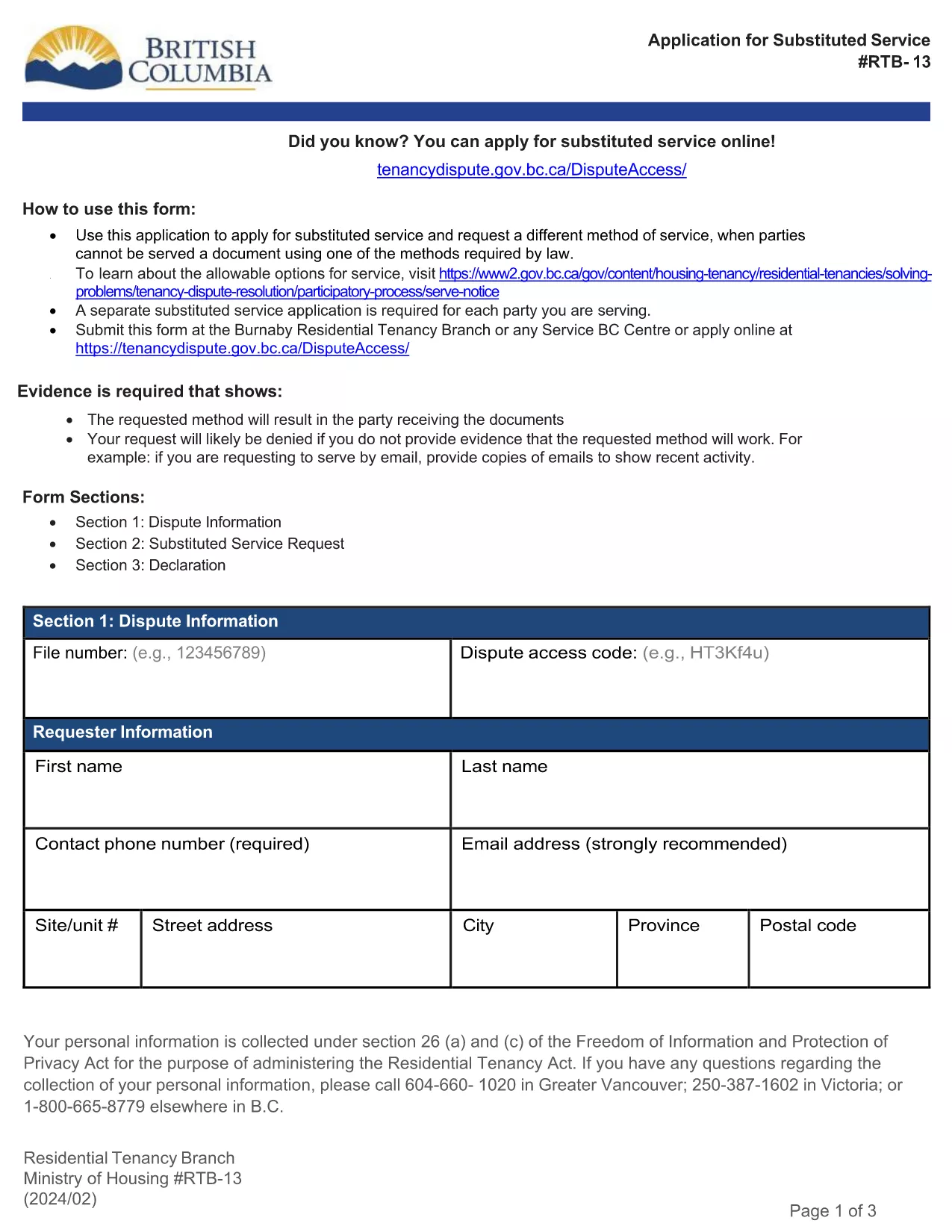
RTB‑13 Application for Substituted Service (Fillable PDF)

  1. 언어 영어
  2. 국가 캐나다
  3. 활동 차용
  4. 상태 브리티시 컬럼비아
RTB‑13 Application for Substituted Service (Fillable PDF)

The RTB‑13 Application for Substituted Service is the official form used by the British Columbia Residential Tenancy Branch when a party needs the arbitrator to order an alternative method of serving documents. This form is required when the usual service methods under the Residential Tenancy Act cannot be used.

What Is the RTB‑13 Form?

RTB‑13 is a government‑issued, fillable PDF that captures details such as:

  • Parties involved (landlord, tenant, arbitrator)
  • Reason for requesting substituted service
  • Proposed method of service (email, courier, posting, etc.)
  • Supporting evidence or affidavits

When Should You Use RTB‑13?

Use this form if you have tried the standard service methods (personal delivery, registered mail, etc.) and they have failed, or if the other party’s location makes normal service impractical. Common scenarios include:

  • Tenant has moved without leaving a forwarding address.
  • Landlord cannot locate the tenant after multiple attempts.
  • Documents need to be served to a corporate entity that only accepts electronic delivery.

How to Complete the RTB‑13 Online

Instead of downloading the PDF to a desktop editor, simply click the "Fill out this form" button below. The Formize PDF Filler app will load in your browser, allowing you to:

  1. Navigate field‑by‑field using the Tab key.
  2. Enter required information directly into each box.
  3. Attach supporting documents or affidavits.
  4. Save a copy for your records.
  5. Submit the completed form to the Residential Tenancy Branch via email or upload.

Common Mistakes & Tips

  • Missing signatures: The form is invalid without the landlord’s and tenant’s signatures.
  • Incorrect dates: Use the exact date you attempted the standard service.
  • Insufficient detail: Clearly describe why normal service failed and propose a realistic alternative.
  • File size limits: Keep attached PDFs under 5 MB to avoid upload errors.

Download the Fillable PDF

If you prefer to work offline, you can still download the official RTB‑13 PDF using the link below. Open it with the latest version of Adobe Acrobat Reader for full fillable functionality.

자주하는 질문
  • What is the purpose of RTB‑13?

    RTB‑13 requests that an arbitrator order a different method of serving documents when standard service methods are impossible or have failed.

  • Can I submit RTB‑13 electronically?

    Yes. After completing the fillable PDF with Formize, you can email the PDF or upload it through the Residential Tenancy Branch’s online portal.

  • Do I need a lawyer to fill out RTB‑13?

    No. The form is designed for landlords and tenants to complete themselves, though you may seek legal advice if the situation is complex.

  • How long does the arbitrator take to decide on a substituted service request?

    Processing times vary, but most decisions are issued within 10‑14 business days after the completed form is received.

  • What supporting documents should I include?

    Attach proof of attempted service (e.g., delivery receipts, correspondence), affidavits, and any relevant court orders or notices.

  • Is there a fee for filing RTB‑13?

    There is no filing fee for the RTB‑13 application itself, though other tenancy dispute fees may apply.

  • Can I save my progress and return later?

    Yes. The Formize PDF Filler lets you save a draft on your computer and continue editing at any time.

  • What if I make a mistake after submitting?

    Contact the Residential Tenancy Branch immediately. You may be asked to submit a corrected RTB‑13 with a brief explanation of the changes.

어떻게

5개의 간단한 단계를 통해 온라인으로 RTB-13를 무료로 작성하는 방법:

  1. 1
    Click the Fill‑out Button
    Press the "Fill out this form" button on the page. The Formize PDF Filler loads instantly in your browser.
  2. 2
    Enter Your Information
    Tab through each fillable field, entering the required details such as party names, reasons for substituted service, and proposed method.
  3. 3
    Attach Supporting Documents
    Use the attachment field to upload affidavits, proof of attempted service, or any other evidence the arbitrator may need.
  4. 4
    Save and Review
    Click "Save" to store a copy on your device, then review all entries for accuracy before submitting.
  5. 5
    Submit to the Residential Tenancy Branch
    Follow the on‑screen instructions to email or upload the completed RTB‑13 form directly to the BC Residential Tenancy Branch.
Formize PDF 필러 앱
에 대한

집주인 및/또는 세입자가 임대차 계약과 관련된 조치를 제안하기 위한 양식.

RTB-13는 대부분의 개인 집주인과 주택 조합에서 사용하는 주거용 임대차 계약 유형입니다.

집주인이나 임차인이 규정에 명시된 특정 규칙을 따라야 하는 여러 가지 문제가 있습니다. 경우에 따라 임차 계약의 상대방에게 영향을 미칠 수 있는 조치를 제안하는 '규정된 양식'이라는 양식을 작성해야 할 수도 있습니다.

양식을 작성하는 사람과 양식을 송달받는 사람이 제안 내용과 그에 대한 응답으로 무엇을 할 수 있는지 이해할 수 있도록 양식의 문구가 주의 깊게 작성되었기 때문에 양식을 규정 양식이라고 합니다. 올바른 양식을 제공하지 않으면 제안된 조치가 무효화될 수 있습니다.

양식에서 그렇게 할 수 있다고 명시하지 않는 한 이러한 양식의 문구를 변경할 수 없습니다. 문구를 변경하면 양식이 무효화될 수 있습니다. 또한 양식에 명시된 모든 통지 기간을 준수해야 합니다.

특징

PDF 필러

온라인에서 PDF 양식을 채우는 가장 쉬운 방법

  • RTB-13를 빠르게 작성하세요.
    온라인에서 RTB-13을(를) 빠르게 채우는 방법을 찾고 계십니까? 온라인 무료 PDF 양식 필러를 사용하면 1분 이내에 이 PDF 문서를 편집하고 채우는 방법을 알 수 있습니다.
  • 사용하기 쉬운 온라인 PDF 편집기
    다시 스캔하여 다시 보내기 전에 편집할 수 있도록 PDF 파일을 인쇄하는 데 지쳤습니까? 온라인에서 무료로 PDF 문서를 편집하세요. 온라인 PDF 편집기를 사용하여 시간과 종이를 절약하십시오.
  • 훌륭한 도구, 모든 플랫폼
    Mac에서 RTB-13를 채우는 방법이나 PDF 필러를 무료로 사용하는 방법이 궁금하십니까? 당사의 온라인 PDF 도구는 모든 플랫폼에서 작동합니다.
  • 안전한 파일 저장
    완료된 "RTB-13" 파일은 Amazon 클라우드 호스팅에서 관리하는 보안 데이터베이스에 저장됩니다. 언제든지 시스템에서 파일을 삭제할 수 있습니다. 어쨌든 이러한 파일은 24시간 후에 자동으로 삭제됩니다.
  • RTB-13님과 채팅
    무료 PDF 리더 도우미인 Chatize에서 "RTB-13"와 채팅하세요. "RTB-13"에서 질문하고 답변을 받으세요. 위의 문서와 채팅 버튼을 클릭하세요.

필링 세션 삭제

선택한 필링 세션을 삭제하시겠습니까?이 경우 양식 작성 진행 상황이 손실됩니다.

편집 세션 삭제

선택한 편집 세션을 삭제하시겠습니까? 이 경우 양식 작성 및 편집 진행 상황이 손실됩니다.