
언어 선택

RTB-40 Tenant Direct Request Worksheet (Fillable PDF)

  1. 언어 영어
  2. 국가 캐나다
  3. 활동 차용
  4. 상태 브리티시 컬럼비아
RTB-40 Tenant Direct Request Worksheet (Fillable PDF)

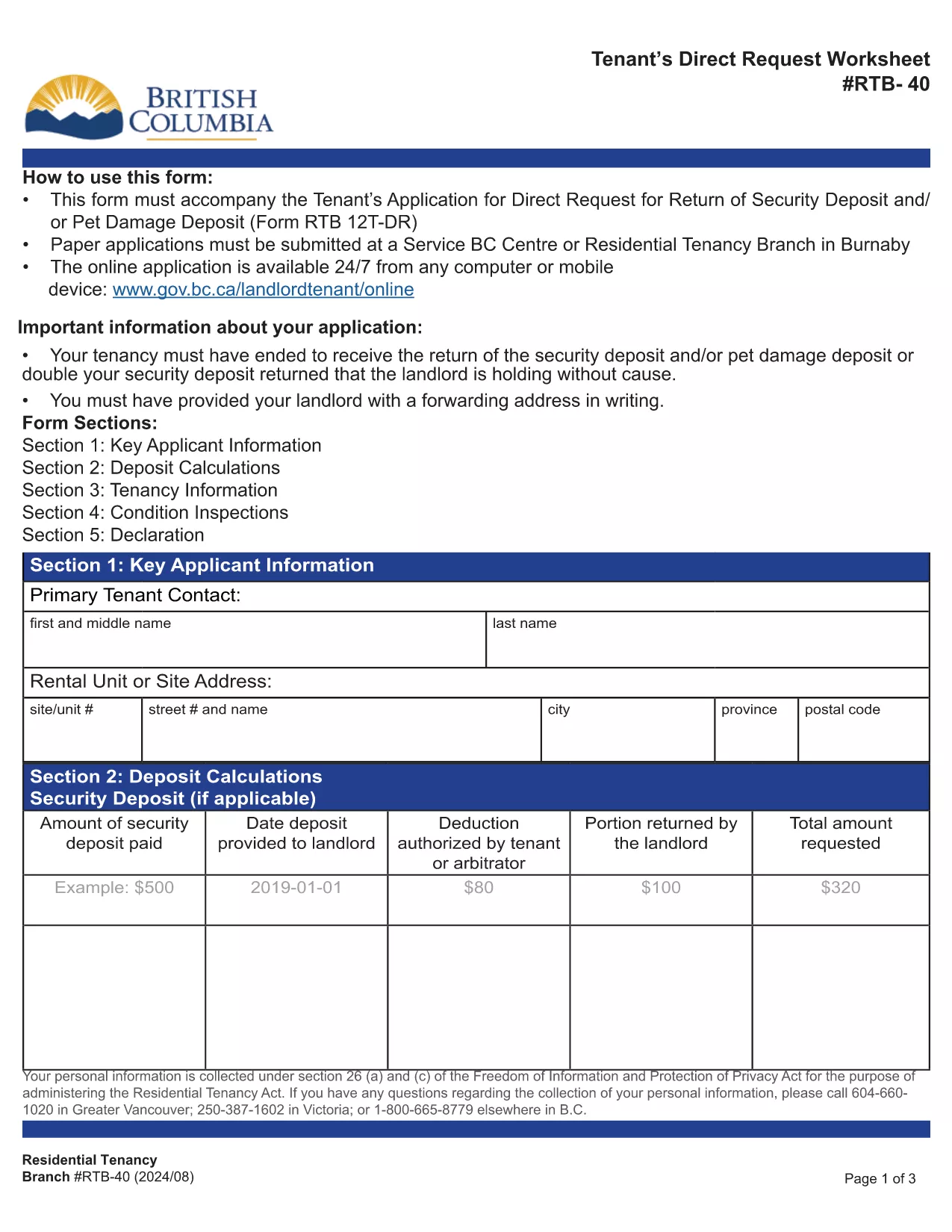
The RTB-40, also known as the Tenant Direct Request Worksheet, is the official British Columbia Residential Tenancy Branch form used when a tenant requests the return of a security or pet‑damage deposit. It allows you to present evidence, list amounts owed, and provide your forwarding address.

Formize hosts a fully‑fillable, web‑based version of this PDF so you can complete the worksheet from any device without installing Adobe Reader. Your data is saved securely and the final PDF can be downloaded or emailed directly to the Residential Tenancy Branch.

Using the online filler saves time, eliminates printing errors, and ensures the form meets the latest BC tenancy regulations.

자주하는 질문
  • Do I need Adobe Reader to fill the RTB‑40?

    No. Formize’s online filler works in any modern browser, so you can complete the form without installing additional software.

  • Can I save my progress and finish later?

    Yes. The filler allows you to download a partially completed PDF, which you can reopen in Formize to continue editing.

  • Is the online version accepted by the Residential Tenancy Branch?

    Absolutely. The PDF generated by Formize is identical to the official government version, so it meets all submission requirements.

  • What supporting documents should I attach?

    Include copies of the original lease, receipts for any deductions, and proof of the deposit amount. List each item in the worksheet’s evidence section.

  • How do I correct a mistake after I’ve saved the PDF?

    Open the saved PDF again in Formize, make the necessary edits, and re‑save. The file remains fully editable until it is signed.

  • Is there a fee to use Formize’s PDF filler?

    No. The filler is free for all government forms, including the RTB‑40.

어떻게

4개의 간단한 단계를 통해 온라인으로 RTB-40를 무료로 작성하는 방법:

  1. 1
    Open the Fillable Form
    Click the blue “Fill out this form” button on this page. The Formize PDF Filler will open in a new tab.
  2. 2
    Enter Your Information
    Type directly into each field – the worksheet includes sections for tenant details, deposit amounts, and supporting evidence.
  3. 3
    Review and Save
    Check all entries for accuracy, then click “Save PDF”. The completed RTB‑40 will be downloaded to your computer.
  4. 4
    Submit to the Residential Tenancy Branch
    Print the saved PDF or attach it to an email as instructed in your tenancy dispute package.
Formize PDF 필러 앱
에 대한

집주인 및/또는 세입자가 임대차 계약과 관련된 조치를 제안하기 위한 양식.

RTB-40는 대부분의 개인 집주인과 주택 조합에서 사용하는 주거용 임대차 계약 유형입니다.

집주인이나 임차인이 규정에 명시된 특정 규칙을 따라야 하는 여러 가지 문제가 있습니다. 경우에 따라 임차 계약의 상대방에게 영향을 미칠 수 있는 조치를 제안하는 '규정된 양식'이라는 양식을 작성해야 할 수도 있습니다.

양식을 작성하는 사람과 양식을 송달받는 사람이 제안 내용과 그에 대한 응답으로 무엇을 할 수 있는지 이해할 수 있도록 양식의 문구가 주의 깊게 작성되었기 때문에 양식을 규정 양식이라고 합니다. 올바른 양식을 제공하지 않으면 제안된 조치가 무효화될 수 있습니다.

양식에서 그렇게 할 수 있다고 명시하지 않는 한 이러한 양식의 문구를 변경할 수 없습니다. 문구를 변경하면 양식이 무효화될 수 있습니다. 또한 양식에 명시된 모든 통지 기간을 준수해야 합니다.

특징

PDF 필러

온라인에서 PDF 양식을 채우는 가장 쉬운 방법

  • RTB-40를 빠르게 작성하세요.
    온라인에서 RTB-40을(를) 빠르게 채우는 방법을 찾고 계십니까? 온라인 무료 PDF 양식 필러를 사용하면 1분 이내에 이 PDF 문서를 편집하고 채우는 방법을 알 수 있습니다.
  • 사용하기 쉬운 온라인 PDF 편집기
    다시 스캔하여 다시 보내기 전에 편집할 수 있도록 PDF 파일을 인쇄하는 데 지쳤습니까? 온라인에서 무료로 PDF 문서를 편집하세요. 온라인 PDF 편집기를 사용하여 시간과 종이를 절약하십시오.
  • 훌륭한 도구, 모든 플랫폼
    Mac에서 RTB-40를 채우는 방법이나 PDF 필러를 무료로 사용하는 방법이 궁금하십니까? 당사의 온라인 PDF 도구는 모든 플랫폼에서 작동합니다.
  • 안전한 파일 저장
    완료된 "RTB-40" 파일은 Amazon 클라우드 호스팅에서 관리하는 보안 데이터베이스에 저장됩니다. 언제든지 시스템에서 파일을 삭제할 수 있습니다. 어쨌든 이러한 파일은 24시간 후에 자동으로 삭제됩니다.
  • RTB-40님과 채팅
    무료 PDF 리더 도우미인 Chatize에서 "RTB-40"와 채팅하세요. "RTB-40"에서 질문하고 답변을 받으세요. 위의 문서와 채팅 버튼을 클릭하세요.

필링 세션 삭제

선택한 필링 세션을 삭제하시겠습니까?이 경우 양식 작성 진행 상황이 손실됩니다.

편집 세션 삭제

선택한 편집 세션을 삭제하시겠습니까? 이 경우 양식 작성 및 편집 진행 상황이 손실됩니다.