
언어 선택

Form 1040 Schedule 1 – Fillable PDF

  1. 국가 미국
  2. 언어 영어
  3. 활동 구실
  4. 부서 국세청
Form 1040 Schedule 1 – Fillable PDF

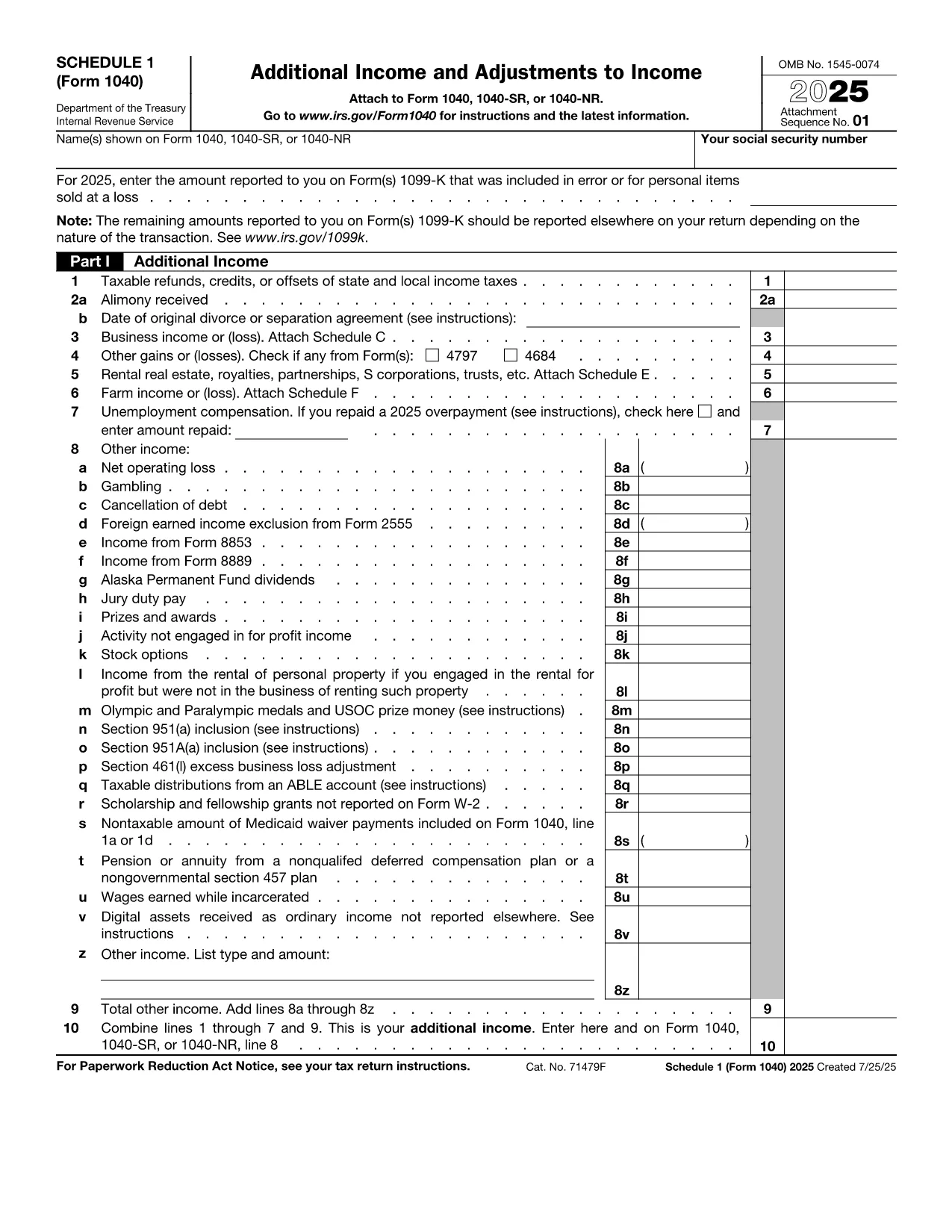
The IRS Form 1040 Schedule 1 is an essential supplement to the main U.S. Individual Income Tax Return (Form 1040). It captures additional income, adjustments to income, and certain credits that don’t fit on the primary form. With Formize’s fillable PDF, you can complete Schedule 1 directly in your browser—no extra software required.

What Is Form 1040 Schedule 1?

Schedule 1 (Form 1040) reports:

  • Business income or loss (self‑employment)
  • Rental real estate, royalties, partnerships, S corporations, trusts
  • Unemployment compensation, alimony received, and other income
  • Adjustments such as educator expenses, student loan interest, and IRA contributions

Filling this schedule accurately can lower your taxable income and increase your refund.

How to Complete the Fillable PDF on Formize

Follow the simple steps below to finish Schedule 1 online:

  1. Click the "Fill out this form" button on this page.
  2. Wait a few seconds while the Formize PDF Filler app loads the fillable version of Schedule 1.
  3. Enter your information in each field. The interface highlights required fields and validates numbers in real time.
  4. When you’re done, press Save & Download to get a completed PDF you can print or attach to your electronic filing.

Common Mistakes to Avoid

Even with a fillable form, errors can happen. Keep an eye out for these frequent pitfalls:

  • Leaving required fields blank – the Formize validator will flag them before you download.
  • Mismatching line numbers between Schedule 1 and the main Form 1040.
  • Using the wrong tax year version – always verify the year on the PDF header.
  • Forgetting signatures – the signature line must be signed by hand after printing.

Where to Submit Your Completed Form

After downloading the filled PDF, you can:

  • Attach it to your electronic filing through approved tax software.
  • Print, sign, and mail it with the rest of your Form 1040 package.

Make sure to keep a copy for your records.

지침

자주하는 질문
  • Who must file Form 1040 Schedule 1?

    Anyone who has additional income, adjustments, or credits not reported on the main Form 1040 must attach Schedule 1. This includes self‑employment income, unemployment compensation, and certain deductions.

  • Can I file Schedule 1 electronically?

    Yes. Most tax software accepts the filled PDF as part of an electronic submission. Ensure you sign the final Form 1040 by hand after printing, if required.

  • What is the deadline for filing Schedule 1?

    Schedule 1 follows the same deadline as Form 1040 – typically April 15 of the year following the tax year, with extensions available until October 15.

  • Do I need a PDF reader to use the fillable form?

    No. The Formize filler runs entirely in your browser, so you don’t need Adobe Acrobat or any other PDF reader to complete the form.

  • Is the fillable PDF free to use?

    Yes. Formize provides the fillable version of Schedule 1 at no cost. You only pay if you choose premium services, which are optional.

  • What should I do if I make a mistake after downloading?

    You can reopen the saved PDF in any PDF editor, correct the fields, and re‑download. For major errors, it’s often easier to start a new fillable session.

어떻게

4개의 간단한 단계를 통해 온라인으로 Form 1040 Schedule 1를 무료로 작성하는 방법:

  1. 1
    Click the Fill‑out Button
    Press the "Fill out this form" button on the page to launch the Formize PDF Filler.
  2. 2
    Wait for the Filler to Load
    A short loading screen appears while the fillable Schedule 1 PDF is prepared in the browser.
  3. 3
    Enter Your Information
    Complete each highlighted field. Required fields are marked with an asterisk and validated instantly.
  4. 4
    Save and Download
    When all data is entered, click "Save & Download" to obtain a completed PDF ready for printing or electronic filing.
Formize PDF 필러 앱
에 대한

세금 양식

Form 1040 Schedule 1는 개인 또는 기업의 소득, 공제 및 납세 의무에 대한 정보를 관련 세무 당국에 보고하는 데 사용되는 문서인 세금 양식 중 하나입니다. 이 양식은 세법을 준수하고 납세 의무를 이행하는 데 필요합니다. 세금 양식은 국가 및 특정 세금 요건에 따라 다릅니다. 다음은 몇 가지 일반적인 세금 양식 유형입니다.

개인 세금 양식: 이 양식은 개인 납세자가 개인 소득과 청구 공제, 공제 및 면제를 신고하는 데 사용됩니다. 예를 들어 미국의 1040 양식 또는 영국의 자진 신고서 양식이 있습니다.

사업세 양식: 사업세 양식은 회사, 파트너십 또는 자영업자가 사업 소득, 비용 및 기타 세금 관련 정보를 보고하는 데 사용됩니다. 예를 들어 미국의 Schedule C 양식(사업 이익 또는 손실) 또는 영국의 CT600 양식(회사 세금 신고서)이 있습니다.

급여 세금 양식: 이 양식은 고용주가 직원의 급여에서 원천징수된 임금, 급여 및 세금을 보고하는 데 사용됩니다. 예를 들어 미국의 W-2 양식 또는 영국의 P60 양식이 있습니다.

판매세 양식: 판매세 양식은 기업이 과세 대상 상품이나 서비스에 대해 징수한 판매세를 신고하고 송금하는 데 사용됩니다. 구체적인 판매세 양식은 관할권에 따라 다릅니다.

부가가치세(VAT) 양식: VAT 양식은 판매 시 징수된 VAT를 신고 및 납부하고 구매 시 VAT 공제를 청구하기 위해 부가가치세를 부과하는 국가에서 사용됩니다. 그 예로는 많은 국가에서 사용되는 VAT 신고 양식이 있습니다.

추정 세금 양식: 추정 세금 양식은 자영업 소득, 투자 소득 등 원천징수 대상이 아닌 소득에 대한 추정세를 신고하고 납부하는 데 사용됩니다.

이는 존재할 수 있는 수많은 세금 양식 중 몇 가지 예일 뿐입니다. 필요한 특정 양식은 해당 국가 또는 관할권의 세법 및 규정에 따라 다릅니다. 귀하의 상황에 어떤 양식이 적용되는지 결정하려면 세무 당국의 지침을 참조하거나 전문가의 조언을 구하는 것이 중요합니다.

특징

PDF 필러

온라인에서 PDF 양식을 채우는 가장 쉬운 방법

  • Form 1040 Schedule 1를 빠르게 작성하세요.
    온라인에서 Form 1040 Schedule 1을(를) 빠르게 채우는 방법을 찾고 계십니까? 온라인 무료 PDF 양식 필러를 사용하면 1분 이내에 이 PDF 문서를 편집하고 채우는 방법을 알 수 있습니다.
  • 사용하기 쉬운 온라인 PDF 편집기
    다시 스캔하여 다시 보내기 전에 편집할 수 있도록 PDF 파일을 인쇄하는 데 지쳤습니까? 온라인에서 무료로 PDF 문서를 편집하세요. 온라인 PDF 편집기를 사용하여 시간과 종이를 절약하십시오.
  • 훌륭한 도구, 모든 플랫폼
    Mac에서 Form 1040 Schedule 1를 채우는 방법이나 PDF 필러를 무료로 사용하는 방법이 궁금하십니까? 당사의 온라인 PDF 도구는 모든 플랫폼에서 작동합니다.
  • 안전한 파일 저장
    완료된 "Form 1040 Schedule 1" 파일은 Amazon 클라우드 호스팅에서 관리하는 보안 데이터베이스에 저장됩니다. 언제든지 시스템에서 파일을 삭제할 수 있습니다. 어쨌든 이러한 파일은 24시간 후에 자동으로 삭제됩니다.
  • Form 1040 Schedule 1님과 채팅
    무료 PDF 리더 도우미인 Chatize에서 "Form 1040 Schedule 1"와 채팅하세요. "Form 1040 Schedule 1"에서 질문하고 답변을 받으세요. 위의 문서와 채팅 버튼을 클릭하세요.

필링 세션 삭제

선택한 필링 세션을 삭제하시겠습니까?이 경우 양식 작성 진행 상황이 손실됩니다.

편집 세션 삭제

선택한 편집 세션을 삭제하시겠습니까? 이 경우 양식 작성 및 편집 진행 상황이 손실됩니다.