언어 선택

Fillable Form 1118 Schedule K – Download & Complete Online

  1. 국가 미국
  2. 언어 영어
  3. 활동 구실
  4. 부서 국세청
Fillable Form 1118 Schedule K – Download & Complete Online

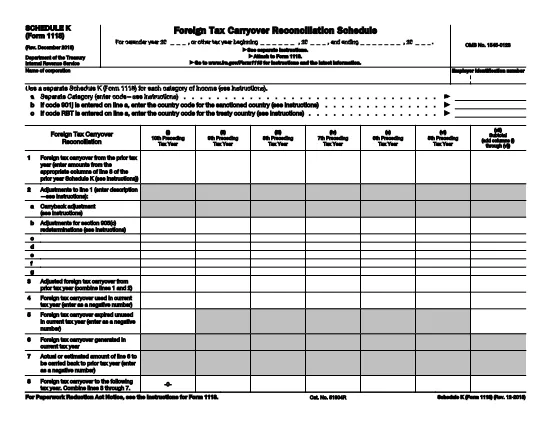
Schedule K (Form 1118) is the supplemental worksheet used by U.S. corporations to report foreign tax credits for each category of income. Whether you’re preparing a corporate tax return or need to amend a prior year, having a fillable PDF version saves time and reduces errors.

Our online Form 1118 Schedule K is hosted on Formize.com, so you can complete the entire form in your browser—no Adobe Acrobat or desktop editor required. Just click the "Fill out this form" button, wait for the Formize PDF Filler to load, and start entering your data.

What Is Schedule K (Form 1118)?

Schedule K breaks down foreign taxes paid, accrued, or deemed paid by a domestic corporation into distinct income categories such as general earnings, passive income, and foreign oil and gas. The IRS uses this detail to calculate the allowable foreign tax credit under sections 901 and 960(b).

How to Fill the Schedule K PDF on Formize

Follow the simple steps below to complete the form quickly and accurately.

Common Mistakes to Avoid on Schedule K

Missing a box, entering an amount in the wrong column, or using the wrong tax year are frequent errors that can delay processing. Double‑check each line against your source documents before submitting.

Where to Find Additional Help

For detailed instructions, refer to the official IRS instructions linked on the page, or consult a qualified tax professional. The IRS also provides a complete Form 1118 guide for broader context.

지침

자주하는 질문
  • Is the Schedule K PDF on Formize truly fillable?

    Yes, the PDF is fully interactive. All numeric fields, checkboxes, and signature lines can be completed directly in your web browser.

  • Do I need an Adobe Acrobat subscription?

    No. Formize’s online filler works in any modern browser, so you can fill the form for free without installing additional software.

  • Can I save my progress and return later?

    Absolutely. Use the "Save" button to download a partially completed PDF, then reopen it later in Formize to continue.

  • What if I make a mistake after saving?

    Simply reopen the saved PDF in Formize, edit the incorrect fields, and save a new version. The original file remains unchanged.

  • Is the data I enter secure?

    Formize uses SSL encryption for all data transmitted between your browser and our servers, ensuring your tax information stays private.

  • Do I need to print the form after filling it online?

    Only if the IRS specifically requires a paper copy. Most corporate filings can be submitted electronically with the completed PDF attached.

  • Where can I find the official IRS instructions for Schedule K?

    The official instructions are linked on the page and can also be downloaded from the IRS website at https://www.irs.gov/pub/irs-pdf/f1118.pdf.

어떻게

3개의 간단한 단계를 통해 온라인으로 Form 1118 Schedule K를 무료로 작성하는 방법:

  1. 1
    Click the Fill‑out Button
    On the Formize page, click the bright "Fill out this form" button to launch the online PDF filler.
  2. 2
    Wait for the Formize PDF Filler to Load
    The app loads the fillable Schedule K PDF in your browser. No download or installation is needed.
  3. 3
    Complete the Fields and Save
    Enter the required numbers, double‑check for accuracy, then click "Save" to download the completed PDF or submit it directly to the IRS portal.
Formize PDF 필러 앱
에 대한

세금 양식

Form 1118 Schedule K는 관련 세무 당국에 소득, 공제 및 납세 의무를 신고하는 데 사용되는 문서인 세금 양식 중 하나입니다. 이 양식은 세금 신고 절차의 필수적인 부분이며 개인과 기업이 세법을 준수하고 납세 의무를 정확하게 계산하는 데 사용됩니다.

필요한 특정 세금 양식은 개인의 납세자 신분, 소득원, 국가의 세법 등의 요인에 따라 달라질 수 있습니다. 그러나 다음은 몇 가지 일반적인 유형의 세금 양식입니다.

개인 소득세 양식: 미국의 1040 시리즈와 같은 양식이 사용됩니다. 개인이 소득을 신고하고, 공제 및 세액공제를 청구하고, 납세 의무를 계산할 수 있습니다.

사업세 양식: 개인 사업자, 파트너십, 법인, 자영업자를 포함한 기업은 소득, 비용 및 납부해야 할 세금을 신고하기 위해 다양한 양식을 제출해야 할 수 있습니다. 예를 들면 일정 C(사업 이익 또는 손실) 및 양식 1120(미국 법인 소득세 신고서)이 있습니다.

고용세 양식: 고용주는 직원 임금을 신고하고 급여세를 원천징수 및 납부해야 합니다. W-2(임금 및 세금 명세서) 및 941(고용주의 분기별 연방 세금 신고서)과 같은 양식이 이러한 목적으로 사용됩니다.

투자 및 퇴직 계좌 양식: 이 양식은 투자 소득, 자본 이득, 손실은 물론 퇴직 계좌의 기부금과 분배금을 보고하는 데 사용됩니다. 예를 들면 양식 1099-DIV(배당금 및 분배금) 및 양식 5498(IRA 기부 정보).

재산 및 증여세 양식: 개인이 사망하거나 상당한 증여를 한 경우 Form 706(미국 유산(및 세대 생략 양도) 세금 신고) 및 Form 709(미국 증여(및 세대- Skipping Transfer) Tax Return)은 해당 유산세 또는 증여세를 보고하고 계산하는 데 사용됩니다.

세법과 양식은 시간이 지남에 따라 변경될 수 있다는 점을 유념하는 것이 중요합니다. 따라서 개인과 기업은 관련 세무 당국에 문의하거나 전문 세무 조언을 구하여 현재 요구 사항을 준수해야 합니다.

특징

PDF 필러

온라인에서 PDF 양식을 채우는 가장 쉬운 방법

  • Form 1118 Schedule K를 빠르게 작성하세요.
    온라인에서 Form 1118 Schedule K을(를) 빠르게 채우는 방법을 찾고 계십니까? 온라인 무료 PDF 양식 필러를 사용하면 1분 이내에 이 PDF 문서를 편집하고 채우는 방법을 알 수 있습니다.
  • 사용하기 쉬운 온라인 PDF 편집기
    다시 스캔하여 다시 보내기 전에 편집할 수 있도록 PDF 파일을 인쇄하는 데 지쳤습니까? 온라인에서 무료로 PDF 문서를 편집하세요. 온라인 PDF 편집기를 사용하여 시간과 종이를 절약하십시오.
  • 훌륭한 도구, 모든 플랫폼
    Mac에서 Form 1118 Schedule K를 채우는 방법이나 PDF 필러를 무료로 사용하는 방법이 궁금하십니까? 당사의 온라인 PDF 도구는 모든 플랫폼에서 작동합니다.
  • 안전한 파일 저장
    완료된 "Form 1118 Schedule K" 파일은 Amazon 클라우드 호스팅에서 관리하는 보안 데이터베이스에 저장됩니다. 언제든지 시스템에서 파일을 삭제할 수 있습니다. 어쨌든 이러한 파일은 24시간 후에 자동으로 삭제됩니다.
  • Form 1118 Schedule K님과 채팅
    무료 PDF 리더 도우미인 Chatize에서 "Form 1118 Schedule K"와 채팅하세요. "Form 1118 Schedule K"에서 질문하고 답변을 받으세요. 위의 문서와 채팅 버튼을 클릭하세요.

필링 세션 삭제

선택한 필링 세션을 삭제하시겠습니까?이 경우 양식 작성 진행 상황이 손실됩니다.

편집 세션 삭제

선택한 편집 세션을 삭제하시겠습니까? 이 경우 양식 작성 및 편집 진행 상황이 손실됩니다.