
언어 선택

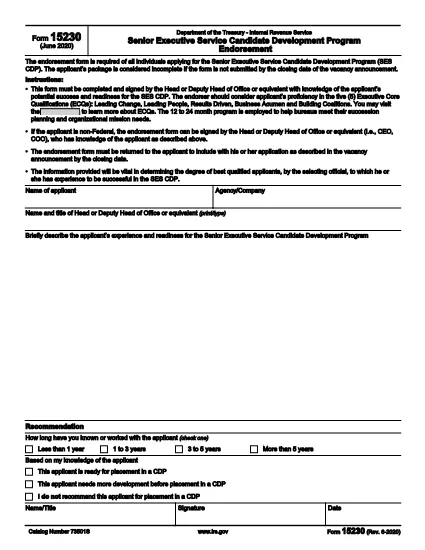
IRS Form 15230 – Mobility Statement (Fillable PDF)

  1. 국가 미국
  2. 언어 영어
  3. 활동 구실
  4. 부서 국세청
IRS Form 15230 – Mobility Statement (Fillable PDF)

What Is Form 15230?

Form 15230, also known as the Mobility Statement for the Senior Executive Service Candidate Development Program (SES CDP), is an official IRS document used to capture a candidate’s willingness and ability to relocate for senior executive positions within the federal government. The form is required during the SES CDP application process and helps selecting officials assess mobility readiness.

How to Fill Out Form 15230 Online

Instead of printing, scanning, or manually editing the PDF, you can complete the form instantly with Formize’s built‑in PDF Filler. Follow these simple steps:

  1. Click the “Fill out this form” button on this page.
  2. Wait a few seconds while the Formize PDF Filler app loads the fillable version of Form 15230.
  3. Enter your personal information, current position, and mobility preferences directly in the browser.
  4. Use the signature field to e‑sign the form with a mouse, touch, or stylus.
  5. Review all entries for accuracy, then click Submit to download the completed PDF or save it to your cloud storage.

Common Mistakes to Avoid

  • Leaving required fields blank – the form will not accept submission if mandatory sections are empty.
  • Mismatching dates and locations – ensure the geographic areas you select match your actual willingness to relocate.
  • Using an outdated version – always start with the latest PDF (Rev. 6‑2020) provided by the IRS.
  • Signing with a scanned image – use the built‑in e‑signature tool for a legally binding signature.

Download the Official PDF

If you prefer to keep a copy of the original document, you can download the official IRS PDF directly from the link below. The file is the same version that Formize loads for online completion.

Download IRS Form 15230 (PDF)

FAQs About Form 15230

Below are answers to the most common questions candidates ask about this mobility statement.

자주하는 질문
  • What is the purpose of Form 15230?

    Form 15230 records a candidate’s willingness and ability to relocate for senior executive roles in the SES Candidate Development Program.

  • Do I need to print the PDF to fill it out?

    No. With Formize you can fill, sign, and save the form entirely online – no printing required.

  • Can I use a scanned signature?

    A scanned image is not legally binding. Use the e‑signature field in the Formize filler for a valid signature.

  • Which version of the form should I use?

    Always use the latest revision (Rev. 6‑2020). The link on this page points to the current IRS version.

  • What happens after I submit the form?

    You will receive a completed PDF that you can download or store in the cloud. Submit the file to your agency’s HR or SES CDP office as instructed.

  • Is Form 15230 required for all federal job applications?

    It is required only for candidates applying to the Senior Executive Service Candidate Development Program.

  • Where can I get help if I have questions about the form?

    Contact your agency’s human‑resources office or review the IRS instructions included in the PDF.

어떻게

5개의 간단한 단계를 통해 온라인으로 Form 15230를 무료로 작성하는 방법:

  1. 1
    Click the Fill‑out Button
    Press the “Fill out this form” button on the page to launch the Formize PDF Filler.
  2. 2
    Wait for the Filler to Load
    The app loads the fillable version of Form 15230 in a few seconds – no download required.
  3. 3
    Enter Your Information
    Complete all required fields: personal details, current position, and mobility preferences.
  4. 4
    Add Your Electronic Signature
    Use the built‑in signature tool to sign with a mouse, finger, or stylus.
  5. 5
    Review and Save
    Check the form for accuracy, then click Submit to download the completed PDF or save it to your cloud storage.
Formize PDF 필러 앱
에 대한

국세청(IRS) 양식

Form 15230는 미국에서 소득 신고, 공제 및 세액공제 청구, 납세 의무 계산, 기타 세금 관련 의무 이행에 사용되는 공식 세금 양식 중 하나입니다. IRS는 미국 내 수입법을 관리하고 집행하는 연방 기관입니다.

다음은 국세청 양식의 몇 가지 예입니다.

양식 1040: 이는 대부분의 납세자가 사용하는 기본 개인 소득세 신고 양식입니다. 이는 다양한 유형의 소득을 신고하고, 공제 및 세액공제를 청구하고, 납세 의무를 계산하고, 납세자가 추가 세금을 납부해야 하는지 또는 환급받을 자격이 있는지 여부를 결정하는 데 사용됩니다.

양식 1099: 양식 1099에는 1099-MISC, 1099-INT, 1099-DIV 등. 이 양식은 자영업 등 고용 이외의 다양한 출처에서 개인이나 기업이 받은 소득을 신고하는 데 사용됩니다. 소득, 이자소득, 배당소득, 임대소득이 있습니다.

양식 W-2: 이 양식은 고용주가 직원에게 지급한 임금과 세금을 신고하는 데 사용됩니다. 급여에서 원천징수됩니다. 직원들은 양식 W-2의 정보를 사용하여 개인 세금 신고서를 작성합니다.

양식 941: 고용주는 이 양식을 사용하여 원천징수된 연방 소득세, 사회보장세, 메디케어 세금을 포함하여 직원에 대한 고용세를 신고합니다.

양식 1065: 이 양식은 파트너십이 소득, 공제 및 납세 의무를 신고하는 데 사용됩니다. 파트너십 자체는 소득세를 납부하지 않습니다. 대신 파트너는 개인 세금 신고서에 파트너십 소득 지분을 보고합니다.

양식 1120: 이는 C 기업이 소득을 보고하기 위해 사용하는 법인 소득세 신고서입니다. 공제 및 세금 책임.

양식 990: 이 양식은 비영리 단체 및 자선 단체와 같은 면세 조직에서 다음을 수행하는 데 사용됩니다. 재무 정보, 활동 및 세법 준수 여부를 보고합니다.

양식 8862: 이 양식은 이전에 근로소득세액공제(EITC)를 신청한 납세자가 사용합니다. 하지만 허용되지 않았는데 이제 다시 소유권을 주장하고 싶습니다.

이는 다양한 세금 관련 의무를 이행하기 위해 존재하는 수많은 IRS 양식 중 몇 가지 예일 뿐입니다. 개인이나 사업체에 필요한 특정 양식은 고유한 상황, 소득원 및 공제액에 따라 다릅니다. 특정 IRS에 관한 정확한 최신 정보를 얻으려면 국세청 공식 웹사이트(www.irs.gov)를 참조하거나 세무 전문 조언을 구하는 것이 좋습니다. 귀하의 세금 상황과 관련된 양식입니다.

특징

PDF 필러

온라인에서 PDF 양식을 채우는 가장 쉬운 방법

  • Form 15230를 빠르게 작성하세요.
    온라인에서 Form 15230을(를) 빠르게 채우는 방법을 찾고 계십니까? 온라인 무료 PDF 양식 필러를 사용하면 1분 이내에 이 PDF 문서를 편집하고 채우는 방법을 알 수 있습니다.
  • 사용하기 쉬운 온라인 PDF 편집기
    다시 스캔하여 다시 보내기 전에 편집할 수 있도록 PDF 파일을 인쇄하는 데 지쳤습니까? 온라인에서 무료로 PDF 문서를 편집하세요. 온라인 PDF 편집기를 사용하여 시간과 종이를 절약하십시오.
  • 훌륭한 도구, 모든 플랫폼
    Mac에서 Form 15230를 채우는 방법이나 PDF 필러를 무료로 사용하는 방법이 궁금하십니까? 당사의 온라인 PDF 도구는 모든 플랫폼에서 작동합니다.
  • 안전한 파일 저장
    완료된 "Form 15230" 파일은 Amazon 클라우드 호스팅에서 관리하는 보안 데이터베이스에 저장됩니다. 언제든지 시스템에서 파일을 삭제할 수 있습니다. 어쨌든 이러한 파일은 24시간 후에 자동으로 삭제됩니다.
  • Form 15230님과 채팅
    무료 PDF 리더 도우미인 Chatize에서 "Form 15230"와 채팅하세요. "Form 15230"에서 질문하고 답변을 받으세요. 위의 문서와 채팅 버튼을 클릭하세요.

필링 세션 삭제

선택한 필링 세션을 삭제하시겠습니까?이 경우 양식 작성 진행 상황이 손실됩니다.

편집 세션 삭제

선택한 편집 세션을 삭제하시겠습니까? 이 경우 양식 작성 및 편집 진행 상황이 손실됩니다.