
언어 선택

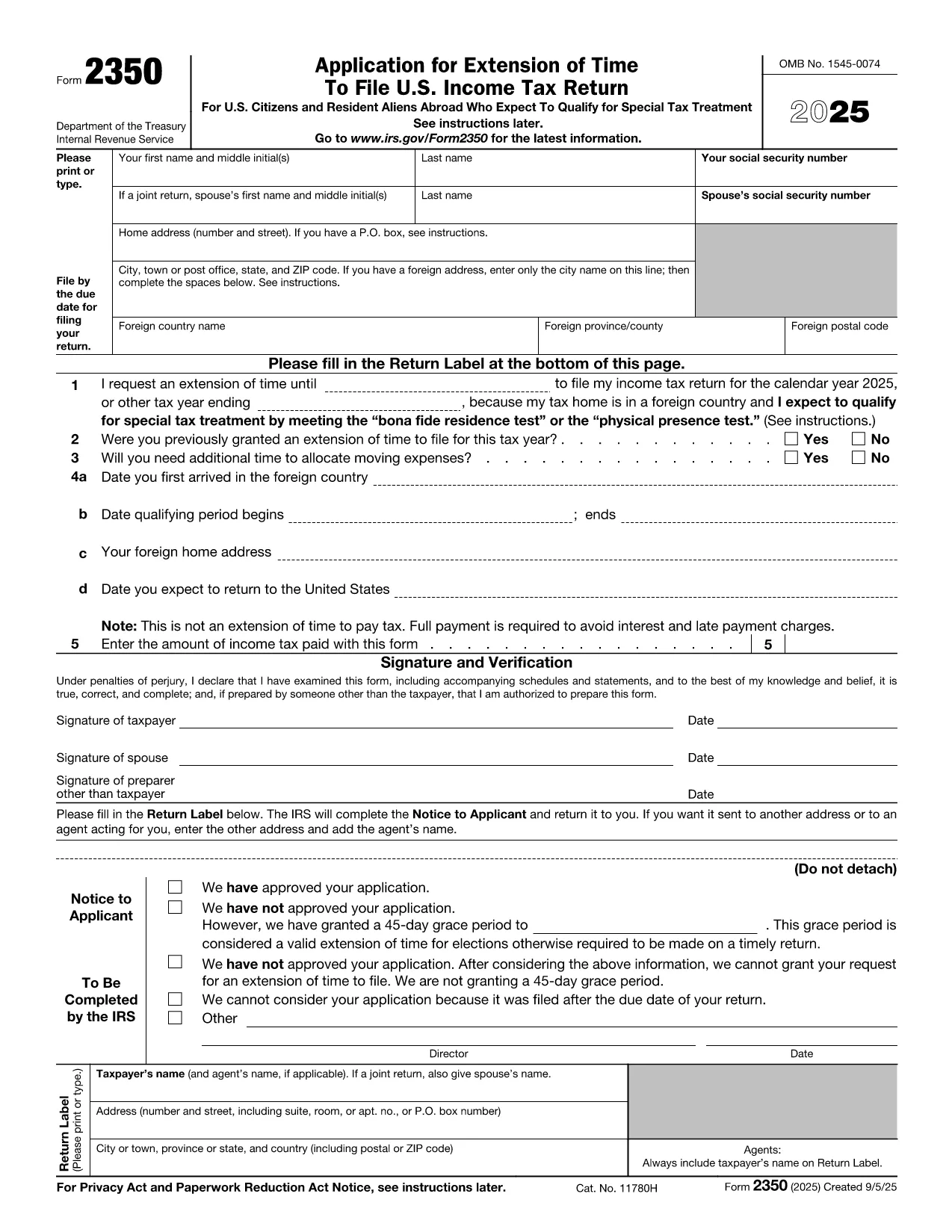
IRS Form 2350 – Fillable PDF for Tax Extension Abroad

  1. 국가 미국
  2. 언어 영어
  3. 활동 구실
  4. 부서 국세청
IRS Form 2350 – Fillable PDF for Tax Extension Abroad

U.S. citizens and resident aliens who live outside the United States often need extra time to meet the presence requirements for the foreign earned income exclusion or foreign housing exclusion. IRS Form 2350 is the official request for a two‑month filing extension when you are abroad.

When to Use Form 2350

File Form 2350 if you:

  • Expect to claim the foreign earned income exclusion (Form 2555) or foreign housing exclusion.
  • Need additional time to meet the bona fide residence test or the physical presence test.
  • Require extra days to allocate moving expenses.

How to Complete the Fillable PDF

Our online Formize fillable PDF loads instantly – just click the "Fill out this form" button and the Formize PDF Filler app will appear. Follow these steps:

  • Enter your personal information (name, SSN, home and foreign addresses).
  • Specify the date you need the extension for (Line 1).
  • Answer whether you have previously received an extension (Line 2).
  • Provide the qualifying period dates for the bona fide residence or physical presence test (Lines 4a‑4b).
  • Indicate any payment you are sending with the extension request (Line 5).
  • Sign and date the form electronically.

Common Mistakes to Avoid

  • Wrong qualifying dates: The extension date must be 12 months + 30 days from the start of your qualifying period.
  • Missing foreign address details: Include city, country, province/state, and postal code.
  • Forgetting the payment: The extension does not extend the payment deadline. Include any tax due to avoid interest.
  • Incorrect signatures: Both spouses must sign on a joint return.

Where to Submit Your Extension Request

After filling out the form, you can:

  • Mail the completed PDF to the IRS address listed in the instructions.
  • Bring it to a local IRS representative office.
  • Keep a digital copy for your records and attach it to an electronic filing if you later e‑file your return.

Need the official PDF? Download Form 2350 (PDF) directly from the IRS.

자주하는 질문
  • What is the purpose of IRS Form 2350?

    Form 2350 requests a two‑month extension to file your U.S. individual income tax return when you are living abroad and need extra time to meet the foreign earned income or housing exclusion tests.

  • Who must file Form 2350?

    U.S. citizens or resident aliens abroad who expect to claim the foreign earned income exclusion (Form 2555) or foreign housing exclusion and need more time to meet the qualifying tests.

  • Does Form 2350 extend the payment deadline?

    No. The extension only applies to filing the return. Any tax due must still be paid by the original filing deadline to avoid interest and penalties.

  • Can I file Form 2350 electronically?

    The IRS does not accept an electronic submission for Form 2350. You must mail the completed form or deliver it to a local IRS office.

  • What is the difference between the bona fide residence test and the physical presence test?

    The bona fide residence test requires you to be a resident of a foreign country for an uninterrupted period that includes an entire tax year. The physical presence test requires you to be physically present in a foreign country for at least 330 full days in any 12‑month period.

  • How long is the extension granted by Form 2350?

    Typically, the IRS grants a two‑month extension, but you can request additional days for moving expenses, up to a total of 12 months + 30 days from the start of your qualifying period.

  • What happens if I miss the extended filing deadline?

    If you miss the extension deadline, the IRS may assess a failure‑to‑file penalty and continue to charge interest on any unpaid tax.

  • Do I need to attach Form 2555 with my Form 2350?

    No. Form 2555 is filed with your tax return after the extension is granted. Form 2350 only requests more time to file.

어떻게

7개의 간단한 단계를 통해 온라인으로 IRS Form 2350를 무료로 작성하는 방법:

  1. 1
    Open the Fillable Form
    Click the “Fill out this form” button on the page. The Formize PDF Filler app loads directly in your browser.
  2. 2
    Enter Personal Information
    Type your name, Social Security number, home address, and foreign address exactly as they appear on your tax documents.
  3. 3
    Set the Extension Date
    In Line 1, enter the date that is 12 months + 30 days after the first day of your qualifying period (or add 90 days if you have moving expenses).
  4. 4
    Answer Eligibility Questions
    Complete Lines 2‑4, indicating prior extensions, moving expenses, and the dates you arrived in and will leave the foreign country.
  5. 5
    Include Your Payment (If Any)
    Enter the amount of tax you are sending with the extension request on Line 5. Remember the extension does not postpone payment.
  6. 6
    Sign Electronically
    Use the built‑in signature field to sign. If filing jointly, both spouses must sign.
  7. 7
    Save and Submit
    Save the completed PDF, print it, and mail it to the IRS address provided in the instructions, or keep a digital copy for your records.
Formize PDF 필러 앱
에 대한

국세청(IRS) 양식

IRS Form 2350는 미국에서 소득 신고, 공제 및 세액공제 청구, 납세 의무 계산, 기타 세금 관련 의무 이행에 사용되는 공식 세금 양식 중 하나입니다. IRS는 미국 내 수입법을 관리하고 집행하는 연방 기관입니다.

다음은 국세청 양식의 몇 가지 예입니다.

양식 1040: 이는 대부분의 납세자가 사용하는 기본 개인 소득세 신고 양식입니다. 이는 다양한 유형의 소득을 신고하고, 공제 및 세액공제를 청구하고, 납세 의무를 계산하고, 납세자가 추가 세금을 납부해야 하는지 또는 환급받을 자격이 있는지 여부를 결정하는 데 사용됩니다.

양식 1099: 양식 1099에는 1099-MISC, 1099-INT, 1099-DIV 등. 이 양식은 자영업 등 고용 이외의 다양한 출처에서 개인이나 기업이 받은 소득을 신고하는 데 사용됩니다. 소득, 이자소득, 배당소득, 임대소득이 있습니다.

양식 W-2: 이 양식은 고용주가 직원에게 지급한 임금과 세금을 신고하는 데 사용됩니다. 급여에서 원천징수됩니다. 직원들은 양식 W-2의 정보를 사용하여 개인 세금 신고서를 작성합니다.

양식 941: 고용주는 이 양식을 사용하여 원천징수된 연방 소득세, 사회보장세, 메디케어 세금을 포함하여 직원에 대한 고용세를 신고합니다.

양식 1065: 이 양식은 파트너십이 소득, 공제 및 납세 의무를 신고하는 데 사용됩니다. 파트너십 자체는 소득세를 납부하지 않습니다. 대신 파트너는 개인 세금 신고서에 파트너십 소득 지분을 보고합니다.

양식 1120: 이는 C 기업이 소득을 보고하기 위해 사용하는 법인 소득세 신고서입니다. 공제 및 세금 책임.

양식 990: 이 양식은 비영리 단체 및 자선 단체와 같은 면세 조직에서 다음을 수행하는 데 사용됩니다. 재무 정보, 활동 및 세법 준수 여부를 보고합니다.

양식 8862: 이 양식은 이전에 근로소득세액공제(EITC)를 신청한 납세자가 사용합니다. 하지만 허용되지 않았는데 이제 다시 소유권을 주장하고 싶습니다.

이는 다양한 세금 관련 의무를 이행하기 위해 존재하는 수많은 IRS 양식 중 몇 가지 예일 뿐입니다. 개인이나 사업체에 필요한 특정 양식은 고유한 상황, 소득원 및 공제액에 따라 다릅니다. 특정 IRS에 관한 정확한 최신 정보를 얻으려면 국세청 공식 웹사이트(www.irs.gov)를 참조하거나 세무 전문 조언을 구하는 것이 좋습니다. 귀하의 세금 상황과 관련된 양식입니다.

특징

PDF 필러

온라인에서 PDF 양식을 채우는 가장 쉬운 방법

  • IRS Form 2350를 빠르게 작성하세요.
    온라인에서 IRS Form 2350을(를) 빠르게 채우는 방법을 찾고 계십니까? 온라인 무료 PDF 양식 필러를 사용하면 1분 이내에 이 PDF 문서를 편집하고 채우는 방법을 알 수 있습니다.
  • 사용하기 쉬운 온라인 PDF 편집기
    다시 스캔하여 다시 보내기 전에 편집할 수 있도록 PDF 파일을 인쇄하는 데 지쳤습니까? 온라인에서 무료로 PDF 문서를 편집하세요. 온라인 PDF 편집기를 사용하여 시간과 종이를 절약하십시오.
  • 훌륭한 도구, 모든 플랫폼
    Mac에서 IRS Form 2350를 채우는 방법이나 PDF 필러를 무료로 사용하는 방법이 궁금하십니까? 당사의 온라인 PDF 도구는 모든 플랫폼에서 작동합니다.
  • 안전한 파일 저장
    완료된 "IRS Form 2350" 파일은 Amazon 클라우드 호스팅에서 관리하는 보안 데이터베이스에 저장됩니다. 언제든지 시스템에서 파일을 삭제할 수 있습니다. 어쨌든 이러한 파일은 24시간 후에 자동으로 삭제됩니다.
  • IRS Form 2350님과 채팅
    무료 PDF 리더 도우미인 Chatize에서 "IRS Form 2350"와 채팅하세요. "IRS Form 2350"에서 질문하고 답변을 받으세요. 위의 문서와 채팅 버튼을 클릭하세요.

필링 세션 삭제

선택한 필링 세션을 삭제하시겠습니까?이 경우 양식 작성 진행 상황이 손실됩니다.

편집 세션 삭제

선택한 편집 세션을 삭제하시겠습니까? 이 경우 양식 작성 및 편집 진행 상황이 손실됩니다.