언어 선택

IRS Form 433‑B – Fillable PDF Collection Statement for Businesses

  1. 국가 미국
  2. 언어 영어
  3. 활동 구실
  4. 부서 국세청
IRS Form 433‑B – Fillable PDF Collection Statement for Businesses

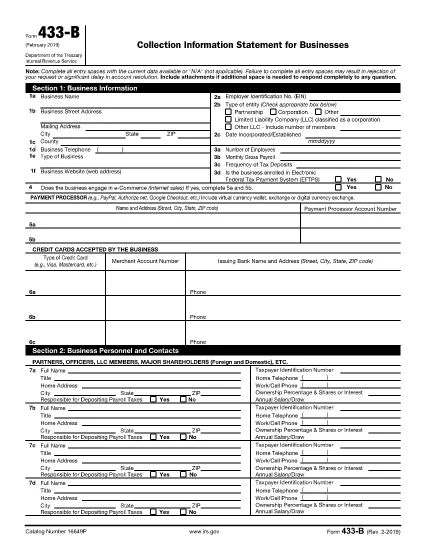
Form 433‑B, Collection Information Statement for Businesses, is the IRS’s standard form for gathering detailed financial data from corporations, partnerships, LLCs, and other business entities that owe tax. Completing this form accurately is essential when you are pursuing an Offer in Compromise, requesting a payment plan, or negotiating any other tax‑relief option.

What Is Form 433‑B and Who Needs It?

The form captures business information, assets, income, expenses, and the minimum offer amount the IRS will accept. It is required for:

  • Corporations (C‑corp, S‑corp)
  • Partnerships
  • LLCs taxed as corporations or partnerships
  • Any other entity with unpaid federal tax liabilities

Step‑by‑Step Guide to Fill Out Form 433‑B

Follow these simple steps using Formize’s built‑in PDF filler:

  1. Open the Fillable Form – Click the “Fill out this form” button on this page. The Formize PDF Filler loads automatically.
  2. Enter Business Information – Provide the legal name, EIN, address, phone, and a brief description of your business.
  3. Provide Officer/Owner Details – List each partner, officer, or member with name, title, ownership percentage, and salary.
  4. Report Assets – Include cash, bank accounts, real‑estate, equipment, vehicles, and any other valuable assets.
  5. Report Income & Expenses – Fill in monthly gross receipts, cost of goods sold, payroll, rent, utilities, and other operating costs.
  6. Calculate Minimum Offer – The form automatically totals the data; use the built‑in calculator to see the IRS‑required minimum offer amount.
  7. Review & Sign – Double‑check every field, then add the authorized signature and date.

Common Mistakes to Avoid

  • Leaving required fields blank – the IRS will reject the form.
  • Using outdated asset valuations – provide current market values.
  • Misclassifying the business entity – select the correct box for corporation, partnership, or LLC.
  • Forgetting to attach supporting documents – statements, depreciation schedules, and loan agreements are often required.

How to Submit the Completed Form

Once you finish, you have three options:

  • Download PDF and mail it to the IRS address indicated in the instructions.
  • Print & fax a hard copy to the appropriate IRS office.
  • Save securely and upload it through your IRS online account if you are working with a tax professional.

Using Formize ensures the PDF stays fillable and printable without losing formatting.

자주하는 질문
  • What types of businesses must use Form 433‑B?

    Corporations, partnerships, and LLCs (taxed as corporations or partnerships) with unpaid federal tax liabilities are required to complete Form 433‑B.

  • Can I use Form 433‑B for a sole proprietorship?

    No. Sole proprietors should use Form 433‑A, the collection statement for wage earners and self‑employed individuals.

  • Is the PDF on Formize really fillable?

    Yes. The PDF retains all fillable fields, and the Formize online filler lets you type, save, and print without altering the original layout.

  • Do I need to attach supporting documents?

    Attach recent bank statements, asset appraisals, loan balances, and depreciation schedules as referenced in the form’s instructions.

  • How long does the IRS take to process a completed Form 433‑B?

    Processing time varies, but expect 30‑60 days for the IRS to review the information and respond to your request.

  • Can I submit the form electronically?

    The IRS does not accept an electronic upload for Form 433‑B directly. You must mail or fax the printed form, or provide it to your tax professional for electronic submission through the IRS portal.

  • What happens if I make a mistake on the form?

    Correct any errors before signing. If you discover a mistake after submission, send a revised form with “Amended” noted at the top of the first page.

어떻게

5개의 간단한 단계를 통해 온라인으로 IRS Form 433-B를 무료로 작성하는 방법:

  1. 1
    Open the Fillable Form
    Click the “Fill out this form” button on this page. The Formize PDF Filler loads in your browser, no download required.
  2. 2
    Enter Business Information
    Type the legal name, EIN, address, phone number, and a short description of your business into the highlighted fields.
  3. 3
    Add Asset and Income Details
    Provide current values for cash, bank accounts, real‑estate, equipment, and vehicles. Then enter monthly income and expense figures.
  4. 4
    Review Calculations
    Use the built‑in calculator to verify the minimum offer amount and ensure all totals are correct.
  5. 5
    Submit or Print
    When you’re satisfied, click “Save PDF” to download a completed copy, or print directly from the filler to mail to the IRS.
Formize PDF 필러 앱
에 대한

국세청(IRS) 양식

IRS Form 433-B는 미국에서 소득 신고, 공제 및 세액공제 청구, 납세 의무 계산, 기타 세금 관련 의무 이행에 사용되는 공식 세금 양식 중 하나입니다. IRS는 미국 내 수입법을 관리하고 집행하는 연방 기관입니다.

다음은 국세청 양식의 몇 가지 예입니다.

양식 1040: 이는 대부분의 납세자가 사용하는 기본 개인 소득세 신고 양식입니다. 이는 다양한 유형의 소득을 신고하고, 공제 및 세액공제를 청구하고, 납세 의무를 계산하고, 납세자가 추가 세금을 납부해야 하는지 또는 환급받을 자격이 있는지 여부를 결정하는 데 사용됩니다.

양식 1099: 양식 1099에는 1099-MISC, 1099-INT, 1099-DIV 등. 이 양식은 자영업 등 고용 이외의 다양한 출처에서 개인이나 기업이 받은 소득을 신고하는 데 사용됩니다. 소득, 이자소득, 배당소득, 임대소득이 있습니다.

양식 W-2: 이 양식은 고용주가 직원에게 지급한 임금과 세금을 신고하는 데 사용됩니다. 급여에서 원천징수됩니다. 직원들은 양식 W-2의 정보를 사용하여 개인 세금 신고서를 작성합니다.

양식 941: 고용주는 이 양식을 사용하여 원천징수된 연방 소득세, 사회보장세, 메디케어 세금을 포함하여 직원에 대한 고용세를 신고합니다.

양식 1065: 이 양식은 파트너십이 소득, 공제 및 납세 의무를 신고하는 데 사용됩니다. 파트너십 자체는 소득세를 납부하지 않습니다. 대신 파트너는 개인 세금 신고서에 파트너십 소득 지분을 보고합니다.

양식 1120: 이는 C 기업이 소득을 보고하기 위해 사용하는 법인 소득세 신고서입니다. 공제 및 세금 책임.

양식 990: 이 양식은 비영리 단체 및 자선 단체와 같은 면세 조직에서 다음을 수행하는 데 사용됩니다. 재무 정보, 활동 및 세법 준수 여부를 보고합니다.

양식 8862: 이 양식은 이전에 근로소득세액공제(EITC)를 신청한 납세자가 사용합니다. 하지만 허용되지 않았는데 이제 다시 소유권을 주장하고 싶습니다.

이는 다양한 세금 관련 의무를 이행하기 위해 존재하는 수많은 IRS 양식 중 몇 가지 예일 뿐입니다. 개인이나 사업체에 필요한 특정 양식은 고유한 상황, 소득원 및 공제액에 따라 다릅니다. 특정 IRS에 관한 정확한 최신 정보를 얻으려면 국세청 공식 웹사이트(www.irs.gov)를 참조하거나 세무 전문 조언을 구하는 것이 좋습니다. 귀하의 세금 상황과 관련된 양식입니다.

특징

PDF 필러

온라인에서 PDF 양식을 채우는 가장 쉬운 방법

  • IRS Form 433-B를 빠르게 작성하세요.
    온라인에서 IRS Form 433-B을(를) 빠르게 채우는 방법을 찾고 계십니까? 온라인 무료 PDF 양식 필러를 사용하면 1분 이내에 이 PDF 문서를 편집하고 채우는 방법을 알 수 있습니다.
  • 사용하기 쉬운 온라인 PDF 편집기
    다시 스캔하여 다시 보내기 전에 편집할 수 있도록 PDF 파일을 인쇄하는 데 지쳤습니까? 온라인에서 무료로 PDF 문서를 편집하세요. 온라인 PDF 편집기를 사용하여 시간과 종이를 절약하십시오.
  • 훌륭한 도구, 모든 플랫폼
    Mac에서 IRS Form 433-B를 채우는 방법이나 PDF 필러를 무료로 사용하는 방법이 궁금하십니까? 당사의 온라인 PDF 도구는 모든 플랫폼에서 작동합니다.
  • 안전한 파일 저장
    완료된 "IRS Form 433-B" 파일은 Amazon 클라우드 호스팅에서 관리하는 보안 데이터베이스에 저장됩니다. 언제든지 시스템에서 파일을 삭제할 수 있습니다. 어쨌든 이러한 파일은 24시간 후에 자동으로 삭제됩니다.
  • IRS Form 433-B님과 채팅
    무료 PDF 리더 도우미인 Chatize에서 "IRS Form 433-B"와 채팅하세요. "IRS Form 433-B"에서 질문하고 답변을 받으세요. 위의 문서와 채팅 버튼을 클릭하세요.

필링 세션 삭제

선택한 필링 세션을 삭제하시겠습니까?이 경우 양식 작성 진행 상황이 손실됩니다.

편집 세션 삭제

선택한 편집 세션을 삭제하시겠습니까? 이 경우 양식 작성 및 편집 진행 상황이 손실됩니다.