
언어 선택

Form 4461-C Fillable PDF – Download & Complete Online

  1. 국가 미국
  2. 언어 영어
  3. 활동 구실
  4. 부서 국세청
Form 4461-C Fillable PDF – Download & Complete Online

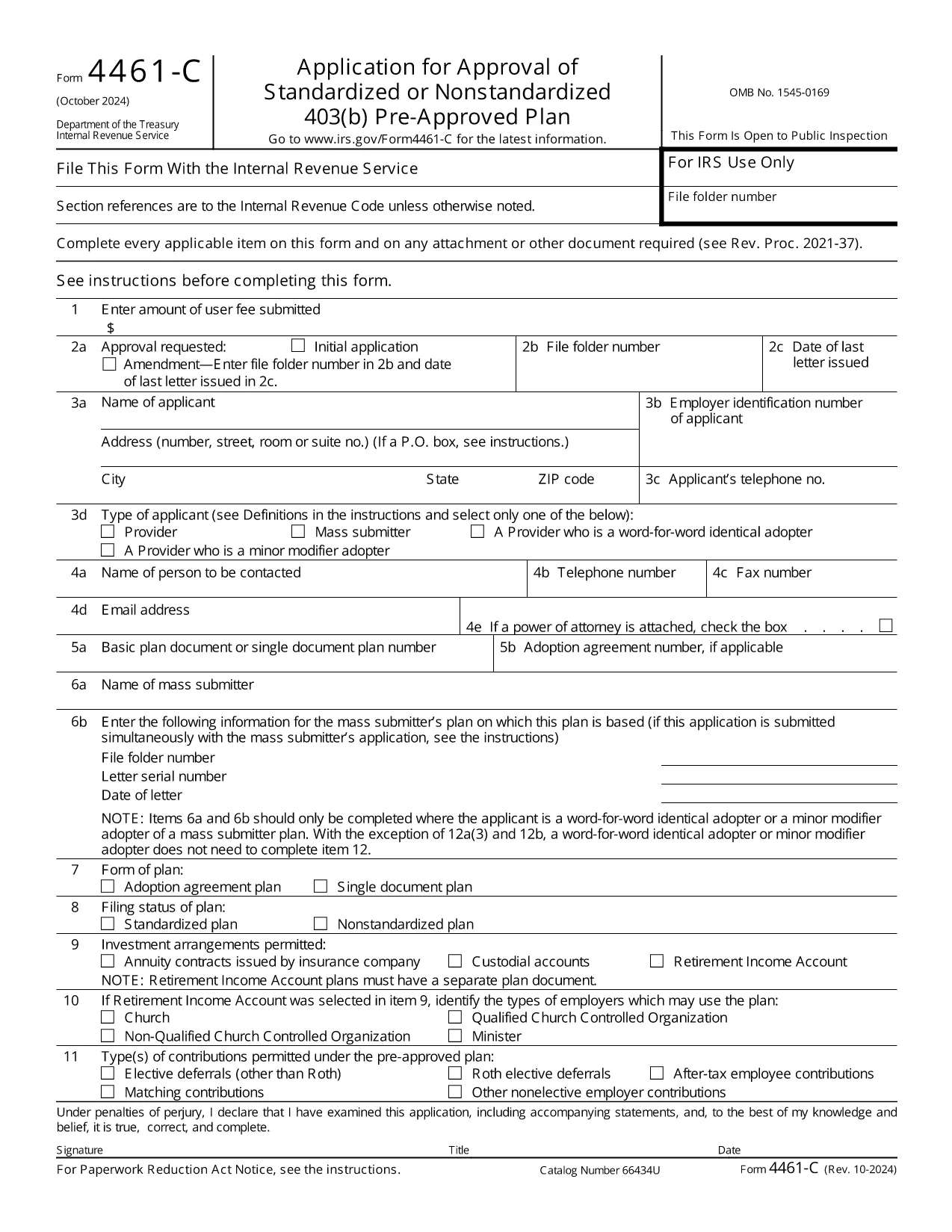
The IRS Form 4461‑C is the official application used by providers or mass submitters of a 403(b) pre‑approved plan. It must be filed for each separate adoption agreement or for each single‑document plan where no adoption agreement is used. Our fillable PDF lets you complete the form quickly, accurately, and securely.

What Is Form 4461‑C?

Form 4461‑C is part of the IRS’s pre‑approval process for employee benefit plans under section 401(a) of the Internal Revenue Code. It captures essential plan details, adoption agreements, and supporting documentation required for IRS approval.

How to Fill Out Form 4461‑C Online

Instead of downloading the PDF and opening a separate editor, simply click the "Fill out this form" button on this page. The Formize PDF Filler will load in your browser, allowing you to:

  1. Enter information directly into each field.
  2. Save your progress automatically.
  3. Validate entries with built‑in checks.
  4. Download the completed, IRS‑ready PDF or submit it electronically.

Common Mistakes to Avoid

  • Leaving required fields blank: The filler highlights missing data before you can save.
  • Mismatched plan numbers: Double‑check the plan identification numbers on line 12(a).
  • Incorrect signatures: Use the electronic signature option or print and sign where required.
  • Submitting outdated versions: This page always provides the latest revision (Rev. 10‑2024).

Submission & Acceptance Guidelines

After completing the form, you can either:

  • Download the PDF and mail it to the IRS address listed in the instructions.
  • Upload the PDF through the IRS e‑file portal if you have an authorized transmitter.

Keep a copy for your records and track the submission status using the IRS’s online tools.

FAQs About Form 4461‑C

For quick answers, scroll down to the FAQ section below.

자주하는 질문
  • Who must file Form 4461‑C?

    Any provider or mass submitter of a 403(b) pre‑approved plan must file Form 4461‑C for each separate adoption agreement or single‑document plan.

  • Can I file Form 4461‑C electronically?

    Yes. After completing the fillable PDF, you can upload it through the IRS e‑file portal if you have an authorized transmitter.

  • How many copies of Form 4461‑C are required?

    Submit one copy of Form 4461‑C for each adoption agreement or each single‑document plan, plus any supporting documents listed on line 12(a).

  • What is the latest revision of Form 4461‑C?

    The current version is Rev. 10‑2024, which is the PDF linked on this page.

  • Do I need a signature on the PDF?

    Yes. The form requires the plan sponsor’s signature. You can use the electronic signature feature in Formize or print, sign, and scan the completed form.

  • Where do I send the completed form?

    Mail the completed form to the address specified in the IRS instructions, or submit it electronically via the IRS e‑file system.

어떻게

4개의 간단한 단계를 통해 온라인으로 Form 4461-C를 무료로 작성하는 방법:

  1. 1
    Open the Fillable Form
    Click the "Fill out this form" button on the page. The Formize PDF Filler loads instantly in your browser.
  2. 2
    Enter Your Information
    Complete each field. Required fields are highlighted. Use the auto‑save feature to protect your data.
  3. 3
    Review & Sign
    Check all entries for accuracy, add electronic signatures where allowed, and correct any validation warnings.
  4. 4
    Download or Submit
    When finished, download the completed PDF for mailing or upload it to the IRS e‑file system.
Formize PDF 필러 앱
에 대한

세금 양식

Form 4461-C는 세금 관련 정보를 해당 세무 당국에 보고하는 데 사용되는 문서인 세금 양식 중 하나입니다. 납세자의 상황과 위치에 따라 연방, 주 및 지방 세금 양식을 포함하여 다양한 유형의 세금 양식이 있습니다.

특징

PDF 필러

온라인에서 PDF 양식을 채우는 가장 쉬운 방법

  • Form 4461-C를 빠르게 작성하세요.
    온라인에서 Form 4461-C을(를) 빠르게 채우는 방법을 찾고 계십니까? 온라인 무료 PDF 양식 필러를 사용하면 1분 이내에 이 PDF 문서를 편집하고 채우는 방법을 알 수 있습니다.
  • 사용하기 쉬운 온라인 PDF 편집기
    다시 스캔하여 다시 보내기 전에 편집할 수 있도록 PDF 파일을 인쇄하는 데 지쳤습니까? 온라인에서 무료로 PDF 문서를 편집하세요. 온라인 PDF 편집기를 사용하여 시간과 종이를 절약하십시오.
  • 훌륭한 도구, 모든 플랫폼
    Mac에서 Form 4461-C를 채우는 방법이나 PDF 필러를 무료로 사용하는 방법이 궁금하십니까? 당사의 온라인 PDF 도구는 모든 플랫폼에서 작동합니다.
  • 안전한 파일 저장
    완료된 "Form 4461-C" 파일은 Amazon 클라우드 호스팅에서 관리하는 보안 데이터베이스에 저장됩니다. 언제든지 시스템에서 파일을 삭제할 수 있습니다. 어쨌든 이러한 파일은 24시간 후에 자동으로 삭제됩니다.
  • Form 4461-C님과 채팅
    무료 PDF 리더 도우미인 Chatize에서 "Form 4461-C"와 채팅하세요. "Form 4461-C"에서 질문하고 답변을 받으세요. 위의 문서와 채팅 버튼을 클릭하세요.

필링 세션 삭제

선택한 필링 세션을 삭제하시겠습니까?이 경우 양식 작성 진행 상황이 손실됩니다.

편집 세션 삭제

선택한 편집 세션을 삭제하시겠습니까? 이 경우 양식 작성 및 편집 진행 상황이 손실됩니다.