
언어 선택

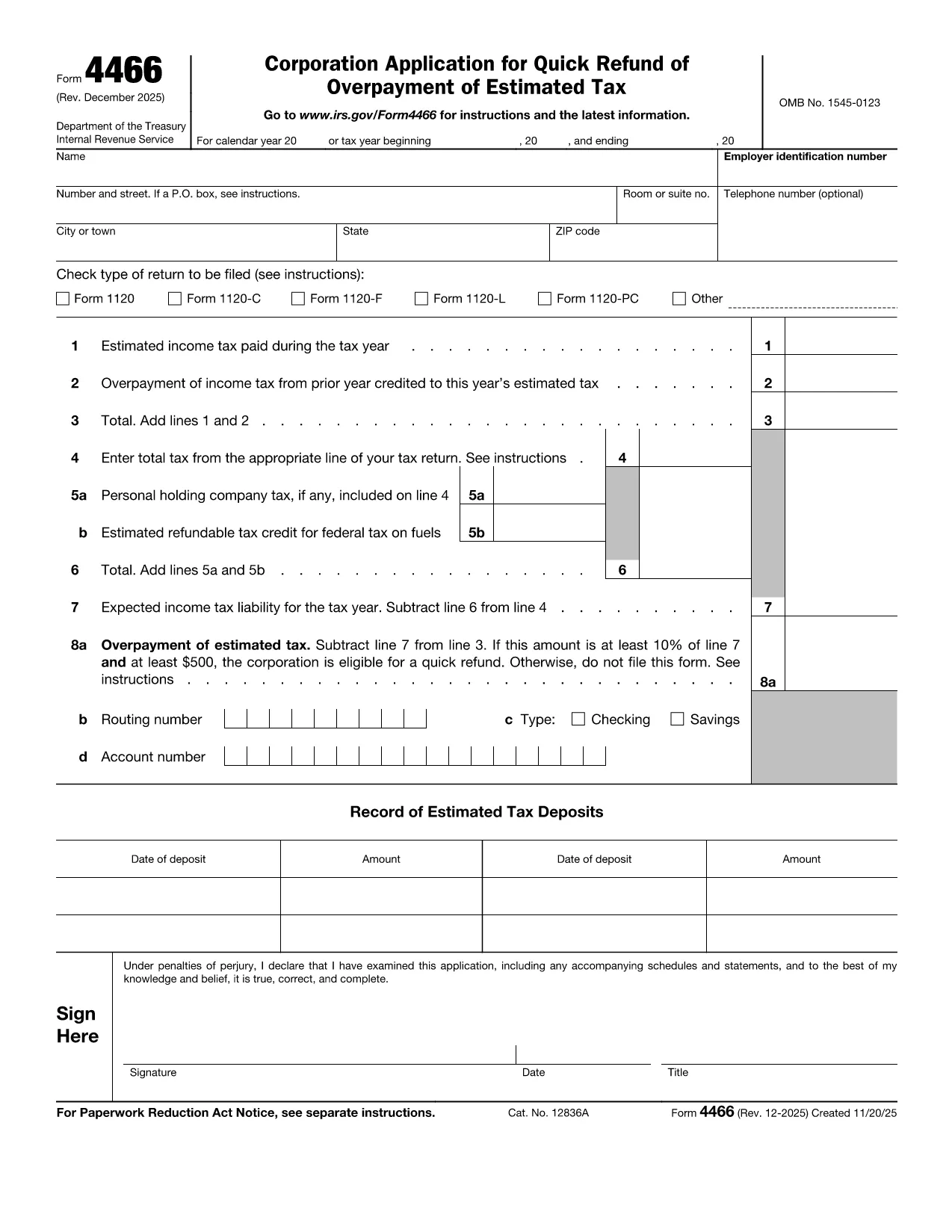
Form 4466 – Corporation Application for Quick Refund of Overpayment

  1. 국가 미국
  2. 언어 영어
  3. 활동 구실
  4. 부서 국세청
Form 4466 – Corporation Application for Quick Refund of Overpayment

Form 4466 is the IRS’s official Corporation Application for Quick Refund of Overpayment of Estimated Tax. Corporations that have over‑paid their estimated taxes can use this form to request a fast cash refund, helping maintain cash flow and avoid unnecessary interest.

Who Can Use Form 4466?

Only corporations (C‑corporations) that have filed a complete tax return for the year in question are eligible. Partnerships, S‑corporations, and individuals must use other refund procedures.

Key Eligibility Requirements

  • The overpayment must be at least 10 % of the expected tax liability AND at least $500.
  • The corporation must have a filed tax return (Form 1120) for the year the overpayment occurred.
  • The request must be made within the time limits set by the IRS (generally within 45 days of filing the return).

How to Complete and Submit Form 4466

Instead of downloading, printing, and scanning the PDF, simply click the "Fill out this form" button on this page. The Formize PDF Filler will load instantly, allowing you to enter data directly on the screen and submit electronically.

Common Mistakes to Avoid

  • Leaving any required field blank – the filler will highlight missing information.
  • Submitting the form before the corporate tax return is filed – the IRS will reject the application.
  • Mis‑calculating the overpayment amount – double‑check lines 9 and 10 of your return.

Processing Time & What Happens Next

The IRS aims to process Form 4466 within 45 days. You will receive a notice confirming the refund amount or explaining any issues. If you filed an extension for your tax return, it does NOT extend the deadline for Form 4466.

Ready to get your refund? Click the button below, fill the form in minutes, and let Formize handle the rest.

자주하는 질문
  • What is the deadline to file Form 4466?

    Form 4466 must be filed before the corporation files its tax return for the year, and the IRS processes it within 45 days of receipt.

  • Can I file Form 4466 electronically?

    Yes. With Formize you can fill and submit the form online; the IRS still receives a paper copy via mail, but the online process speeds up data entry.

  • Do I need to attach my Form 1120?

    A copy of the filed corporate tax return (Form 1120) must be attached to verify the overpayment.

  • What if my overpayment is less than $500?

    The corporation does not qualify for the quick refund program; you must wait for the standard refund process.

  • How long does the IRS take to issue the refund?

    The IRS aims to process the request within 45 days, after which the refund is issued by check or direct deposit.

  • Is there a fee to use the Formize filler?

    No. Formize provides the fillable PDF for free; you only pay any standard mailing costs if you choose to mail a paper copy.

  • Can I correct a mistake after submitting?

    If you discover an error, contact the IRS immediately and submit a corrected Form 4466 with a cover letter explaining the change.

어떻게

5개의 간단한 단계를 통해 온라인으로 Form 4466를 무료로 작성하는 방법:

  1. 1
    Open the Fillable Form
    Click the "Fill out this form" button on this page. The Formize PDF Filler loads in your browser.
  2. 2
    Enter Corporate Information
    Fill in the corporation’s name, EIN, tax year, and overpayment amount exactly as shown on your filed Form 1120.
  3. 3
    Attach Required Documents
    Upload a copy of the corporate tax return and any payment receipts that verify the overpayment.
  4. 4
    Review and Submit
    Use the built‑in validation to check for missing fields, then click Submit. The form will be securely transmitted to the IRS address.
  5. 5
    Track Your Refund
    After submission, you’ll receive a confirmation email with a tracking number. Keep it for any follow‑up with the IRS.
Formize PDF 필러 앱
에 대한

세금 양식

Form 4466는 개인 또는 기업의 소득, 공제 및 납세 의무에 대한 정보를 관련 세무 당국에 보고하는 데 사용되는 문서인 세금 양식 중 하나입니다. 이 양식은 세법을 준수하고 납세 의무를 이행하는 데 필요합니다. 세금 양식은 국가 및 특정 세금 요건에 따라 다릅니다. 다음은 몇 가지 일반적인 세금 양식 유형입니다.

개인 세금 양식: 이 양식은 개인 납세자가 개인 소득과 청구 공제, 공제 및 면제를 신고하는 데 사용됩니다. 예를 들어 미국의 1040 양식 또는 영국의 자진 신고서 양식이 있습니다.

사업세 양식: 사업세 양식은 회사, 파트너십 또는 자영업자가 사업 소득, 비용 및 기타 세금 관련 정보를 보고하는 데 사용됩니다. 예를 들어 미국의 Schedule C 양식(사업 이익 또는 손실) 또는 영국의 CT600 양식(회사 세금 신고서)이 있습니다.

급여 세금 양식: 이 양식은 고용주가 직원의 급여에서 원천징수된 임금, 급여 및 세금을 보고하는 데 사용됩니다. 예를 들어 미국의 W-2 양식 또는 영국의 P60 양식이 있습니다.

판매세 양식: 판매세 양식은 기업이 과세 대상 상품이나 서비스에 대해 징수한 판매세를 신고하고 송금하는 데 사용됩니다. 구체적인 판매세 양식은 관할권에 따라 다릅니다.

부가가치세(VAT) 양식: VAT 양식은 판매 시 징수된 VAT를 신고 및 납부하고 구매 시 VAT 공제를 청구하기 위해 부가가치세를 부과하는 국가에서 사용됩니다. 그 예로는 많은 국가에서 사용되는 VAT 신고 양식이 있습니다.

추정 세금 양식: 추정 세금 양식은 자영업 소득, 투자 소득 등 원천징수 대상이 아닌 소득에 대한 추정세를 신고하고 납부하는 데 사용됩니다.

이는 존재할 수 있는 수많은 세금 양식 중 몇 가지 예일 뿐입니다. 필요한 특정 양식은 해당 국가 또는 관할권의 세법 및 규정에 따라 다릅니다. 귀하의 상황에 어떤 양식이 적용되는지 결정하려면 세무 당국의 지침을 참조하거나 전문가의 조언을 구하는 것이 중요합니다.

특징

PDF 필러

온라인에서 PDF 양식을 채우는 가장 쉬운 방법

  • Form 4466를 빠르게 작성하세요.
    온라인에서 Form 4466을(를) 빠르게 채우는 방법을 찾고 계십니까? 온라인 무료 PDF 양식 필러를 사용하면 1분 이내에 이 PDF 문서를 편집하고 채우는 방법을 알 수 있습니다.
  • 사용하기 쉬운 온라인 PDF 편집기
    다시 스캔하여 다시 보내기 전에 편집할 수 있도록 PDF 파일을 인쇄하는 데 지쳤습니까? 온라인에서 무료로 PDF 문서를 편집하세요. 온라인 PDF 편집기를 사용하여 시간과 종이를 절약하십시오.
  • 훌륭한 도구, 모든 플랫폼
    Mac에서 Form 4466를 채우는 방법이나 PDF 필러를 무료로 사용하는 방법이 궁금하십니까? 당사의 온라인 PDF 도구는 모든 플랫폼에서 작동합니다.
  • 안전한 파일 저장
    완료된 "Form 4466" 파일은 Amazon 클라우드 호스팅에서 관리하는 보안 데이터베이스에 저장됩니다. 언제든지 시스템에서 파일을 삭제할 수 있습니다. 어쨌든 이러한 파일은 24시간 후에 자동으로 삭제됩니다.
  • Form 4466님과 채팅
    무료 PDF 리더 도우미인 Chatize에서 "Form 4466"와 채팅하세요. "Form 4466"에서 질문하고 답변을 받으세요. 위의 문서와 채팅 버튼을 클릭하세요.

필링 세션 삭제

선택한 필링 세션을 삭제하시겠습니까?이 경우 양식 작성 진행 상황이 손실됩니다.

편집 세션 삭제

선택한 편집 세션을 삭제하시겠습니까? 이 경우 양식 작성 및 편집 진행 상황이 손실됩니다.