
언어 선택

Form 5471 Schedule I-1 – Fillable PDF Online

  1. 국가 미국
  2. 언어 영어
  3. 활동 구실
  4. 부서 국세청
Form 5471 Schedule I-1 – Fillable PDF Online

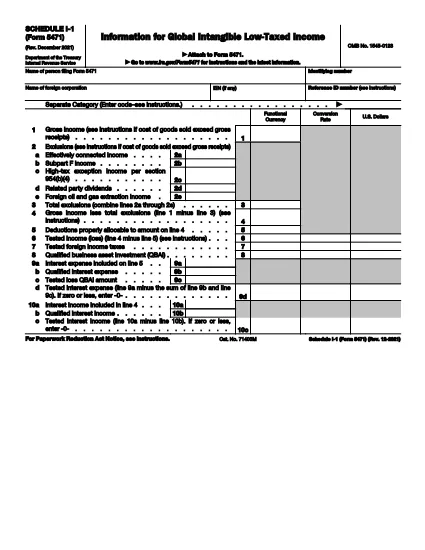
Form 5471 Schedule I‑1 is a supplemental attachment to the IRS Form 5471 series. It is used to report Global Intangible Low‑Taxed Income (GILTI) and related foreign oil and gas extraction income for U.S. shareholders of controlled foreign corporations.

Why Use a Fillable PDF?

Downloading the official IRS PDF guarantees you have the most current version. With Formize’s online PDF filler you can:

  • Complete the schedule directly in your browser – no extra software needed.
  • Save progress and return later.
  • Export a clean, printable PDF ready for filing.
  • Maintain data security with SSL‑encrypted connections.

How the Form Works

Schedule I‑1 captures detailed information on:

  • Foreign oil and gas extraction income (lines 2a‑2e).
  • Total exclusions and deductions.
  • GILTI calculations required for the 2021‑2025 tax years.

Common Mistakes to Avoid

  • Leaving lines blank: Even if a line is zero, enter “0” to avoid processing delays.
  • Mismatched totals: Ensure the sum of lines 2a‑2e matches the total exclusion amount.
  • Using an outdated version: Always use the latest PDF (Rev. December 2021) linked below.
  • Incorrect rounding: Follow IRS rounding rules – round to the nearest whole dollar unless otherwise specified.

Download the Official PDF

Click the button below to download the IRS‑approved Schedule I‑1 PDF. Then use the Fill out this form button on the page to open the Formize PDF filler.

지침

자주하는 질문
  • Who must file Form 5471 Schedule I-1?

    U.S. shareholders of controlled foreign corporations who have GILTI or foreign oil and gas extraction income must attach Schedule I‑1 to their Form 5471 filing.

  • Is the Schedule I-1 available as a fillable PDF?

    Yes. The IRS provides a fillable PDF (Rev. December 2021) which can be completed online using Formize’s PDF filler.

  • Can I edit the PDF on my computer without Formize?

    You can use any PDF editor, but Formize’s online filler saves your work automatically and requires no installation.

  • What is GILTI and why does it matter?

    GILTI stands for Global Intangible Low‑Taxed Income. It is a category of income that U.S. shareholders must report to prevent tax deferral on foreign earnings.

  • Do I need to attach supporting documents to Schedule I-1?

    Only if the IRS specifically requests additional detail for the items reported on lines 2a‑2e. Otherwise, the schedule itself is sufficient.

  • What if I make a mistake after filing?

    Amend the original return by filing Form 1040X and attach a corrected Schedule I‑1. Include an explanation of the changes.

  • Is there a filing deadline for Schedule I-1?

    Schedule I‑1 is due with the taxpayer’s Form 5471, which is attached to the individual’s annual tax return (typically April 15, with extensions as applicable).

어떻게

4개의 간단한 단계를 통해 온라인으로 Form 5471 Schedule I-1를 무료로 작성하는 방법:

  1. 1
    Open the Fillable Form
    Click the **Fill out this form** button on the page. The Formize PDF Filler app will load in a new browser tab.
  2. 2
    Enter Your Information
    Type directly into each field of Schedule I‑1. Use the on‑screen guidance for line numbers and required data.
  3. 3
    Save or Export
    When you finish, click **Save** to store the document in your Formize account or **Export** to download a completed PDF for filing.
  4. 4
    Review Before Submitting
    Double‑check totals, ensure no fields are left blank, and verify that all required signatures are included.
Formize PDF 필러 앱
에 대한

세금 양식

Form 5471 Schedule I-1는 세금 관련 정보를 해당 세무 당국에 보고하는 데 사용되는 문서인 세금 양식 중 하나입니다. 납세자의 상황과 위치에 따라 연방, 주 및 지방 세금 양식을 포함하여 다양한 유형의 세금 양식이 있습니다.

특징

PDF 필러

온라인에서 PDF 양식을 채우는 가장 쉬운 방법

  • Form 5471 Schedule I-1를 빠르게 작성하세요.
    온라인에서 Form 5471 Schedule I-1을(를) 빠르게 채우는 방법을 찾고 계십니까? 온라인 무료 PDF 양식 필러를 사용하면 1분 이내에 이 PDF 문서를 편집하고 채우는 방법을 알 수 있습니다.
  • 사용하기 쉬운 온라인 PDF 편집기
    다시 스캔하여 다시 보내기 전에 편집할 수 있도록 PDF 파일을 인쇄하는 데 지쳤습니까? 온라인에서 무료로 PDF 문서를 편집하세요. 온라인 PDF 편집기를 사용하여 시간과 종이를 절약하십시오.
  • 훌륭한 도구, 모든 플랫폼
    Mac에서 Form 5471 Schedule I-1를 채우는 방법이나 PDF 필러를 무료로 사용하는 방법이 궁금하십니까? 당사의 온라인 PDF 도구는 모든 플랫폼에서 작동합니다.
  • 안전한 파일 저장
    완료된 "Form 5471 Schedule I-1" 파일은 Amazon 클라우드 호스팅에서 관리하는 보안 데이터베이스에 저장됩니다. 언제든지 시스템에서 파일을 삭제할 수 있습니다. 어쨌든 이러한 파일은 24시간 후에 자동으로 삭제됩니다.
  • Form 5471 Schedule I-1님과 채팅
    무료 PDF 리더 도우미인 Chatize에서 "Form 5471 Schedule I-1"와 채팅하세요. "Form 5471 Schedule I-1"에서 질문하고 답변을 받으세요. 위의 문서와 채팅 버튼을 클릭하세요.

필링 세션 삭제

선택한 필링 세션을 삭제하시겠습니까?이 경우 양식 작성 진행 상황이 손실됩니다.

편집 세션 삭제

선택한 편집 세션을 삭제하시겠습니까? 이 경우 양식 작성 및 편집 진행 상황이 손실됩니다.