
언어 선택

IRS Form 8857 – Request for Innocent Spouse Relief (Fillable PDF)

  1. 국가 미국
  2. 언어 영어
  3. 활동 구실
  4. 부서 국세청
IRS Form 8857 – Request for Innocent Spouse Relief (Fillable PDF)

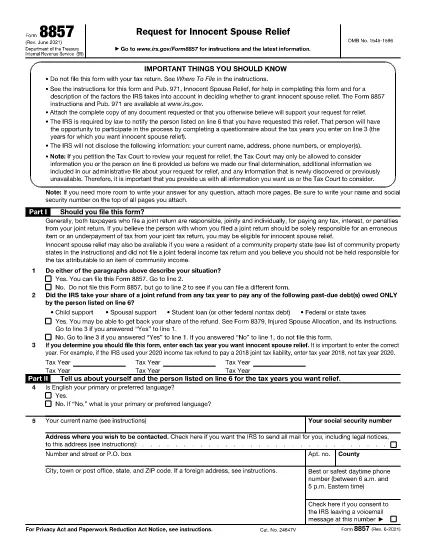
Form 8857, officially titled Request for Innocent Spouse Relief, lets taxpayers ask the Internal Revenue Service (IRS) to remove or reduce their joint tax liability when they believe the spouse or former spouse is solely responsible for an error or underpayment. This page provides a fillable PDF version, a simple step‑by‑step guide, and answers to the most common questions.

What Is Form 8857 and Who Can Use It?

Form 8857 is used when you filed a joint return and later discover that the tax liability is the result of:

  • Undisclosed income or fraudulent activity by your spouse,
  • Errors you were unaware of at the time of signing,
  • Coercion or duress that forced you to sign the return, or
  • Significant financial hardship if you were held liable.

If any of these situations apply, you may qualify for innocent spouse relief, equitable relief, or separation of liability relief.

How to Fill Out the Fillable PDF with Formize

Instead of downloading the PDF and editing it with a separate editor, use the built‑in Formize PDF Filler. Follow these easy steps:

  1. Click “Fill out this form” on this page.
  2. The Formize PDF Filler app loads directly in your browser.
  3. Enter your information in each fillable field – the form automatically saves your progress.
  4. When finished, click Save & Download to get a completed PDF.
  5. Print, sign, and mail the form to the IRS address shown in the instructions, or submit it electronically if you have an IRS e‑file account.

Common Mistakes to Avoid When Completing Form 8857

Even a small error can delay processing. Keep these tips in mind:

  • Don’t leave any required boxes blank. If a question does not apply, write “N/A”.
  • Provide supporting documentation. Attach copies of the joint return, notices, and any evidence of the spouse’s wrongdoing.
  • Use the correct tax year. The year you are requesting relief for must match the year on the joint return.
  • Sign both the taxpayer and spouse sections. If you have a paid preparer, they must also sign.
  • Check the address. Mail the form to the IRS location specified in the instructions for your state.

Following these guidelines will help the IRS process your request faster.

지침

자주하는 질문
  • What is IRS Form 8857 used for?

    Form 8857 is the Request for Innocent Spouse Relief. It allows a taxpayer to ask the IRS to remove or reduce liability on a joint return when the spouse is responsible for the tax debt.

  • Who qualifies for innocent spouse relief?

    You may qualify if you were unaware of the error, were coerced into signing, had no control over the financial matters, or would suffer significant hardship if held liable.

  • Can I file Form 8857 electronically?

    Yes, if you have an IRS e‑file account you can upload the completed PDF through the IRS portal. Otherwise, mail the signed form to the address in the instructions.

  • What supporting documents should I include?

    Attach a copy of the joint tax return, any IRS notices, proof of the spouse’s wrongdoing (e.g., fraud letters), and documentation of hardship (e.g., medical bills).

  • Is there a deadline to submit Form 8857?

    Generally, you must file within two years after the IRS issues a notice of liability, but it’s best to submit as soon as possible.

  • Do I need a tax professional to complete Form 8857?

    A professional can help, but the fillable PDF and step‑by‑step guide make it possible to complete the form on your own.

  • What happens after I submit the form?

    The IRS will review your request, may contact you for additional information, and will issue a determination letter with its decision.

  • Can I request relief for more than one tax year?

    Yes, you can file separate Form 8857 requests for each tax year you need relief for.

어떻게

5개의 간단한 단계를 통해 온라인으로 Form 8857를 무료로 작성하는 방법:

  1. 1
    Open the Fillable Form
    Click the “Fill out this form” button on the page. The Formize PDF Filler loads instantly in your browser.
  2. 2
    Enter Your Information
    Complete each field. The form auto‑saves as you type, so you won’t lose any data.
  3. 3
    Attach Supporting Documents
    Use the “Add Attachment” option to upload copies of the joint return, IRS notices, and any evidence of spouse misconduct.
  4. 4
    Save and Download
    When all sections are complete, click “Save & Download”. A completed PDF will be saved to your device.
  5. 5
    Print, Sign, and Submit
    Print the PDF, sign where required, and mail it to the IRS address listed in the form instructions, or submit electronically if eligible.
Formize PDF 필러 앱
에 대한

연방 세금 양식

Form 8857는 미국 국세청(IRS)에 연방 소득세를 보고하고 제출하는 데 사용되는 문서인 연방 세금 양식 중 하나입니다. 이 양식은 개인, 기업 및 조직이 소득, 공제 및 연방 세금 납부액 계산에 필요한 기타 관련 정보를 보고하는 데 사용됩니다.

가장 일반적으로 사용되는 연방 세금 양식은 개인 납세자가 개인 소득세를 신고하는 데 사용하는 양식 1040입니다. 일반적으로 사용되는 기타 양식으로는 파트너십을 위한 양식 1065, 양식 1120, 면세 조직의 경우 양식 990.

연방 세금 양식에서는 일반적으로 납세자가 임금, 급여, 팁 등 다양한 소득원은 물론 투자 소득, 임대 부동산 및 기타 소득원을 보고하도록 요구합니다. 또한 이 양식을 통해 납세자는 자선 기부금, 모기지 이자, 의료비 등 다양한 비용에 대해 공제 및 세액공제를 청구할 수 있습니다.

연방 세금 양식을 정확하고 제때에 제출하는 것이 중요합니다. 그렇게 하지 않으면 IRS로부터 벌금과 이자가 부과될 수 있습니다.

특징

PDF 필러

온라인에서 PDF 양식을 채우는 가장 쉬운 방법

  • Form 8857를 빠르게 작성하세요.
    온라인에서 Form 8857을(를) 빠르게 채우는 방법을 찾고 계십니까? 온라인 무료 PDF 양식 필러를 사용하면 1분 이내에 이 PDF 문서를 편집하고 채우는 방법을 알 수 있습니다.
  • 사용하기 쉬운 온라인 PDF 편집기
    다시 스캔하여 다시 보내기 전에 편집할 수 있도록 PDF 파일을 인쇄하는 데 지쳤습니까? 온라인에서 무료로 PDF 문서를 편집하세요. 온라인 PDF 편집기를 사용하여 시간과 종이를 절약하십시오.
  • 훌륭한 도구, 모든 플랫폼
    Mac에서 Form 8857를 채우는 방법이나 PDF 필러를 무료로 사용하는 방법이 궁금하십니까? 당사의 온라인 PDF 도구는 모든 플랫폼에서 작동합니다.
  • 안전한 파일 저장
    완료된 "Form 8857" 파일은 Amazon 클라우드 호스팅에서 관리하는 보안 데이터베이스에 저장됩니다. 언제든지 시스템에서 파일을 삭제할 수 있습니다. 어쨌든 이러한 파일은 24시간 후에 자동으로 삭제됩니다.
  • Form 8857님과 채팅
    무료 PDF 리더 도우미인 Chatize에서 "Form 8857"와 채팅하세요. "Form 8857"에서 질문하고 답변을 받으세요. 위의 문서와 채팅 버튼을 클릭하세요.

필링 세션 삭제

선택한 필링 세션을 삭제하시겠습니까?이 경우 양식 작성 진행 상황이 손실됩니다.

편집 세션 삭제

선택한 편집 세션을 삭제하시겠습니까? 이 경우 양식 작성 및 편집 진행 상황이 손실됩니다.