
언어 선택

Form 8951 – Employee Plans Compliance Resolution System (VCP) Fee Form

  1. 국가 미국
  2. 언어 영어
  3. 활동 구실
  4. 부서 국세청
Form 8951 – Employee Plans Compliance Resolution System (VCP) Fee Form

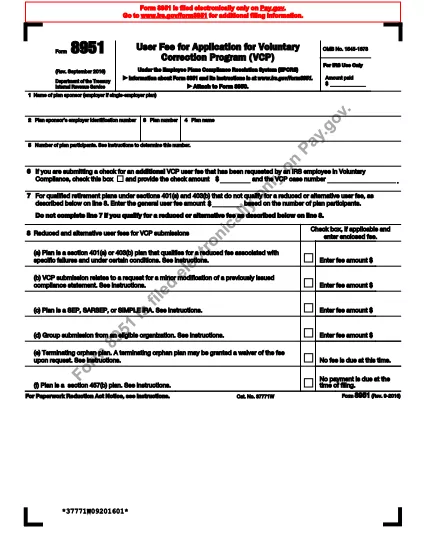
Form 8951 is the official IRS document used to calculate the compliance fee required for a Voluntary Correction Program (VCP) submission under the Employee Plans Compliance Resolution System. Whether you’re a plan sponsor, administrator, or tax professional, our fillable PDF lets you complete the form quickly and accurately.

What Is Form 8951?

The form captures basic plan information – sponsor name, EIN, plan number, participant count, and the applicable fee schedule. It is required whenever you submit a VCP request to correct plan failures.

How to Fill Out Form 8951 Online

Instead of downloading the PDF and using a separate editor, simply click the “Fill out this form” button on this page. The Formize PDF Filler app will open in your browser, and you can start typing immediately.

  • Enter the plan sponsor’s name and EIN.
  • Provide the plan number and plan name.
  • Enter the total number of participants from your most recent Form 5500.
  • Select the correct compliance fee from the schedule shown on lines 7‑8.
  • Check any applicable exception boxes.

Common Mistakes to Avoid

  • Leaving the participant count blank – the IRS will reject the VCP request.
  • Using an outdated fee schedule – always refer to the latest IRS instructions.
  • Misspelling the plan sponsor’s EIN – double‑check the nine‑digit number.
  • Forgetting to sign the form – the electronic signature is captured by the filler.

Download and Save Your Completed Form

After you review all entries, click Save to download a completed PDF, or choose Email to send it directly to your tax advisor or the IRS. Your data stays secure, and no extra software is required.

자주하는 질문
  • What is the purpose of Form 8951?

    Form 8951 is used to calculate and submit the compliance fee that accompanies a Voluntary Correction Program (VCP) request for employee benefit plans.

  • Do I need a separate PDF editor to complete Form 8951?

    No. With Formize you can fill out the form directly in your web browser—no extra software required.

  • Can I submit Form 8951 electronically to the IRS?

    The IRS still requires a printed and signed PDF, but you can print the completed form directly from the filler and mail it with your VCP package.

  • What fee schedule should I use on line 7?

    Use the fee schedule in the current IRS instructions for Form 8951, which is based on the total number of plan participants reported on your latest Form 5500.

  • Is my data safe while using the Formize filler?

    Yes. Formize uses SSL encryption, and the data is processed only in your browser until you choose to save or email the final PDF.

  • Can I save my progress and finish later?

    The online filler lets you download a partially completed PDF at any time, so you can resume editing later.

  • What common errors cause the IRS to reject a VCP submission?

    Missing participant count, incorrect EIN, outdated fee schedule, and unsigned forms are the top reasons for rejection.

  • Where can I find the official instructions for Form 8951?

    The official IRS instructions are included in the PDF linked below and on the IRS website.

어떻게

5개의 간단한 단계를 통해 온라인으로 Form 8951를 무료로 작성하는 방법:

  1. 1
    Click the “Fill out this form” button
    Locate the bright button on the page and click it. The Formize PDF Filler will launch in a new browser tab.
  2. 2
    Wait for the filler to load
    The app loads in a few seconds. You’ll see the Form 8951 template with editable fields.
  3. 3
    Enter required information
    Type directly into each field – sponsor name, EIN, plan number, participant count, and fee selection.
  4. 4
    Review and sign
    Double‑check all entries, then use the built‑in e‑signature field to sign the form.
  5. 5
    Save or email the completed PDF
    Choose “Save” to download the finished PDF or “Email” to send it directly to your advisor or the IRS.
Formize PDF 필러 앱
에 대한

세금 양식

Form 8951는 개인 또는 기업의 소득, 공제 및 납세 의무에 대한 정보를 관련 세무 당국에 보고하는 데 사용되는 문서인 세금 양식 중 하나입니다. 이 양식은 세법을 준수하고 납세 의무를 이행하는 데 필요합니다. 세금 양식은 국가 및 특정 세금 요건에 따라 다릅니다. 다음은 몇 가지 일반적인 세금 양식 유형입니다.

개인 세금 양식: 이 양식은 개인 납세자가 개인 소득과 청구 공제, 공제 및 면제를 신고하는 데 사용됩니다. 예를 들어 미국의 1040 양식 또는 영국의 자진 신고서 양식이 있습니다.

사업세 양식: 사업세 양식은 회사, 파트너십 또는 자영업자가 사업 소득, 비용 및 기타 세금 관련 정보를 보고하는 데 사용됩니다. 예를 들어 미국의 Schedule C 양식(사업 이익 또는 손실) 또는 영국의 CT600 양식(회사 세금 신고서)이 있습니다.

급여 세금 양식: 이 양식은 고용주가 직원의 급여에서 원천징수된 임금, 급여 및 세금을 보고하는 데 사용됩니다. 예를 들어 미국의 W-2 양식 또는 영국의 P60 양식이 있습니다.

판매세 양식: 판매세 양식은 기업이 과세 대상 상품이나 서비스에 대해 징수한 판매세를 신고하고 송금하는 데 사용됩니다. 구체적인 판매세 양식은 관할권에 따라 다릅니다.

부가가치세(VAT) 양식: VAT 양식은 판매 시 징수된 VAT를 신고 및 납부하고 구매 시 VAT 공제를 청구하기 위해 부가가치세를 부과하는 국가에서 사용됩니다. 그 예로는 많은 국가에서 사용되는 VAT 신고 양식이 있습니다.

추정 세금 양식: 추정 세금 양식은 자영업 소득, 투자 소득 등 원천징수 대상이 아닌 소득에 대한 추정세를 신고하고 납부하는 데 사용됩니다.

이는 존재할 수 있는 수많은 세금 양식 중 몇 가지 예일 뿐입니다. 필요한 특정 양식은 해당 국가 또는 관할권의 세법 및 규정에 따라 다릅니다. 귀하의 상황에 어떤 양식이 적용되는지 결정하려면 세무 당국의 지침을 참조하거나 전문가의 조언을 구하는 것이 중요합니다.

특징

PDF 필러

온라인에서 PDF 양식을 채우는 가장 쉬운 방법

  • Form 8951를 빠르게 작성하세요.
    온라인에서 Form 8951을(를) 빠르게 채우는 방법을 찾고 계십니까? 온라인 무료 PDF 양식 필러를 사용하면 1분 이내에 이 PDF 문서를 편집하고 채우는 방법을 알 수 있습니다.
  • 사용하기 쉬운 온라인 PDF 편집기
    다시 스캔하여 다시 보내기 전에 편집할 수 있도록 PDF 파일을 인쇄하는 데 지쳤습니까? 온라인에서 무료로 PDF 문서를 편집하세요. 온라인 PDF 편집기를 사용하여 시간과 종이를 절약하십시오.
  • 훌륭한 도구, 모든 플랫폼
    Mac에서 Form 8951를 채우는 방법이나 PDF 필러를 무료로 사용하는 방법이 궁금하십니까? 당사의 온라인 PDF 도구는 모든 플랫폼에서 작동합니다.
  • 안전한 파일 저장
    완료된 "Form 8951" 파일은 Amazon 클라우드 호스팅에서 관리하는 보안 데이터베이스에 저장됩니다. 언제든지 시스템에서 파일을 삭제할 수 있습니다. 어쨌든 이러한 파일은 24시간 후에 자동으로 삭제됩니다.
  • Form 8951님과 채팅
    무료 PDF 리더 도우미인 Chatize에서 "Form 8951"와 채팅하세요. "Form 8951"에서 질문하고 답변을 받으세요. 위의 문서와 채팅 버튼을 클릭하세요.

필링 세션 삭제

선택한 필링 세션을 삭제하시겠습니까?이 경우 양식 작성 진행 상황이 손실됩니다.

편집 세션 삭제

선택한 편집 세션을 삭제하시겠습니까? 이 경우 양식 작성 및 편집 진행 상황이 손실됩니다.