
언어 선택

IRS Form 966 – Fillable PDF for Corporate Dissolution & Liquidation

  1. 국가 미국
  2. 언어 영어
  3. 활동 구실
  4. 부서 국세청
IRS Form 966 – Fillable PDF for Corporate Dissolution & Liquidation

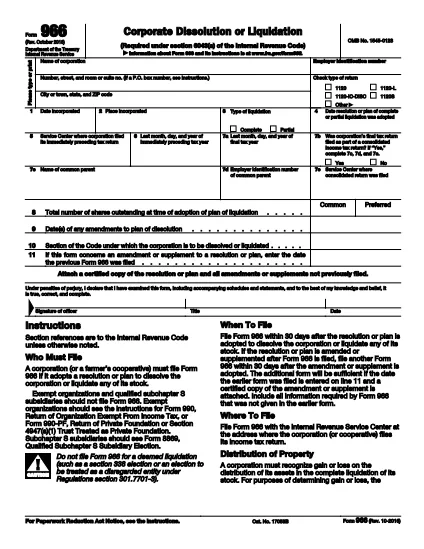
Form 966 is the official IRS document used by a corporation or a farmer’s cooperative to report a resolution or plan to dissolve, liquidate, or otherwise terminate its business. The form must be filed within 30 days of adopting the dissolution plan.

What Is Form 966?

Form 966 collects basic corporate information, the type of liquidation (partial or complete), the adoption date of the resolution, and the IRS service center where the last tax return was filed. It is a single‑page form, making it straightforward to complete when you have the right data.

Who Must File Form 966?

  • Any corporation (including S‑corporations) that adopts a plan to dissolve or liquidate its stock.
  • Farmer’s cooperatives that are winding down operations.
  • Entities that file a final tax return under IRC §6043(a).

How to Complete the Fillable PDF

Instead of printing, editing, and rescanning, use our fillable PDF powered by Formize. Follow these simple steps:

  1. Click the Fill out this form button on the page.
  2. Wait for the Formize PDF Filler app to load – it runs directly in your browser.
  3. Enter the requested information in each field (name, EIN, liquidation type, dates, etc.).
  4. Review the completed form, then click Save or Print to generate a PDF you can submit to the IRS.

Common Mistakes to Avoid

  • Missing dates: Ensure the adoption date and final tax year dates match your corporate records.
  • Incorrect EIN: Double‑check the Employer Identification Number; a typo can delay processing.
  • Wrong liquidation type: Choose “partial” or “complete” accurately; the IRS uses this to determine tax treatment.
  • Signature omission: An authorized officer must sign; electronic signatures are accepted if the PDF supports them.

Download & Fill the Form Instantly

Ready to get started? Click the button below to open the fillable version of Form 966. No software download, no paper copies—just a quick, secure way to meet your filing deadline.

자주하는 질문
  • When must Form 966 be filed?

    Form 966 must be filed within 30 days after the corporation adopts a resolution or plan to dissolve or liquidate.

  • Can I file Form 966 electronically?

    The IRS does not accept electronic filing for Form 966; however, you can complete the form online with our fillable PDF, then mail the printed copy.

  • Do I need a signature on Form 966?

    Yes. An authorized corporate officer (president, secretary, treasurer, etc.) must sign the form. Electronic signatures are acceptable if the PDF supports them.

  • What if the dissolution plan changes after filing?

    If the plan is amended or supplemented, you must file a new Form 966 within 30 days of the amendment.

  • Is Form 966 required for a partial liquidation?

    Yes. Both partial and complete liquidations require Form 966 to notify the IRS of the corporate restructuring.

  • Where do I send the completed Form 966?

    Send the signed form to the IRS Service Center where the corporation filed its most recent tax return (see line 5 of the form).

  • Can I use the same Form 966 for multiple shareholders?

    Form 966 is filed by the corporation, not individual shareholders. Shareholders receive separate tax documents based on the liquidation.

어떻게

3개의 간단한 단계를 통해 온라인으로 IRS Form 966를 무료로 작성하는 방법:

  1. 1
    Open the Fillable Form
    Click the “Fill out this form” button on the page to launch the Formize PDF Filler directly in your browser.
  2. 2
    Enter Your Information
    Fill each field with the corporation’s details, liquidation type, dates, and EIN. The interface guides you field‑by‑field.
  3. 3
    Save, Print, and Submit
    When all sections are complete, click Save to download the finished PDF or Print to send a hard copy to the IRS service center.
Formize PDF 필러 앱
에 대한

국세청(IRS) 양식

IRS Form 966는 미국에서 소득 신고, 공제 및 세액공제 청구, 납세 의무 계산, 기타 세금 관련 의무 이행에 사용되는 공식 세금 양식 중 하나입니다. IRS는 미국 내 수입법을 관리하고 집행하는 연방 기관입니다.

다음은 국세청 양식의 몇 가지 예입니다.

양식 1040: 이는 대부분의 납세자가 사용하는 기본 개인 소득세 신고 양식입니다. 이는 다양한 유형의 소득을 신고하고, 공제 및 세액공제를 청구하고, 납세 의무를 계산하고, 납세자가 추가 세금을 납부해야 하는지 또는 환급받을 자격이 있는지 여부를 결정하는 데 사용됩니다.

양식 1099: 양식 1099에는 1099-MISC, 1099-INT, 1099-DIV 등. 이 양식은 자영업 등 고용 이외의 다양한 출처에서 개인이나 기업이 받은 소득을 신고하는 데 사용됩니다. 소득, 이자소득, 배당소득, 임대소득이 있습니다.

양식 W-2: 이 양식은 고용주가 직원에게 지급한 임금과 세금을 신고하는 데 사용됩니다. 급여에서 원천징수됩니다. 직원들은 양식 W-2의 정보를 사용하여 개인 세금 신고서를 작성합니다.

양식 941: 고용주는 이 양식을 사용하여 원천징수된 연방 소득세, 사회보장세, 메디케어 세금을 포함하여 직원에 대한 고용세를 신고합니다.

양식 1065: 이 양식은 파트너십이 소득, 공제 및 납세 의무를 신고하는 데 사용됩니다. 파트너십 자체는 소득세를 납부하지 않습니다. 대신 파트너는 개인 세금 신고서에 파트너십 소득 지분을 보고합니다.

양식 1120: 이는 C 기업이 소득을 보고하기 위해 사용하는 법인 소득세 신고서입니다. 공제 및 세금 책임.

양식 990: 이 양식은 비영리 단체 및 자선 단체와 같은 면세 조직에서 다음을 수행하는 데 사용됩니다. 재무 정보, 활동 및 세법 준수 여부를 보고합니다.

양식 8862: 이 양식은 이전에 근로소득세액공제(EITC)를 신청한 납세자가 사용합니다. 하지만 허용되지 않았는데 이제 다시 소유권을 주장하고 싶습니다.

이는 다양한 세금 관련 의무를 이행하기 위해 존재하는 수많은 IRS 양식 중 몇 가지 예일 뿐입니다. 개인이나 사업체에 필요한 특정 양식은 고유한 상황, 소득원 및 공제액에 따라 다릅니다. 특정 IRS에 관한 정확한 최신 정보를 얻으려면 국세청 공식 웹사이트(www.irs.gov)를 참조하거나 세무 전문 조언을 구하는 것이 좋습니다. 귀하의 세금 상황과 관련된 양식입니다.

특징

PDF 필러

온라인에서 PDF 양식을 채우는 가장 쉬운 방법

  • IRS Form 966를 빠르게 작성하세요.
    온라인에서 IRS Form 966을(를) 빠르게 채우는 방법을 찾고 계십니까? 온라인 무료 PDF 양식 필러를 사용하면 1분 이내에 이 PDF 문서를 편집하고 채우는 방법을 알 수 있습니다.
  • 사용하기 쉬운 온라인 PDF 편집기
    다시 스캔하여 다시 보내기 전에 편집할 수 있도록 PDF 파일을 인쇄하는 데 지쳤습니까? 온라인에서 무료로 PDF 문서를 편집하세요. 온라인 PDF 편집기를 사용하여 시간과 종이를 절약하십시오.
  • 훌륭한 도구, 모든 플랫폼
    Mac에서 IRS Form 966를 채우는 방법이나 PDF 필러를 무료로 사용하는 방법이 궁금하십니까? 당사의 온라인 PDF 도구는 모든 플랫폼에서 작동합니다.
  • 안전한 파일 저장
    완료된 "IRS Form 966" 파일은 Amazon 클라우드 호스팅에서 관리하는 보안 데이터베이스에 저장됩니다. 언제든지 시스템에서 파일을 삭제할 수 있습니다. 어쨌든 이러한 파일은 24시간 후에 자동으로 삭제됩니다.
  • IRS Form 966님과 채팅
    무료 PDF 리더 도우미인 Chatize에서 "IRS Form 966"와 채팅하세요. "IRS Form 966"에서 질문하고 답변을 받으세요. 위의 문서와 채팅 버튼을 클릭하세요.

필링 세션 삭제

선택한 필링 세션을 삭제하시겠습니까?이 경우 양식 작성 진행 상황이 손실됩니다.

편집 세션 삭제

선택한 편집 세션을 삭제하시겠습니까? 이 경우 양식 작성 및 편집 진행 상황이 손실됩니다.