
언어 선택

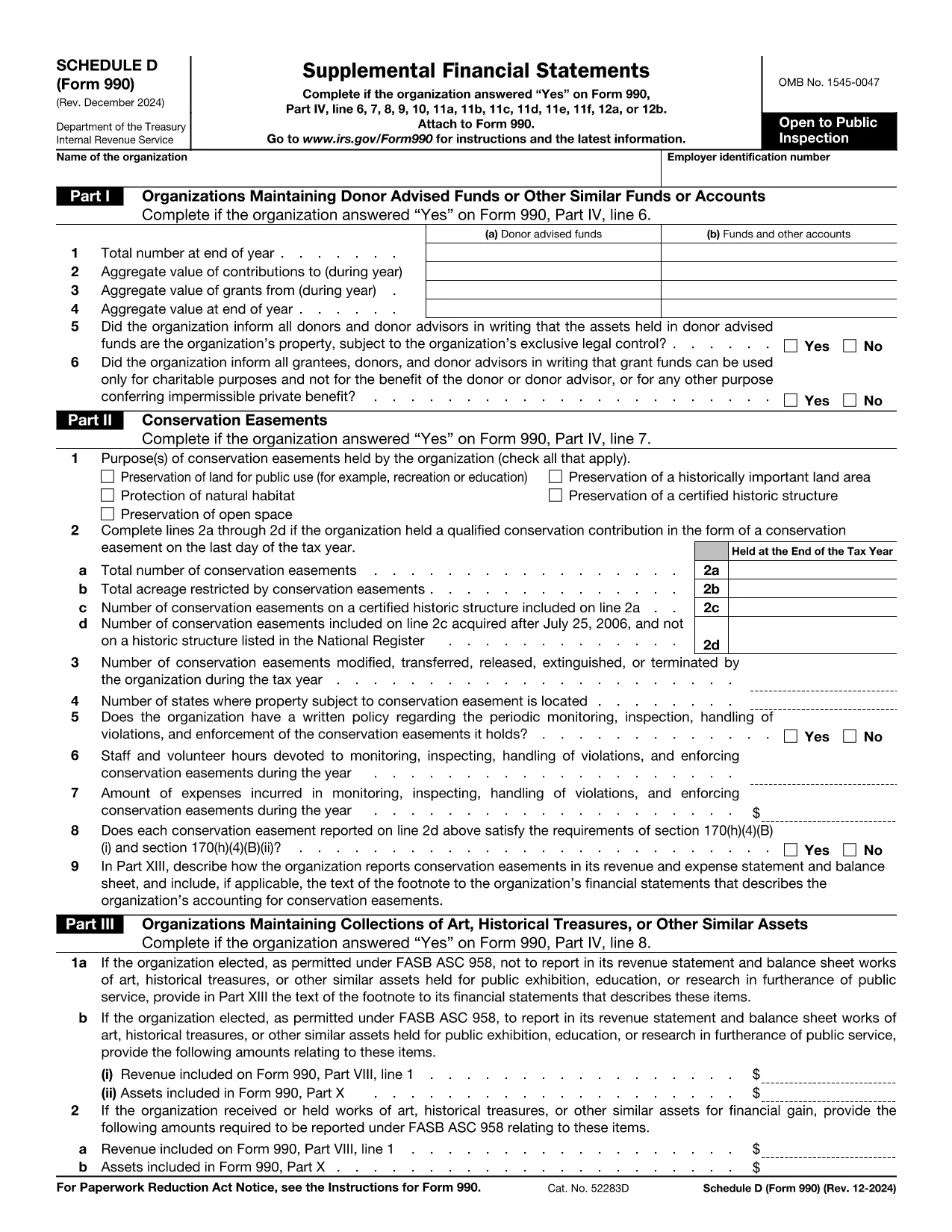
IRS Form 990 Schedule D – Fillable PDF

  1. 국가 미국
  2. 언어 영어
  3. 활동 구실
  4. 부서 국세청
IRS Form 990 Schedule D – Fillable PDF

Schedule D is the supplemental attachment to the IRS Form 990 that tax‑exempt organizations use to disclose detailed information about donor‑advised funds, conservation easements, art collections, and other special assets. Getting the correct, up‑to‑date fillable PDF and completing it accurately is essential for compliance.

What Is Schedule D (Form 990)?

Schedule D (Form 990) provides the Internal Revenue Service with supplemental financial statements. It covers:

  • Donor‑advised funds and similar accounts
  • Conservation easements
  • Collections of art, historical treasures, or other valuable assets
  • Endowment, escrow, and custodial arrangements

How to Fill Schedule D Directly on Formize

Instead of downloading the PDF and opening a separate editor, simply click the "Fill out this form" button on this page. The Formize PDF Filler app will load in your browser, letting you complete every field online.

Common Mistakes to Avoid

  • Skipping Part I questions – the IRS cross‑checks these answers with the main Form 990.
  • Incorrect EIN formatting – use nine digits without dashes.
  • Leaving supplemental narrative sections blank when the schedule asks for explanations.
  • Not signing the form – the digital signature is required before submission.

Download the Official Fillable PDF

If you prefer to work offline, you can download the official Schedule D PDF directly from the IRS:

Download Form 990 Schedule D (PDF)

Frequently Asked Questions

Below are the most common questions nonprofit professionals ask about Schedule D.

자주하는 질문
  • Do I need Schedule D if I file Form 990‑EZ?

    No. Schedule D is only required when filing the full Form 990. Organizations filing Form 990‑EZ or Form 990‑N do not attach Schedule D.

  • What types of assets must be reported on Schedule D?

    Donor‑advised funds, conservation easements, art or historical collections, endowment funds, and any escrow or custodial arrangements must be disclosed.

  • Can I edit the PDF after I download it?

    Yes, but the easiest method is to use the Formize online filler, which saves changes automatically and provides a secure digital signature.

  • How long do I have to keep a copy of Schedule D?

    Nonprofit organizations must retain a copy of all filed schedules for at least three years from the filing date.

  • What are the penalties for not filing Schedule D when required?

    Failure to file can result in monetary penalties and may jeopardize the organization’s tax‑exempt status.

  • Is there a fee to use the Formize PDF Filler?

    Formize provides free access to fill out Schedule D online; no hidden fees are charged for the basic filling and download features.

  • Where should I mail the completed Schedule D?

    Schedule D is filed together with the main Form 990 at the address listed in the Form 990 instructions for your filing type.

어떻게

5개의 간단한 단계를 통해 온라인으로 Form 990 Schedule D를 무료로 작성하는 방법:

  1. 1
    Click the Fill‑out Button
    Press the bright “Fill out this form” button on this page to launch the Formize PDF Filler.
  2. 2
    Wait for the Filler to Load
    The web‑based filler loads in seconds. No download or installation is required.
  3. 3
    Enter All Required Information
    Complete each section—organization name, EIN, and all Part I‑XIII questions—using the on‑screen fields.
  4. 4
    Review and Add a Digital Signature
    Use the built‑in signature tool to sign the form electronically. Review for accuracy before saving.
  5. 5
    Save, Download, or Submit
    When you’re done, click “Save” to store a copy, “Download” to get the completed PDF, or follow your organization’s submission process.
Formize PDF 필러 앱
에 대한

세금 양식

Form 990 Schedule D는 세금 관련 정보를 해당 세무 당국에 보고하는 데 사용되는 문서인 세금 양식 중 하나입니다. 납세자의 상황과 위치에 따라 연방, 주 및 지방 세금 양식을 포함하여 다양한 유형의 세금 양식이 있습니다.

특징

PDF 필러

온라인에서 PDF 양식을 채우는 가장 쉬운 방법

  • Form 990 Schedule D를 빠르게 작성하세요.
    온라인에서 Form 990 Schedule D을(를) 빠르게 채우는 방법을 찾고 계십니까? 온라인 무료 PDF 양식 필러를 사용하면 1분 이내에 이 PDF 문서를 편집하고 채우는 방법을 알 수 있습니다.
  • 사용하기 쉬운 온라인 PDF 편집기
    다시 스캔하여 다시 보내기 전에 편집할 수 있도록 PDF 파일을 인쇄하는 데 지쳤습니까? 온라인에서 무료로 PDF 문서를 편집하세요. 온라인 PDF 편집기를 사용하여 시간과 종이를 절약하십시오.
  • 훌륭한 도구, 모든 플랫폼
    Mac에서 Form 990 Schedule D를 채우는 방법이나 PDF 필러를 무료로 사용하는 방법이 궁금하십니까? 당사의 온라인 PDF 도구는 모든 플랫폼에서 작동합니다.
  • 안전한 파일 저장
    완료된 "Form 990 Schedule D" 파일은 Amazon 클라우드 호스팅에서 관리하는 보안 데이터베이스에 저장됩니다. 언제든지 시스템에서 파일을 삭제할 수 있습니다. 어쨌든 이러한 파일은 24시간 후에 자동으로 삭제됩니다.
  • Form 990 Schedule D님과 채팅
    무료 PDF 리더 도우미인 Chatize에서 "Form 990 Schedule D"와 채팅하세요. "Form 990 Schedule D"에서 질문하고 답변을 받으세요. 위의 문서와 채팅 버튼을 클릭하세요.

필링 세션 삭제

선택한 필링 세션을 삭제하시겠습니까?이 경우 양식 작성 진행 상황이 손실됩니다.

편집 세션 삭제

선택한 편집 세션을 삭제하시겠습니까? 이 경우 양식 작성 및 편집 진행 상황이 손실됩니다.