
언어 선택

IRS W‑4 Employee Tax Form – Fillable PDF Online

  1. 국가 미국
  2. 언어 영어
  3. 활동 구실
  4. 부서 국세청
IRS W‑4 Employee Tax Form – Fillable PDF Online

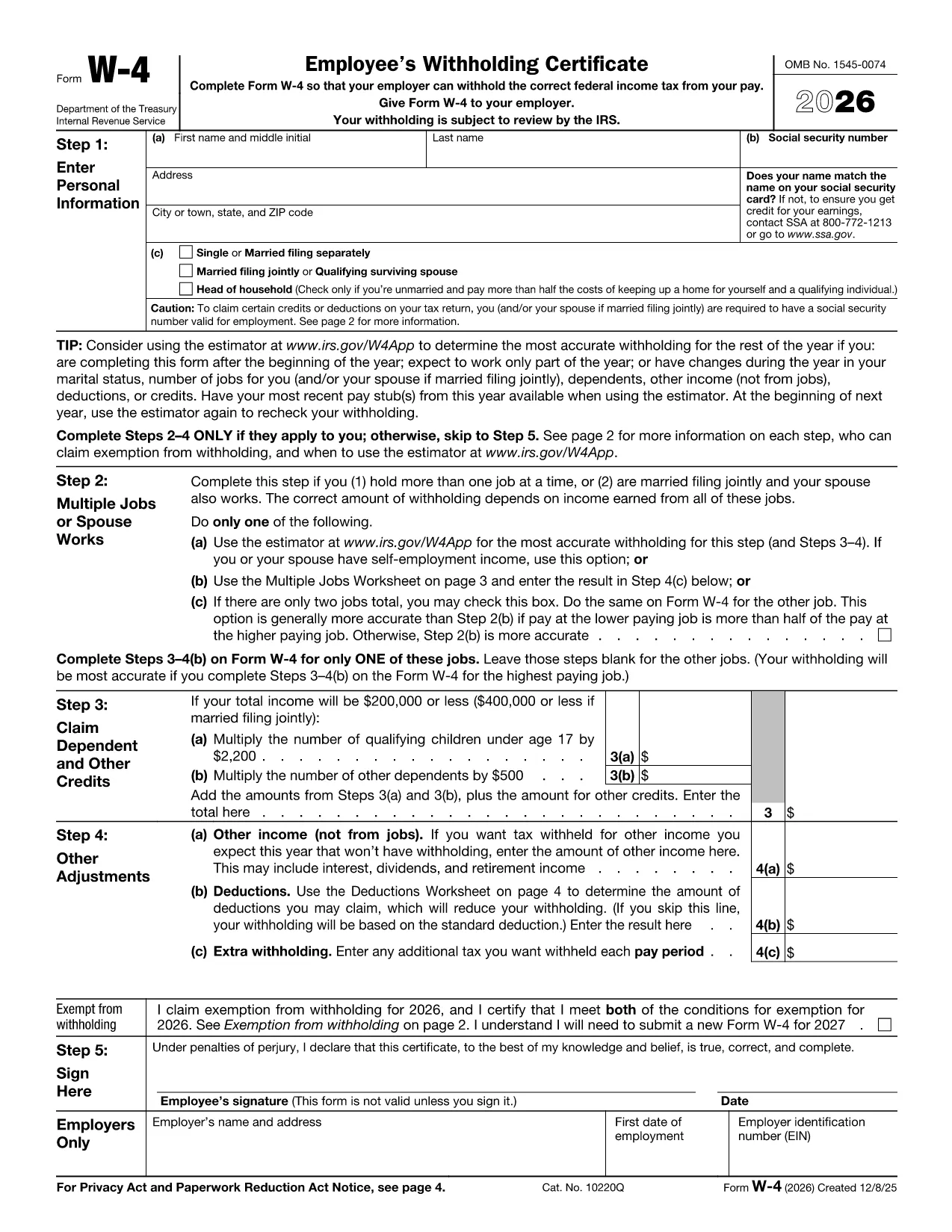
Employers require the IRS W‑4 employee tax form to determine the correct amount of federal income tax to withhold from each paycheck. Instead of printing, scanning, or struggling with a static PDF, you can fill out the official form directly in your browser using Formize’s online PDF filler.

Why Use the Fillable W‑4 Form?

  • Official source: The PDF is provided by the IRS, ensuring it meets the latest tax year requirements.
  • Fully fillable: All fields are interactive – no need for a separate editor.
  • Secure and private: Your data never leaves your device unless you choose to download or email the completed form.
  • Save time: Complete the form in minutes, then download or print the finished document.

How to Complete the W‑4 in Seconds

Follow the simple steps below and you’ll have a correctly completed W‑4 ready for your HR department.

Common Mistakes to Avoid

  • Leaving the Signature line blank – the form is invalid without a signature.
  • Incorrectly entering the number of dependents – double‑check the Dependents worksheet.
  • Forgetting to update the form when your life changes (marriage, new child, second job).

Where to Submit Your W‑4

After you download the completed PDF, give it to your employer’s payroll or HR department. Some companies also accept a secure email attachment.

Need More Help?

The IRS provides detailed instructions on the second page of the form. If you have specific tax‑withholding questions, consult a tax professional.

자주하는 질문
  • Is the IRS W‑4 form on Formize really free?

    Yes. The PDF is provided directly from the IRS website and the Formize filler is free to use for this form.

  • Do I need an Adobe Acrobat Reader to fill out the W‑4?

    No. The Formize online filler works in any modern browser, so you don’t need additional software.

  • Can I save my progress and finish later?

    Yes. While filling, click “Save” to download a partially completed PDF. Re‑upload it later to continue.

  • What if I make a mistake after I submit the form to my employer?

    Submit a new, corrected W‑4 to your HR department. The IRS allows you to update your withholding at any time.

  • Do I need to file the W‑4 with the IRS?

    No. The W‑4 is only for your employer’s payroll records. The IRS receives the information indirectly through your employer’s tax filings.

  • Is my personal data safe when I use Formize?

    Formize processes the PDF locally in your browser; no data is stored on our servers unless you choose to download or share the file.

어떻게

5개의 간단한 단계를 통해 온라인으로 W‑4 form를 무료로 작성하는 방법:

  1. 1
    Click the Fill‑out Button
    On this page, click the bright “Fill out this form” button. The Formize PDF Filler app will launch in a new tab.
  2. 2
    Wait for the Form to Load
    The official IRS W‑4 PDF loads automatically. All fields become interactive, ready for your input.
  3. 3
    Enter Your Information
    Type your name, address, Social Security number, filing status, and any adjustments. Use the built‑in calculator for dependents if needed.
  4. 4
    Review and Sign
    Double‑check every entry, then type your electronic signature in the signature box.
  5. 5
    Download or Print
    When you’re satisfied, click “Download PDF” to save a copy or “Print” to hand it directly to your employer.
Formize PDF 필러 앱
에 대한

세금 양식

W‑4 form는 세금 관련 정보를 해당 세무 당국에 보고하는 데 사용되는 문서인 세금 양식 중 하나입니다. 납세자의 상황과 위치에 따라 연방, 주 및 지방 세금 양식을 포함하여 다양한 유형의 세금 양식이 있습니다.

특징

PDF 필러

온라인에서 PDF 양식을 채우는 가장 쉬운 방법

  • W‑4 form를 빠르게 작성하세요.
    온라인에서 W‑4 form을(를) 빠르게 채우는 방법을 찾고 계십니까? 온라인 무료 PDF 양식 필러를 사용하면 1분 이내에 이 PDF 문서를 편집하고 채우는 방법을 알 수 있습니다.
  • 사용하기 쉬운 온라인 PDF 편집기
    다시 스캔하여 다시 보내기 전에 편집할 수 있도록 PDF 파일을 인쇄하는 데 지쳤습니까? 온라인에서 무료로 PDF 문서를 편집하세요. 온라인 PDF 편집기를 사용하여 시간과 종이를 절약하십시오.
  • 훌륭한 도구, 모든 플랫폼
    Mac에서 W‑4 form를 채우는 방법이나 PDF 필러를 무료로 사용하는 방법이 궁금하십니까? 당사의 온라인 PDF 도구는 모든 플랫폼에서 작동합니다.
  • 안전한 파일 저장
    완료된 "W‑4 form" 파일은 Amazon 클라우드 호스팅에서 관리하는 보안 데이터베이스에 저장됩니다. 언제든지 시스템에서 파일을 삭제할 수 있습니다. 어쨌든 이러한 파일은 24시간 후에 자동으로 삭제됩니다.
  • W‑4 form님과 채팅
    무료 PDF 리더 도우미인 Chatize에서 "W‑4 form"와 채팅하세요. "W‑4 form"에서 질문하고 답변을 받으세요. 위의 문서와 채팅 버튼을 클릭하세요.

필링 세션 삭제

선택한 필링 세션을 삭제하시겠습니까?이 경우 양식 작성 진행 상황이 손실됩니다.

편집 세션 삭제

선택한 편집 세션을 삭제하시겠습니까? 이 경우 양식 작성 및 편집 진행 상황이 손실됩니다.