
언어 선택

IRS Form W‑4S – Fillable PDF for Sick Pay Tax Withholding

  1. 국가 미국
  2. 언어 영어
  3. 활동 구실
  4. 부서 국세청
IRS Form W‑4S – Fillable PDF for Sick Pay Tax Withholding

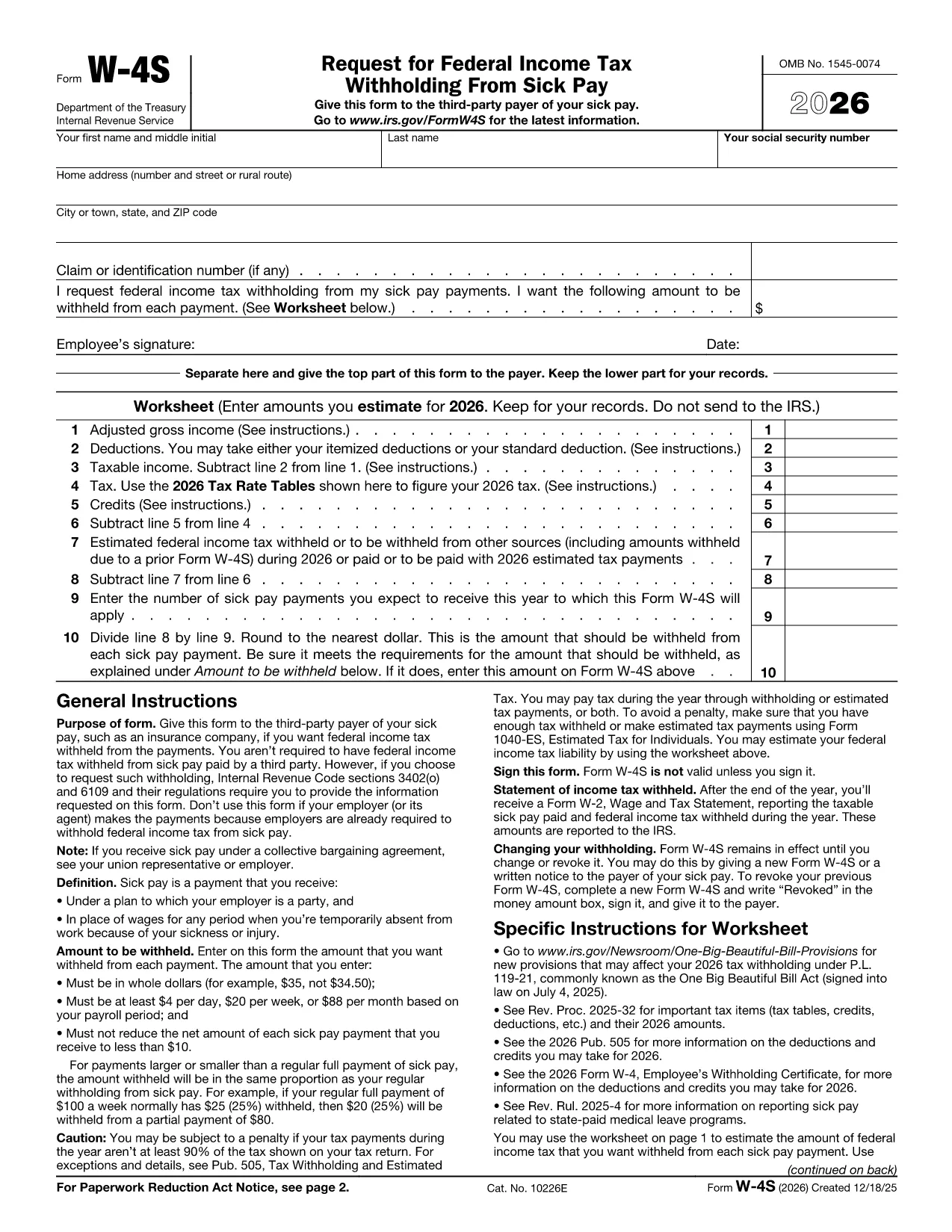
Form W‑4S, officially titled Request for Federal Income Tax Withholding From Sick Pay, is the IRS document you give to a third‑party payer (such as an insurance company) so that federal income tax can be withheld from your sick‑pay benefits.

What Is Form W‑4S?

This one‑page form has two parts: a Withholding Certificate that the payer keeps, and a Worksheet for your records. The certificate tells the payer how much tax you want taken out of each payment, while the worksheet helps you calculate the correct amount based on your projected income, deductions, and credits.

How to Complete Form W‑4S Online with Formize

Instead of downloading the PDF and editing it in a desktop program, you can fill it out instantly on our site:

  1. Click the **"Fill out this form"** button below.
  2. Wait a few seconds while the Formize PDF Filler app loads the official IRS PDF.
  3. Enter your personal information, Social Security number, and the exact dollar amount you want withheld.
  4. Complete the worksheet section to verify your calculation.
  5. Review the completed form, then click **Submit** to download a signed copy or print it for your payer.

When Should You Use Form W‑4S?

Use this form whenever you receive sick‑pay from a third‑party payer (e.g., an insurance carrier) and you want federal tax withheld. It is not required when the sick pay comes directly from your employer, because employers already withhold taxes.

Common Mistakes to Avoid

  • Entering amounts in cents – the IRS requires whole‑dollar amounts only.
  • Withholding less than the minimum: $4 per day, $20 per week, or $88 per month.
  • Reducing your net payment below $10 – the payer cannot withhold more than the payment allows.
  • Forgetting to sign and date the form – an unsigned form is invalid.

Where to Find Help

If you have questions about the calculations, consult the IRS instructions (linked on the form) or a tax professional. You can also review our detailed FAQ below.

자주하는 질문
  • Do I need to file Form W‑4S with the IRS?

    No. You give the completed certificate to the third‑party payer of your sick pay. Keep the worksheet for your records.

  • Can I change the withholding amount later?

    Yes. Submit a new Form W‑4S whenever your financial situation changes or you want a different withholding amount.

  • What is the minimum amount the IRS allows me to withhold?

    The minimum is $4 per day, $20 per week, or $88 per month. The payer cannot withhold less than these amounts.

  • Is the Formize filler truly free?

    Yes. Formize provides a free, secure online PDF filler for IRS forms, including Form W‑4S.

  • What if my sick‑pay provider is my employer?

    Employers already withhold federal tax from sick pay, so Form W‑4S is not required in that case.

  • Can I submit the form electronically to the payer?

    Most third‑party payers accept a printed copy. Check with your payer; some may allow a scanned PDF upload.

  • What happens if I withhold too much?

    Any excess tax withheld will be refunded to you when you file your annual tax return.

  • Do I need to attach the worksheet to the payer?

    No. The worksheet is for your personal records only; only the top part of the form goes to the payer.

어떻게

5개의 간단한 단계를 통해 온라인으로 Form W-4S를 무료로 작성하는 방법:

  1. 1
    Open the Fillable Form
    Click the **"Fill out this form"** button on the page. The Formize PDF Filler will open the official IRS Form W‑4S instantly.
  2. 2
    Enter Your Information
    Type your name, SSN, address, and the exact dollar amount you want withheld per payment.
  3. 3
    Complete the Worksheet
    Use the worksheet section to calculate your estimated tax based on projected income, deductions, and credits.
  4. 4
    Review and Sign
    Check all entries for accuracy, then add your electronic signature and date.
  5. 5
    Download or Print
    When you’re satisfied, click **Submit** to download the completed PDF or print it to give to your payer.
Formize PDF 필러 앱
에 대한

세금 양식

Form W-4S는 세금 관련 정보를 해당 세무 당국에 보고하는 데 사용되는 문서인 세금 양식 중 하나입니다. 납세자의 상황과 위치에 따라 연방, 주 및 지방 세금 양식을 포함하여 다양한 유형의 세금 양식이 있습니다.

특징

PDF 필러

온라인에서 PDF 양식을 채우는 가장 쉬운 방법

  • Form W-4S를 빠르게 작성하세요.
    온라인에서 Form W-4S을(를) 빠르게 채우는 방법을 찾고 계십니까? 온라인 무료 PDF 양식 필러를 사용하면 1분 이내에 이 PDF 문서를 편집하고 채우는 방법을 알 수 있습니다.
  • 사용하기 쉬운 온라인 PDF 편집기
    다시 스캔하여 다시 보내기 전에 편집할 수 있도록 PDF 파일을 인쇄하는 데 지쳤습니까? 온라인에서 무료로 PDF 문서를 편집하세요. 온라인 PDF 편집기를 사용하여 시간과 종이를 절약하십시오.
  • 훌륭한 도구, 모든 플랫폼
    Mac에서 Form W-4S를 채우는 방법이나 PDF 필러를 무료로 사용하는 방법이 궁금하십니까? 당사의 온라인 PDF 도구는 모든 플랫폼에서 작동합니다.
  • 안전한 파일 저장
    완료된 "Form W-4S" 파일은 Amazon 클라우드 호스팅에서 관리하는 보안 데이터베이스에 저장됩니다. 언제든지 시스템에서 파일을 삭제할 수 있습니다. 어쨌든 이러한 파일은 24시간 후에 자동으로 삭제됩니다.
  • Form W-4S님과 채팅
    무료 PDF 리더 도우미인 Chatize에서 "Form W-4S"와 채팅하세요. "Form W-4S"에서 질문하고 답변을 받으세요. 위의 문서와 채팅 버튼을 클릭하세요.

필링 세션 삭제

선택한 필링 세션을 삭제하시겠습니까?이 경우 양식 작성 진행 상황이 손실됩니다.

편집 세션 삭제

선택한 편집 세션을 삭제하시겠습니까? 이 경우 양식 작성 및 편집 진행 상황이 손실됩니다.