
언어 선택

Fillable Form W-8ECI – Claim Effectively Connected Income

  1. 국가 미국
  2. 언어 영어
  3. 활동 구실
  4. 부서 국세청
Fillable Form W-8ECI – Claim Effectively Connected Income

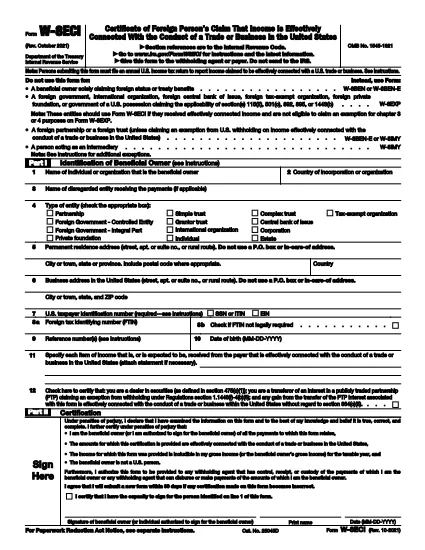
The IRS Form W-8ECI (Certificate of Foreign Person’s Claim That Income Is Effectively Connected With the Conduct of a Trade or Business in the United States) is required when a foreign individual or entity receives income that is effectively connected (ECI) with a U.S. trade or business. Using a fillable PDF saves time, reduces errors, and lets you submit the form electronically.

What Is Form W-8ECI?

Form W-8ECI certifies that the income you receive is ECI and therefore subject to regular U.S. income tax withholding rather than the 30% flat rate applied to non‑effectively connected payments. The form also provides the IRS with your taxpayer identification number (TIN) and details about the trade or business activities.

When and Who Must Use Form W-8ECI

  • Foreign individuals, corporations, partnerships, or trusts earning ECI from U.S. sources.
  • Payments such as rents, royalties, interest, or services that are connected to a U.S. trade or business.
  • When you are not eligible to claim a chapter 3 or 4 exemption on Form W-8EXP.

Step‑by‑Step Guide to Completing the Fillable PDF

Follow the simple steps below to fill out the form directly on our page without downloading any software.

Common Mistakes to Avoid

  • Leaving the U.S. TIN blank or entering an incorrect number.
  • Using the wrong version of the form (always choose the latest revision).
  • Failing to sign and date the form – an unsigned form is invalid.
  • Confusing “effectively connected income” with “portfolio interest” – the latter uses a different form.

Why Choose Formize’s Online PDF Filler

Our cloud‑based PDF Filler loads instantly, keeps your data secure, and lets you download a completed, IRS‑ready PDF in seconds. No extra plugins, no printing, no scanning.

지침

자주하는 질문
  • Do I need a U.S. Social Security Number to file Form W-8ECI?

    No. Foreign entities can use an Individual Taxpayer Identification Number (ITIN) or an Employer Identification Number (EIN) issued by the IRS.

  • How often must I renew Form W-8ECI?

    The form is valid until the end of the third calendar year after the year it was signed, unless a change in circumstances makes the information incorrect.

  • Can I use Form W-8ECI for royalty payments?

    Yes, if the royalties are derived from a trade or business in the United States and are considered ECI. Otherwise, a different form may be required.

  • What happens if I submit an unsigned Form W-8ECI?

    The payer must treat the payment as non‑effectively connected and apply the 30% withholding rate, which could result in over‑withholding.

  • Is the fillable PDF on Formize compliant with IRS standards?

    Absolutely. The PDF mirrors the official IRS version (Rev. October 2021) and meets all formatting and field requirements.

  • Can I edit the form after I download it?

    Yes, the downloaded PDF remains fully editable with any standard PDF editor, but it’s best to complete the form online to avoid errors.

  • Do I need to send Form W-8ECI to the IRS directly?

    No. The completed form is provided to the U.S. withholding agent or payer, who then forwards the necessary information to the IRS.

  • Is there a fee to use Formize’s PDF filler for Form W-8ECI?

    Formize offers this fillable version for free. No hidden charges or subscription are required.

어떻게

4개의 간단한 단계를 통해 온라인으로 W-8ECI form를 무료로 작성하는 방법:

  1. 1
    Open the Fillable Form
    Click the “Fill out this form” button on the page. The Formize PDF Filler app will load in your browser within a few seconds.
  2. 2
    Enter Your Information
    Complete each field – name, address, U.S. TIN, and details of the effectively connected income. All fields are interactive and validated.
  3. 3
    Review and Sign
    Use the built‑in signature tool to add your electronic signature, then double‑check that every required box is filled.
  4. 4
    Download or Submit
    When the form is complete, click “Download PDF” to save a copy for your records, or use the “Submit to IRS” option if your payer accepts electronic submission.
Formize PDF 필러 앱
에 대한

세금 양식

W-8ECI form는 관련 세무 당국에 소득, 공제 및 납세 의무를 신고하는 데 사용되는 문서인 세금 양식 중 하나입니다. 이 양식은 세금 신고 절차의 필수적인 부분이며 개인과 기업이 세법을 준수하고 납세 의무를 정확하게 계산하는 데 사용됩니다.

필요한 특정 세금 양식은 개인의 납세자 신분, 소득원, 국가의 세법 등의 요인에 따라 달라질 수 있습니다. 그러나 다음은 몇 가지 일반적인 유형의 세금 양식입니다.

개인 소득세 양식: 미국의 1040 시리즈와 같은 양식이 사용됩니다. 개인이 소득을 신고하고, 공제 및 세액공제를 청구하고, 납세 의무를 계산할 수 있습니다.

사업세 양식: 개인 사업자, 파트너십, 법인, 자영업자를 포함한 기업은 소득, 비용 및 납부해야 할 세금을 신고하기 위해 다양한 양식을 제출해야 할 수 있습니다. 예를 들면 일정 C(사업 이익 또는 손실) 및 양식 1120(미국 법인 소득세 신고서)이 있습니다.

고용세 양식: 고용주는 직원 임금을 신고하고 급여세를 원천징수 및 납부해야 합니다. W-2(임금 및 세금 명세서) 및 941(고용주의 분기별 연방 세금 신고서)과 같은 양식이 이러한 목적으로 사용됩니다.

투자 및 퇴직 계좌 양식: 이 양식은 투자 소득, 자본 이득, 손실은 물론 퇴직 계좌의 기부금과 분배금을 보고하는 데 사용됩니다. 예를 들면 양식 1099-DIV(배당금 및 분배금) 및 양식 5498(IRA 기부 정보).

재산 및 증여세 양식: 개인이 사망하거나 상당한 증여를 한 경우 Form 706(미국 유산(및 세대 생략 양도) 세금 신고) 및 Form 709(미국 증여(및 세대- Skipping Transfer) Tax Return)은 해당 유산세 또는 증여세를 보고하고 계산하는 데 사용됩니다.

세법과 양식은 시간이 지남에 따라 변경될 수 있다는 점을 유념하는 것이 중요합니다. 따라서 개인과 기업은 관련 세무 당국에 문의하거나 전문 세무 조언을 구하여 현재 요구 사항을 준수해야 합니다.

특징

PDF 필러

온라인에서 PDF 양식을 채우는 가장 쉬운 방법

  • W-8ECI form를 빠르게 작성하세요.
    온라인에서 W-8ECI form을(를) 빠르게 채우는 방법을 찾고 계십니까? 온라인 무료 PDF 양식 필러를 사용하면 1분 이내에 이 PDF 문서를 편집하고 채우는 방법을 알 수 있습니다.
  • 사용하기 쉬운 온라인 PDF 편집기
    다시 스캔하여 다시 보내기 전에 편집할 수 있도록 PDF 파일을 인쇄하는 데 지쳤습니까? 온라인에서 무료로 PDF 문서를 편집하세요. 온라인 PDF 편집기를 사용하여 시간과 종이를 절약하십시오.
  • 훌륭한 도구, 모든 플랫폼
    Mac에서 W-8ECI form를 채우는 방법이나 PDF 필러를 무료로 사용하는 방법이 궁금하십니까? 당사의 온라인 PDF 도구는 모든 플랫폼에서 작동합니다.
  • 안전한 파일 저장
    완료된 "W-8ECI form" 파일은 Amazon 클라우드 호스팅에서 관리하는 보안 데이터베이스에 저장됩니다. 언제든지 시스템에서 파일을 삭제할 수 있습니다. 어쨌든 이러한 파일은 24시간 후에 자동으로 삭제됩니다.
  • W-8ECI form님과 채팅
    무료 PDF 리더 도우미인 Chatize에서 "W-8ECI form"와 채팅하세요. "W-8ECI form"에서 질문하고 답변을 받으세요. 위의 문서와 채팅 버튼을 클릭하세요.

필링 세션 삭제

선택한 필링 세션을 삭제하시겠습니까?이 경우 양식 작성 진행 상황이 손실됩니다.

편집 세션 삭제

선택한 편집 세션을 삭제하시겠습니까? 이 경우 양식 작성 및 편집 진행 상황이 손실됩니다.