
언어 선택

Netherlands Schengen Visa Application – Fillable PDF Form

  1. 언어 영어
  2. 국가 네덜란드
  3. 부서 Immigration
  4. 활동 비자
Netherlands Schengen Visa Application – Fillable PDF Form

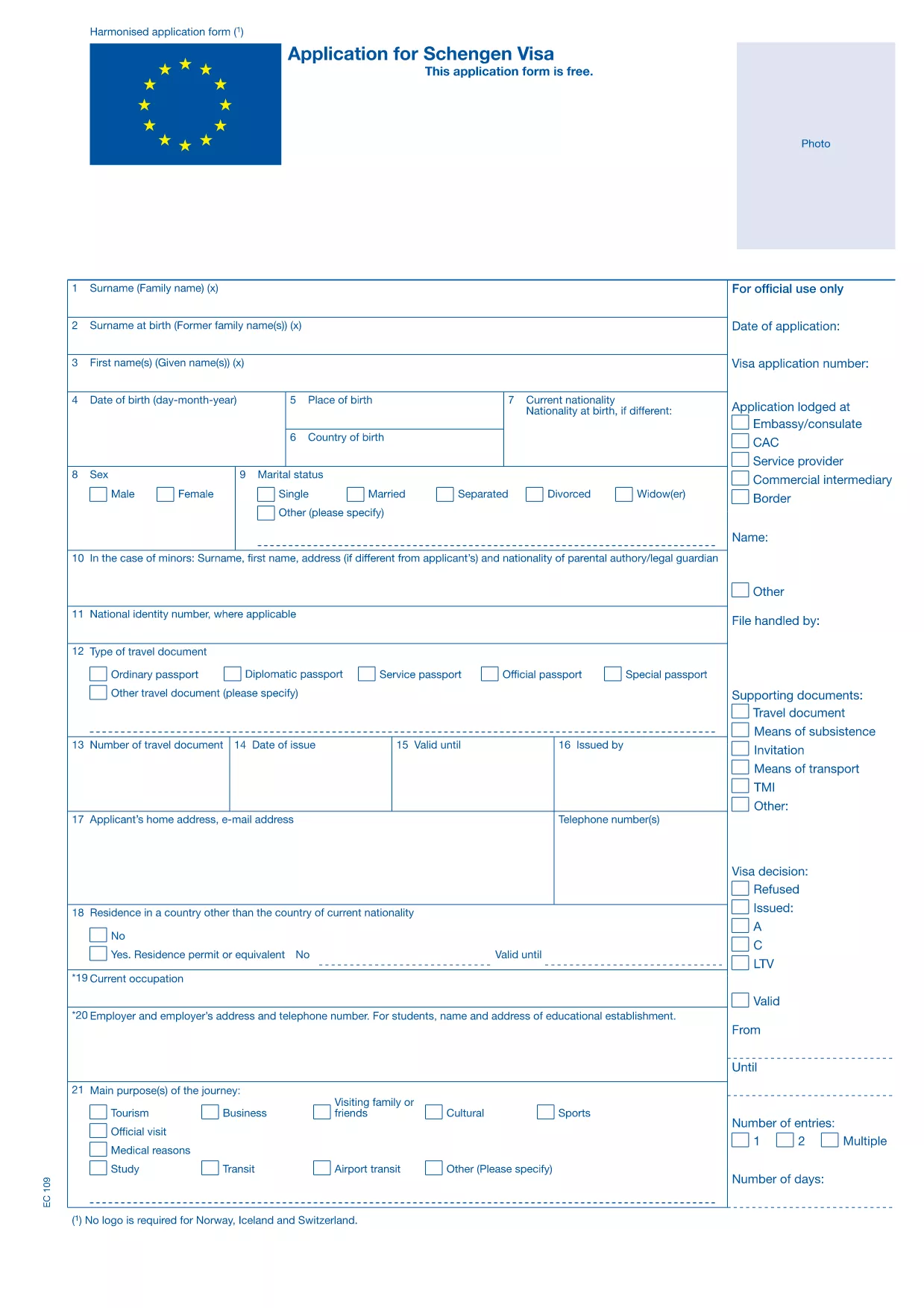
Planning a trip to the Netherlands? The first step is securing a Schengen visa. Our page offers the official, fillable Netherlands Schengen visa application PDF so you can complete the form quickly, accurately, and without printing.

Why Use the Official Fillable PDF?

The fillable version matches the exact layout required by Dutch consulates and VFS Global. It ensures that all mandatory fields are present, reduces the risk of rejected applications, and lets you save a digital copy for future reference.

How to Complete the Netherlands Schengen Visa Form Online

Follow the simple steps below – no PDF editor needed. Just click the button, let Formize load the PDF Filler, and start typing.

Common Mistakes to Avoid

  • Leaving any mandatory field blank.
  • Using a photo that doesn’t meet the Dutch specifications.
  • Entering dates that are inconsistent with your travel itinerary.
  • Signing the form in a decorative font.

Required Supporting Documents

Along with the completed form, you’ll need a valid passport, travel insurance, proof of accommodation, flight itinerary, and proof of financial means. Check the official checklist for a full list.

What Happens After You Submit the Form?

Save the filled PDF, print it, and bring it to your appointment at the Dutch embassy or VFS Global Visa Application Centre. The consular officer will verify the data and may request additional documents before issuing the visa.

자주하는 질문
  • Is the fillable PDF accepted by all Dutch consulates?

    Yes. The form follows the exact layout approved by the Netherlands Ministry of Foreign Affairs and is accepted at every Dutch embassy and VFS Global centre.

  • Can I edit the form after I download it?

    You can edit the PDF as long as you use a fillable‑PDF editor like Formize. Do not use a standard PDF reader that only allows viewing.

  • Do I need to attach a digital photo inside the PDF?

    No. The photo must be a separate passport‑type photo that you attach to your physical application packet.

  • How long does it take to fill out the form?

    Most applicants complete it in 10‑15 minutes. Allocate extra time if you need to gather travel details.

  • What should I do if I make a mistake after signing?

    Contact the visa centre for guidance. In many cases you can correct the error by re‑signing a new version of the form.

어떻게

4개의 간단한 단계를 통해 온라인으로 Schengen visa application Netherlands를 무료로 작성하는 방법:

  1. 1
    Click the Fillable Form Button
    Press the “Fill out this form” button on the page. Formize will open the PDF in its secure online filler.
  2. 2
    Enter Your Information
    Type directly into each field. The filler automatically saves your progress, so you won’t lose data.
  3. 3
    Review and Sign
    Check every entry for accuracy, then use the digital signature tool to sign the last page.
  4. 4
    Download or Print
    When you’re satisfied, download the completed PDF or print it for your visa appointment.
Formize PDF 필러 앱
에 대한

비자 양식

Schengen visa application Netherlands는 외국에 입국하기 위해 비자를 신청하는 데 사용되는 문서인 비자 양식 중 하나입니다. 비자는 외국인이 특정 기간 동안 외국에 입국, 체류 및 때때로 일할 수 있도록 허용하는 문서입니다. 비자 취득을 위한 정확한 양식과 요건은 국가와 비자 유형에 따라 다릅니다.

비자 양식에는 일반적으로 이름, 생년월일, 여권 정보와 같은 개인 정보는 물론 여행의 목적과 기간, 목적지, 신청자가 이전에 비자를 거부했거나 국가에서 추방되었는지 여부에 대한 정보가 필요합니다. 양식에는 여권, 사진, 재정 지원 증명서와 같은 지원 문서가 필요할 수도 있습니다.

미국에서 가장 일반적인 비자 양식은 DS-160 및 DS-260 양식입니다. DS-160 양식은 비이민 비자 신청에 사용되는 반면 DS-260 양식은 이민 비자 신청에 사용됩니다. 이러한 양식에는 신청자의 개인 및 여행 이력에 대한 자세한 정보와 여권, 여행 일정 및 재무 기록과 같은 지원 문서가 필요합니다.

다른 국가에서는 다양한 비자 양식과 요구 사항이 있을 수 있지만 기본 프로세스에는 일반적으로 비자 신청서 작성, 증빙 서류 제공, 미국 대사관 또는 영사관의 영사관과의 인터뷰 참석이 포함됩니다. 비자 신청 절차는 복잡하고 시간이 많이 소요될 수 있으므로 비자를 원하는 개인은 이민 변호사 또는 기타 자격을 갖춘 전문가와 상담하여 필요한 모든 양식과 요구 사항이 충족되었는지 확인하는 것이 좋습니다.

특징

PDF 필러

온라인에서 PDF 양식을 채우는 가장 쉬운 방법

  • Schengen visa application Netherlands를 빠르게 작성하세요.
    온라인에서 Schengen visa application Netherlands을(를) 빠르게 채우는 방법을 찾고 계십니까? 온라인 무료 PDF 양식 필러를 사용하면 1분 이내에 이 PDF 문서를 편집하고 채우는 방법을 알 수 있습니다.
  • 사용하기 쉬운 온라인 PDF 편집기
    다시 스캔하여 다시 보내기 전에 편집할 수 있도록 PDF 파일을 인쇄하는 데 지쳤습니까? 온라인에서 무료로 PDF 문서를 편집하세요. 온라인 PDF 편집기를 사용하여 시간과 종이를 절약하십시오.
  • 훌륭한 도구, 모든 플랫폼
    Mac에서 Schengen visa application Netherlands를 채우는 방법이나 PDF 필러를 무료로 사용하는 방법이 궁금하십니까? 당사의 온라인 PDF 도구는 모든 플랫폼에서 작동합니다.
  • 안전한 파일 저장
    완료된 "Schengen visa application Netherlands" 파일은 Amazon 클라우드 호스팅에서 관리하는 보안 데이터베이스에 저장됩니다. 언제든지 시스템에서 파일을 삭제할 수 있습니다. 어쨌든 이러한 파일은 24시간 후에 자동으로 삭제됩니다.
  • Schengen visa application Netherlands님과 채팅
    무료 PDF 리더 도우미인 Chatize에서 "Schengen visa application Netherlands"와 채팅하세요. "Schengen visa application Netherlands"에서 질문하고 답변을 받으세요. 위의 문서와 채팅 버튼을 클릭하세요.

필링 세션 삭제

선택한 필링 세션을 삭제하시겠습니까?이 경우 양식 작성 진행 상황이 손실됩니다.

편집 세션 삭제

선택한 편집 세션을 삭제하시겠습니까? 이 경우 양식 작성 및 편집 진행 상황이 손실됩니다.