
언어 선택

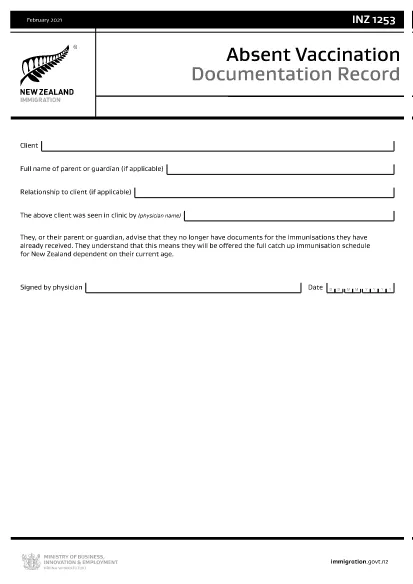
INZ1253 – Absent Vaccination Documentation Record (Fillable PDF)

  1. 언어 영어
  2. 국가 뉴질랜드
  3. 활동 건강
INZ1253 – Absent Vaccination Documentation Record (Fillable PDF)

The INZ1253 is the official Absent Vaccination Documentation Record used by Immigration New Zealand when an applicant cannot produce proof of previously received immunisations. This form allows the applicant (or a parent/guardian) to declare the missing records and request the appropriate catch‑up vaccination schedule.

What is the INZ1253 Form?

The form is required for anyone applying for a New Zealand visa or residency who does not have the original vaccination certificates. By completing INZ1253 you acknowledge that you will follow the full catch‑up immunisation schedule based on your age.

How to Complete the INZ1253 Online

Instead of downloading, printing, and scanning, you can fill out the form directly on our site:

  • Click the “Fill out this form” button below.
  • Wait a few seconds while the Formize PDF Filler app loads.
  • Enter the required information in the fillable fields (personal details, reason for missing records, etc.).
  • Save the completed PDF to your device or submit it directly to Immigration New Zealand.

Common Mistakes to Avoid

  • Leaving mandatory fields blank – the system will highlight any missing information before you can save.
  • Using an outdated version – always use the latest INZ1253 PDF provided below.
  • Incorrect date formats – follow the DD/MM/YYYY format as shown in the example.
  • Not signing the form – the electronic signature field must be completed before submission.

Where to Submit the Completed Form

After you have saved the filled PDF, attach it to your visa or residency application through the Immigration New Zealand online portal. If you are applying by paper, include the printed form with your supporting documents.

Need help? Review the FAQs below or contact Immigration New Zealand directly.

자주하는 질문
  • Do I need to print the INZ1253 form after filling it online?

    No. The Formize filler creates a fully signed PDF that can be uploaded directly to the Immigration New Zealand portal.

  • Can I edit the form after I have saved it?

    Yes. Open the saved PDF again with the Formize filler to make any changes, then re‑save.

  • What if I don’t have any vaccination records at all?

    Select “No records available” in the form and provide a brief explanation. You will be scheduled for the full catch‑up immunisation program.

  • Is the electronic signature legally accepted?

    Immigration New Zealand accepts electronic signatures on the INZ1253 when the form is completed using a certified PDF filler like Formize.

  • How long does it take for Immigration New Zealand to process the form?

    Processing times vary, but most applicants receive a response within 5‑10 business days after submission.

어떻게

4개의 간단한 단계를 통해 온라인으로 INZ1253를 무료로 작성하는 방법:

  1. 1
    Open the Fillable Form
    Click the “Fill out this form” button on the page. The Formize PDF Filler will launch in your browser.
  2. 2
    Enter Your Details
    Complete each highlighted field – personal information, reason for missing vaccination records, and any additional notes.
  3. 3
    Save or Submit
    When all required fields are filled, click “Save PDF” to download the completed form or use the built‑in “Submit” button to send it directly to Immigration New Zealand.
  4. 4
    Confirm Receipt
    Check your email or the immigration portal for a confirmation that the form has been received.
Formize PDF 필러 앱
에 대한

메디케어 신청서

INZ1253은(는) 주로 65세 이상 개인뿐만 아니라 장애가 있거나 특정 의료가 있는 특정 젊은 개인을 위한 미국의 연방 건강 보험 프로그램인 Medicare 프로그램의 관리에 사용되는 문서인 Medicare 양식 중 하나입니다. 정황. 이 양식은 Medicare 혜택 등록, 관리 및 이용과 관련된 다양한 목적으로 사용됩니다. 다음은 몇 가지 일반적인 메디케어 양식입니다:

메디케어 신청서: CMS-40B와 같은 이 양식은 파트 A(병원 보험) 및/또는 파트 B(의료 보험)를 포함한 메디케어 혜택을 신청하는 데 사용됩니다. 이름, 주소, 사회보장번호, 현재 건강 보험 보장에 관한 정보 등의 개인 정보가 필요합니다.

Medicare 등록 양식: 의료 서비스 제공자를 위한 CMS-855B와 같은 이 양식은 의료 전문가, 공급업체 및 조직이 Medicare 프로그램에 등록하는 데 사용됩니다. 이들은 제공자나 조직에 대한 정보와 메디케어 참여 자격에 대한 정보를 수집합니다.

메디케어 청구 양식: CMS-1500 또는 UB-04와 같은 이 양식은 메디케어 수혜자에게 제공된 의료 서비스에 대한 환급 청구를 제출하는 데 사용됩니다. 의료 서비스 제공자 또는 공급업체는 보장 서비스에 대한 지불을 요청하기 위해 이 양식을 작성합니다.

메디케어 처방약 플랜 양식: CMS-10260과 같은 이 양식은 메디케어 파트 D 처방약 플랜에 등록하거나 기존 플랜을 변경하는 데 사용됩니다. 수혜자가 복용하는 약품과 선호하는 약국에 대한 정보가 필요합니다.

Medicare 승인 양식: CMS-10114와 같은 이 양식은 Medicare 기록의 개인 건강 정보를 지정된 개인이나 조직에 공개하는 것을 승인하는 데 사용됩니다. 이를 통해 수혜자는 특정 목적을 위해 자신의 의료 기록에 대한 접근 권한을 부여할 수 있습니다.

Medicare 항소 양식: CMS-20027과 같은 이 양식은 청구가 거부되거나 Medicare 결정에 동의하지 않는 경우 항소를 요청하는 데 사용됩니다. 이는 수혜자 또는 그 대리인이 보장 범위 결정이나 지불 결정에 대한 검토를 구할 수 있는 프로세스를 제공합니다.

이는 존재하는 다양한 메디케어 형태의 몇 가지 예일 뿐입니다. 구체적인 양식과 요구 사항은 다를 수 있으므로 공식 Medicare 웹사이트를 참조하거나 Medicare 관리 당국에 문의하여 정확한 최신 정보를 확인하는 것이 중요합니다.

특징

PDF 필러

온라인에서 PDF 양식을 채우는 가장 쉬운 방법

  • INZ1253를 빠르게 작성하세요.
    온라인에서 INZ1253을(를) 빠르게 채우는 방법을 찾고 계십니까? 온라인 무료 PDF 양식 필러를 사용하면 1분 이내에 이 PDF 문서를 편집하고 채우는 방법을 알 수 있습니다.
  • 사용하기 쉬운 온라인 PDF 편집기
    다시 스캔하여 다시 보내기 전에 편집할 수 있도록 PDF 파일을 인쇄하는 데 지쳤습니까? 온라인에서 무료로 PDF 문서를 편집하세요. 온라인 PDF 편집기를 사용하여 시간과 종이를 절약하십시오.
  • 훌륭한 도구, 모든 플랫폼
    Mac에서 INZ1253를 채우는 방법이나 PDF 필러를 무료로 사용하는 방법이 궁금하십니까? 당사의 온라인 PDF 도구는 모든 플랫폼에서 작동합니다.
  • 안전한 파일 저장
    완료된 "INZ1253" 파일은 Amazon 클라우드 호스팅에서 관리하는 보안 데이터베이스에 저장됩니다. 언제든지 시스템에서 파일을 삭제할 수 있습니다. 어쨌든 이러한 파일은 24시간 후에 자동으로 삭제됩니다.
  • INZ1253님과 채팅
    무료 PDF 리더 도우미인 Chatize에서 "INZ1253"와 채팅하세요. "INZ1253"에서 질문하고 답변을 받으세요. 위의 문서와 채팅 버튼을 클릭하세요.

필링 세션 삭제

선택한 필링 세션을 삭제하시겠습니까?이 경우 양식 작성 진행 상황이 손실됩니다.

편집 세션 삭제

선택한 편집 세션을 삭제하시겠습니까? 이 경우 양식 작성 및 편집 진행 상황이 손실됩니다.