
언어 선택

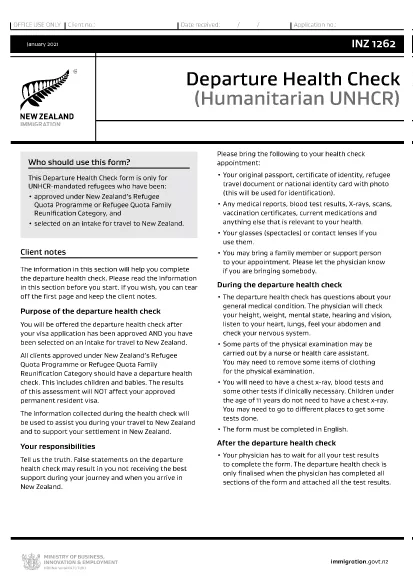
INZ1262 – Departure Health Check Form (Fillable PDF)

  1. 언어 영어
  2. 국가 뉴질랜드
  3. 활동 건강
INZ1262 – Departure Health Check Form (Fillable PDF)

The INZ1262 Departure Health Check is a mandatory form for UNHCR‑mandated refugees who have been approved for a New Zealand permanent‑resident visa under the Refugee Quota Programme or the Refugee Quota Family Reunification Category. It confirms that the applicant meets New Zealand's health requirements before travel.

What Is the INZ1262 Departure Health Check?

This form records medical examinations, vaccinations, and any health conditions that could affect entry into New Zealand. It must be completed by a qualified health professional and signed by the applicant.

How to Fill the INZ1262 Form Online

Instead of downloading the PDF and using a separate editor, simply click the "Fill out this form" button on this page. The Formize PDF Filler app will load the official INZ1262 document, allowing you to type directly into each field.

  • Step 1: Click the fillable‑PDF button.
  • Step 2: Wait a few seconds while Formize loads the form.
  • Step 3: Complete every required field using your keyboard or a touchscreen.
  • Step 4: Review the information for accuracy.
  • Step 5: Save or download the finished PDF to attach to your visa application.

Common Mistakes to Avoid

  • Leaving any mandatory field blank – the form will be rejected.
  • Using an outdated version of the PDF – always use the latest INZ1262 from the official link.
  • Providing incorrect passport or visa numbers.
  • Failing to sign the form digitally or print‑sign after download.

Download the Official INZ1262 PDF

If you prefer to work offline, you can download the official form directly from Immigration New Zealand:

Download INZ1262 PDF

Using Formize’s online filler ensures you always have the most current version and eliminates formatting errors.

자주하는 질문
  • Who needs to fill out the INZ1262 form?

    Any UNHCR‑mandated refugee approved for a New Zealand permanent‑resident visa under the Refugee Quota Programme or Family Reunification Category must complete the INZ1262.

  • Can I use a handwritten PDF?

    While a printed, handwritten form is accepted, a fillable PDF reduces errors and speeds up processing.

  • Do I need a medical practitioner’s signature?

    Yes. A qualified health professional must sign the sections that require medical verification.

  • What if I make a mistake after submitting?

    Contact Immigration New Zealand immediately. You may need to submit an amended form with a new reference number.

  • Is there a fee to use the Formize PDF Filler?

    No. Formize provides free online filling for this government form.

  • How long is the INZ1262 valid?

    The health check is valid for the duration of the visa processing period. If your travel is delayed beyond 12 months, a new health assessment may be required.

어떻게

5개의 간단한 단계를 통해 온라인으로 INZ1262를 무료로 작성하는 방법:

  1. 1
    Click the Fillable Form Button
    Press the "Fill out this form" button on the page to launch the Formize PDF Filler.
  2. 2
    Wait for the Form to Load
    The Formize app loads the official INZ1262 PDF within a few seconds.
  3. 3
    Complete All Required Fields
    Enter your personal details, medical information, and signatures directly in the browser.
  4. 4
    Review and Save
    Double‑check the entered data, then click "Save" to download the completed PDF.
  5. 5
    Submit with Your Visa Application
    Attach the saved INZ1262 PDF to your refugee visa file as instructed by Immigration New Zealand.
Formize PDF 필러 앱
에 대한

메디케어 신청서

Medicare 혜택을 신청할 수 있는 빠르고 간단한 방법을 제공하십시오. 온라인 메디케어 양식 템플릿의 도움으로 새로운 환자 기록을 설정하거나 환자의 병력에 대해 자세히 알아보는 것과 같은 절차가 훨씬 간단해졌습니다.

특징

PDF 필러

온라인에서 PDF 양식을 채우는 가장 쉬운 방법

  • INZ1262를 빠르게 작성하세요.
    온라인에서 INZ1262을(를) 빠르게 채우는 방법을 찾고 계십니까? 온라인 무료 PDF 양식 필러를 사용하면 1분 이내에 이 PDF 문서를 편집하고 채우는 방법을 알 수 있습니다.
  • 사용하기 쉬운 온라인 PDF 편집기
    다시 스캔하여 다시 보내기 전에 편집할 수 있도록 PDF 파일을 인쇄하는 데 지쳤습니까? 온라인에서 무료로 PDF 문서를 편집하세요. 온라인 PDF 편집기를 사용하여 시간과 종이를 절약하십시오.
  • 훌륭한 도구, 모든 플랫폼
    Mac에서 INZ1262를 채우는 방법이나 PDF 필러를 무료로 사용하는 방법이 궁금하십니까? 당사의 온라인 PDF 도구는 모든 플랫폼에서 작동합니다.
  • 안전한 파일 저장
    완료된 "INZ1262" 파일은 Amazon 클라우드 호스팅에서 관리하는 보안 데이터베이스에 저장됩니다. 언제든지 시스템에서 파일을 삭제할 수 있습니다. 어쨌든 이러한 파일은 24시간 후에 자동으로 삭제됩니다.
  • INZ1262님과 채팅
    무료 PDF 리더 도우미인 Chatize에서 "INZ1262"와 채팅하세요. "INZ1262"에서 질문하고 답변을 받으세요. 위의 문서와 채팅 버튼을 클릭하세요.

필링 세션 삭제

선택한 필링 세션을 삭제하시겠습니까?이 경우 양식 작성 진행 상황이 손실됩니다.

편집 세션 삭제

선택한 편집 세션을 삭제하시겠습니까? 이 경우 양식 작성 및 편집 진행 상황이 손실됩니다.