
언어 선택

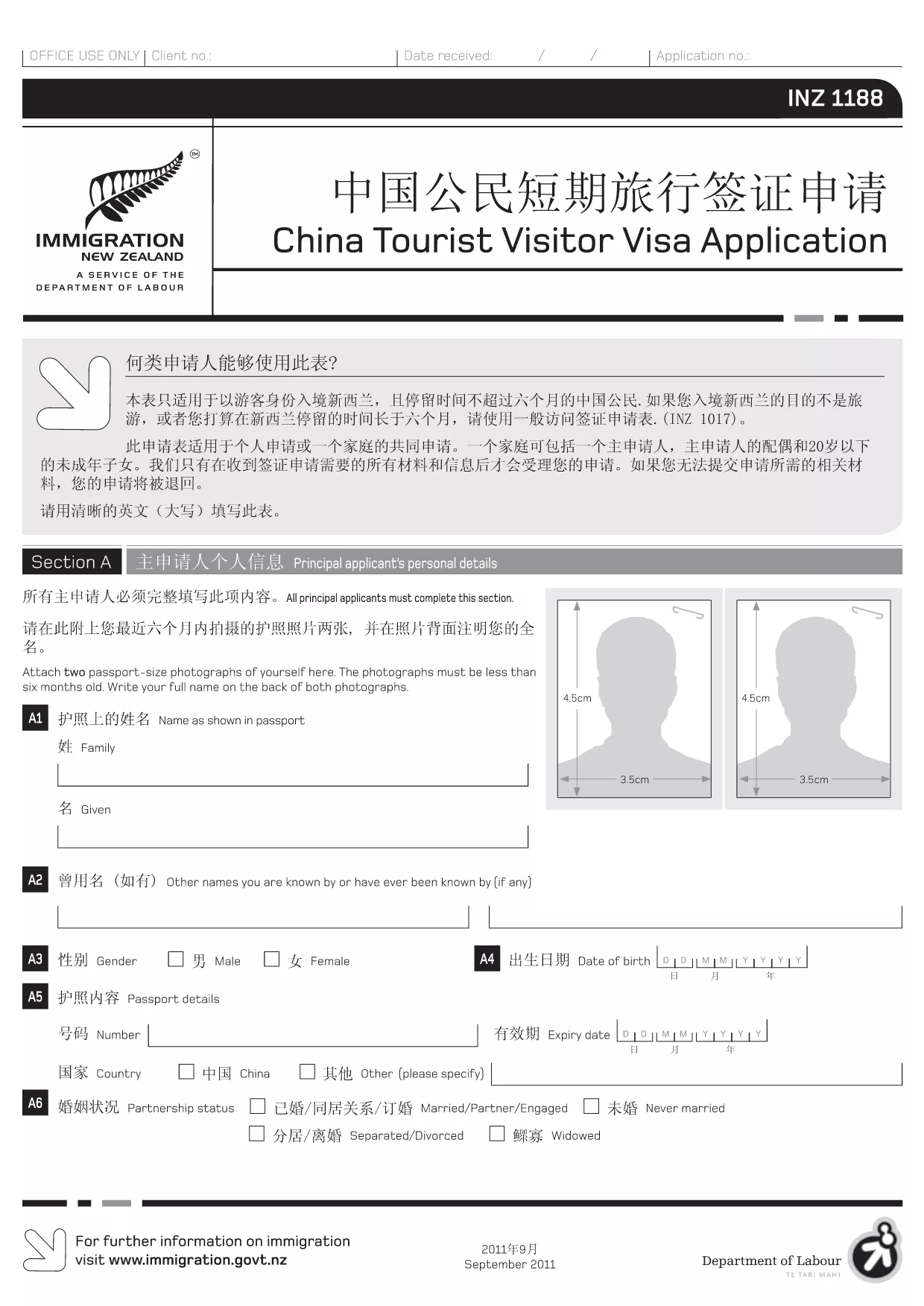
INZ 1188 Tourist Visitor Visa Application – Fillable PDF

  1. 언어 중국어 (간체) 영어
  2. 국가 뉴질랜드
  3. 활동 방문 및 관광 이민
INZ 1188 Tourist Visitor Visa Application – Fillable PDF

The INZ 1188 is the official application form for Chinese citizens applying for a short‑term tourist visa to New Zealand. With the Formize PDF Filler, you can fill out the form directly in your browser – no extra software required.

What is the INZ 1188 Form?

This form collects personal details, travel plans, health information, and a declaration by the applicant or an assisting person. It is used by Immigration New Zealand to assess eligibility for a visitor visa.

How to Complete the INZ 1188 Form Online

Follow these simple steps to fill the form quickly and accurately:

  • Click the "Fill out this form" button on this page.
  • Wait for the Formize PDF Filler app to load (usually a few seconds).
  • Enter your information in each fillable field. The interface highlights required fields.
  • Use the "Save" button to store progress or the "Download" button to get a completed PDF.

Common Mistakes to Avoid

  • Using lowercase letters in fields that require capital letters – the form validates case.
  • Leaving any required field blank; the filler will show an error before you can submit.
  • Providing outdated passport numbers – double‑check your passport before entering.
  • Skipping the declaration section (Section J). Both applicant and assisting person must sign.

Download & Fill the PDF Instantly

Our direct link gives you the latest official INZ 1188 PDF. The file is hosted by the New Zealand immigration authority and is fully compatible with the Formize online filler.

Where to Get Help

If you have questions about specific sections, consult the Immigration New Zealand website or contact the nearest New Zealand Visa Office. The Formize platform also provides inline tips for most fields.

자주하는 질문
  • Do I need to print the INZ 1188 form after filling it online?

    No. The Formize filler lets you download a completed PDF that you can submit electronically or print if required by the visa office.

  • Can I save my progress and finish later?

    Yes. Click the "Save" button to download a partially completed PDF. Re‑upload it later to continue editing.

  • What language should I use to fill the form?

    The official INZ 1188 form is in English. All fields must be completed in English, even if your native language is Chinese.

  • Is there a fee to use the Formize PDF Filler?

    No. Formize provides free online filling for this form. There may be visa processing fees charged by Immigration New Zealand.

  • What if I make a mistake after downloading the PDF?

    You can open the downloaded file in any PDF editor, correct the error, and re‑upload it if needed. Alternatively, start a new session with the filler.

  • Do I need a supporting letter from a New Zealand resident?

    Only if the visa category you are applying for requires sponsorship. The INZ 1188 form includes a section for a sponsor’s declaration.

어떻게

4개의 간단한 단계를 통해 온라인으로 INZ 1188를 무료로 작성하는 방법:

  1. 1
    Open the Fillable Form
    Click the "Fill out this form" button on this page. The Formize PDF Filler will open in a new tab.
  2. 2
    Load the PDF
    Wait a few seconds while the INZ 1188 PDF loads into the online editor.
  3. 3
    Enter Your Information
    Complete each highlighted field. Required fields are marked with an asterisk.
  4. 4
    Review and Save
    Use the "Review" button to check for missing data, then click "Save" or "Download" to get your finished PDF.
Formize PDF 필러 앱
에 대한

관광 형태

INZ 1188는 관광 목적으로 여행을 계획하는 개인 또는 단체가 사용하는 문서인 관광 양식 중 하나입니다. 이러한 양식은 목적지 국가 또는 여행 서비스 제공업체에 따라 다를 수 있지만 일반적으로 여행자, 여정 및 기타 관련 세부 정보에 대한 정보를 포함합니다.

몇 가지 일반적인 관광 형태는 다음과 같습니다.

여행 일정: 이 양식에는 항공편의 날짜, 시간, 위치, 숙박 시설, 여행 및 기타 활동을 포함하여 여행자의 계획된 활동이 나열됩니다.

비자 신청: 많은 국가에서는 관광객이 입국하기 전에 비자를 취득하도록 요구합니다. 비자 신청 양식은 일반적으로 개인 정보, 여행 세부 정보 및 여권, 사진 또는 재무 제표와 같은 지원 문서를 요구합니다.

건강 신고 양식: 이 양식은 질병 또는 COVID-19와 같은 전염성 질병에 대한 노출 가능성을 신고하는 데 사용됩니다. 일부 국가에서는 여행자가 입국 전에 음성 COVID-19 테스트를 제공하도록 요구합니다.

여행 보험 양식: 이 양식은 정책 유형, 보장 한도 및 비상 연락처 정보를 포함하여 여행자의 여행 보험 보장에 대한 정보를 제공합니다.

세관 신고 양식: 이 양식은 일부 국가에서 선물, 기념품 또는 전자 제품과 같이 국가로 반입되는 품목을 신고하는 데 필요합니다.

숙소 예약 양식: 이 양식은 숙박 날짜, 객실 유형 및 특별 요청을 포함하여 여행자의 숙박 시설에 대한 정보를 제공합니다.

관광 양식은 항공사, 여행사, 호텔 또는 기타 여행 서비스 제공업체에서 요구할 수 있으며 전자 또는 종이 형식으로 제공될 수 있습니다. 원활하고 번거롭지 않은 여행 경험을 보장하기 위해 필요한 모든 양식을 주의 깊게 검토하고 작성하는 것이 중요합니다.

특징

PDF 필러

온라인에서 PDF 양식을 채우는 가장 쉬운 방법

  • INZ 1188를 빠르게 작성하세요.
    온라인에서 INZ 1188을(를) 빠르게 채우는 방법을 찾고 계십니까? 온라인 무료 PDF 양식 필러를 사용하면 1분 이내에 이 PDF 문서를 편집하고 채우는 방법을 알 수 있습니다.
  • 사용하기 쉬운 온라인 PDF 편집기
    다시 스캔하여 다시 보내기 전에 편집할 수 있도록 PDF 파일을 인쇄하는 데 지쳤습니까? 온라인에서 무료로 PDF 문서를 편집하세요. 온라인 PDF 편집기를 사용하여 시간과 종이를 절약하십시오.
  • 훌륭한 도구, 모든 플랫폼
    Mac에서 INZ 1188를 채우는 방법이나 PDF 필러를 무료로 사용하는 방법이 궁금하십니까? 당사의 온라인 PDF 도구는 모든 플랫폼에서 작동합니다.
  • 안전한 파일 저장
    완료된 "INZ 1188" 파일은 Amazon 클라우드 호스팅에서 관리하는 보안 데이터베이스에 저장됩니다. 언제든지 시스템에서 파일을 삭제할 수 있습니다. 어쨌든 이러한 파일은 24시간 후에 자동으로 삭제됩니다.
  • INZ 1188님과 채팅
    무료 PDF 리더 도우미인 Chatize에서 "INZ 1188"와 채팅하세요. "INZ 1188"에서 질문하고 답변을 받으세요. 위의 문서와 채팅 버튼을 클릭하세요.

필링 세션 삭제

선택한 필링 세션을 삭제하시겠습니까?이 경우 양식 작성 진행 상황이 손실됩니다.

편집 세션 삭제

선택한 편집 세션을 삭제하시겠습니까? 이 경우 양식 작성 및 편집 진행 상황이 손실됩니다.