
언어 선택

Pakistan Visa Application Form (Fillable PDF)

  1. 언어 영어
  2. 국가 파키스탄
  3. 부서 Immigration
  4. 활동 비자
Pakistan Visa Application Form (Fillable PDF)

Pakistan Visa Application Form (Fillable PDF)

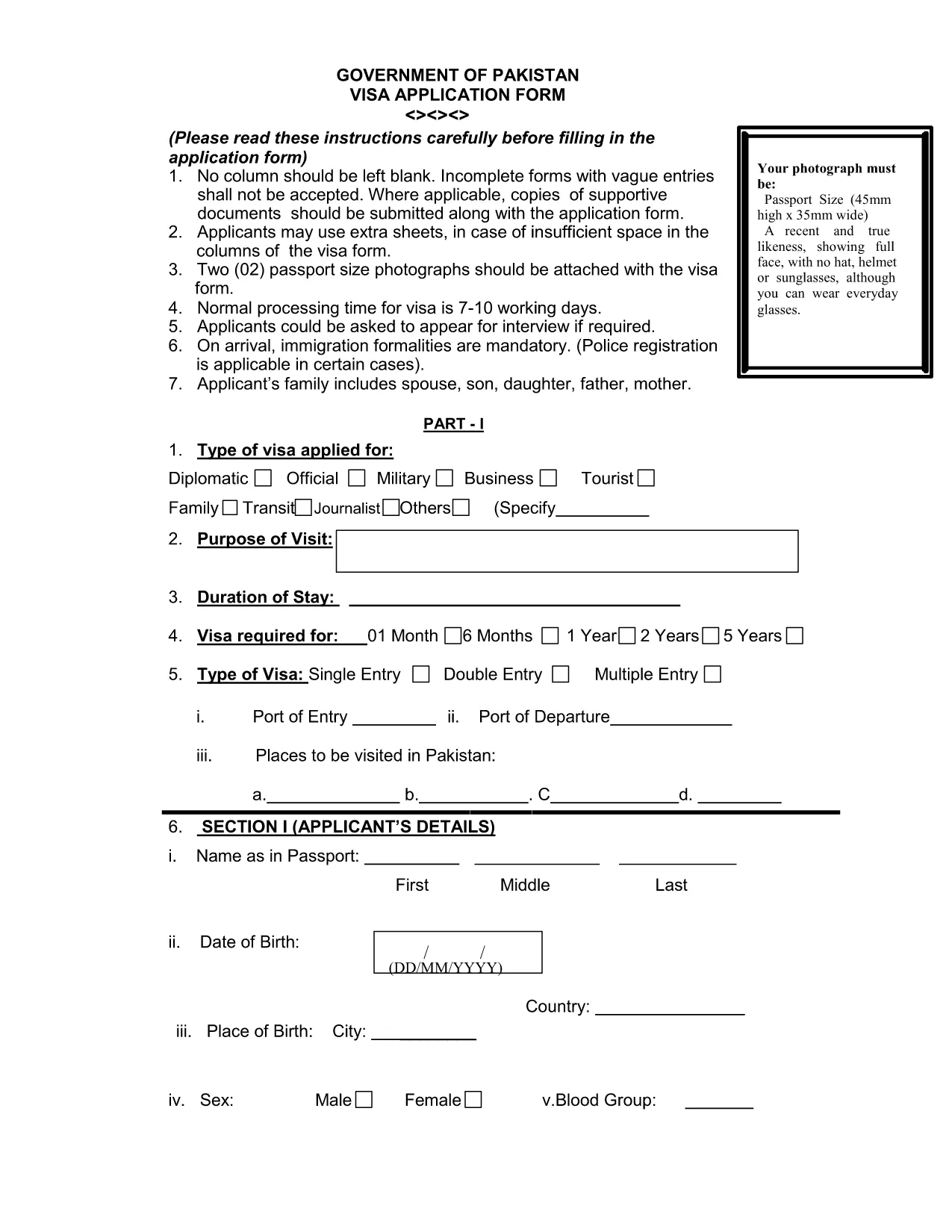
Planning a trip to Pakistan? The first step is completing the official visa application. Our fillable PDF version lets you enter data directly in your browser, save your progress, and print a clean, error‑free form ready for submission.

Why Use Our Fillable PDF?

The original paper form can be hard to read and easy to fill out incorrectly. With the Formize PDF Filler you get:

  • Instant online editing – no extra software required.
  • Auto‑validation of required fields.
  • Save and resume capability.
  • High‑quality PDF ready for printing or electronic submission.

How to Complete the Pakistan Visa Form Online

Follow these simple steps to finish your application without leaving the page:

  1. Click the "Fill out this form" button below.
  2. Wait a few seconds while the Formize PDF Filler app loads.
  3. Enter your personal, passport, and travel details in the highlighted fields.
  4. Upload the required supporting documents (passport scan, photos, invitation letter, etc.).
  5. Review the completed form, then click Download PDF to print or email to the Pakistani consulate.

Common Mistakes to Avoid

Even a small error can delay processing. Keep these tips in mind:

  • Use the exact name as it appears on your passport.
  • Enter dates in the DD/MM/YYYY format.
  • Do not leave any required field blank – the filler will highlight missing entries.
  • Attach two recent passport‑size photos that meet the 2x2 inch requirement.
  • Double‑check the spelling of your address and phone number.

Required Supporting Documents

Along with the completed form, you will need to submit:

  • A clear, colour scan of the passport information page.
  • Two passport‑size photographs (white background).
  • Proof of travel (flight itinerary, hotel reservation).
  • Invitation letter or business correspondence, if applicable.

Submission Process & Processing Time

After printing, sign the form in ink and attach all supporting documents. Submit the package to the nearest Pakistani embassy or consulate. Standard processing takes 7‑10 working days, but it can vary by location.

Need the PDF now? Click the button below to start filling it out instantly.

자주하는 질문
  • Is the Pakistan visa form free to download?

    Yes, the official form is provided at no cost. You only need to pay the visa fee when you submit the application to the embassy.

  • Can I submit the filled PDF electronically?

    Most Pakistani missions require a printed, signed copy, but some accept a scanned PDF via email. Check the specific consulate’s guidelines.

  • What passport validity is required?

    Your passport must be valid for at least six months beyond the intended date of entry into Pakistan.

  • Do I need to attach photos to the PDF before printing?

    Yes. Attach two recent passport‑size photos (2x2 inches, white background) to the designated fields before downloading the final PDF.

  • How long does visa processing take?

    Standard processing time is 7‑10 working days, though it may be longer during peak travel seasons.

  • What should I do if I make a mistake after printing?

    If you notice an error, cross out the mistake with a single line, initial it, and write the correct information clearly. For major errors, re‑fill the form online.

  • Is there a way to save my progress?

    Yes. The Formize PDF Filler lets you save the partially completed form to your computer and resume later.

  • Do I need a separate application for an e‑visa?

    The same fillable PDF is used for both regular visas and e‑visas. Follow the specific instructions on the embassy’s website for e‑visa submission.

어떻게

4개의 간단한 단계를 통해 온라인으로 Pakistan visa form를 무료로 작성하는 방법:

  1. 1
    Open the Fillable Form
    Click the "Fill out this form" button on the page. The Formize PDF Filler app will load in your browser.
  2. 2
    Enter Your Information
    Type your personal details, passport data, and travel plans directly into the highlighted fields. The app validates required entries automatically.
  3. 3
    Upload Supporting Documents
    Use the upload buttons to attach scanned copies of your passport page, photos, and any invitation letters.
  4. 4
    Download or Print
    When all fields are complete, click "Download PDF" to save a printable version or send the file to the Pakistani consulate.
Formize PDF 필러 앱
에 대한

비자 양식

Pakistan visa form는 외국에 입국하기 위해 비자를 신청하는 데 사용되는 문서인 비자 양식 중 하나입니다. 비자는 외국인이 특정 기간 동안 외국에 입국, 체류 및 때때로 일할 수 있도록 허용하는 문서입니다. 비자 취득을 위한 정확한 양식과 요건은 국가와 비자 유형에 따라 다릅니다.

비자 양식에는 일반적으로 이름, 생년월일, 여권 정보와 같은 개인 정보는 물론 여행의 목적과 기간, 목적지, 신청자가 이전에 비자를 거부했거나 국가에서 추방되었는지 여부에 대한 정보가 필요합니다. 양식에는 여권, 사진, 재정 지원 증명서와 같은 지원 문서가 필요할 수도 있습니다.

미국에서 가장 일반적인 비자 양식은 DS-160 및 DS-260 양식입니다. DS-160 양식은 비이민 비자 신청에 사용되는 반면 DS-260 양식은 이민 비자 신청에 사용됩니다. 이러한 양식에는 신청자의 개인 및 여행 이력에 대한 자세한 정보와 여권, 여행 일정 및 재무 기록과 같은 지원 문서가 필요합니다.

다른 국가에서는 다양한 비자 양식과 요구 사항이 있을 수 있지만 기본 프로세스에는 일반적으로 비자 신청서 작성, 증빙 서류 제공, 미국 대사관 또는 영사관의 영사관과의 인터뷰 참석이 포함됩니다. 비자 신청 절차는 복잡하고 시간이 많이 소요될 수 있으므로 비자를 원하는 개인은 이민 변호사 또는 기타 자격을 갖춘 전문가와 상담하여 필요한 모든 양식과 요구 사항이 충족되었는지 확인하는 것이 좋습니다.

특징

PDF 필러

온라인에서 PDF 양식을 채우는 가장 쉬운 방법

  • Pakistan visa form를 빠르게 작성하세요.
    온라인에서 Pakistan visa form을(를) 빠르게 채우는 방법을 찾고 계십니까? 온라인 무료 PDF 양식 필러를 사용하면 1분 이내에 이 PDF 문서를 편집하고 채우는 방법을 알 수 있습니다.
  • 사용하기 쉬운 온라인 PDF 편집기
    다시 스캔하여 다시 보내기 전에 편집할 수 있도록 PDF 파일을 인쇄하는 데 지쳤습니까? 온라인에서 무료로 PDF 문서를 편집하세요. 온라인 PDF 편집기를 사용하여 시간과 종이를 절약하십시오.
  • 훌륭한 도구, 모든 플랫폼
    Mac에서 Pakistan visa form를 채우는 방법이나 PDF 필러를 무료로 사용하는 방법이 궁금하십니까? 당사의 온라인 PDF 도구는 모든 플랫폼에서 작동합니다.
  • 안전한 파일 저장
    완료된 "Pakistan visa form" 파일은 Amazon 클라우드 호스팅에서 관리하는 보안 데이터베이스에 저장됩니다. 언제든지 시스템에서 파일을 삭제할 수 있습니다. 어쨌든 이러한 파일은 24시간 후에 자동으로 삭제됩니다.
  • Pakistan visa form님과 채팅
    무료 PDF 리더 도우미인 Chatize에서 "Pakistan visa form"와 채팅하세요. "Pakistan visa form"에서 질문하고 답변을 받으세요. 위의 문서와 채팅 버튼을 클릭하세요.

필링 세션 삭제

선택한 필링 세션을 삭제하시겠습니까?이 경우 양식 작성 진행 상황이 손실됩니다.

편집 세션 삭제

선택한 편집 세션을 삭제하시겠습니까? 이 경우 양식 작성 및 편집 진행 상황이 손실됩니다.