
언어 선택

BOT Passport Application Form – Fillable PDF

  1. 언어 영어
  2. 국가 Turks and Caicos Islands
  3. 활동 Travel Documents
  4. 부서 Passport Office
BOT Passport Application Form – Fillable PDF

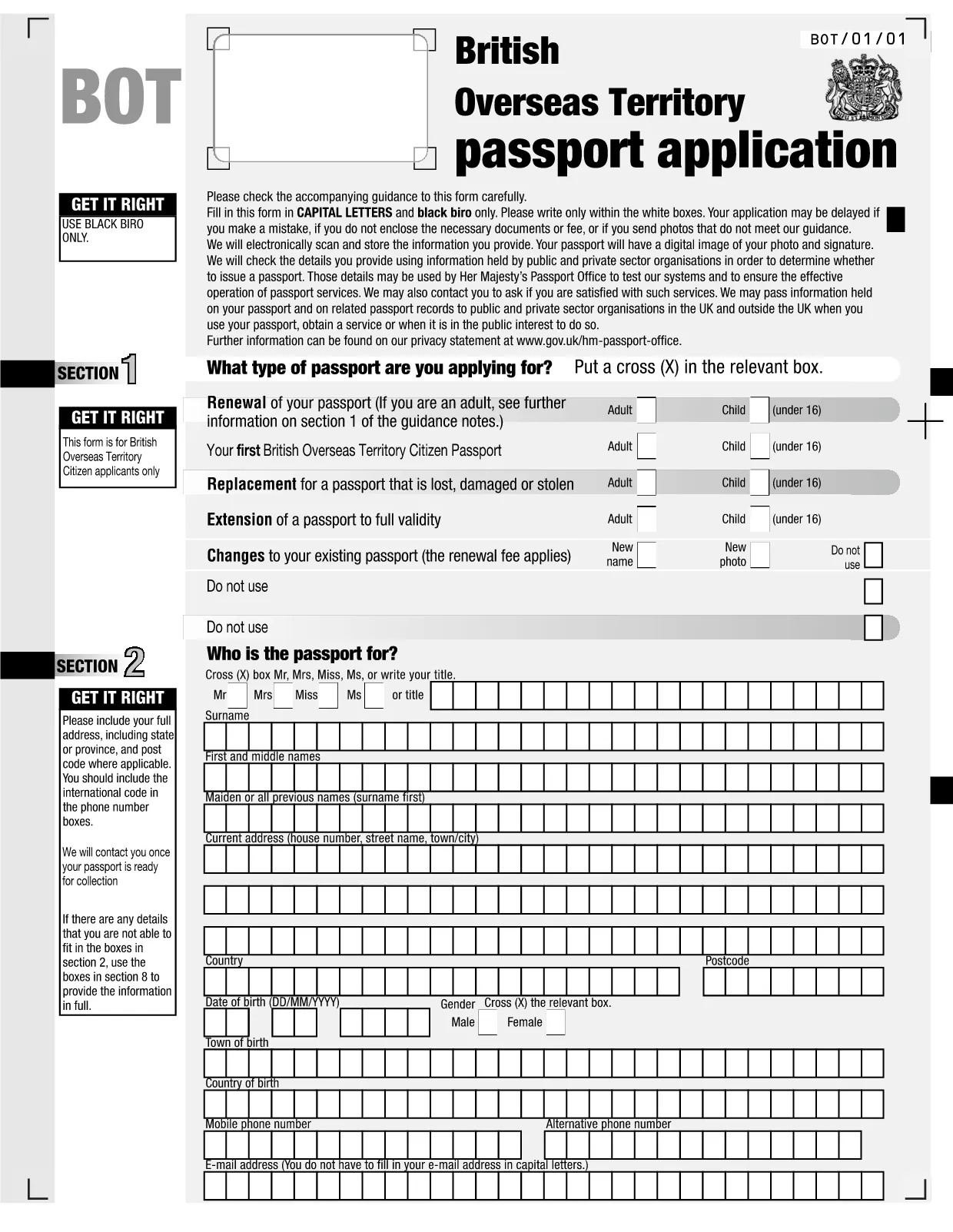
The BOT Passport Application Form is the official document required to apply for a passport from the Turks and Caicos Islands. With Formize’s fillable PDF technology, you can complete the entire form directly in your browser—no printer, scanner, or PDF editor needed.

Our online PDF filler automatically validates required fields, preserves your formatting, and lets you save a copy for your records. Once you finish, simply download the completed PDF and submit it according to the instructions provided by the Passport Office.

Using a fillable PDF reduces errors, speeds up processing, and ensures that your application meets the strict formatting rules (CAPITAL LETTERS, black biro, and writing within the white boxes). Follow the step‑by‑step guide below to submit a flawless passport application.

자주하는 질문
  • Is the BOT Passport Application Form truly fillable online?

    Yes. Formize loads the official PDF in a secure online editor, allowing you to type directly into each field without installing any software.

  • Can I save my progress and finish later?

    Absolutely. Use the "Save" button to store a draft in your browser or download a partially completed PDF to resume at any time.

  • Do I still need to print the form after filling it online?

    The Passport Office may require a printed copy with a handwritten signature. Download the completed PDF, print it on white A4 paper, and sign where indicated.

  • What format must my photo be?

    The form requires a recent passport‑size photo (35mm x 45mm) with a plain white background. Attach the digital image to the PDF or include a printed photo with your submission.

  • How long does processing take after I submit?

    Processing times vary, but most standard applications are handled within 10‑14 business days once all required documents are received.

  • Is there a fee for the passport application?

    Yes. The current fee schedule is listed on the Passport Office website. Include the payment receipt with your completed application.

  • What should I do if I make a mistake after downloading?

    If you notice an error, reopen the saved draft in Formize, correct the field, and download a new version. Do not manually edit the PDF with other editors.

어떻게

5개의 간단한 단계를 통해 온라인으로 BOT passport application를 무료로 작성하는 방법:

  1. 1
    Open the Fillable Form
    Click the "Fill out this form" button on the page. The Formize PDF Filler app will load the BOT Passport Application Form directly in your browser.
  2. 2
    Enter Your Information
    Type your details into each field. The filler automatically checks for required entries and correct formatting (CAPITAL LETTERS, black text).
  3. 3
    Review and Validate
    Use the built‑in validation to spot missing or incorrectly entered data. Correct any highlighted issues before proceeding.
  4. 4
    Save or Download
    When all fields are complete, click "Save" to store a copy in your account or "Download" to get the finished PDF on your device.
  5. 5
    Submit the Application
    Print the downloaded PDF (if required) and attach the supporting documents, then submit it to the Turks and Caicos Passport Office as instructed.
Formize PDF 필러 앱
에 대한

{키워드} 템플릿

PDF 문서를 보고 작성하기 위한 기존 기능 세트와 웹 애플리케이션 및 반응형 레이아웃의 이점을 결합하면 몇 분 만에 BOT passport application을(를) 완료할 수 있습니다.
특징

PDF 필러

온라인에서 PDF 양식을 채우는 가장 쉬운 방법

  • BOT passport application를 빠르게 작성하세요.
    온라인에서 BOT passport application을(를) 빠르게 채우는 방법을 찾고 계십니까? 온라인 무료 PDF 양식 필러를 사용하면 1분 이내에 이 PDF 문서를 편집하고 채우는 방법을 알 수 있습니다.
  • 사용하기 쉬운 온라인 PDF 편집기
    다시 스캔하여 다시 보내기 전에 편집할 수 있도록 PDF 파일을 인쇄하는 데 지쳤습니까? 온라인에서 무료로 PDF 문서를 편집하세요. 온라인 PDF 편집기를 사용하여 시간과 종이를 절약하십시오.
  • 훌륭한 도구, 모든 플랫폼
    Mac에서 BOT passport application를 채우는 방법이나 PDF 필러를 무료로 사용하는 방법이 궁금하십니까? 당사의 온라인 PDF 도구는 모든 플랫폼에서 작동합니다.
  • 안전한 파일 저장
    완료된 "BOT passport application" 파일은 Amazon 클라우드 호스팅에서 관리하는 보안 데이터베이스에 저장됩니다. 언제든지 시스템에서 파일을 삭제할 수 있습니다. 어쨌든 이러한 파일은 24시간 후에 자동으로 삭제됩니다.
  • BOT passport application님과 채팅
    무료 PDF 리더 도우미인 Chatize에서 "BOT passport application"와 채팅하세요. "BOT passport application"에서 질문하고 답변을 받으세요. 위의 문서와 채팅 버튼을 클릭하세요.

필링 세션 삭제

선택한 필링 세션을 삭제하시겠습니까?이 경우 양식 작성 진행 상황이 손실됩니다.

편집 세션 삭제

선택한 편집 세션을 삭제하시겠습니까? 이 경우 양식 작성 및 편집 진행 상황이 손실됩니다.