언어 선택

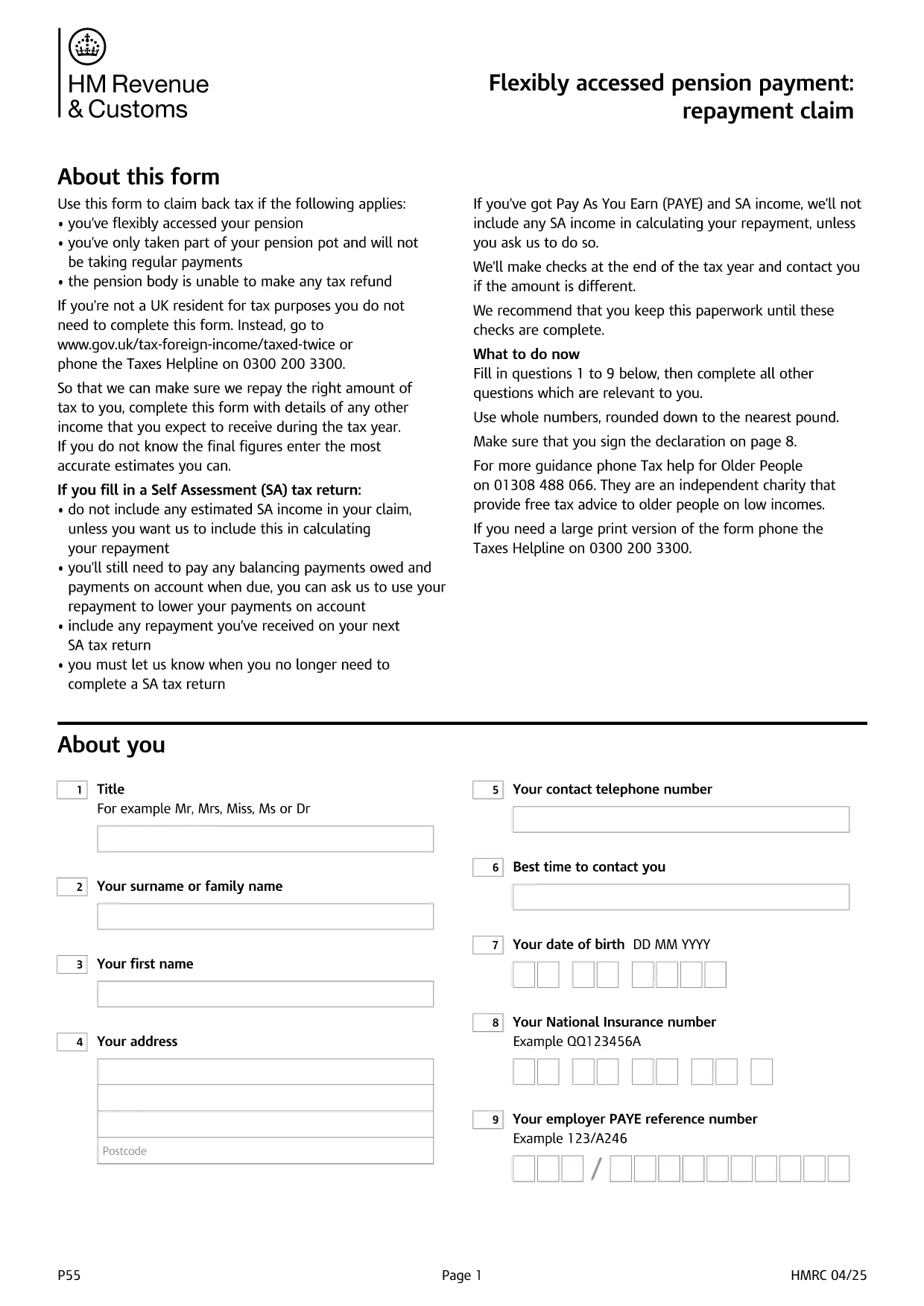
UK HMRC Form P55 – Fillable PDF for Pension Tax Refund

  1. 언어 영어
  2. 국가 United Kingdom
  3. 부서 HMRC
  4. 활동 구실
UK HMRC Form P55 – Fillable PDF for Pension Tax Refund

Form P55 is the HMRC claim form used to recover tax that was over‑deducted when you accessed a portion of your pension flexibly. With the fillable PDF hosted by Formize, you can complete the form directly in your browser—no extra software required.

What Is HMRC Form P55?

The P55 is issued by HM Revenue & Customs (HMRC) to correct the "month‑1" emergency tax code that pension providers often apply to a one‑off withdrawal. It allows you to claim back the excess tax within the same tax year.

When and Why to Use Form P55

  • You have taken a partial pension withdrawal (not the whole pot).
  • The withdrawal was a single lump‑sum or occasional payment.
  • Your provider could not issue the refund themselves.
  • You want the refund sooner than the end‑of‑year reconciliation.

How to Complete Form P55 Online

Instead of downloading the PDF and editing it with a separate editor, simply click the "Fill out this form" button on this page. The Formize PDF Filler app will load, and you can:

  1. Enter your personal details, NI number, and bank account.
  2. Provide the pension payment information (gross amount, tax deducted, provider details).
  3. Add any other income you earned during the tax year.
  4. Sign electronically with a typed, drawn, or uploaded signature.
  5. Submit the completed form directly to HMRC or download it for postal submission.

Common Mistakes to Avoid

  • Leaving fields blank – HMRC will reject an incomplete claim.
  • Using the wrong tax year version – always select the form for the current tax year.
  • Mismatching your NI number or bank details – double‑check before submitting.
  • Forgetting to include other income – HMRC recalculates your total tax position.

Submit Your Claim & Receive Your Refund

After you finish, you can either:

  • Submit electronically via your HMRC Government Gateway account (fastest).
  • Print the completed PDF and post it to the address shown on the form.

HMRC typically processes a P55 claim within 30 days and pays the refund by Faster Payments or cheque.

자주하는 질문
  • What is the purpose of Form P55?

    Form P55 lets you claim back tax that was over‑deducted when you took a partial, one‑off pension withdrawal.

  • Do I need a new Form P55 each tax year?

    Yes. HMRC releases a new version every April, so always use the form that matches the current tax year.

  • Can I submit Form P55 online?

    Yes. After completing the fillable PDF, you can upload it through your HMRC Government Gateway account for the fastest processing.

  • How long does HMRC take to process a P55 claim?

    Typical processing time is up to 30 days, after which the refund is paid via Faster Payments or cheque.

  • What if I make another pension withdrawal later in the year?

    You may need to submit an additional P55 for the new withdrawal, or wait for the end‑of‑year reconciliation to settle the final tax position.

  • Is there a fee to use the Formize fillable PDF?

    Formize provides the fillable PDF for free; you only pay any standard HMRC filing fees if applicable.

  • What common errors cause a P55 to be rejected?

    Leaving required fields blank, using the wrong tax‑year version, or providing mismatched NI or bank details are the most frequent reasons.

어떻게

5개의 간단한 단계를 통해 온라인으로 HMRC Form P55를 무료로 작성하는 방법:

  1. 1
    Click the Fill‑out Button
    Press the "Fill out this form" button on the page. The Formize PDF Filler loads in seconds.
  2. 2
    Enter Your Details
    Fill in personal information, NI number, pension payment figures, and any other income for the tax year.
  3. 3
    Add Your Signature
    Use the built‑in signature tool to draw, upload, or type a legally‑binding signature.
  4. 4
    Submit or Download
    Choose to submit directly to HMRC via your Government Gateway account or download the completed PDF for postal submission.
  5. 5
    Receive Your Refund
    HMRC processes the claim within 30 days and sends the refund to your bank account or by cheque.
Formize PDF 필러 앱
에 대한

세금 양식

HMRC Form P55는 관련 세무 당국에 소득, 공제 및 납세 의무를 신고하는 데 사용되는 문서인 세금 양식 중 하나입니다. 이 양식은 세금 신고 절차의 필수적인 부분이며 개인과 기업이 세법을 준수하고 납세 의무를 정확하게 계산하는 데 사용됩니다.

필요한 특정 세금 양식은 개인의 납세자 신분, 소득원, 국가의 세법 등의 요인에 따라 달라질 수 있습니다. 그러나 다음은 몇 가지 일반적인 유형의 세금 양식입니다.

개인 소득세 양식: 미국의 1040 시리즈와 같은 양식이 사용됩니다. 개인이 소득을 신고하고, 공제 및 세액공제를 청구하고, 납세 의무를 계산할 수 있습니다.

사업세 양식: 개인 사업자, 파트너십, 법인, 자영업자를 포함한 기업은 소득, 비용 및 납부해야 할 세금을 신고하기 위해 다양한 양식을 제출해야 할 수 있습니다. 예를 들면 일정 C(사업 이익 또는 손실) 및 양식 1120(미국 법인 소득세 신고서)이 있습니다.

고용세 양식: 고용주는 직원 임금을 신고하고 급여세를 원천징수 및 납부해야 합니다. W-2(임금 및 세금 명세서) 및 941(고용주의 분기별 연방 세금 신고서)과 같은 양식이 이러한 목적으로 사용됩니다.

투자 및 퇴직 계좌 양식: 이 양식은 투자 소득, 자본 이득, 손실은 물론 퇴직 계좌의 기부금과 분배금을 보고하는 데 사용됩니다. 예를 들면 양식 1099-DIV(배당금 및 분배금) 및 양식 5498(IRA 기부 정보).

재산 및 증여세 양식: 개인이 사망하거나 상당한 증여를 한 경우 Form 706(미국 유산(및 세대 생략 양도) 세금 신고) 및 Form 709(미국 증여(및 세대- Skipping Transfer) Tax Return)은 해당 유산세 또는 증여세를 보고하고 계산하는 데 사용됩니다.

세법과 양식은 시간이 지남에 따라 변경될 수 있다는 점을 유념하는 것이 중요합니다. 따라서 개인과 기업은 관련 세무 당국에 문의하거나 전문 세무 조언을 구하여 현재 요구 사항을 준수해야 합니다.

특징

PDF 필러

온라인에서 PDF 양식을 채우는 가장 쉬운 방법

  • HMRC Form P55를 빠르게 작성하세요.
    온라인에서 HMRC Form P55을(를) 빠르게 채우는 방법을 찾고 계십니까? 온라인 무료 PDF 양식 필러를 사용하면 1분 이내에 이 PDF 문서를 편집하고 채우는 방법을 알 수 있습니다.
  • 사용하기 쉬운 온라인 PDF 편집기
    다시 스캔하여 다시 보내기 전에 편집할 수 있도록 PDF 파일을 인쇄하는 데 지쳤습니까? 온라인에서 무료로 PDF 문서를 편집하세요. 온라인 PDF 편집기를 사용하여 시간과 종이를 절약하십시오.
  • 훌륭한 도구, 모든 플랫폼
    Mac에서 HMRC Form P55를 채우는 방법이나 PDF 필러를 무료로 사용하는 방법이 궁금하십니까? 당사의 온라인 PDF 도구는 모든 플랫폼에서 작동합니다.
  • 안전한 파일 저장
    완료된 "HMRC Form P55" 파일은 Amazon 클라우드 호스팅에서 관리하는 보안 데이터베이스에 저장됩니다. 언제든지 시스템에서 파일을 삭제할 수 있습니다. 어쨌든 이러한 파일은 24시간 후에 자동으로 삭제됩니다.
  • HMRC Form P55님과 채팅
    무료 PDF 리더 도우미인 Chatize에서 "HMRC Form P55"와 채팅하세요. "HMRC Form P55"에서 질문하고 답변을 받으세요. 위의 문서와 채팅 버튼을 클릭하세요.

필링 세션 삭제

선택한 필링 세션을 삭제하시겠습니까?이 경우 양식 작성 진행 상황이 손실됩니다.

편집 세션 삭제

선택한 편집 세션을 삭제하시겠습니까? 이 경우 양식 작성 및 편집 진행 상황이 손실됩니다.