
언어 선택

Medicare Part A Application Form (CMS‑18F5) – Fillable PDF

  1. 국가 미국
  2. 언어 영어
  3. 활동 Healthcare
  4. 부서 CMS
Medicare Part A Application Form (CMS‑18F5) – Fillable PDF

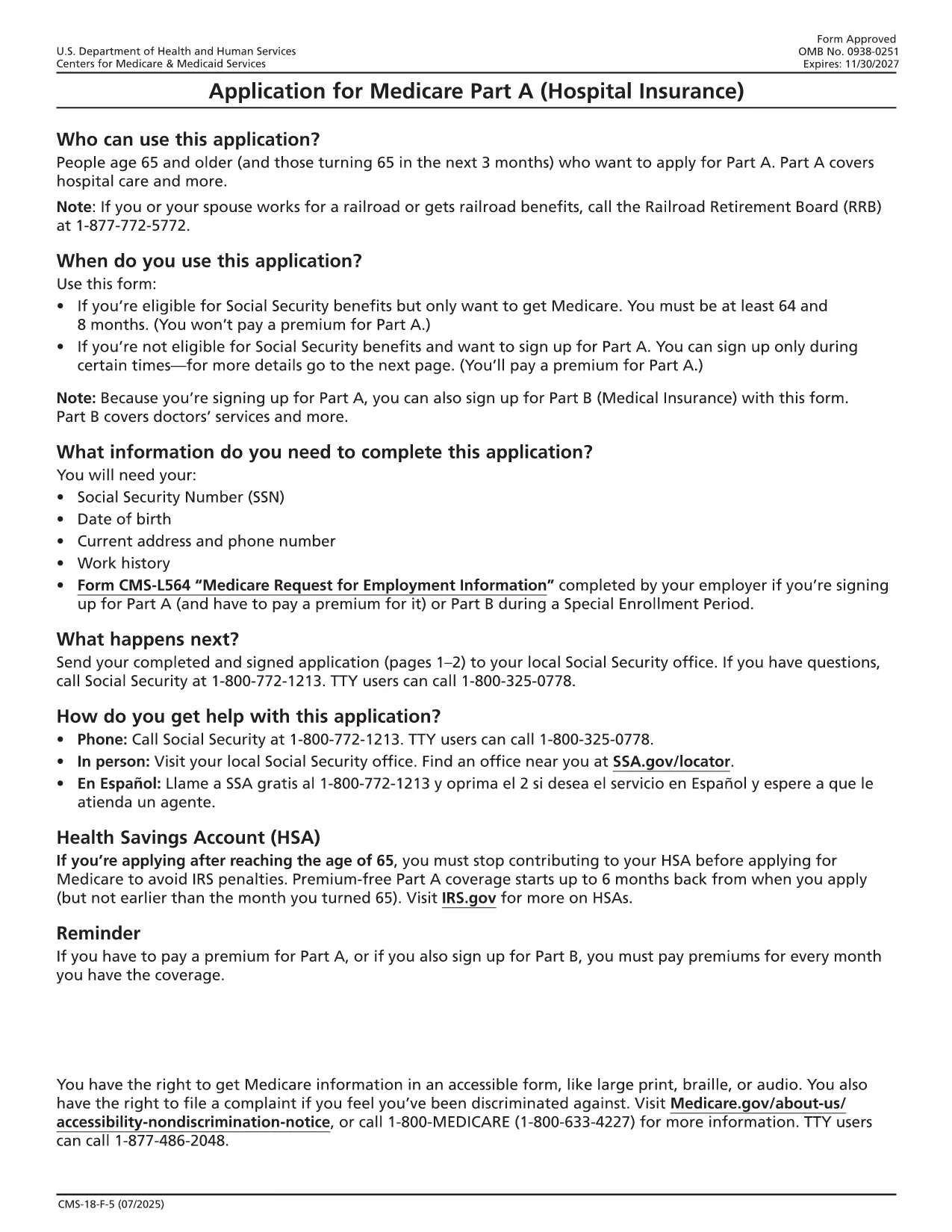
The CMS‑18F5 is the official application for Medicare Part A (Hospital Insurance). Whether you’re enrolling for the first time or updating your information, the fillable PDF on this page lets you complete the form quickly without printing or scanning.

Our integrated Fill out this form button launches the Formize PDF Filler app directly in your browser. All fields are interactive, and you can save your progress, add an electronic signature, and download the completed PDF in seconds.

What is the Medicare Part A Application?

Medicare Part A provides coverage for inpatient hospital stays, skilled nursing facility care, hospice, and some home health services. The CMS‑18F5 form collects personal details, citizenship status, employment history, and other information required by the Centers for Medicare & Medicaid Services (CMS) to determine eligibility.

How to Fill Out the CMS‑18F5 Form Online

  • Step 1: Click the “Fill out this form” button on this page.
  • Step 2: Wait for the Formize PDF Filler to load (usually a few seconds).
  • Step 3: Complete each field. The filler includes tool‑tips and automatic date formatting.
  • Step 4: Add your electronic signature in the designated box.
  • Step 5: Review the form, then click “Download Completed PDF” or “Print & Mail” according to your preference.

Common Mistakes to Avoid

Even a small error can delay processing. Keep these tips in mind:

  • Double‑check Social Security numbers and dates of birth.
  • Provide a current mailing address; PO boxes are not accepted for eligibility verification.
  • Ensure the signature matches the one on file with the Social Security Administration.
  • Do not leave any required fields blank; the filler will highlight missing information.

Eligibility Requirements

Generally, you qualify for Part A if you:

  • Are 65 years or older, or
  • Receive Social Security Disability Insurance (SSDI) for 24 months, or
  • Have End‑Stage Renal Disease (ESRD) or Amyotrophic Lateral Sclerosis (ALS).

Where to Submit Your Completed Form

After downloading the filled PDF, you can:

  • Mail it to your local Social Security Administration office.
  • Upload it securely through the SSA Medicare portal if you have an online account.
  • Bring a printed copy to your nearest SSA office for in‑person assistance.

Using Formize’s fillable PDF saves you time, reduces errors, and keeps your personal data protected.

자주하는 질문
  • Is the CMS‑18F5 form free to download?

    Yes, the fillable PDF is provided by the federal government at no cost. Formize only hosts the interactive version.

  • Can I submit the completed form electronically?

    You can upload the filled PDF through the Social Security Administration’s online portal if you have an account, or mail a printed copy.

  • What if I make a mistake after downloading?

    Simply reopen the saved PDF in Formize, edit the incorrect fields, and re‑download the corrected version.

  • Do I need a digital signature for Part A?

    An electronic signature is accepted as long as it matches the signature on file with the SSA.

  • How long does processing take after I submit?

    Processing typically takes 30‑45 days. You’ll receive a notice by mail confirming your enrollment status.

  • Is my personal information secure while using Formize?

    Formize uses SSL encryption and does not store any of your data on its servers after the session ends.

어떻게

5개의 간단한 단계를 통해 온라인으로 Medicare Part A application를 무료로 작성하는 방법:

  1. 1
    Open the Fillable Form
    Click the “Fill out this form” button on the page. The Formize PDF Filler will open in a new tab.
  2. 2
    Load the Formizer App
    Wait a few seconds while the filler loads the CMS‑18F5 document.
  3. 3
    Complete All Required Fields
    Enter your personal information, citizenship details, and employment history. Tool‑tips appear for each field.
  4. 4
    Add Your Electronic Signature
    Use the signature field to draw or type your signature. This satisfies the legal signing requirement.
  5. 5
    Save or Submit
    Click “Download Completed PDF” to save a copy, or print and mail it to the SSA as instructed.
Formize PDF 필러 앱
에 대한

{키워드} 템플릿

PDF 문서를 보고 작성하기 위한 기존 기능 세트와 웹 애플리케이션 및 반응형 레이아웃의 이점을 결합하면 몇 분 만에 Medicare Part A application을(를) 완료할 수 있습니다.
특징

PDF 필러

온라인에서 PDF 양식을 채우는 가장 쉬운 방법

  • Medicare Part A application를 빠르게 작성하세요.
    온라인에서 Medicare Part A application을(를) 빠르게 채우는 방법을 찾고 계십니까? 온라인 무료 PDF 양식 필러를 사용하면 1분 이내에 이 PDF 문서를 편집하고 채우는 방법을 알 수 있습니다.
  • 사용하기 쉬운 온라인 PDF 편집기
    다시 스캔하여 다시 보내기 전에 편집할 수 있도록 PDF 파일을 인쇄하는 데 지쳤습니까? 온라인에서 무료로 PDF 문서를 편집하세요. 온라인 PDF 편집기를 사용하여 시간과 종이를 절약하십시오.
  • 훌륭한 도구, 모든 플랫폼
    Mac에서 Medicare Part A application를 채우는 방법이나 PDF 필러를 무료로 사용하는 방법이 궁금하십니까? 당사의 온라인 PDF 도구는 모든 플랫폼에서 작동합니다.
  • 안전한 파일 저장
    완료된 "Medicare Part A application" 파일은 Amazon 클라우드 호스팅에서 관리하는 보안 데이터베이스에 저장됩니다. 언제든지 시스템에서 파일을 삭제할 수 있습니다. 어쨌든 이러한 파일은 24시간 후에 자동으로 삭제됩니다.
  • Medicare Part A application님과 채팅
    무료 PDF 리더 도우미인 Chatize에서 "Medicare Part A application"와 채팅하세요. "Medicare Part A application"에서 질문하고 답변을 받으세요. 위의 문서와 채팅 버튼을 클릭하세요.

필링 세션 삭제

선택한 필링 세션을 삭제하시겠습니까?이 경우 양식 작성 진행 상황이 손실됩니다.

편집 세션 삭제

선택한 편집 세션을 삭제하시겠습니까? 이 경우 양식 작성 및 편집 진행 상황이 손실됩니다.