
언어 선택

Secure Test Declaration – Fillable PDF Form

  1. 언어 영어
  2. 국가 미국
  3. 부서 저작권 사무소
Secure Test Declaration – Fillable PDF Form

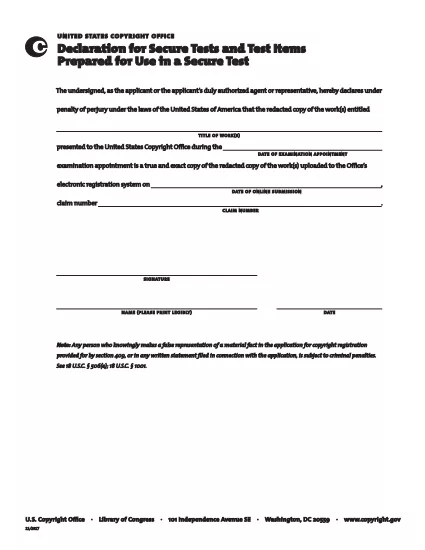
The Secure Test Declaration is a legally‑required statement used by the United States Copyright Office to certify that a test item is protected and will be handled securely. Our fillable PDF version lets you complete the form quickly, accurately, and without installing any extra software.

With Formize’s integrated PDF Filler, you can open the document directly in your browser, enter the required information, and save or print a certified copy. This eliminates the hassle of downloading, editing, and re‑uploading static PDFs.

Below you’ll find a brief overview of the form’s sections, tips for avoiding common errors, and step‑by‑step instructions for completing the declaration online.

What Is a Secure Test Declaration?

A Secure Test Declaration confirms that the test material you are submitting is confidential, that you have the authority to submit it, and that you understand the penalties for false statements. It is commonly required for copyrighted works that involve proprietary testing methods or confidential data.

Key Sections of the Form

  • Applicant Information – Name, address, and contact details.
  • Test Description – Title, purpose, and nature of the test.
  • Security Measures – How the test will be protected.
  • Declaration Statement – Signature line confirming truthfulness.

How to Fill Out the Secure Test Declaration Online

Instead of downloading the PDF and opening it in a separate editor, simply click the "Fill out this form" button on this page. The Formize PDF Filler app will load automatically, allowing you to complete every field directly in your browser.

Common Mistakes to Avoid

  • Leaving required fields blank – the filler will highlight missing information.
  • Using an unofficial signature image – type your name in the signature field for a legally accepted electronic signature.
  • Submitting outdated contact details – double‑check phone numbers and email addresses before saving.

Where to Submit the Completed Form

After saving the completed declaration, you can either:

  1. Upload the PDF through the Copyright Office’s online portal.
  2. Print, sign physically (if required), and mail it to the address listed on the form.

For most users, the electronic submission option is faster and provides immediate confirmation of receipt.

자주하는 질문
  • Do I need Adobe Acrobat to fill out the Secure Test Declaration?

    No. Formize’s online PDF Filler works in any modern browser, so you don’t need Acrobat or any other software.

  • Can I edit the form after I’ve saved it?

    Yes. Open the saved PDF with Formize again, make any necessary changes, and re‑save.

  • Is an electronic signature accepted by the Copyright Office?

    For the Secure Test Declaration, an electronic signature entered through the Formize filler is considered valid, provided the form is submitted electronically.

  • What happens if I submit incomplete information?

    The filler will highlight missing required fields before you can save. Submitting an incomplete form may delay processing.

  • Is there a fee to download or use the Secure Test Declaration form?

    The PDF download and online filling are free. Any filing fees are set by the Copyright Office and are paid separately during submission.

어떻게

4개의 간단한 단계를 통해 온라인으로 secure test declaration를 무료로 작성하는 방법:

  1. 1
    Open the Fillable Form
    Click the "Fill out this form" button on the page. The Formize PDF Filler loads in a new tab.
  2. 2
    Enter Your Information
    Complete each highlighted field – the filler will guide you through Applicant Information, Test Description, and Security Measures.
  3. 3
    Sign Electronically
    Type your name in the signature field. The system records a timestamp for legal validity.
  4. 4
    Save and Submit
    Click "Save PDF" to download a copy, then upload it to the Copyright Office portal or print and mail as instructed.
Formize PDF 필러 앱
에 대한

저작권 사무 양식

secure test declaration는 미국 의회 도서관 산하 부서인 미국 저작권청(United States Copyright Office)에서 저작권을 등록하고 보호하기 위해 사용하는 공식 양식 중 하나입니다. 저작권청은 저작권 등록, 저작권 이전 및 라이센스 기록, 저작권 관련 정보 및 서비스 제공 등 미국의 저작권법을 관리하는 일을 담당합니다.

다음은 저작권 사무소 양식의 몇 가지 예입니다.

저작권 등록 신청서: 미국 저작권청에 저작권을 등록하는 데 사용되는 기본 양식입니다. 문학 작품, 시각 예술, 음악 작곡, 녹음, 영화 등과 같은 다양한 유형의 작품에 대해 다양한 신청서가 제공됩니다. 애플리케이션은 등록된 저작물, 저자, 청구인 및 기타 관련 세부정보에 대한 정보를 수집합니다.

문서 기록 양식: 이 양식은 저작권 사무소에 양도 또는 라이센스와 같은 저작권 이전을 기록하는 데 사용됩니다. 이는 저작권 소유권 이전에 대한 공개 기록을 수립하는 방법을 제공합니다.

DMCA 지정 대리인 디렉토리 양식: 이 양식은 디지털 밀레니엄 저작권법(DMCA)에 따라 저작권청의 대리인을 지정하는 데 사용됩니다. 지정된 대리인은 온라인 저작권 침해와 관련된 게시 중단 통지를 접수하고 처리할 책임이 있습니다.

저작권 사무소 수수료 명세: 수수료 명세는 특정 형식은 아니지만 등록, 기록 및 기타 관련 서비스를 포함한 다양한 저작권 서비스와 관련된 수수료에 대한 정보를 제공합니다.

특정 양식과 요구 사항은 시간이 지남에 따라 변경될 수 있으며 다양한 유형의 저작권 등록 또는 서비스에 대해 서로 다른 양식이 필요할 수 있다는 점에 유의하는 것이 중요합니다. 정확한 최신 정보를 얻으려면 미국 저작권청 공식 웹사이트(www.copyright.gov)를 방문하거나 저작권법 전문 법률 전문가와 상담하는 것이 좋습니다. 귀하의 저작권 관련 요구 사항과 관련된 특정 저작권 사무소 양식에 대해 알아보세요.

특징

PDF 필러

온라인에서 PDF 양식을 채우는 가장 쉬운 방법

  • secure test declaration를 빠르게 작성하세요.
    온라인에서 secure test declaration을(를) 빠르게 채우는 방법을 찾고 계십니까? 온라인 무료 PDF 양식 필러를 사용하면 1분 이내에 이 PDF 문서를 편집하고 채우는 방법을 알 수 있습니다.
  • 사용하기 쉬운 온라인 PDF 편집기
    다시 스캔하여 다시 보내기 전에 편집할 수 있도록 PDF 파일을 인쇄하는 데 지쳤습니까? 온라인에서 무료로 PDF 문서를 편집하세요. 온라인 PDF 편집기를 사용하여 시간과 종이를 절약하십시오.
  • 훌륭한 도구, 모든 플랫폼
    Mac에서 secure test declaration를 채우는 방법이나 PDF 필러를 무료로 사용하는 방법이 궁금하십니까? 당사의 온라인 PDF 도구는 모든 플랫폼에서 작동합니다.
  • 안전한 파일 저장
    완료된 "secure test declaration" 파일은 Amazon 클라우드 호스팅에서 관리하는 보안 데이터베이스에 저장됩니다. 언제든지 시스템에서 파일을 삭제할 수 있습니다. 어쨌든 이러한 파일은 24시간 후에 자동으로 삭제됩니다.
  • secure test declaration님과 채팅
    무료 PDF 리더 도우미인 Chatize에서 "secure test declaration"와 채팅하세요. "secure test declaration"에서 질문하고 답변을 받으세요. 위의 문서와 채팅 버튼을 클릭하세요.

필링 세션 삭제

선택한 필링 세션을 삭제하시겠습니까?이 경우 양식 작성 진행 상황이 손실됩니다.

편집 세션 삭제

선택한 편집 세션을 삭제하시겠습니까? 이 경우 양식 작성 및 편집 진행 상황이 손실됩니다.