
언어 선택

Parole Form I‑24 – Fillable PDF Download

  1. 언어 영어
  2. 국가 미국
  3. 부서 법무부
Parole Form I‑24 – Fillable PDF Download

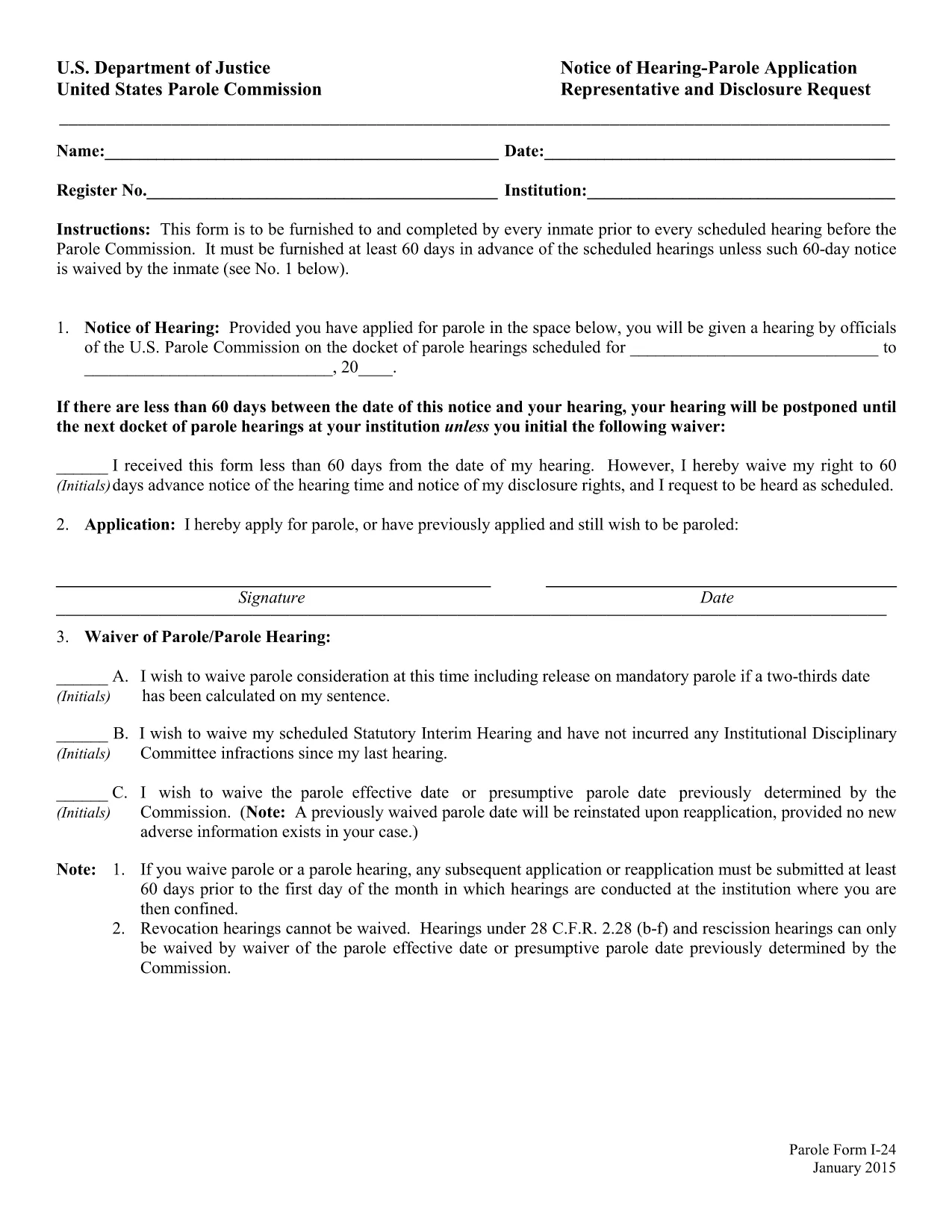
The Parole Form I‑24 (Notice of Hearing – Parole Application Representative and Disclosure Request) is the mandatory document that every inmate must submit before a scheduled hearing before the United States Parole Commission. The form must be delivered at least 60 days prior to the hearing unless the inmate waives the notice period.

What Is Form I‑24?

Form I‑24 collects essential information about the inmate, the requested representative, and any disclosure requests. It ensures the Parole Commission has all the details needed to schedule and conduct a fair hearing.

How to Fill Out the Parole Form Online

Instead of downloading the PDF and opening a separate editor, simply click the "Fill out this form" button on this page. The Formize PDF Filler app will load in your browser, allowing you to complete every field directly online.

  • Step 1: Click the button and wait for the Formize editor to appear.
  • Step 2: Enter inmate details, hearing date, and representative information.
  • Step 3: Review the disclosure request section and add any required attachments.
  • Step 4: Use the built‑in validation to catch missing or incorrectly formatted data.
  • Step 5: Save the completed form as a PDF or submit it directly to your facility.

Common Mistakes to Avoid

Even a small error can delay your hearing. Watch out for:

  • Leaving the "Notice of Hearing" date blank or entering a date less than 60 days before the hearing.
  • Misspelling the representative’s name or providing an incorrect address.
  • Forgetting to sign the form in the designated fields.
  • Submitting an outdated PDF version – always use the latest fillable file provided below.

Download & Save the Fillable PDF

If you prefer to work offline, you can download the official fillable PDF from the United States Department of Justice. The file is fully searchable and compatible with most PDF editors.

Submission Deadlines & Requirements

Remember, the completed Form I‑24 must reach the Parole Commission at least 60 days before the scheduled hearing. If you waive the notice period, include a written waiver on the form. Keep a copy of the submitted PDF for your records.

자주하는 질문
  • What is the purpose of Form I‑24?

    Form I‑24 notifies the United States Parole Commission of an upcoming hearing and records the inmate’s representative and any disclosure requests.

  • Do I have to submit the form 60 days before the hearing?

    Yes, unless the inmate waives the notice period in writing on the form.

  • Can I edit the PDF after I download it?

    The official file is fillable, but using the Formize online editor is recommended to avoid compatibility issues.

  • Is an electronic signature accepted?

    Yes. The Parole Commission accepts electronic signatures as long as the form is fully completed and saved as a PDF.

  • What should I do if I make a mistake after submitting?

    Contact your facility’s parole office immediately and request a corrected Form I‑24. Submit the revised form with a brief explanation of the error.

  • Where can I find a printable version of the form?

    A printable, fillable PDF is available via the download link below. You can print it after completing the fields online.

  • Do I need legal representation to fill out Form I‑24?

    Legal representation is not required, but you may list a representative if you have one. The form includes a section for that information.

어떻게

5개의 간단한 단계를 통해 온라인으로 parole form i-24를 무료로 작성하는 방법:

  1. 1
    Open the Formize PDF Filler
    Click the "Fill out this form" button on the page. The Formize editor will load in a new tab.
  2. 2
    Enter All Required Information
    Type inmate details, hearing date, representative name, and any disclosure requests directly into the fields.
  3. 3
    Validate Your Entries
    Use the built‑in validation to ensure dates are correct and required fields are not left blank.
  4. 4
    Review and Sign
    Double‑check all information, add your electronic signature, and confirm the waiver if you are skipping the 60‑day notice.
  5. 5
    Save or Submit
    Download the completed PDF for your records or follow your facility’s instructions to submit the form electronically.
Formize PDF 필러 앱
에 대한

법무부(DOJ) 양식

parole form i-24는 미국 법무부와 다양한 부서, 기관 및 구성 요소에서 사용하는 공식 형식 중 하나입니다. DOJ는 연방법을 집행하고, 법적 문제에서 미국의 이익을 보호하며, 정의를 집행하는 연방 행정부입니다.

다음은 법무부 양식의 몇 가지 예입니다.

연방 지원 신청서(SF-424): 이 양식은 DOJ 또는 그 구성 요소가 관리하는 연방 보조금 또는 재정 지원을 신청하는 조직에서 사용됩니다. 조직, 제안된 프로젝트, 예산에 대한 정보를 수집합니다.

민권 불만 신고 양식: 이 양식은 인종, 성별, 장애 또는 출신 국가에 따른 차별과 같은 민권법 위반 혐의에 대해 DOJ의 민권부에 불만을 제기하는 데 사용됩니다.

피해자 통지 요청 양식: 이 양식은 법무부가 범죄 피해자에게 정보와 지원을 제공하려는 노력의 일환으로 범죄 피해자가 연방 형사 사건의 상태 및 절차에 대한 통지를 요청하는 데 사용됩니다.

이민 양식: DOJ의 이민 심사 사무국(EOIR)은 이민 법원 및 이민 관련 절차를 관리합니다. 이민 법원 절차에는 추방 구제 신청용 EOIR-42B 양식, 항소용 EOIR-28 양식 등 다양한 양식이 사용됩니다.

ATF 양식: DOJ의 구성 요소인 주류, 담배, 총기 및 폭발물 관리국(ATF)은 이전 응답에서 언급한 것처럼 다양한 목적을 위한 자체 양식 세트를 보유하고 있습니다.

DEA(마약단속국) 양식: DOJ의 또 다른 구성 요소인 DEA는 등록 신청, 보고 및 기록 보관 요건을 포함하여 규제 물질과 관련된 문제에 대해 자체 양식을 사용합니다.

이 예에서는 DOJ 양식의 몇 가지 범주를 강조하지만, 법무부가 사용하는 특정 양식은 관련 부서, 기관 또는 구성 요소와 서비스 또는 절차의 성격에 따라 달라질 수 있습니다. 귀하의 상황과 관련된 특정 DOJ 양식에 관한 정확한 최신 정보를 얻으려면 DOJ 내 특정 부서 또는 기관의 공식 웹사이트를 참조하거나 법적 조언을 구하는 것이 좋습니다.

특징

PDF 필러

온라인에서 PDF 양식을 채우는 가장 쉬운 방법

  • parole form i-24를 빠르게 작성하세요.
    온라인에서 parole form i-24을(를) 빠르게 채우는 방법을 찾고 계십니까? 온라인 무료 PDF 양식 필러를 사용하면 1분 이내에 이 PDF 문서를 편집하고 채우는 방법을 알 수 있습니다.
  • 사용하기 쉬운 온라인 PDF 편집기
    다시 스캔하여 다시 보내기 전에 편집할 수 있도록 PDF 파일을 인쇄하는 데 지쳤습니까? 온라인에서 무료로 PDF 문서를 편집하세요. 온라인 PDF 편집기를 사용하여 시간과 종이를 절약하십시오.
  • 훌륭한 도구, 모든 플랫폼
    Mac에서 parole form i-24를 채우는 방법이나 PDF 필러를 무료로 사용하는 방법이 궁금하십니까? 당사의 온라인 PDF 도구는 모든 플랫폼에서 작동합니다.
  • 안전한 파일 저장
    완료된 "parole form i-24" 파일은 Amazon 클라우드 호스팅에서 관리하는 보안 데이터베이스에 저장됩니다. 언제든지 시스템에서 파일을 삭제할 수 있습니다. 어쨌든 이러한 파일은 24시간 후에 자동으로 삭제됩니다.
  • parole form i-24님과 채팅
    무료 PDF 리더 도우미인 Chatize에서 "parole form i-24"와 채팅하세요. "parole form i-24"에서 질문하고 답변을 받으세요. 위의 문서와 채팅 버튼을 클릭하세요.

필링 세션 삭제

선택한 필링 세션을 삭제하시겠습니까?이 경우 양식 작성 진행 상황이 손실됩니다.

편집 세션 삭제

선택한 편집 세션을 삭제하시겠습니까? 이 경우 양식 작성 및 편집 진행 상황이 손실됩니다.