
언어 선택

Online Fillable Job Application Form

  1. 언어 영어
  2. 국가 미국
  3. 활동 Employment
  4. 부서 노동부
Online Fillable Job Application Form

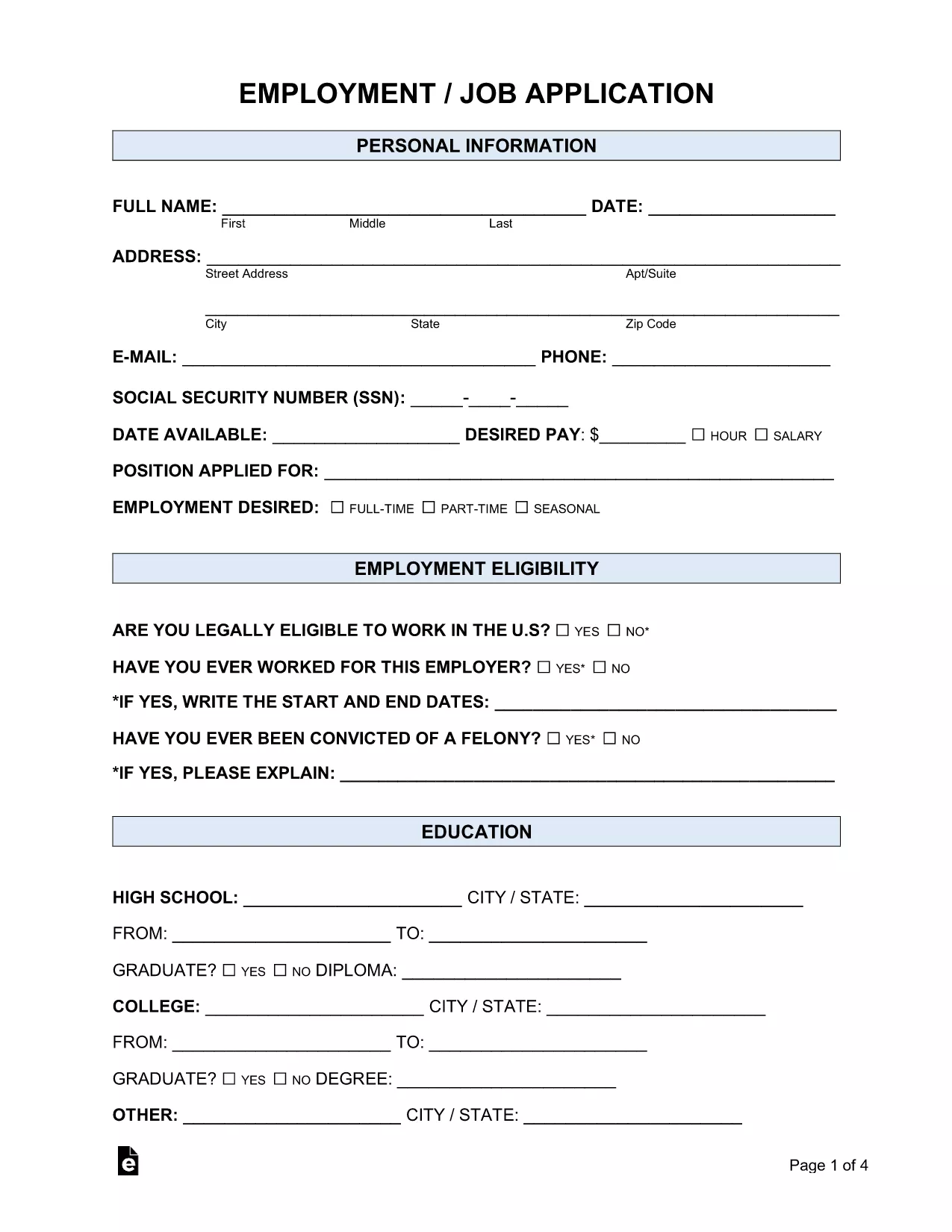
Looking for a simple way to submit a professional job application? Our fillable Employment Job Application PDF lets you complete the entire form online, without printing or installing any software. Powered by Formize’s PDF Filler, the form is secure, saves your data in real time, and can be downloaded or emailed directly to employers.

Whether you’re applying for a full‑time position, a part‑time role, or an internship, this form covers all the essential sections:

  • Personal information and contact details
  • Employment history and references
  • Education background
  • Availability and salary expectations
  • Signature and date

Because the form is fully fillable, you can type directly into each field, use drop‑down menus where available, and add attachments such as a résumé. The built‑in validation helps you avoid common errors, ensuring a smooth submission process.

Ready to get started? Just click the "Fill out this form" button below, wait for the Formize PDF Filler app to load, and follow the quick step‑by‑step guide.

자주하는 질문
  • Do I need Adobe Reader to fill out this form?

    No. The Formize PDF Filler works in any modern browser, so you can complete the form without installing additional software.

  • Can I save my progress and return later?

    Yes. Use the "Save" button in the filler to download a partially completed PDF and reload it later.

  • Is my personal data secure?

    Formize uses SSL encryption for all data transmitted between your browser and our servers, keeping your information private.

  • What file format will I receive after completing the form?

    You will receive a standard PDF file that can be opened with any PDF viewer and attached to email applications.

  • Can I add a digital signature?

    Yes. The filler includes a signature field where you can draw or upload an image of your signature.

  • Is there a limit to how many times I can use the form?

    No. The fillable PDF can be used repeatedly for multiple job applications.

어떻게

4개의 간단한 단계를 통해 온라인으로 job application form를 무료로 작성하는 방법:

  1. 1
    Click the Fill Out Button
    Press the "Fill out this form" button on the page. The Formize PDF Filler app will open in a new tab.
  2. 2
    Wait for the Filler to Load
    The app loads the fillable PDF automatically. This usually takes a few seconds.
  3. 3
    Enter Your Information
    Type directly into each field, select options from drop‑downs, and attach your resume if required.
  4. 4
    Review and Save
    Check all entries for accuracy, then click "Save" to download a completed copy or "Email" to send it to the employer.
Formize PDF 필러 앱
에 대한

노동부(DOL) 양식

job application form는 미국 노동부 및 다양한 기관에서 정보를 수집하고, 프로그램을 관리하고, 노동 관련 법률 및 규정을 집행하는 데 사용하는 공식 양식 중 하나입니다. 노동부는 근로자의 복지 증진 및 보호, 공정한 고용 관행 보장, 미국 노동 및 고용의 다양한 측면을 감독하는 연방 행정부입니다.

다음은 노동부 양식의 몇 가지 예입니다.

취업 자격 확인(양식 I-9): 미국 시민권 및 이민국(USCIS)에서 관리하는 양식 I-9는 노동부와 관련이 있는 경우가 많습니다. 이는 고용주가 미국에서 고용하기 위해 고용된 개인의 신원과 고용 자격을 확인하는 데 사용됩니다.

가족 및 의료 휴가법(FMLA) 양식: DOL의 임금 및 시간 부서에서 FMLA를 관리하며 의료 인증을 포함하여 이 연방법의 조항을 구현하고 준수하기 위해 다양한 양식이 사용됩니다. 제공자 양식 및 FMLA 적격성 및 권리 및 책임 통지서 양식.

산업안전보건청(OSHA) 양식: DOL의 한 부서인 OSHA는 특정 고용주가 OSHA 양식 300, OSHA 양식 300A 및 OSHA와 같은 양식을 사용하여 직장 부상 및 질병 기록을 유지하도록 요구합니다. 양식 301.

실업 보험 양식: DOL의 고용 훈련국은 실업 보험(UI) 프로그램을 감독하며 주 인력 기관에서는 UI 수당 청구를 관리하고 처리하기 위해 다양한 양식을 사용합니다.

임금 및 근무 시간 준수 양식: DOL의 임금 및 근무 시간 부서는 공정 노동 기준법(FLSA) 및 가족 및 의료 휴가법(FMLA)을 포함한 다양한 노동법을 시행합니다. 고용주는 근무 시간, 임금, 기타 관련 정보 기록 등 이러한 법률 준수를 유지하기 위해 특정 양식을 사용해야 할 수도 있습니다.

이러한 예는 노동부 양식의 몇 가지 일반적인 범주를 나타내지만 노동부 및 다양한 기관에서 노동 및 고용과 관련된 책임을 수행하기 위해 사용하는 다른 양식도 많이 있습니다. 필요한 특정 양식은 관련된 프로그램, 규정 또는 집행 조치에 따라 달라질 수 있습니다. 정확한 최신 정보를 얻으려면 미국 노동부 공식 웹사이트(www.dol.gov)를 방문하거나 관련 DOL 기관 또는 법률 전문가와 상담하는 것이 좋습니다. 노동 관련 요구 사항 또는 규정 준수 요구 사항과 관련된 특정 DOL 양식에 관한 날짜 정보.

특징

PDF 필러

온라인에서 PDF 양식을 채우는 가장 쉬운 방법

  • job application form를 빠르게 작성하세요.
    온라인에서 job application form을(를) 빠르게 채우는 방법을 찾고 계십니까? 온라인 무료 PDF 양식 필러를 사용하면 1분 이내에 이 PDF 문서를 편집하고 채우는 방법을 알 수 있습니다.
  • 사용하기 쉬운 온라인 PDF 편집기
    다시 스캔하여 다시 보내기 전에 편집할 수 있도록 PDF 파일을 인쇄하는 데 지쳤습니까? 온라인에서 무료로 PDF 문서를 편집하세요. 온라인 PDF 편집기를 사용하여 시간과 종이를 절약하십시오.
  • 훌륭한 도구, 모든 플랫폼
    Mac에서 job application form를 채우는 방법이나 PDF 필러를 무료로 사용하는 방법이 궁금하십니까? 당사의 온라인 PDF 도구는 모든 플랫폼에서 작동합니다.
  • 안전한 파일 저장
    완료된 "job application form" 파일은 Amazon 클라우드 호스팅에서 관리하는 보안 데이터베이스에 저장됩니다. 언제든지 시스템에서 파일을 삭제할 수 있습니다. 어쨌든 이러한 파일은 24시간 후에 자동으로 삭제됩니다.
  • job application form님과 채팅
    무료 PDF 리더 도우미인 Chatize에서 "job application form"와 채팅하세요. "job application form"에서 질문하고 답변을 받으세요. 위의 문서와 채팅 버튼을 클릭하세요.

필링 세션 삭제

선택한 필링 세션을 삭제하시겠습니까?이 경우 양식 작성 진행 상황이 손실됩니다.

편집 세션 삭제

선택한 편집 세션을 삭제하시겠습니까? 이 경우 양식 작성 및 편집 진행 상황이 손실됩니다.