
언어 선택

MV2956 Fillable PDF – Wisconsin Vehicle Registration Form

  1. 언어 영어
  2. 국가 미국
  3. 활동 차량 등록
  4. 부서 Department of Motor Vehicles
MV2956 Fillable PDF – Wisconsin Vehicle Registration Form

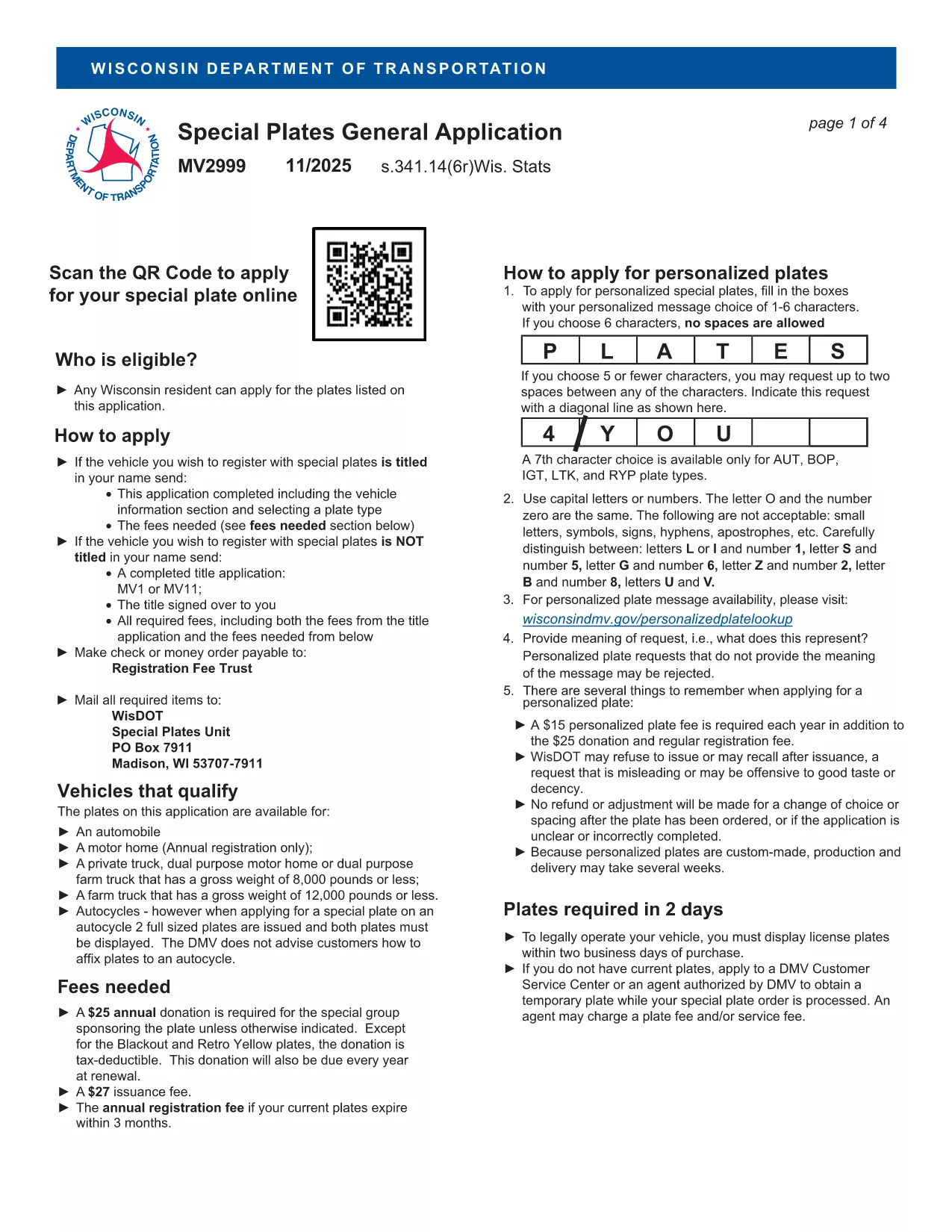
The MV2956 is the official Wisconsin Department of Motor Vehicles (DMV) form used for vehicle registration changes, special plate applications, and related paperwork. Instead of printing, scanning, and mailing a paper copy, you can now complete the form instantly online with our Fill out this form button powered by the Formize PDF Filler app.

What Is the MV2956 Form?

MV2956 is a fillable PDF that captures essential vehicle information, owner details, and any special requests (e.g., personalized plates). It is required for:

  • Transferring ownership of a vehicle within Wisconsin
  • Updating registration address
  • Applying for specialty or disability plates

How to Fill Out MV2956 Online with Formize

Follow these simple steps to complete the form without leaving your browser:

  • Click the Fill out this form button on this page.
  • The Formize PDF Filler will load in a secure overlay.
  • Enter your information directly into the highlighted fields.
  • Use the built‑in validation to avoid common entry errors.
  • When finished, click Submit to download a completed PDF or Print to send it to the DMV.

Common Mistakes to Avoid

Even with a fillable PDF, a few errors can delay processing:

  • Incorrect VIN: Double‑check the Vehicle Identification Number for typos.
  • Missing signatures: The form requires the owner’s digital signature; use the signature tool in Formize.
  • Outdated address: Ensure the address matches the one on your driver’s license.

Download & Save the PDF

If you prefer a hard copy, you can also download the original MV2999 PDF (the closest available version) and use Formize to fill it out.

Frequently Asked Questions

Below are answers to the most common queries about the MV2956 form.

자주하는 질문
  • What is the MV2956 form used for?

    It is the Wisconsin DMV’s standard form for vehicle registration changes, ownership transfers, and specialty plate requests.

  • Do I need to print the form after filling it out?

    No. You can download the completed PDF and submit it electronically if the DMV accepts electronic filings, or print it if a hard copy is required.

  • Is there a fee to use the Formize PDF Filler?

    Formize’s basic fillable‑PDF feature is free for users; any DMV filing fees are paid directly to the Wisconsin DMV.

  • Can I save my progress and return later?

    Yes. The Formize app lets you save a draft of the PDF and resume editing at any time.

  • What should I do if I make a mistake?

    Use the “Clear” button to reset a field, or download the PDF, correct it in a PDF editor, and re‑upload.

  • Where do I submit the completed MV2956 form?

    Submit the printed form to your local Wisconsin DMV office or follow any electronic submission instructions provided by the DMV.

  • Is the MV2956 form available in other languages?

    The official form is in English; however, you can use translation tools for assistance while filling it out.

어떻게

5개의 간단한 단계를 통해 온라인으로 MV2956를 무료로 작성하는 방법:

  1. 1
    Click the Fill‑out Button
    Press the “Fill out this form” button on the page to launch the Formize PDF Filler.
  2. 2
    Wait for the Filler to Load
    A secure overlay will appear; the fillable PDF loads automatically.
  3. 3
    Enter Your Information
    Complete each highlighted field, using the built‑in validation to ensure accuracy.
  4. 4
    Review and Sign
    Double‑check all entries, add your digital signature, and click “Submit.”
  5. 5
    Download or Print
    Save the completed PDF to your device or print it for submission to the Wisconsin DMV.
Formize PDF 필러 앱
에 대한

차량 등록 양식

자동차, 트레일러 또는 보트를 소유하거나 임대하는 경우 차량을 법적으로 등록하고 안전하게 유지하기 위해 특정 의무를 충족해야 합니다.

MV2956는 차량 등록 양식 중 하나로 해당 주 또는 지방 당국에 자동차를 등록하는 데 사용되는 문서입니다. 이러한 양식은 일반적으로 사람이 신차 또는 중고차를 구입하거나 차량을 가지고 새로운 주 또는 지방으로 이사할 때 필요합니다.

차량 등록에 필요한 정확한 요구 사항과 양식은 위치에 따라 다를 수 있지만 일반적으로 프로세스에는 차량, 소유자 및 차량에 대한 모든 유치권에 대한 정보를 제공하는 것이 포함됩니다.

등록 양식과 수수료가 제출되면 주 또는 지방 당국은 차량 소유자에게 등록 증명서 또는 번호판을 발급합니다. 이 등록을 통해 차량은 일반 도로와 고속도로에서 합법적으로 운행할 수 있습니다.

특징

PDF 필러

온라인에서 PDF 양식을 채우는 가장 쉬운 방법

  • MV2956를 빠르게 작성하세요.
    온라인에서 MV2956을(를) 빠르게 채우는 방법을 찾고 계십니까? 온라인 무료 PDF 양식 필러를 사용하면 1분 이내에 이 PDF 문서를 편집하고 채우는 방법을 알 수 있습니다.
  • 사용하기 쉬운 온라인 PDF 편집기
    다시 스캔하여 다시 보내기 전에 편집할 수 있도록 PDF 파일을 인쇄하는 데 지쳤습니까? 온라인에서 무료로 PDF 문서를 편집하세요. 온라인 PDF 편집기를 사용하여 시간과 종이를 절약하십시오.
  • 훌륭한 도구, 모든 플랫폼
    Mac에서 MV2956를 채우는 방법이나 PDF 필러를 무료로 사용하는 방법이 궁금하십니까? 당사의 온라인 PDF 도구는 모든 플랫폼에서 작동합니다.
  • 안전한 파일 저장
    완료된 "MV2956" 파일은 Amazon 클라우드 호스팅에서 관리하는 보안 데이터베이스에 저장됩니다. 언제든지 시스템에서 파일을 삭제할 수 있습니다. 어쨌든 이러한 파일은 24시간 후에 자동으로 삭제됩니다.
  • MV2956님과 채팅
    무료 PDF 리더 도우미인 Chatize에서 "MV2956"와 채팅하세요. "MV2956"에서 질문하고 답변을 받으세요. 위의 문서와 채팅 버튼을 클릭하세요.

필링 세션 삭제

선택한 필링 세션을 삭제하시겠습니까?이 경우 양식 작성 진행 상황이 손실됩니다.

편집 세션 삭제

선택한 편집 세션을 삭제하시겠습니까? 이 경우 양식 작성 및 편집 진행 상황이 손실됩니다.