
언어 선택

MVR‑27DI Fillable PDF – North Carolina Specialty Plate Form

  1. 언어 영어
  2. 국가 미국
  3. 활동 차량 등록
  4. 부서 Department of Motor Vehicles
MVR‑27DI Fillable PDF – North Carolina Specialty Plate Form

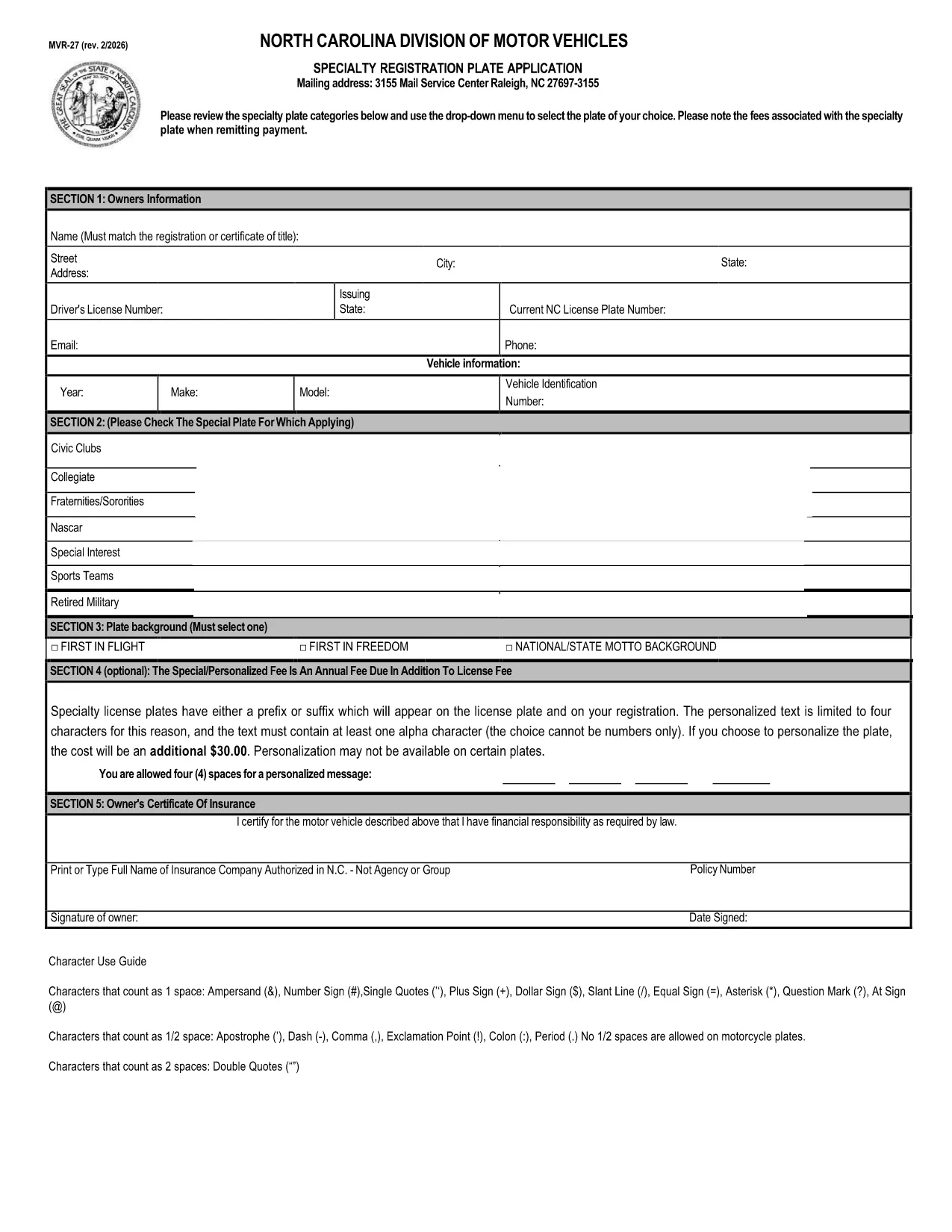
The MVR‑27DI is the North Carolina Department of Motor Vehicles (NCDMV) application for requesting a combined specialty license plate. This form is required whenever you want to add a custom or commemorative plate to your vehicle.

What is Form MVR‑27DI?

Form MVR‑27DI (also listed as MVR‑27) captures vehicle information, owner details, and the specific specialty plate category you have chosen. The form must be completed, signed, and submitted with the appropriate fee.

How to Fill Out MVR‑27DI Online

Instead of printing, printing, and scanning, you can fill the PDF directly in your browser using Formize’s PDF Filler app. Follow the simple steps below.

Common Mistakes to Avoid

  • Leaving any required field blank – the system will block submission.
  • Entering an incorrect VIN or plate number.
  • Forgetting to select the correct specialty‑plate category from the drop‑down list.
  • Not attaching the required payment receipt when submitting in person.

Where to Submit the Completed Form

After you have filled and saved the PDF, you can:

  • Visit any NCDMV license‑plate agency with the completed form, a valid driver’s license, and payment.
  • Mail the form to the address listed on the NCDMV website.

Download the Fillable PDF

Click the button below to open the fillable PDF in Formize. No software download is required – the Formize PDF Filler loads instantly in your browser.

자주하는 질문
  • Is the MVR‑27DI form available as a fillable PDF?

    Yes. The North Carolina DMV provides a fillable PDF that can be completed online using Formize.

  • Do I need a printer to submit the form?

    No. You can fill the form online, save the completed PDF, and either email it (if your local office accepts electronic submissions) or bring the saved file on a USB drive.

  • What fee is required for a specialty plate?

    Fees vary by plate type. The amount is listed on the form’s fee schedule and must be paid at the time of submission.

  • Can I change the specialty plate after it’s approved?

    Yes, but you’ll need to submit a new MVR‑27DI form and pay any additional fees associated with the new plate.

  • What documents do I need to bring with the completed form?

    A valid North Carolina driver’s license (or out‑of‑state license), proof of vehicle ownership, and the payment receipt.

  • How long does it take to process the MVR‑27DI?

    Processing typically takes 7‑10 business days after the form and payment are received.

  • Is the Formize PDF Filler secure?

    Yes. Formize uses SSL encryption, and your data never leaves your browser unless you choose to download or submit the file.

어떻게

4개의 간단한 단계를 통해 온라인으로 MVR-27DI를 무료로 작성하는 방법:

  1. 1
    Click “Fill out this form”
    Press the button on the page to open the MVR‑27DI PDF in the Formize PDF Filler app.
  2. 2
    Wait for the Formize loader
    The filler loads in seconds; you’ll see editable fields appear directly in your browser.
  3. 3
    Complete all required fields
    Enter your vehicle details, select the specialty‑plate category, and provide your contact information.
  4. 4
    Save or submit
    When finished, click “Save” to download the completed PDF or print it for in‑person submission.
Formize PDF 필러 앱
에 대한

차량 등록 양식

MVR-27DI는 관련 정부 기관(일반적으로 차량국(DMV) 또는 이와 동등한 기관)에 자동차를 등록하는 데 사용되는 문서인 차량 등록 양식 중 하나입니다. 이러한 양식은 개인이 새 차량이나 중고 차량을 구입하거나 차량 소유권을 이전하거나 차량을 가지고 새로운 관할 구역으로 이동할 때 필요합니다.

특정 차량 등록 양식은 관할권에 따라 다를 수 있지만 일반적으로 다음 정보가 필요합니다.

차량 정보: 여기에는 제조사, 모델, 연도, 차량 식별 번호(VIN), 주행 거리계 판독값 등 차량에 대한 세부정보가 포함됩니다.

소유주 정보: 양식에는 이름, 주소, 연락처 정보, 운전면허증 번호 등 차량 소유자에 대한 정보가 필요합니다.

소유권 증명: 상황에 따라 소유권 증명서, 판매 명세서 또는 제조업체 원산지 증명서(신차의 경우) 등 소유권 증명이 필요할 수 있습니다.

보험 정보: 일반적으로 유효한 차량 보험 보장 증명서가 필요합니다. 여기에는 보험 증권 번호, 보장 날짜, 보험 회사 세부 정보 제공이 포함될 수 있습니다.

수수료 지불: 차량 등록에는 등록 수수료, 세금 및 관할권에 따른 기타 요금 등 다양한 수수료를 지불하는 과정이 포함됩니다.

이러한 기본 요구 사항 외에도 일부 관할권에는 추가 양식 또는 문서 요구 사항이 있을 수 있습니다. 예를 들어 특정 지역에서는 배출 테스트 결과, 안전 검사 또는 거주 증명이 필요할 수 있습니다.

차량 등록 양식을 작성하여 제출하면 정부 당국에서 등록증, 번호판, 등록 스티커를 발급합니다. 이 문서는 차량이 합법적으로 등록되어 있으며 공공 도로에서 운행할 권한이 있음을 나타냅니다.

차량 등록 요구 사항은 관할권에 따라 크게 다를 수 있다는 점에 유의하는 것이 중요합니다. 따라서 귀하의 지역에 적용되는 특정 양식 및 절차에 대해서는 지역 DMV 또는 이에 상응하는 기관에 문의하는 것이 좋습니다.

특징

PDF 필러

온라인에서 PDF 양식을 채우는 가장 쉬운 방법

  • MVR-27DI를 빠르게 작성하세요.
    온라인에서 MVR-27DI을(를) 빠르게 채우는 방법을 찾고 계십니까? 온라인 무료 PDF 양식 필러를 사용하면 1분 이내에 이 PDF 문서를 편집하고 채우는 방법을 알 수 있습니다.
  • 사용하기 쉬운 온라인 PDF 편집기
    다시 스캔하여 다시 보내기 전에 편집할 수 있도록 PDF 파일을 인쇄하는 데 지쳤습니까? 온라인에서 무료로 PDF 문서를 편집하세요. 온라인 PDF 편집기를 사용하여 시간과 종이를 절약하십시오.
  • 훌륭한 도구, 모든 플랫폼
    Mac에서 MVR-27DI를 채우는 방법이나 PDF 필러를 무료로 사용하는 방법이 궁금하십니까? 당사의 온라인 PDF 도구는 모든 플랫폼에서 작동합니다.
  • 안전한 파일 저장
    완료된 "MVR-27DI" 파일은 Amazon 클라우드 호스팅에서 관리하는 보안 데이터베이스에 저장됩니다. 언제든지 시스템에서 파일을 삭제할 수 있습니다. 어쨌든 이러한 파일은 24시간 후에 자동으로 삭제됩니다.
  • MVR-27DI님과 채팅
    무료 PDF 리더 도우미인 Chatize에서 "MVR-27DI"와 채팅하세요. "MVR-27DI"에서 질문하고 답변을 받으세요. 위의 문서와 채팅 버튼을 클릭하세요.

필링 세션 삭제

선택한 필링 세션을 삭제하시겠습니까?이 경우 양식 작성 진행 상황이 손실됩니다.

편집 세션 삭제

선택한 편집 세션을 삭제하시겠습니까? 이 경우 양식 작성 및 편집 진행 상황이 손실됩니다.