
언어 선택

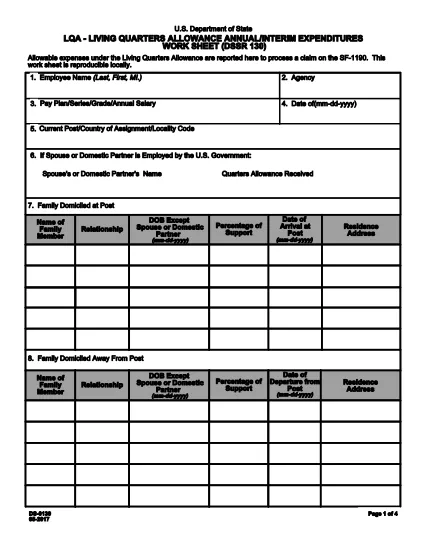
DS-130 Fillable PDF Form – Complete Online

  1. 언어 영어
  2. 국가 미국
  3. 부서 국무부
DS-130 Fillable PDF Form – Complete Online

What is the DS-130 Form?

The DS-130 (also known as the DSSR-130 Living Quarters Allowance Worksheet) is a U.S. Department of State document used to report allowable expenses for living‑quarters allowances. It is frequently required for military and civilian personnel who receive LQA benefits.

How to Fill the DS-130 Online with Formize

Formize makes the DS-130 completely fillable in your browser—no PDF editor needed. Follow these simple steps:

  • Click the "Fill out this form" button on this page.
  • Wait a few seconds while the Formize PDF Filler app loads.
  • Enter your information in the highlighted fields. The form automatically saves your entries.
  • When you’re done, click "Save & Download" to get a completed PDF you can print or email.

Common Mistakes to Avoid on DS-130

Even a small error can delay processing. Keep these tips in mind:

  • Incorrect dates: Double‑check the start and end dates of each expense period.
  • Missing signatures: The form requires the claimant’s signature; use the electronic signature feature in Formize.
  • Wrong totals: Use the automatic calculation fields; do not manually add totals.
  • Unclear handwriting: With the fillable PDF, every entry is typed, eliminating illegible handwriting.

Where to Submit the Completed DS-130

After saving your completed DS-130, submit it according to your agency’s instructions—usually to your finance or personnel office, or directly to the Department of State LQA office. Keep a copy for your records.

Ready to start? Click the button below and complete the DS-130 in minutes.

자주하는 질문
  • What is the purpose of the DS-130 form?

    The DS-130 is a Living Quarters Allowance worksheet used to report and calculate allowable housing expenses for eligible personnel.

  • Can I fill out the DS-130 on a mobile device?

    Yes. Formize’s fillable PDF works on smartphones, tablets, and desktop computers.

  • Do I need Adobe Acrobat to complete the DS-130?

    No. The form is fully fillable in the browser via Formize, so no extra software is required.

  • How long does it take to complete the DS-130?

    Most users finish in 5‑10 minutes once they have their expense information ready.

  • What should I do if I make a mistake after downloading?

    Return to the Formize page, click "Fill out this form" again, and re‑enter the corrected information before downloading a new PDF.

  • Is the DS-130 form free to download?

    Yes. The PDF is provided at no cost; you only need an internet connection to use Formize.

어떻게

4개의 간단한 단계를 통해 온라인으로 ds-130를 무료로 작성하는 방법:

  1. 1
    Click the Fill Out Button
    Press the "Fill out this form" button on the page to launch the Formize PDF Filler.
  2. 2
    Enter Your Information
    Type your data into each highlighted field. The form saves automatically as you go.
  3. 3
    Review and Sign
    Check all entries for accuracy, then use the electronic signature tool to sign the DS-130.
  4. 4
    Save & Download
    Click "Save & Download" to obtain a completed PDF you can print or email to your office.
Formize PDF 필러 앱
에 대한

국무부(DOS) 양식

ds-130는 미국 국무부(DOS)에서 해외 여행, 비자, 여권, 영사 서비스와 관련된 정보를 수집하고 다양한 서비스를 처리하기 위해 사용하는 신청서 양식 중 하나입니다. DOS는 미국의 외교 정책과 국제 관계를 관리하고 미국 시민과 외국인에게 서비스를 제공하는 일을 담당합니다.

다음은 국무부 양식의 몇 가지 예입니다.

여권 신청서: 이 양식은 개인이 해외 여행을 할 수 있도록 정부가 발행한 공식 문서인 미국 여권을 신청하는 데 사용됩니다. 여권 신청 양식은 개인정보, 시민권 세부정보, 신원 및 기타 필수 정보를 수집합니다.

비이민 비자 신청서: DOS는 외국인이 관광, 사업, 학업, 취업 등 다양한 목적으로 일시적으로 미국을 방문할 수 있도록 허용하는 비이민 비자 발급을 감독합니다. DS-160, DS-156 또는 DS-260과 같은 비이민 비자 신청서는 신청자의 개인 정보, 여행 이력, 여행 목적 및 기타 관련 정보에 대한 정보를 수집하는 데 사용됩니다.

이민 비자 신청서: 미국으로 이민하려는 개인의 경우 이민 비자 신청서가 사용됩니다. 이 양식은 신청자의 개인 이력, 가족, 고용 이력 및 기타 관련 정보에 대한 자세한 정보를 수집합니다. 가족 기반 이민을 위한 DS-260 양식 또는 다양성 비자 복권 당첨자를 위한 DS-230 양식을 예로 들 수 있습니다.

해외 출생 영사 보고서(CRBA) 양식: 이 양식이 사용됩니다. 해외에서 미국 시민 자녀가 태어났다는 사실을 미국 시민 부모에게 문서로 기록하는 것입니다. 아동, 부모 및 증빙 서류에 대한 정보를 수집합니다.

지원 진술서 양식: 미국 이민자를 후원하는 경우 미국 시민권자 또는 합법적인 영주권자는 재정 지원 진술서 양식을 제출해야 할 수도 있습니다. I-864 또는 I-134와 같은 이 양식은 이민자를 지원하고 생활 보호 대상이 되는 것을 방지할 수 있는 재정적 능력을 입증하는 데 사용됩니다.

영사 서비스 양식: DOS는 미국 시민과 외국인에게 공증 서비스, 긴급 지원 요청, 미국 시민권 포기 등 다양한 영사 서비스를 제공합니다. 요청된 서비스의 성격에 따라 양식 DS-11, DS-3053 또는 DS-4079를 포함한 특정 양식이 이러한 서비스에 사용됩니다.

미국 국무부에서 사용하는 특정 양식은 시간이 지남에 따라 변경될 수 있으며 서비스마다 다른 양식이 필요할 수 있다는 점에 유의하는 것이 중요합니다. 다양한 서비스에 필요한 특정 양식에 관한 가장 최신의 정확한 정보를 얻으려면 미국 국무부의 공식 웹사이트를 방문하거나 가장 가까운 미국 대사관 또는 영사관에 ​​문의하는 것이 좋습니다.

특징

PDF 필러

온라인에서 PDF 양식을 채우는 가장 쉬운 방법

  • ds-130를 빠르게 작성하세요.
    온라인에서 ds-130을(를) 빠르게 채우는 방법을 찾고 계십니까? 온라인 무료 PDF 양식 필러를 사용하면 1분 이내에 이 PDF 문서를 편집하고 채우는 방법을 알 수 있습니다.
  • 사용하기 쉬운 온라인 PDF 편집기
    다시 스캔하여 다시 보내기 전에 편집할 수 있도록 PDF 파일을 인쇄하는 데 지쳤습니까? 온라인에서 무료로 PDF 문서를 편집하세요. 온라인 PDF 편집기를 사용하여 시간과 종이를 절약하십시오.
  • 훌륭한 도구, 모든 플랫폼
    Mac에서 ds-130를 채우는 방법이나 PDF 필러를 무료로 사용하는 방법이 궁금하십니까? 당사의 온라인 PDF 도구는 모든 플랫폼에서 작동합니다.
  • 안전한 파일 저장
    완료된 "ds-130" 파일은 Amazon 클라우드 호스팅에서 관리하는 보안 데이터베이스에 저장됩니다. 언제든지 시스템에서 파일을 삭제할 수 있습니다. 어쨌든 이러한 파일은 24시간 후에 자동으로 삭제됩니다.
  • ds-130님과 채팅
    무료 PDF 리더 도우미인 Chatize에서 "ds-130"와 채팅하세요. "ds-130"에서 질문하고 답변을 받으세요. 위의 문서와 채팅 버튼을 클릭하세요.

필링 세션 삭제

선택한 필링 세션을 삭제하시겠습니까?이 경우 양식 작성 진행 상황이 손실됩니다.

편집 세션 삭제

선택한 편집 세션을 삭제하시겠습니까? 이 경우 양식 작성 및 편집 진행 상황이 손실됩니다.