
언어 선택

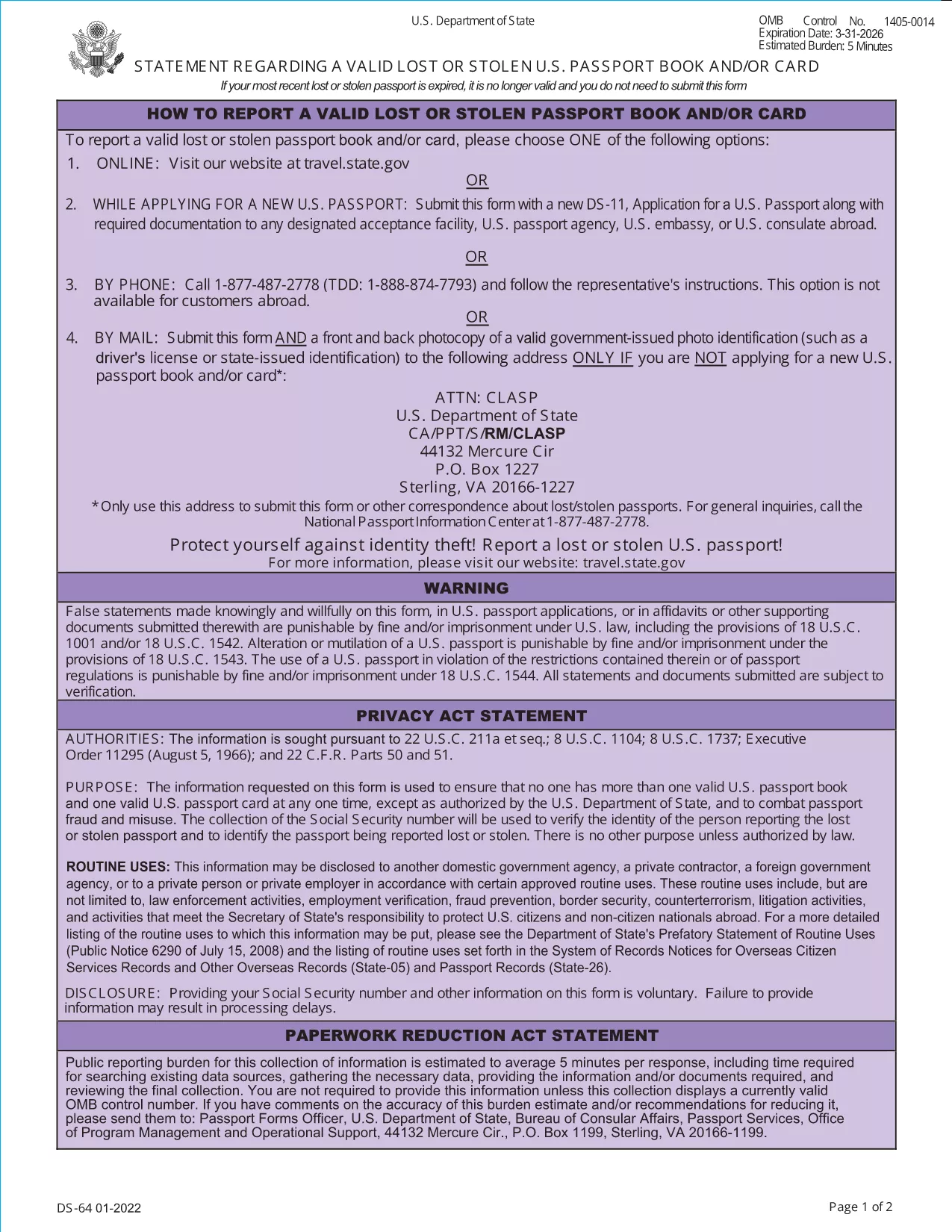
DS-64 Statement – Lost or Stolen U.S. Passport Fillable Form

  1. 언어 영어
  2. 국가 미국
  3. 부서 국무부
  4. 활동 Passports
DS-64 Statement – Lost or Stolen U.S. Passport Fillable Form

If your U.S. passport has been lost or stolen, the Department of State requires you to submit the DS-64, Statement Regarding a Lost or Stolen Passport. This official PDF can now be filled out directly on our site, saved, and printed without any extra software.

What Is the DS-64 Form?

The DS-64 is a short, one‑page declaration that tells the State Department that your passport is no longer in your possession. It includes basic personal details, the passport number (if known), and the circumstances of the loss or theft. Submitting this form protects you from fraud and allows the State Department to cancel the missing document.

How to Complete the DS-64 Online with Formize

Follow these simple steps to fill the form instantly:

  • Click the "Fill out this form" button on this page.
  • Wait a few seconds while the Formize PDF Filler app loads.
  • Enter the required information in the highlighted fields.
  • Review your entries, then click Save & Download to get a completed PDF.
  • Print the PDF and sign it before submission.

Common Mistakes to Avoid

  • Leaving the passport number blank: If you truly don’t know it, write "000000000" rather than leaving the field empty.
  • Forgetting to sign: The form is not valid without a handwritten signature.
  • Providing inaccurate dates: Give the best estimate if you can’t recall the exact issue date.
  • Submitting an unsigned PDF: Print, sign, and then scan or mail the original.

Where to Submit the Completed Form

After printing and signing, mail the DS-64 to the Consular Lost and Stolen Passport Unit (CLASP). Include any supporting documentation, such as a police report for stolen passports. If you are filing a replacement application (DS‑11), attach the DS‑64 to that packet.

Need Help? Quick Resources

U.S. Department of State – Official Forms
Passport Fees & Processing Times

자주하는 질문
  • Do I need a passport number if I don’t know it?

    If the number is unknown, write nine zeros (000000000). The State Department accepts this placeholder for lost or stolen passports.

  • Can I submit the DS-64 electronically?

    The DS-64 must be signed by hand. You can fill it out online, download, print, and sign before mailing it to the CLASP.

  • How long does it take for the lost passport to be cancelled?

    Cancellation is usually processed within 5–7 business days after the CLASP receives your signed DS‑64.

  • Do I need to fill out a DS‑11 as well?

    Yes, if you are applying for a replacement passport you must submit a DS‑11 together with the completed DS‑64.

  • Is there a fee for filing the DS‑64?

    There is no separate fee for the DS‑64 itself. Fees apply only to the replacement passport application (DS‑11).

  • What if my passport was stolen abroad?

    Report the theft to the local police, obtain a report, and then submit the DS‑64 to the U.S. Embassy or Consulate along with your replacement application.

  • Can I use the same DS‑64 for multiple lost passports?

    Each lost or stolen passport requires its own DS‑64 statement. Submit a separate form for each incident.

어떻게

5개의 간단한 단계를 통해 온라인으로 lost passport form를 무료로 작성하는 방법:

  1. 1
    Open the Fillable Form
    Click the "Fill out this form" button on this page. The Formize PDF Filler will open in a new window.
  2. 2
    Enter Your Information
    Type your personal details, passport number (or 000000000 if unknown), and describe how the passport was lost or stolen.
  3. 3
    Save and Download
    After completing all fields, click "Save & Download". The filled PDF will be saved to your device.
  4. 4
    Print and Sign
    Print the downloaded PDF and add your handwritten signature in the designated area.
  5. 5
    Submit to CLASP
    Mail the signed form to the Consular Lost and Stolen Passport Unit (CLASP) along with any required supporting documents.
Formize PDF 필러 앱
에 대한

국무부(DOS) 양식

lost passport form는 미국 국무부(DOS)에서 해외 여행, 비자, 여권, 영사 서비스와 관련된 정보를 수집하고 다양한 서비스를 처리하기 위해 사용하는 신청서 양식 중 하나입니다. DOS는 미국의 외교 정책과 국제 관계를 관리하고 미국 시민과 외국인에게 서비스를 제공하는 일을 담당합니다.

다음은 국무부 양식의 몇 가지 예입니다.

여권 신청서: 이 양식은 개인이 해외 여행을 할 수 있도록 정부가 발행한 공식 문서인 미국 여권을 신청하는 데 사용됩니다. 여권 신청 양식은 개인정보, 시민권 세부정보, 신원 및 기타 필수 정보를 수집합니다.

비이민 비자 신청서: DOS는 외국인이 관광, 사업, 학업, 취업 등 다양한 목적으로 일시적으로 미국을 방문할 수 있도록 허용하는 비이민 비자 발급을 감독합니다. DS-160, DS-156 또는 DS-260과 같은 비이민 비자 신청서는 신청자의 개인 정보, 여행 이력, 여행 목적 및 기타 관련 정보에 대한 정보를 수집하는 데 사용됩니다.

이민 비자 신청서: 미국으로 이민하려는 개인의 경우 이민 비자 신청서가 사용됩니다. 이 양식은 신청자의 개인 이력, 가족, 고용 이력 및 기타 관련 정보에 대한 자세한 정보를 수집합니다. 가족 기반 이민을 위한 DS-260 양식 또는 다양성 비자 복권 당첨자를 위한 DS-230 양식을 예로 들 수 있습니다.

해외 출생 영사 보고서(CRBA) 양식: 이 양식이 사용됩니다. 해외에서 미국 시민 자녀가 태어났다는 사실을 미국 시민 부모에게 문서로 기록하는 것입니다. 아동, 부모 및 증빙 서류에 대한 정보를 수집합니다.

지원 진술서 양식: 미국 이민자를 후원하는 경우 미국 시민권자 또는 합법적인 영주권자는 재정 지원 진술서 양식을 제출해야 할 수도 있습니다. I-864 또는 I-134와 같은 이 양식은 이민자를 지원하고 생활 보호 대상이 되는 것을 방지할 수 있는 재정적 능력을 입증하는 데 사용됩니다.

영사 서비스 양식: DOS는 미국 시민과 외국인에게 공증 서비스, 긴급 지원 요청, 미국 시민권 포기 등 다양한 영사 서비스를 제공합니다. 요청된 서비스의 성격에 따라 양식 DS-11, DS-3053 또는 DS-4079를 포함한 특정 양식이 이러한 서비스에 사용됩니다.

미국 국무부에서 사용하는 특정 양식은 시간이 지남에 따라 변경될 수 있으며 서비스마다 다른 양식이 필요할 수 있다는 점에 유의하는 것이 중요합니다. 다양한 서비스에 필요한 특정 양식에 관한 가장 최신의 정확한 정보를 얻으려면 미국 국무부의 공식 웹사이트를 방문하거나 가장 가까운 미국 대사관 또는 영사관에 ​​문의하는 것이 좋습니다.

특징

PDF 필러

온라인에서 PDF 양식을 채우는 가장 쉬운 방법

  • lost passport form를 빠르게 작성하세요.
    온라인에서 lost passport form을(를) 빠르게 채우는 방법을 찾고 계십니까? 온라인 무료 PDF 양식 필러를 사용하면 1분 이내에 이 PDF 문서를 편집하고 채우는 방법을 알 수 있습니다.
  • 사용하기 쉬운 온라인 PDF 편집기
    다시 스캔하여 다시 보내기 전에 편집할 수 있도록 PDF 파일을 인쇄하는 데 지쳤습니까? 온라인에서 무료로 PDF 문서를 편집하세요. 온라인 PDF 편집기를 사용하여 시간과 종이를 절약하십시오.
  • 훌륭한 도구, 모든 플랫폼
    Mac에서 lost passport form를 채우는 방법이나 PDF 필러를 무료로 사용하는 방법이 궁금하십니까? 당사의 온라인 PDF 도구는 모든 플랫폼에서 작동합니다.
  • 안전한 파일 저장
    완료된 "lost passport form" 파일은 Amazon 클라우드 호스팅에서 관리하는 보안 데이터베이스에 저장됩니다. 언제든지 시스템에서 파일을 삭제할 수 있습니다. 어쨌든 이러한 파일은 24시간 후에 자동으로 삭제됩니다.
  • lost passport form님과 채팅
    무료 PDF 리더 도우미인 Chatize에서 "lost passport form"와 채팅하세요. "lost passport form"에서 질문하고 답변을 받으세요. 위의 문서와 채팅 버튼을 클릭하세요.

필링 세션 삭제

선택한 필링 세션을 삭제하시겠습니까?이 경우 양식 작성 진행 상황이 손실됩니다.

편집 세션 삭제

선택한 편집 세션을 삭제하시겠습니까? 이 경우 양식 작성 및 편집 진행 상황이 손실됩니다.