
언어 선택

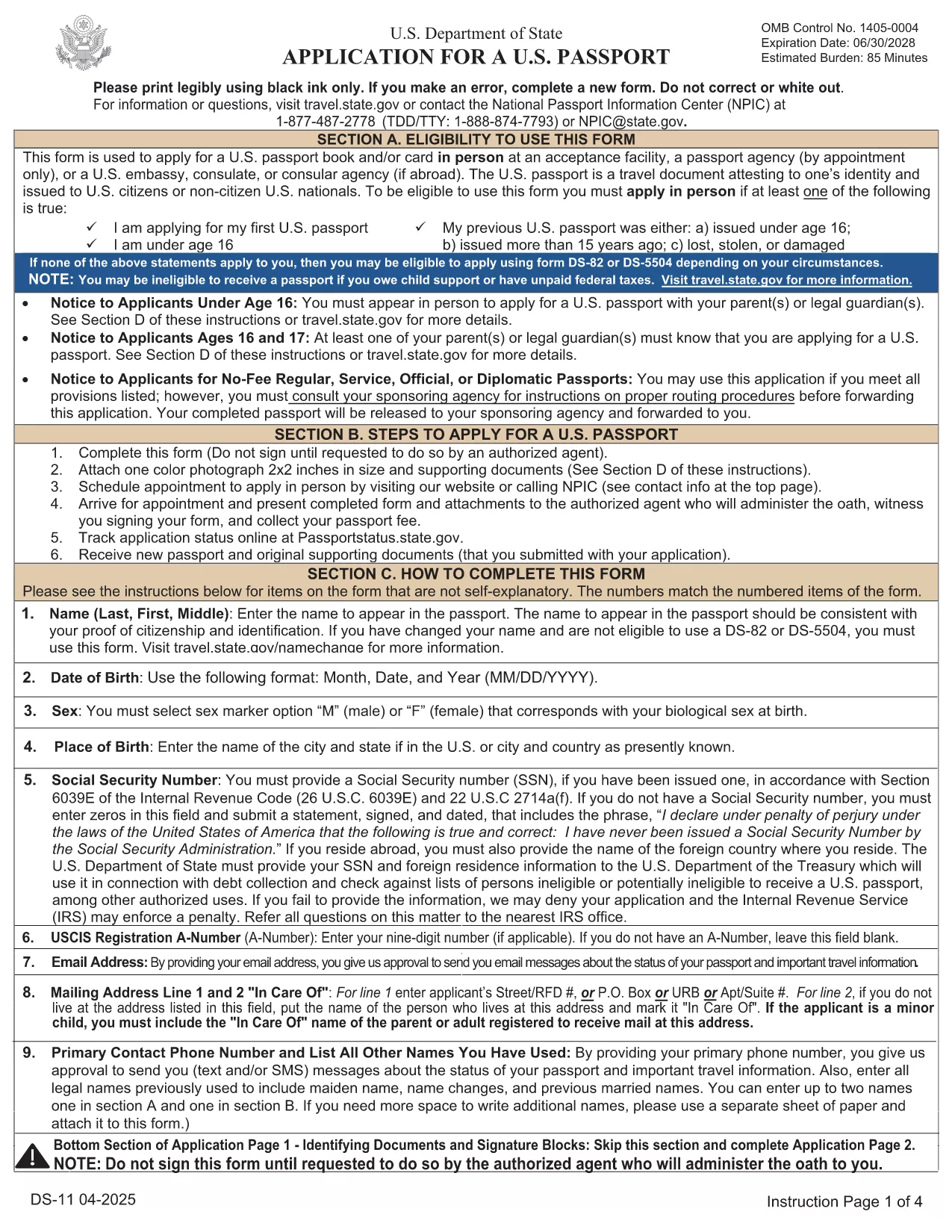
Passport Renewal Application – Fillable DS-11 PDF

  1. 언어 영어
  2. 국가 미국
  3. 부서 국무부
  4. 활동 Passports
Passport Renewal Application – Fillable DS-11 PDF

Renewing your U.S. passport has never been easier. With Formize’s fillable PDF version of the official DS‑11 application, you can complete the entire form online, avoid common errors, and print a clean copy ready for submission.

Why Use a Fillable PDF Form

Traditional paper forms require you to print, write, and re‑write if you make a mistake. A fillable PDF lets you:

  • Enter data directly on your computer or tablet.
  • Save a draft and return later.
  • Validate required fields instantly, reducing the chance of rejection.
  • Print a professional‑looking document that meets State Department standards.

Step‑by‑Step Guide to Complete the DS‑11 Form

Follow the simple steps below instead of downloading the PDF and opening a separate editor.

  • Click "Fill out this form" on this page.
  • Wait a few seconds while the Formize PDF Filler app loads.
  • Enter all requested information in each field. The app highlights missing or incorrectly formatted entries.
  • Review the completed form, add your signature electronically, and click Save & Download.
  • Print the final PDF on white, 8.5" x 11" paper and submit it with your supporting documents.

Common Mistakes to Avoid

  • Leaving the "Middle Name" field blank when you have one – the State Department requires the full legal name.
  • Using a non‑official photo (must be 2" x 2", color, taken within the last six months).
  • Forgetting to sign the form in the designated area – an unsigned form is automatically rejected.
  • Submitting an outdated form version – always use the latest PDF provided by Formize.

Where to Submit Your Completed Form

After printing, mail your DS‑11 renewal package to the appropriate address listed on the U.S. Department of State website. If you need expedited service, use the designated Express or Agency address.

Need help? Review the FAQs below or contact your local passport acceptance facility.

자주하는 질문
  • Can I use the DS‑11 form for a passport renewal?

    Yes, the DS‑11 is accepted for renewals when your previous passport was lost, stolen, or damaged, or if you do not meet the eligibility criteria for DS‑82.

  • What is the difference between DS‑11 and DS‑82?

    DS‑11 is the standard application used for first‑time applicants and certain renewal situations. DS‑82 is a simpler renewal form for eligible adults with an undamaged passport that is still valid or expired less than 5 years.

  • How long does the renewal process take?

    Standard processing takes 8‑11 weeks. Expedited service (for an additional fee) reduces the time to 5‑7 weeks, and urgent appointments can be arranged at a passport agency.

  • Do I need to bring my old passport?

    Yes. Submit your most recent passport with the completed DS‑11 form. If the passport is damaged or lost, you must include a signed statement and any supporting documentation.

  • What fees are required for a renewal?

    As of 2024, the adult passport book fee is $130 for standard service and $210 for expedited service. Additional fees apply for passport cards and optional services.

  • Can I submit the form electronically?

    No. The DS‑11 must be printed, signed, and mailed with supporting documents. However, you can complete the form online using the fillable PDF to avoid errors.

  • What photo specifications are required?

    A 2" x 2" color photo taken within the last six months, with a plain white background, full face view, and no glasses.

  • Where can I find a passport acceptance facility?

    Use the State Department’s online locator to find post offices, libraries, and other authorized facilities near you.

어떻게

5개의 간단한 단계를 통해 온라인으로 passport renewal를 무료로 작성하는 방법:

  1. 1
    Open the Fillable Form
    Click the "Fill out this form" button on the page. The Formize PDF Filler loads directly in your browser.
  2. 2
    Enter Your Information
    Type your details into each highlighted field. The tool checks for required data and formatting in real time.
  3. 3
    Review and Sign
    Double‑check every entry, add your electronic signature, and confirm that the photo meets the guidelines.
  4. 4
    Save or Download
    Click "Save & Download" to get a printable PDF copy of your completed DS‑11 form.
  5. 5
    Print and Submit
    Print the PDF on white 8.5" x 11" paper, attach your supporting documents, and mail it to the address provided by the U.S. Department of State.
Formize PDF 필러 앱
에 대한

국무부(DOS) 양식

passport renewal는 미국 국무부(DOS)에서 해외 여행, 비자, 여권, 영사 서비스와 관련된 정보를 수집하고 다양한 서비스를 처리하기 위해 사용하는 신청서 양식 중 하나입니다. DOS는 미국의 외교 정책과 국제 관계를 관리하고 미국 시민과 외국인에게 서비스를 제공하는 일을 담당합니다.

다음은 국무부 양식의 몇 가지 예입니다.

여권 신청서: 이 양식은 개인이 해외 여행을 할 수 있도록 정부가 발행한 공식 문서인 미국 여권을 신청하는 데 사용됩니다. 여권 신청 양식은 개인정보, 시민권 세부정보, 신원 및 기타 필수 정보를 수집합니다.

비이민 비자 신청서: DOS는 외국인이 관광, 사업, 학업, 취업 등 다양한 목적으로 일시적으로 미국을 방문할 수 있도록 허용하는 비이민 비자 발급을 감독합니다. DS-160, DS-156 또는 DS-260과 같은 비이민 비자 신청서는 신청자의 개인 정보, 여행 이력, 여행 목적 및 기타 관련 정보에 대한 정보를 수집하는 데 사용됩니다.

이민 비자 신청서: 미국으로 이민하려는 개인의 경우 이민 비자 신청서가 사용됩니다. 이 양식은 신청자의 개인 이력, 가족, 고용 이력 및 기타 관련 정보에 대한 자세한 정보를 수집합니다. 가족 기반 이민을 위한 DS-260 양식 또는 다양성 비자 복권 당첨자를 위한 DS-230 양식을 예로 들 수 있습니다.

해외 출생 영사 보고서(CRBA) 양식: 이 양식이 사용됩니다. 해외에서 미국 시민 자녀가 태어났다는 사실을 미국 시민 부모에게 문서로 기록하는 것입니다. 아동, 부모 및 증빙 서류에 대한 정보를 수집합니다.

지원 진술서 양식: 미국 이민자를 후원하는 경우 미국 시민권자 또는 합법적인 영주권자는 재정 지원 진술서 양식을 제출해야 할 수도 있습니다. I-864 또는 I-134와 같은 이 양식은 이민자를 지원하고 생활 보호 대상이 되는 것을 방지할 수 있는 재정적 능력을 입증하는 데 사용됩니다.

영사 서비스 양식: DOS는 미국 시민과 외국인에게 공증 서비스, 긴급 지원 요청, 미국 시민권 포기 등 다양한 영사 서비스를 제공합니다. 요청된 서비스의 성격에 따라 양식 DS-11, DS-3053 또는 DS-4079를 포함한 특정 양식이 이러한 서비스에 사용됩니다.

미국 국무부에서 사용하는 특정 양식은 시간이 지남에 따라 변경될 수 있으며 서비스마다 다른 양식이 필요할 수 있다는 점에 유의하는 것이 중요합니다. 다양한 서비스에 필요한 특정 양식에 관한 가장 최신의 정확한 정보를 얻으려면 미국 국무부의 공식 웹사이트를 방문하거나 가장 가까운 미국 대사관 또는 영사관에 ​​문의하는 것이 좋습니다.

특징

PDF 필러

온라인에서 PDF 양식을 채우는 가장 쉬운 방법

  • passport renewal를 빠르게 작성하세요.
    온라인에서 passport renewal을(를) 빠르게 채우는 방법을 찾고 계십니까? 온라인 무료 PDF 양식 필러를 사용하면 1분 이내에 이 PDF 문서를 편집하고 채우는 방법을 알 수 있습니다.
  • 사용하기 쉬운 온라인 PDF 편집기
    다시 스캔하여 다시 보내기 전에 편집할 수 있도록 PDF 파일을 인쇄하는 데 지쳤습니까? 온라인에서 무료로 PDF 문서를 편집하세요. 온라인 PDF 편집기를 사용하여 시간과 종이를 절약하십시오.
  • 훌륭한 도구, 모든 플랫폼
    Mac에서 passport renewal를 채우는 방법이나 PDF 필러를 무료로 사용하는 방법이 궁금하십니까? 당사의 온라인 PDF 도구는 모든 플랫폼에서 작동합니다.
  • 안전한 파일 저장
    완료된 "passport renewal" 파일은 Amazon 클라우드 호스팅에서 관리하는 보안 데이터베이스에 저장됩니다. 언제든지 시스템에서 파일을 삭제할 수 있습니다. 어쨌든 이러한 파일은 24시간 후에 자동으로 삭제됩니다.
  • passport renewal님과 채팅
    무료 PDF 리더 도우미인 Chatize에서 "passport renewal"와 채팅하세요. "passport renewal"에서 질문하고 답변을 받으세요. 위의 문서와 채팅 버튼을 클릭하세요.

필링 세션 삭제

선택한 필링 세션을 삭제하시겠습니까?이 경우 양식 작성 진행 상황이 손실됩니다.

편집 세션 삭제

선택한 편집 세션을 삭제하시겠습니까? 이 경우 양식 작성 및 편집 진행 상황이 손실됩니다.