언어 선택

OL 801 Student License Application – Fillable PDF

  1. 언어 영어
  2. 국가 미국
  3. 활동 운전 면허증
  4. 상태 캘리포니아
OL 801 Student License Application – Fillable PDF

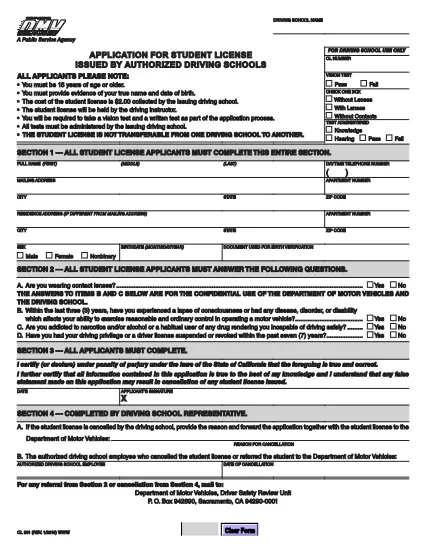
The OL 801 is the California Department of Motor Vehicles (DMV) application used by driving schools and students to obtain a learner’s permit or student driver license. This form must be completed accurately before you can start behind‑the‑wheel training.

Formize makes the process effortless. Instead of printing, scanning, or editing the PDF manually, simply click the Fill out this form button on this page. Our secure PDF filler loads the official DMV document, lets you type directly into each field, and saves a completed copy that you can print or email.

What Is the OL 801 Form?

The OL 801 collects essential information about the student driver, the driving school, and any required endorsements. California law requires a signed, completed form before a student can be issued a provisional license.

How to Complete the OL 801 Online

Follow the step‑by‑step guide below to finish the form in minutes:

  • Click the “Fill out this form” button.
  • Wait for the Formize PDF Filler app to load the official DMV PDF.
  • Enter the requested details – student name, address, school information, and signatures.
  • Review the completed form for accuracy.
  • Download, print, or email the filled PDF directly from the filler.

Common Mistakes to Avoid

  • Leaving any required field blank – the DMV will reject incomplete submissions.
  • Using an outdated version of the form – always use the latest PDF linked below.
  • Incorrectly entering the school’s license number – double‑check with your driving school.
  • Forgetting the student’s signature; an unsigned form is invalid.

Where to Submit Your Completed Form

After filling out the OL 801, you can submit it in one of three ways:

  1. Mail it to the DMV Driver Safety Review Unit, P.O. Box 942890, Sacramento, CA 94290‑0001.
  2. Bring a printed copy to your local DMV office.
  3. Upload a scanned copy through the California DMV online portal (if available).

Download the Official PDF

For reference or offline use, you can also download the original, unfilled PDF directly from the California DMV:

Official OL 801 PDF (2020 version)

자주하는 질문
  • What is the purpose of the OL 801 form?

    The OL 801 is used by California driving schools to apply for a student driver license (learner’s permit) for their students. It verifies the student’s eligibility and records the school’s endorsement.

  • Do I need a printed copy to submit the form?

    Yes. The DMV requires a hard copy with original signatures. You can print the completed PDF from Formize after filling it out online.

  • Can I edit the PDF after I download it?

    Once you download the filled PDF, you can still edit it with any PDF editor, but the Formize filler already lets you complete all fields accurately before download.

  • Is the Formize filler free to use?

    Yes, filling out the OL 801 with Formize’s online PDF filler is completely free and does not require any software installation.

  • How often is the OL 801 form updated?

    The California DMV updates the form as needed. The version linked here (2020) is the current official version; always use the latest PDF from the DMV website.

  • What should I do if I make a mistake while filling out the form?

    If you notice an error before downloading, simply correct it in the Formize filler. If you’ve already printed it, you may need to start a new form or cross out the mistake and initial it, depending on DMV guidelines.

  • Where can I mail the completed OL 801?

    Mail the signed form to: Department of Motor Vehicles, Driver Safety Review Unit, P. O. Box 942890, Sacramento, CA 94290‑0001.

  • Do I need any additional documents with the OL 801?

    Typically you’ll need a copy of the student’s ID, proof of residency, and the driving school’s certification. Check the DMV checklist for your specific situation.

어떻게

4개의 간단한 단계를 통해 온라인으로 OL 801를 무료로 작성하는 방법:

  1. 1
    Click the Fill‑out Button
    Press the “Fill out this form” button on this page to launch the Formize PDF Filler.
  2. 2
    Wait for the Filler to Load
    The app loads the official OL 801 PDF in a secure viewer. This takes only a few seconds.
  3. 3
    Enter All Required Information
    Type directly into each field – student details, school information, and signatures. Use the tab key to move quickly between fields.
  4. 4
    Save, Print, or Email
    When you’re finished, click “Save”. You can download the completed PDF, print it for a hard copy, or email it straight to the DMV.
Formize PDF 필러 앱
에 대한

운전 면허증 신청서

OL 801는 운전면허를 신청하거나 운전면허와 관련된 각종 서비스를 요청할 때 사용하는 서류인 운전면허증 양식 중 하나입니다. 이러한 양식은 일반적으로 미국의 차량국(DMV)과 같이 특정 관할권에서 운전 면허증 발급을 담당하는 부서 또는 기관에서 제공합니다.

일반적인 운전 면허증 양식은 다음과 같습니다.

운전면허 신청서: 이 양식은 새 운전면허를 신청하거나 기존 운전면허를 갱신하는 데 사용됩니다. 일반적으로 이름, 주소, 생년월일, 사회 보장 번호와 같은 개인 정보가 필요합니다.

신분증 서류: 일부 관할권에서는 신청자의 신원과 거주지를 확인하기 위해 특정 신분증을 요구합니다. 여기에는 출생 증명서, 여권, 사회 보장 카드 등의 양식이 포함될 수 있습니다.

시력 검사: 많은 운전면허 신청에는 공인 의료 전문가 또는 안과 전문의가 신청자가 운전에 필요한 최소 시력 요구 사항을 충족했음을 인증하는 시력 검사 양식이 필요합니다.

운전자 교육 양식: 경우에 따라 개인은 운전 교육 수료증이나 강사가 서명한 양식 등 운전 교육 과정을 이수했다는 증거를 제공해야 할 수도 있습니다.

의료 평가: 특정 질병으로 인해 의료 전문가가 추가 양식을 작성해야 할 수도 있습니다. 이 양식은 신청자의 운전에 적합한 신체적, 정신적 적합성을 확인합니다.

주소 변경 양식: 운전 면허증 소지자가 새 주소로 이사하는 경우 주소 변경 양식을 작성하여 운전 면허증 정보를 업데이트해야 할 수도 있습니다.

운전면허증 양식은 지역 DMV 사무소에서 구하거나 웹사이트에서 다운로드할 수 있습니다. 원활한 신청 또는 서비스 프로세스를 보장하려면 필요한 양식을 증빙 서류와 함께 주의 깊게 작성하여 제출하는 것이 중요합니다.

특징

PDF 필러

온라인에서 PDF 양식을 채우는 가장 쉬운 방법

  • OL 801를 빠르게 작성하세요.
    온라인에서 OL 801을(를) 빠르게 채우는 방법을 찾고 계십니까? 온라인 무료 PDF 양식 필러를 사용하면 1분 이내에 이 PDF 문서를 편집하고 채우는 방법을 알 수 있습니다.
  • 사용하기 쉬운 온라인 PDF 편집기
    다시 스캔하여 다시 보내기 전에 편집할 수 있도록 PDF 파일을 인쇄하는 데 지쳤습니까? 온라인에서 무료로 PDF 문서를 편집하세요. 온라인 PDF 편집기를 사용하여 시간과 종이를 절약하십시오.
  • 훌륭한 도구, 모든 플랫폼
    Mac에서 OL 801를 채우는 방법이나 PDF 필러를 무료로 사용하는 방법이 궁금하십니까? 당사의 온라인 PDF 도구는 모든 플랫폼에서 작동합니다.
  • 안전한 파일 저장
    완료된 "OL 801" 파일은 Amazon 클라우드 호스팅에서 관리하는 보안 데이터베이스에 저장됩니다. 언제든지 시스템에서 파일을 삭제할 수 있습니다. 어쨌든 이러한 파일은 24시간 후에 자동으로 삭제됩니다.
  • OL 801님과 채팅
    무료 PDF 리더 도우미인 Chatize에서 "OL 801"와 채팅하세요. "OL 801"에서 질문하고 답변을 받으세요. 위의 문서와 채팅 버튼을 클릭하세요.

필링 세션 삭제

선택한 필링 세션을 삭제하시겠습니까?이 경우 양식 작성 진행 상황이 손실됩니다.

편집 세션 삭제

선택한 편집 세션을 삭제하시겠습니까? 이 경우 양식 작성 및 편집 진행 상황이 손실됩니다.