
언어 선택

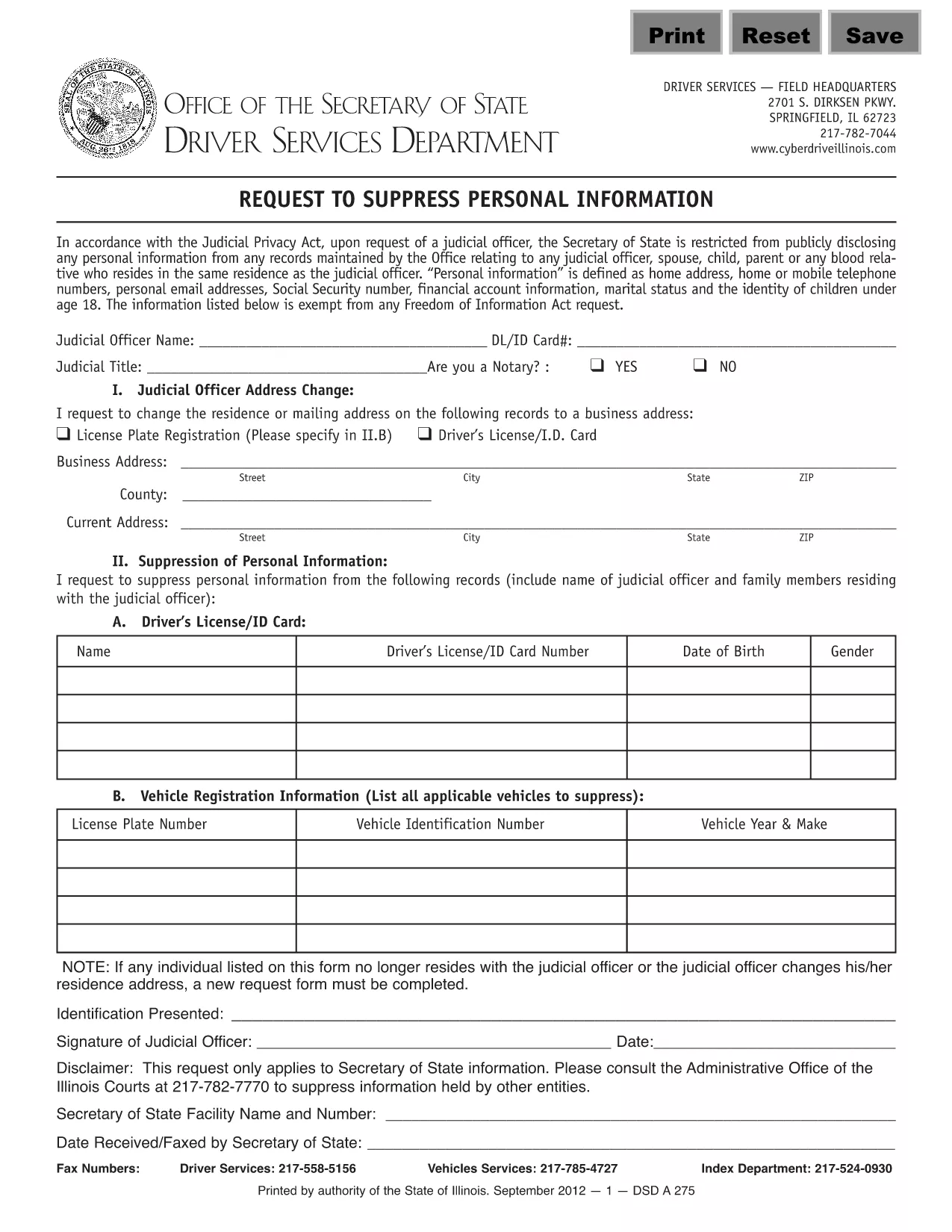
Form DSD A275 – Request to Suppress Personal Information (Fillable PDF)

  1. 언어 영어
  2. 국가 미국
  3. 활동 운전 면허증
  4. 상태 일리노이
Form DSD A275 – Request to Suppress Personal Information (Fillable PDF)

The Illinois DSD A275 is the official request used to suppress or remove personal information from public court records. Whether you are a private citizen, a legal professional, or an organization, this fillable PDF lets you submit a clear, legally‑required request in minutes.

Formize.com hosts a secure, browser‑based PDF filler so you never need to download, print, or scan the document. Simply click the "Fill out this form" button, complete the highlighted fields, and save or submit directly from the browser.

Key benefits of using the online DSD A275 form:

  • All fields are pre‑highlighted for easy navigation.
  • Auto‑save feature protects your data while you work.
  • Instant PDF download or email‑ready version after completion.
  • Compliant with Illinois Secretary of State requirements.

Below you’ll find everything you need to know about the form, step‑by‑step instructions, common pitfalls, and where to send the finished request.

자주하는 질문
  • What does DSD A275 stand for?

    DSD A275 is the Illinois Secretary of State's "Request to Suppress Personal Information" form, used to protect privacy in court records.

  • Do I need Adobe Acrobat to fill this form?

    No. Formize provides a free, browser‑based PDF filler that works with any modern web browser.

  • Can I submit the form electronically?

    Yes. After completing the form, you can email the PDF directly to the designated address or upload it through the Secretary of State’s online portal.

  • What information is required?

    You must provide your full name, contact information, case number (if applicable), and a clear description of the personal data you wish to suppress.

  • How long does the suppression process take?

    Processing time varies, but the Secretary of State typically acknowledges receipt within 5‑7 business days and may take up to 30 days for final action.

  • Is there a fee for filing DSD A275?

    No. The request to suppress personal information is free of charge.

  • What common mistakes should I avoid?

    Do not leave required fields blank, ensure the case number is accurate, and avoid using handwritten entries on the electronic version.

  • Can I edit the form after I’ve saved it?

    Yes. Open the saved PDF in any PDF editor (or re‑load it in Formize) to make changes before final submission.

어떻게

4개의 간단한 단계를 통해 온라인으로 DSD A275를 무료로 작성하는 방법:

  1. 1
    Open the Fillable Form
    Click the "Fill out this form" button on the page. The Formize PDF Filler app will load the DSD A275 document directly in your browser.
  2. 2
    Enter Your Information
    Complete each highlighted field. Use the Tab key or click to move between sections. All required fields are marked with an asterisk (*).
  3. 3
    Review and Save
    After filling out the form, click "Save" to download a copy to your computer or choose "Email" to send the completed PDF to the appropriate office.
  4. 4
    Submit the Request
    Print the saved PDF and mail it to the Illinois Secretary of State, or attach the emailed PDF to your electronic submission as instructed on the form.
Formize PDF 필러 앱
에 대한

운전 면허증 신청서

대부분의 국가에서는 운전 면허증을 소지해야 도로를 달릴 수 있습니다. 운전 면허증을 취득하는 것은 자동차를 운전하려는 모든 사람에게 중요한 이정표입니다.

DSD A275는 운전 면허증을 신청하려는 사람들로부터 정보를 수집하는 데 사용되는 문서인 운전 면허증 신청 양식 중 하나입니다. 일반적으로 신청자의 이름, 생년월일, ID 번호, 연락처 정보, 운전 면허증 기록 및 경험에 대한 필드가 포함됩니다.

특징

PDF 필러

온라인에서 PDF 양식을 채우는 가장 쉬운 방법

  • DSD A275를 빠르게 작성하세요.
    온라인에서 DSD A275을(를) 빠르게 채우는 방법을 찾고 계십니까? 온라인 무료 PDF 양식 필러를 사용하면 1분 이내에 이 PDF 문서를 편집하고 채우는 방법을 알 수 있습니다.
  • 사용하기 쉬운 온라인 PDF 편집기
    다시 스캔하여 다시 보내기 전에 편집할 수 있도록 PDF 파일을 인쇄하는 데 지쳤습니까? 온라인에서 무료로 PDF 문서를 편집하세요. 온라인 PDF 편집기를 사용하여 시간과 종이를 절약하십시오.
  • 훌륭한 도구, 모든 플랫폼
    Mac에서 DSD A275를 채우는 방법이나 PDF 필러를 무료로 사용하는 방법이 궁금하십니까? 당사의 온라인 PDF 도구는 모든 플랫폼에서 작동합니다.
  • 안전한 파일 저장
    완료된 "DSD A275" 파일은 Amazon 클라우드 호스팅에서 관리하는 보안 데이터베이스에 저장됩니다. 언제든지 시스템에서 파일을 삭제할 수 있습니다. 어쨌든 이러한 파일은 24시간 후에 자동으로 삭제됩니다.
  • DSD A275님과 채팅
    무료 PDF 리더 도우미인 Chatize에서 "DSD A275"와 채팅하세요. "DSD A275"에서 질문하고 답변을 받으세요. 위의 문서와 채팅 버튼을 클릭하세요.

필링 세션 삭제

선택한 필링 세션을 삭제하시겠습니까?이 경우 양식 작성 진행 상황이 손실됩니다.

편집 세션 삭제

선택한 편집 세션을 삭제하시겠습니까? 이 경우 양식 작성 및 편집 진행 상황이 손실됩니다.