
언어 선택

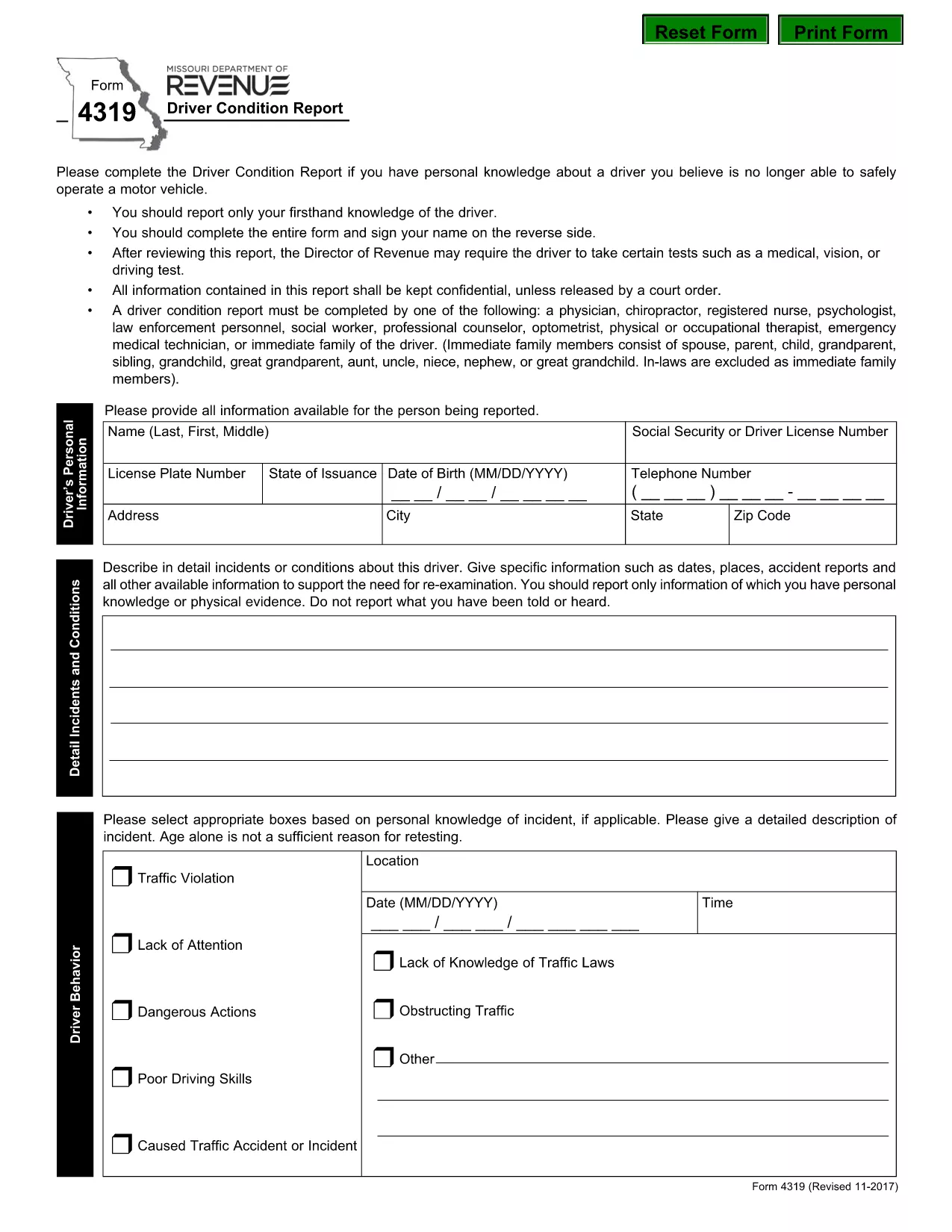
Form 4319 – Missouri Driver Condition Report

  1. 언어 영어
  2. 국가 미국
  3. 활동 운전 면허증
  4. 상태 미주리
Form 4319 – Missouri Driver Condition Report

The Missouri Form 4319, also known as the Driver Condition Report, is required when a driver’s medical, vision, or overall condition may affect safe operation of a vehicle. This form is used by the Missouri Department of Revenue to evaluate whether additional testing or restrictions are needed.

What is Form 4319?

Form 4319 collects detailed information about a driver’s health, recent accidents, and any conditions that could impair driving ability. The report is confidential and is only shared with authorized officials or a court order.

How to Fill Out the Driver Condition Report Online

Instead of downloading and editing the PDF manually, simply click the “Fill out this form” button on this page. The Formize PDF Filler app will load in your browser, allowing you to complete the form directly, save your progress, and submit it electronically.

Common Mistakes to Avoid

  • Leaving any required field blank – the filler will highlight missing information before you can submit.
  • Signing on the reverse side of the PDF – use the built‑in signature field in the online filler.
  • Providing outdated medical information – ensure all health details are current.
  • Forgetting to attach supporting documents (e.g., physician’s statement) when required.

Where to Submit the Completed Form

After completing the form, you can:

  • Submit electronically through the Formize platform (recommended).
  • Print and mail the signed form to the Missouri Department of Revenue, Driver Licensing Division.

Keep a copy of the completed PDF for your records.

Download the Fillable PDF

If you prefer to work offline, you can download the official fillable PDF directly from the Missouri Department of Revenue:

Download Form 4319 (PDF)

자주하는 질문
  • What is the purpose of Form 4319?

    Form 4319 is used by the Missouri Department of Revenue to assess a driver’s medical, vision, or other conditions that could affect safe driving.

  • Can I fill out Form 4319 on a mobile device?

    Yes. The Formize PDF Filler works on most smartphones and tablets with a modern browser.

  • Do I need a doctor’s signature on this form?

    If a physician’s statement is required, you must attach a signed statement from your doctor as a separate PDF attachment.

  • How long does it take for the Department of Revenue to process the report?

    Processing times vary, but most reviews are completed within 10‑14 business days after receipt.

  • Is the information on Form 4319 confidential?

    Yes. All information is kept confidential and is only disclosed under a court order or as required by law.

  • What should I do if I make a mistake after submitting?

    Contact the Missouri Department of Revenue’s Driver Licensing Division immediately to request a correction or to submit a revised form.

  • Can I submit the form by email?

    The online Formize submission is the preferred method. If you mail a printed copy, you can also email a scanned version to the department’s designated address.

  • Is there a fee to submit Form 4319?

    No, there is no fee to complete or submit Form 4319.

어떻게

5개의 간단한 단계를 통해 온라인으로 form 4319를 무료로 작성하는 방법:

  1. 1
    Open the Fillable Form
    Click the “Fill out this form” button on the page. The Formize PDF Filler will open in a new tab.
  2. 2
    Enter Your Information
    Complete each field. Required fields are highlighted. Use the drop‑down menus and date pickers for easy entry.
  3. 3
    Add Your Signature
    Click the signature box, type your name, and the filler will create a digital signature.
  4. 4
    Save and Review
    Press the “Save” button to store a copy on your device. Review all entries for accuracy.
  5. 5
    Submit or Download
    Choose “Submit” to send the form directly to the Missouri Department of Revenue, or click “Download” to get a PDF copy for mailing.
Formize PDF 필러 앱
에 대한

운전 면허증 신청서

대부분의 국가에서는 운전 면허증을 소지해야 도로를 달릴 수 있습니다. 운전 면허증을 취득하는 것은 자동차를 운전하려는 모든 사람에게 중요한 이정표입니다.

form 4319는 운전 면허증을 신청하려는 사람들로부터 정보를 수집하는 데 사용되는 문서인 운전 면허증 신청 양식 중 하나입니다. 일반적으로 신청자의 이름, 생년월일, ID 번호, 연락처 정보, 운전 면허증 기록 및 경험에 대한 필드가 포함됩니다.

특징

PDF 필러

온라인에서 PDF 양식을 채우는 가장 쉬운 방법

  • form 4319를 빠르게 작성하세요.
    온라인에서 form 4319을(를) 빠르게 채우는 방법을 찾고 계십니까? 온라인 무료 PDF 양식 필러를 사용하면 1분 이내에 이 PDF 문서를 편집하고 채우는 방법을 알 수 있습니다.
  • 사용하기 쉬운 온라인 PDF 편집기
    다시 스캔하여 다시 보내기 전에 편집할 수 있도록 PDF 파일을 인쇄하는 데 지쳤습니까? 온라인에서 무료로 PDF 문서를 편집하세요. 온라인 PDF 편집기를 사용하여 시간과 종이를 절약하십시오.
  • 훌륭한 도구, 모든 플랫폼
    Mac에서 form 4319를 채우는 방법이나 PDF 필러를 무료로 사용하는 방법이 궁금하십니까? 당사의 온라인 PDF 도구는 모든 플랫폼에서 작동합니다.
  • 안전한 파일 저장
    완료된 "form 4319" 파일은 Amazon 클라우드 호스팅에서 관리하는 보안 데이터베이스에 저장됩니다. 언제든지 시스템에서 파일을 삭제할 수 있습니다. 어쨌든 이러한 파일은 24시간 후에 자동으로 삭제됩니다.
  • form 4319님과 채팅
    무료 PDF 리더 도우미인 Chatize에서 "form 4319"와 채팅하세요. "form 4319"에서 질문하고 답변을 받으세요. 위의 문서와 채팅 버튼을 클릭하세요.

필링 세션 삭제

선택한 필링 세션을 삭제하시겠습니까?이 경우 양식 작성 진행 상황이 손실됩니다.

편집 세션 삭제

선택한 편집 세션을 삭제하시겠습니까? 이 경우 양식 작성 및 편집 진행 상황이 손실됩니다.