


운전 면허증 신청서
대부분의 국가에서는 운전 면허증을 소지해야 도로를 달릴 수 있습니다. 운전 면허증을 취득하는 것은 자동차를 운전하려는 모든 사람에게 중요한 이정표입니다.
BA-412D는 운전 면허증을 신청하려는 사람들로부터 정보를 수집하는 데 사용되는 문서인 운전 면허증 신청 양식 중 하나입니다. 일반적으로 신청자의 이름, 생년월일, ID 번호, 연락처 정보, 운전 면허증 기록 및 경험에 대한 필드가 포함됩니다.
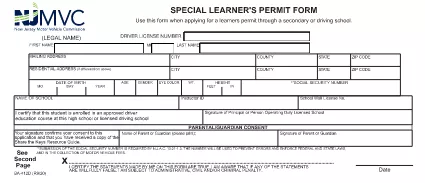
The BA‑412D is New Jersey’s official Application for a Learner’s Permit. It is required before you can take the written knowledge test and begin behind‑the‑wheel training.
This page provides a direct link to the fillable PDF, step‑by‑step instructions, and tips to ensure a smooth submission.
Form BA‑412D (Revision 9/20) is issued by the New Jersey Motor Vehicle Commission (MVC). The form collects personal information, driving history, and a certification that the applicant meets all eligibility requirements.
Anyone age 16‑21 who does not already hold a valid driver’s license and wishes to obtain a New Jersey learner’s permit must submit this form. Parents or legal guardians must also sign if the applicant is under 18.
Rather than downloading and editing the PDF in a separate editor, simply click the "Fill out this form" button below. The Formize PDF Filler app loads instantly, letting you type directly into each field, add checkmarks, and save your progress.
After you finish, download the completed PDF and bring it to your local MVC office along with the required identification documents and payment. The online filler also offers a secure email option if your office accepts electronic submissions.
No. The Formize PDF Filler works entirely in your browser, so no additional software is required.
Yes. Click the "Save Draft" button at any time; the file can be reopened later in the Formize app.
Yes. The official NJ MVC PDF is provided free of charge.
A valid ID (e.g., passport or birth certificate), proof of residency, and the required application fee.
Absolutely. The filler works on the exact PDF provided by the NJ MVC, keeping all fields and formatting intact.
Some MVC offices accept emailed PDFs; check with your local office. The online filler lets you email the file directly from the app.
Open the saved PDF again in the Formize filler, correct the error, and re‑save. The PDF remains fully editable.
대부분의 국가에서는 운전 면허증을 소지해야 도로를 달릴 수 있습니다. 운전 면허증을 취득하는 것은 자동차를 운전하려는 모든 사람에게 중요한 이정표입니다.
BA-412D는 운전 면허증을 신청하려는 사람들로부터 정보를 수집하는 데 사용되는 문서인 운전 면허증 신청 양식 중 하나입니다. 일반적으로 신청자의 이름, 생년월일, ID 번호, 연락처 정보, 운전 면허증 기록 및 경험에 대한 필드가 포함됩니다.
온라인에서 PDF 양식을 채우는 가장 쉬운 방법
필링 세션 삭제
편집 세션 삭제